During Odoo database restoration, developers commonly encounter three major issues.
- Unsupported header file issue.
- The database fails to work after restoring to a lower PostgreSQL version
- Slow database restoration.
We can easily reproduce the first issue related to the unsupported header file. We can check the current PostgreSQL clusters running in our system by using the command below.
pg_lsclusters
Result :
Ver Cluster Port Status Owner    Data directory               Log file
14  main    5435 online postgres /var/lib/postgresql/14/main  /var/log/postgresql/postgresql-14-main.log
17  main    5434 online postgres /var/lib/postgresql/17/main  /var/log/postgresql/postgresql-17-main.log
18  main    5432 online postgres /var/lib/postgresql/18/main  /var/log/postgresql/postgresql-18-main.log
18  main2   5433 online postgres /var/lib/postgresql/18/main2 /var/log/postgresql/postgresql-18-main2.log
1. Unsupported header file issue
So now reproduce this issue.
sudo su postgres
psql -p 5434
psql (18.4 (Ubuntu 18.4-1.pgdg22.04+1), server 17.10 (Ubuntu 17.10-1.pgdg22.04+1))
Type "help" for help.
postgres=# select version();
Result :
                                                                version
---------------------------------------------------------------------------------------------------------------------------------------
 PostgreSQL 17.10 (Ubuntu 17.10-1.pgdg22.04+1) on x86_64-pc-linux-gnu, compiled by gcc (Ubuntu 11.4.0-1ubuntu1~22.04.3) 11.4.0, 64-bit
(1 row)
Check the current databases.
\l+
Result :
                                                                                 List of databases
     Name     |  Owner   | Encoding | Locale Provider | Collate | Ctype | Locale | ICU Rules |   Access privileges   |  Size   | Tablespace |                Description
--------------+----------+----------+-----------------+---------+-------+--------+-----------+-----------------------+---------+------------+--------------------------------------------
 odoo         | cybrosys | UTF8     | libc            | C       | en_IN |        |           |                       | 50 MB   | pg_default |
 odoo_restore | postgres | UTF8     | libc            | en_IN   | en_IN |        |           |                       | 22 MB   | pg_default |
 postgres     | postgres | UTF8     | libc            | en_IN   | en_IN |        |           |                       | 67 MB   | pg_default | default administrative connection database
 template0    | postgres | UTF8     | libc            | en_IN   | en_IN |        |           | =c/postgres          +| 7337 kB | pg_default | unmodifiable empty database
              |          |          |                 |         |       |        |           | postgres=CTc/postgres |         |            |
 template1    | postgres | UTF8     | libc            | en_IN   | en_IN |        |           | =c/postgres          +| 7566 kB | pg_default | default template for new databases
              |          |          |                 |         |       |        |           | postgres=CTc/postgres |         |            |
(5 rows)
Now, take a backup of this database by using the pg_dump version 17.
/usr/lib/postgresql/17/bin/pg_dump \
    -U postgres \
    -d odoo \
    -p 5434 \
    -F c \
    -f /tmp/odoo_db.dump
Now, restore the database in a lower postgres version.
/usr/lib/postgresql/14/bin/pg_restore -U postgres -d odoo -p 5435 /tmp/odoo_db.dump
Result :
pg_restore: error: unsupported version (1.16) in file header
Unsupported Header File Issue
When we make a backup with a version of pg_dump like postgres 17 in a custom format and try to restore it with an old version of pg_restore like postgres 14, the restore process does not work.
This happens because the old pg_restore does not understand the new format that the new pg_dump uses. The restore tool fails when it tries to read the file, even before it starts to restore the database. The pg_restore tool from postgres 14 does not know how to read the file that was made with postgres 17s pg_dump.
How to Solve It
We should use the version of pg_restore that we used to make the backup, or a newer version. If you made the backup with postgres 17s pg_dump, we should restore it with postgres 17s pg_restore or a newer version.
2. Database fails to work after restoring to a lower postgres version
When our Odoo database is from postgres version 18, and we take a backup and restore in a lower postgres version, the ir_actions child tables are not created.
\d+ ir_actions
Result :
                                                                             Table "public.ir_actions"
       Column       |            Type             | Collation | Nullable |                Default                 | Storage  | Compression | Stats target |       Description
--------------------+-----------------------------+-----------+----------+----------------------------------------+----------+-------------+--------------+-------------------------
 id                 | integer                     |           | not null | nextval('ir_actions_id_seq'::regclass) | plain    |             |              |
 binding_model_id   | integer                     |           |          |                                        | plain    |             |              | Binding Model
 create_uid         | integer                     |           |          |                                        | plain    |             |              | Created by
 write_uid          | integer                     |           |          |                                        | plain    |             |              | Last Updated by
 type               | character varying           |           | not null |                                        | extended |             |              | Action Type
 path               | character varying           |           |          |                                        | extended |             |              | Path to show in the URL
 binding_type       | character varying           |           | not null |                                        | extended |             |              | Binding Type
 binding_view_types | character varying           |           |          |                                        | extended |             |              | Binding View Types
 name               | jsonb                       |           | not null |                                        | extended |             |              | Action Name
 help               | jsonb                       |           |          |                                        | extended |             |              | Action Description
 create_date        | timestamp without time zone |           |          |                                        | plain    |             |              | Created on
 write_date         | timestamp without time zone |           |          |                                        | plain    |             |              | Last Updated on
Indexes:
    "ir_actions_pkey" PRIMARY KEY, btree (id)
    "ir_actions_path_unique" UNIQUE CONSTRAINT, btree (path)
Foreign-key constraints:
    "ir_actions_binding_model_id_fkey" FOREIGN KEY (binding_model_id) REFERENCES ir_model(id) ON DELETE CASCADE
    "ir_actions_create_uid_fkey" FOREIGN KEY (create_uid) REFERENCES res_users(id) ON DELETE SET NULL
    "ir_actions_write_uid_fkey" FOREIGN KEY (write_uid) REFERENCES res_users(id) ON DELETE SET NULL
Not-null constraints:
    "ir_actions_id_not_null" NOT NULL "id"
    "ir_actions_type_not_null" NOT NULL "type"
    "ir_actions_binding_type_not_null" NOT NULL "binding_type"
    "ir_actions_name_not_null" NOT NULL "name"
Child tables: ir_act_client,
              ir_act_report_xml,
              ir_act_server,
              ir_act_url,
              ir_act_window
Access method: heap
This is the normal structure of ir_actions and its child tables. Now, take this backup and restore it in a postgres version 17; these child tables are not created. Postgres downgrade is not suitable for odoo database
3. Slow database restoration
When restoring a big-sized database that is in .dump fornat you can use the -j flags to parallelize the restore of the database.
We can check all the flags related to pg_restore by using the command below.
pg_restore --help
Result :
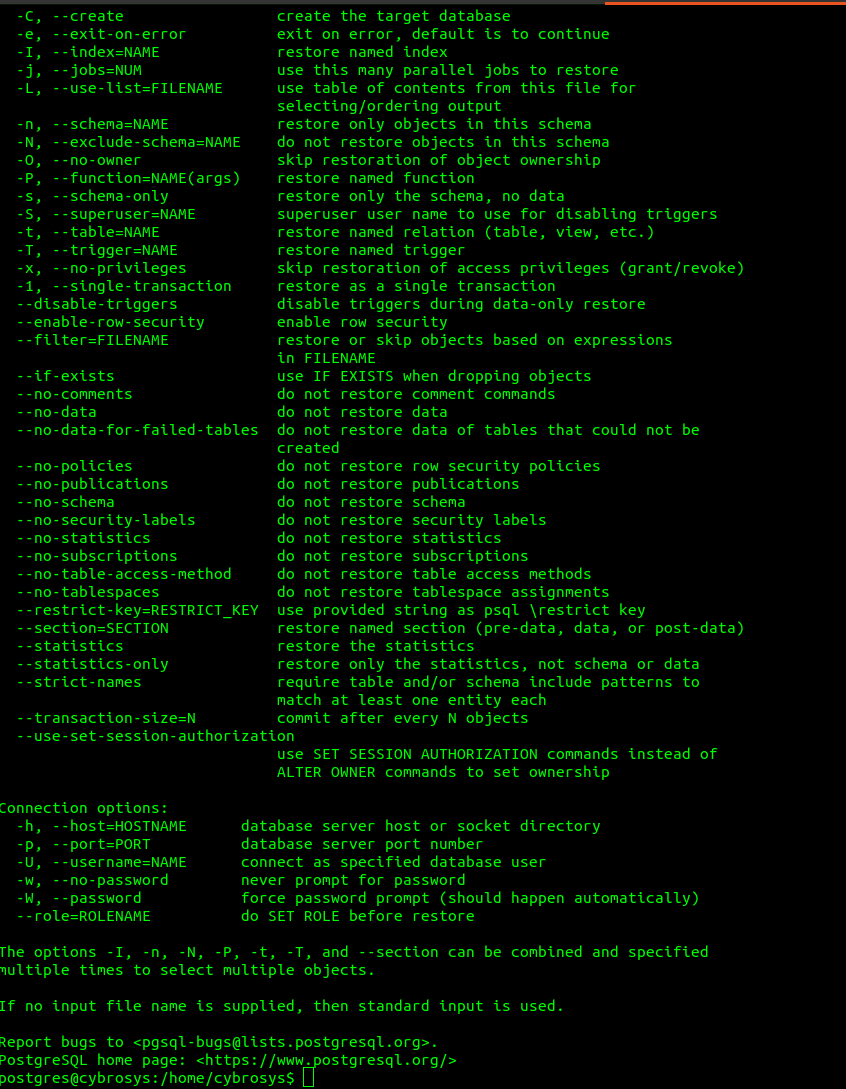
Here we can see the flag named -j
-j, --jobs=NUM use this many parallel jobs to restore
Example :
pg_restore -U postgres -p 5434 -d odoo -j $(nproc) /tmp/odoo_database.dump
Here, the database restore process will execute parallely based on the number of cores available.
Most postgres restore problems can be avoided if you use the tools and follow the steps.
Always use a pg_restore version that is the same or newer than the pg_dump version that was used to create the backup. When restoring an odoo database, make sure you are using the newer postgres major version. Otherwise, some database objects were not created properly. If you have a database that is .dump format, use parallel restore, with the -j option to make the restoration process faster. By doing it this way, we can save a lot of time.