Building postgresql from source gives you control over the PostgreSQL database server. This lets you add custom features, fine-tune performance, or keep your PostgreSQL fork. Yet installing a source-built PostgreSQL manually on each machine can become hard to manage.
Creating a package solves this problem by making installation, upgrades, and deployment much simpler. After packaging, your custom PostgreSQL build can be installed with the Debian package manager. It also works with PostgreSQL’s cluster-management tools.
In this guide you will learn how to package a custom PostgreSQL build into a package that works seamlessly on Ubuntu systems.
Prerequisites
Ensure your system meets the following requirements before proceeding:
- Operating System: Ubuntu 22.04 (Jammy) or Ubuntu 24.04 (Noble).
- PostgreSQL source code
Step 1: Install Build Dependencies
Update the packages
sudo apt update
Now, install the related packages using the command below.
sudo apt install -y build-essential flex bison perl pkg-config \
  libssl-dev libreadline-dev zlib1g-dev liblz4-dev libzstd-dev \
  libicu-dev libxml2-dev libxslt1-dev libpam0g-dev libsystemd-dev \
  dpkg-dev lintian
These packages provide the compiler, development libraries, packaging tools, and utilities required to build PostgreSQL and generate a Debian package.
Step 2: Install PostgreSQL Common Packages from PGDG
Ubuntu Noble includes an older version of postgresql-common. Since the package you'll create depends on version 214 or later, install the PostgreSQL Global Development Group (PGDG) repository.
Install curl and CA certificates.
sudo apt install -y curl ca-certificates
Create the directory for the repository signing key.
sudo install -d /usr/share/postgresql-common/pgdg
Download the PGDG signing key.
sudo curl -o /usr/share/postgresql-common/pgdg/apt.postgresql.org.asc --fail \
  https://www.postgresql.org/media/keys/ACCC4CF8.asc
Add the PGDG repository.
echo "deb [signed-by=/usr/share/postgresql-common/pgdg/apt.postgresql.org.asc] http://apt.postgresql.org/pub/repos/apt noble-pgdg main" \
  | sudo tee /etc/apt/sources.list.d/pgdg.list
After these steps, update the package list.
sudo apt update
Now, install the PostgreSQL common utilities.
sudo apt install -y postgresql-common postgresql-client-common
Step 3: Verify the Unix Socket Directory
Now, create a folder named postgres_19 like this:
mkdir postgres_19
Go to that folder
cd postgres_19
Now, clone the postgres source code like this.
git clone https://github.com/postgres/postgres.git -b REL_19_STABLE
Now, go to the Postgres source code folder
cd ~/postgres_19/postgres
Configure the postgres source code like this.
./configure -prefix=$(pwd) -enable-cassert -enable-debug
Make the source code
make -j $(nproc)
Now, install the source code
sudo make install
Now, for your custom postgres, just add the following log message in the file named startup.c
printf(_("Welcome to the custom postgres fork - made by cybrosys\n"));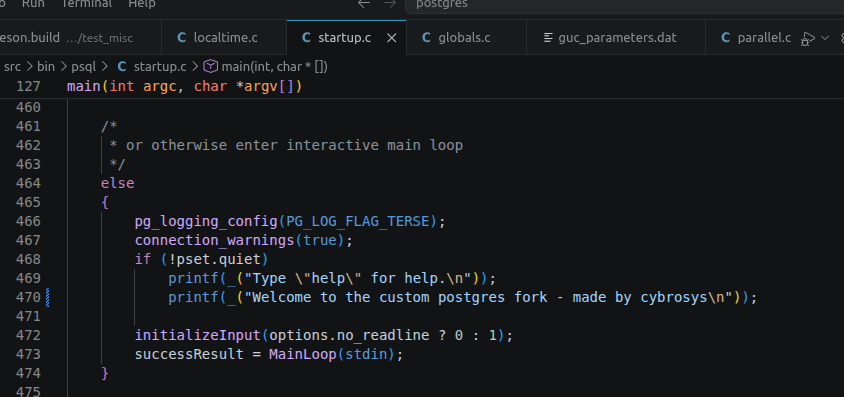
After adding this line, do the following steps to build this source code cleanly.
make distclean && ./configure -prefix=$(pwd) -enable-cassert -enable-debug && make -j $(nproc) && sudo make install
Step 4: Configure and Build PostgreSQL
Go to the folder named postgres_19.
cd ~/postgres_19/postgres
Clean any previous build artifacts.
make distclean 2>/dev/null || true
Configure the postgres.
./configure \
  --prefix=/usr/lib/postgresql/19 \
  --datarootdir=/usr/share/postgresql/19 \
  --sysconfdir=/etc/postgresql-common \
  --includedir=/usr/include/postgresql/19 \
  --libdir=/usr/lib/postgresql/19/lib \
  --mandir=/usr/share/postgresql/19/man \
  --with-openssl --with-lz4 --with-zstd --with-icu \
  --with-libxml --with-libxslt --with-pam --with-systemd
Compile Postgresql
make -j$(nproc) world-bin
Verify the build completed successfully.
echo "build rc: $?"
Step 5: Create the Debian Packaging Script
Create a working directory.
mkdir -p ~/postgres_deb
Create the build script.
cat > ~/postgres_deb/build-deb.sh <<'SCRIPT'
#!/bin/bash
set -e
SRC=$HOME/postgres_19/postgres
STAGE=$HOME/postgres_deb/staging
OUT=$HOME/postgres_deb
CODENAME=$(lsb_release -cs)
PKGVER=19.0-3.${CODENAME}
# ---- stage the install tree ----
rm -rf "$STAGE"
mkdir -p "$STAGE"
cd "$SRC"
make DESTDIR="$STAGE" install-world-bin
# ---- generate dependencies for THIS distro ----
cd "$STAGE"
LIBDIR=usr/lib/postgresql/19/lib
mkdir -p debian && touch debian/control
DEPS=$(dpkg-shlibdeps -O -l"$PWD/$LIBDIR" --ignore-missing-info \
        usr/lib/postgresql/19/bin/postgres \
        usr/lib/postgresql/19/bin/psql \
        $(find $LIBDIR -maxdepth 1 -type f -name '*.so*') 2>/dev/null \
        | sed 's/^shlibs:Depends=//' \
        | sed 's/libpq5[^,]*, *//')
rm -rf debian
echo "generated Depends: $DEPS"
# ---- strip, keeping debug copy ----
rm -rf /tmp/dbblue-unstripped && cp -a usr /tmp/dbblue-unstripped
find usr -type f \( -perm -u+x -o -name '*.so*' \) -exec file {} \; \
  | grep 'not stripped' | cut -d: -f1 | xargs -r strip --strip-unneeded
# ---- control ----
mkdir -p "$STAGE/DEBIAN"
cat > "$STAGE/DEBIAN/control" <<EOF
Package: postgres19
Version: ${PKGVER}
Section: database
Priority: optional
Architecture: amd64
Depends: debconf, postgresql-common (>= 214), postgresql-client-common, ${DEPS}
Provides: postgresql-19, postgresql-server-19
Conflicts: postgresql-19
Replaces: postgresql-19
Recommends: ssl-cert
Maintainer: Cybrosys Technologies
Description: Postgres 19 - Custom PostgreSQL fork
 .
 Integrates with postgresql-common for cluster management.
EOF
# ---- postinst ----
cat > "$STAGE/DEBIAN/postinst" <<'EOF'
#!/bin/sh
set -e
VERSION=19
CLUSTER=main
if [ -f /usr/share/debconf/confmodule ]; then
    . /usr/share/debconf/confmodule
fi
if [ "$1" = configure ]; then
    . /usr/share/postgresql-common/maintscripts-functions
    configure_version $VERSION "$2"
    if [ -z "$2" ] && ! pg_lsclusters -h | awk '{print $1, $2}' \
            | grep -qx "$VERSION $CLUSTER"; then
        pg_createcluster $VERSION $CLUSTER --start \
            -- --data-checksums --locale=C.UTF-8 --encoding=UTF8
        echo "DBBlue: created cluster $VERSION/$CLUSTER on port $(pg_lsclusters -h | awk -v v=$VERSION -v c=$CLUSTER '$1==v && $2==c {print $3}')"
    fi
fi
exit 0
EOF
cat > "$STAGE/DEBIAN/prerm" <<'EOF'
#!/bin/sh
set -e
VERSION=19
if [ "$1" = remove ] || [ "$1" = deconfigure ]; then
    . /usr/share/postgresql-common/maintscripts-functions
    stop_version $VERSION
fi
exit 0
EOF
cat > "$STAGE/DEBIAN/postrm" <<'EOF'
#!/bin/sh
set -e
VERSION=19
case "$1" in
  purge)
    if [ -f /usr/share/postgresql-common/maintscripts-functions ]; then
        . /usr/share/postgresql-common/maintscripts-functions
        remove_version $VERSION
    fi
    echo "NOTE: cluster data under /var/lib/postgresql/$VERSION was NOT removed."
    ;;
esac
exit 0
EOF
chmod 0755 "$STAGE/DEBIAN/postinst" "$STAGE/DEBIAN/prerm" "$STAGE/DEBIAN/postrm"
chmod 0644 "$STAGE/DEBIAN/control"
chmod 0755 "$STAGE"
# ---- build ----
DEB="$OUT/postgres_19_${PKGVER}_amd64.deb"
rm -f "$DEB"
dpkg-deb --build --root-owner-group "$STAGE" "$DEB"
echo "DONE: $DEB"
dpkg-deb -I "$DEB" | grep -E 'Version|Depends'
SCRIPT
Make the script executable.
chmod +x ~/postgres_deb/build-deb.sh
The packaging script automates the complete Debian package creation process.
It performs the following tasks:
- Installs PostgreSQL into a staging directory
- Automatically detects shared library dependencies
- Strips binaries while preserving debug copies
- Generates the Debian control file
- Creates package maintainer scripts (postinst, prerm, and postrm)
- Builds the final .deb package using dpkg-deb
- Supports both Ubuntu Jammy and Noble by automatically detecting the system codename
Because the script recreates the DEBIAN directory during every execution, previous packaging artifacts cannot interfere with new builds.
Step 6: Build the Debian Package
Run the packaging script.
~/postgres_deb/build-deb.sh
Now, check the contents inside the folder
cybrosys@cybrosys:~/postgres_deb$ ls
Result:
build-deb.sh postgres_19_19.0-3.jammy_amd64.deb staging
Check the printed Depends — you should see libicu74 and libssl3t64, confirming it picked up noble's libraries.
Step 7: Install and verify
cd ~/postgres_deb
Install the debian package like this.
sudo apt install ./postgres_19_19.0-3.jammy_amd64.deb
It will select the available port, create a cluster, and start it immediately.
Reading package lists... Done
Building dependency tree... Done
Reading state information... Done
Note, selecting 'postgres19' instead of './postgres_19_19.0-3.jammy_amd64.deb'
The following packages were automatically installed and are no longer required:
  golang-1.18-go golang-1.18-src golang-src libfwupd2 libfwupdplugin5 libgcab-1.0-0 libsmbios-c2 libstd-rust-1.75 libstd-rust-dev percona-postgresql-common
Use 'sudo apt autoremove' to remove them.
The following NEW packages will be installed:
  postgres19
0 upgraded, 1 newly installed, 0 to remove and 63 not upgraded.
Need to get 0 B/8,024 kB of archives.
After this operation, 0 B of additional disk space will be used.
Get:1 /home/cybrosys/postgres_deb/postgres_19_19.0-3.jammy_amd64.deb postgres19 amd64 19.0-3.jammy [8,024 kB]
Selecting previously unselected package postgres19.
(Reading database ... 330819 files and directories currently installed.)
Preparing to unpack .../postgres_19_19.0-3.jammy_amd64.deb ...
Unpacking postgres19 (19.0-3.jammy) ...
Setting up postgres19 (19.0-3.jammy) ...
Creating new PostgreSQL cluster 19/main ...
/usr/lib/postgresql/19/bin/initdb -D /var/lib/postgresql/19/main --auth-local peer --auth-host scram-sha-256 --no-instructions --data-checksums --locale=C.UTF-8 --encoding=UTF8
The files belonging to this database system will be owned by user "postgres".
This user must also own the server process.
The database cluster will be initialized with locale "C.UTF-8".
The default text search configuration will be set to "english".
Data page checksums are enabled.
fixing permissions on existing directory /var/lib/postgresql/19/main ... ok
creating subdirectories ... ok
selecting dynamic shared memory implementation ... posix
selecting default "max_connections" ... 100
selecting default "shared_buffers" ... 128MB
selecting default time zone ... Asia/Kolkata
creating configuration files ... ok
running bootstrap script ... ok
performing post-bootstrap initialization ... ok
syncing data to disk ... ok
Ver Cluster Port Status Owner    Data directory              Log file
19  main    5433 online postgres /var/lib/postgresql/19/main /var/log/postgresql/postgresql-19-main.log
Now, check the current clusters like this.
pg_lsclusters
Result:
Ver Cluster Port Status Owner    Data directory              Log file
17  main    5434 online postgres /var/lib/postgresql/17/main /var/log/postgresql/postgresql-17-main.log
18  main    5432 online postgres /var/lib/postgresql/18/main /var/log/postgresql/postgresql-18-main.log
19  main    5433 online postgres /var/lib/postgresql/19/main /var/log/postgresql/postgresql-19-main.log
Now, you can see that the custom Postgres is installed on port 5433.
Now, log in to port 5433 and check whether the custom log message is showing or not.
cybrosys@cybrosys:~$ sudo su postgres
postgres@cybrosys:/home/cybrosys$ psql -p 5433
psql (19rc1)
Type "help" for help.
Welcome to the custom postgres fork - made by cybrosys
postgres=#
Packaging a custom PostgreSQL build as a Debian package makes deployment much easier than installing directly from source. It provides a consistent installation process, works with PostgreSQL's cluster management utilities, and simplifies upgrades and maintenance across multiple systems.
By following the steps in this guide, you can convert your customized PostgreSQL build into a reusable Debian package that installs cleanly with standard package management tools while preserving all of your custom modifications.