If you read the PostgreSQL source code, you will often see calls like this:
rc = WaitLatch(MyLatch,
               WL_LATCH_SET | WL_TIMEOUT | WL_EXIT_ON_PM_DEATH,
               1000L,
               PG_WAIT_EXTENSION);
What are those WL_ names? Why are they joined with ‘ | ‘? And how does the code know which event woke it up afterwards?
The answer is a small group of macros in src/include/storage/latch.h (moved to waiteventset.h in PostgreSQL 18):
#define WL_LATCH_SET         (1 << 0)
#define WL_SOCKET_READABLE   (1 << 1)
#define WL_SOCKET_WRITEABLE  (1 << 2)
#define WL_TIMEOUT           (1 << 3)   /* not for WaitEventSetWait() */
#define WL_POSTMASTER_DEATH  (1 << 4)
#define WL_EXIT_ON_PM_DEATH  (1 << 5)
In this blog, we will return each flag and see why they are written as 1 << n. Keep in mind: You do not need to understand latched deeply for this blog. Think of WaitLatch( ) as “sleep until something interesting happens”, and the WL_ flags as the list of interesting things.
Problem: One function, Many Reasons to Wake Up
A PostgreSQL process often needs to sleep without wasting CPU. But it may need to wake up for several different reasons:
- Another process asked it to do something.
- Data arrived on a network connection.
- A certain amount of time passed.
- The certain PostgreSQL process (the postmaster) died.
WaitLatch( ) has to accept a list of reasons from the caller, and it has to tell the caller which reason actually happened. We could use six separate bool arguments, but the call would be long and hard to read. Instead, PostgreSQL packs all the choices into one integer.
Why Bitmask Flags?
- One argument, a single int carries any combination of the six choices.
- Easy to read, WL_LACTH_SET | WL_TIMEOUT reads like a sentence.
- Easy to extend, a new flag is just the next bit. Old calls keep working.
- Fast, checking a bit is one CPU instruction.
How 1 << n Works
1 << n means “take the number 1 and shift it left by n places in the binary”. Each result has exactly one bit turned on.
| Flag | Expression | Decimal | Binay |
| WL_LATCH_SET | 1 << 0 | 1 | 000001 |
| WL_SOCKET_READABLE | 1 << 1 | 2 | 000010 |
| WL_SOCKET_WRITABLE | 1 << 2 | 4 | 000100 |
| WL_TIMEOUT | 1 << 3 | 8 | 001000 |
| WL_POSTMASTER | 1 << 4 | 16 | 010000 |
| WL_EXIT_ON_PM_DEATH | 1 << 5 | 32 | 100000 |
Because each flag uses a different bit, you can combine flags without mixing them up. Think of six light switches on a wall. Each flag owns one switch.
The Flags One by One
1. WL_LATCH_SET : “Someone Poked”
A latch is a flag that one process can set to wake another. WL_LATCH_SET means the latch was set. This is the most common way one backend or background process tells another "please wake up and check for work".
2. WL_SOCKET_READABLE: “Data has Arrived”
The network socket you are watching has something to read. For example, a client sent a query, or a connection is waiting to be accepted.
3. WL_SOCKET_WRITEABLE: “You can send now”
The socket is ready to accept data without blocking. This matters when you have a large amount of data to send, and the network buffer is full.
4. WL_TIMEOUT: “Time is Up”
The time limit you gave has passed. The timeout itself is a separate argument (in milliseconds) to WaitLatch( ), and the flag says that a timeout is a part of the wait and tells you afterwards that it happened.
5. WL_POSTMASTER_DEATH: “The parent process died, so exit automatically"
If the POSTMASTER dies, the WAIT returns and reports this flag. Your code must then check for it and handle it, usually by shutting down cleanly.
6. WL_EXIT_ON_PM_DEATH: “The parent process died, so exit automatically”
The easier version of the previous flag. If the postmaster dies, the process exits by itself, and your code never has to check for it. Most new code uses this one.
Use only one of the postmaster death flags in a call, not both.
Combining Flags: The OR Operator
To say “wake me for any of these," join the flags with “ | ” (Bitwise OR):
int wakeEvents = WL_LATCH_SET | WL_TIMEOUT | WL_EXIT_ON_PM_DEATH;
In binary:
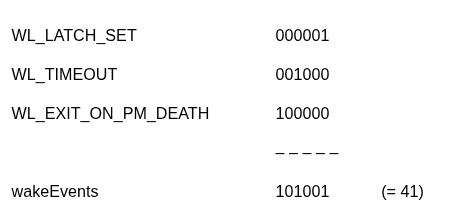
Three switches are on, three are off.
Reading the Results: The AND Operator
WaitLatch( ) returns an integer with the same kind of flags: Bits that are “on” tell you what actually happened. To test a bit, use “ & ” (bitwise AND):
rc = WaitLatch(MyLatch,
               WL_LATCH_SET | WL_TIMEOUT | WL_EXIT_ON_PM_DEATH,
               1000L,
               PG_WAIT_EXTENSION);
if (rc & WL_LATCH_SET)
{
    ResetLatch(MyLatch);
    /* someone asked us to do something */
}
if (rc & WL_TIMEOUT)
{
    /* 1 second passed with nothing else happening */
}
Why “ & ”? Suppose rc is 001001 (Latch set and timeout both happened). Then:
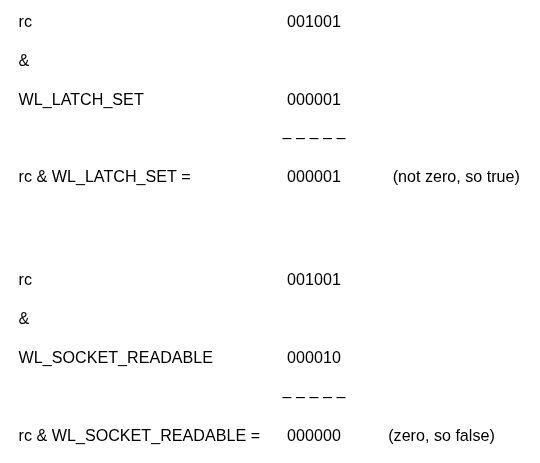
A non-zero result means “that flag is on”. You will see this if(rc & WL_….) pattern everywhere in PostgreSQL.
Turning Flags On and Off
The same operators let you change a set of flags:
| Goal | Code |
| Turn a flag On | flags |= WL_TIMEOUT |
| Turn a flag Off | flags |= ~WL_TIMEOUT |
| Test a flag | if( flags & WL_TIMEOUT) |
“ ~ ” flips every bit, so ~WL_TIMEOUT is “everything except the timeout bit.” Using &= with it clears just that one bit.
Common Mistakes to Avoid
- Using “ == ” to test a flag. if(rc == WL_LATCH_SET ) is only true when nothing has happened. If the latch and the timeout both fired, it fails. Use if(rc & WL_LATCH_SET).
- Using || or && instead of | and &. WL_LATCH_SET | | WL_TIMEOUT gives 1 (TRUE), not a combined flag value. Use the single-character bitwise operators.
- Using + to combine flags. It works until the same flag is added twice. | is safe and is the convention.
- Passing Both WL_POSTMASTER_DEATH and WL_EXIT_ON_PM_DEATH. Choose one.
- Passing WL_TIMEOUT to WaitEventSetWait( ). That function takes its timeout as a separate argument instead.
- Forgetting ResetLatch( ). After WL_LATCH_SET fires, reset the latch or the next wait returns immediately.
- Reusing a bit number in your own flags. Two flags with the same 1 << n cannot be told apart
The WL_ flags look like six unrelated macros, but they are one simple idea: each event gets its own bit, so many events can travel in a single integer. Use | to say what you want to wait for, and & to check what happened. Once you understand bitmasks, you will recognize the same pattern all over the PostgreSQL source.