Every midstream transaction in Oil ERP originates from a common Odoo inventory transfer, with just one additional tick: Oil and Gas Transfer. This is the distinction between transferring a shipload of condensate or a crate of safety boots. Only flagged stock transfers automatically include controls over transport, measurement, and delivery, so the transferred item carries instructions on itself.
Once marked, the Transport Details page becomes available. The dispatcher chooses the vehicle and driver, with displayed information about cargo capacity and applicable tank volume as well. The process of recording loading temperature, departure, and arrival times goes on in the same tab, so it gets all necessary details about the load.
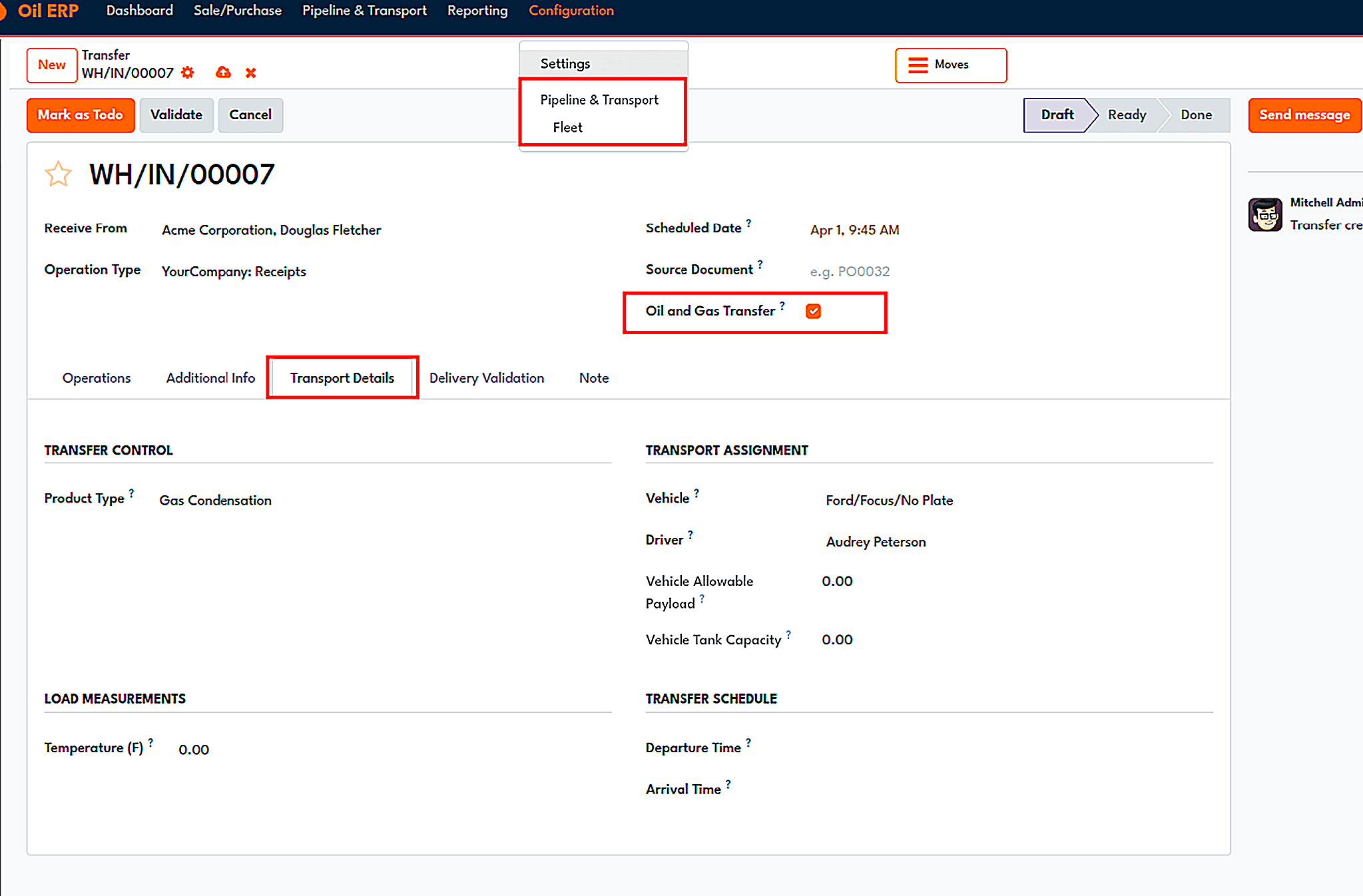
The Transport Details tab of an oil and gas transfer, with vehicle, driver, load measurements, and schedule.
The main drawback of the majority of oil delivery and pumping processes can be found at the moment of delivery when the actual amount loaded and the amount received do not even get close to each other. Oil ERP uses a validation technology to solve this issue. Each time the validation button is pressed for a transfer, the Delivery Validation tool appears and asks for some choices, such as arrival time, loading and unloading beginning and finishing times, temperature while loading and unloading, the gross weight of the empty and filled tank, tank volume before and after filling, and the real quantity delivered of the product.
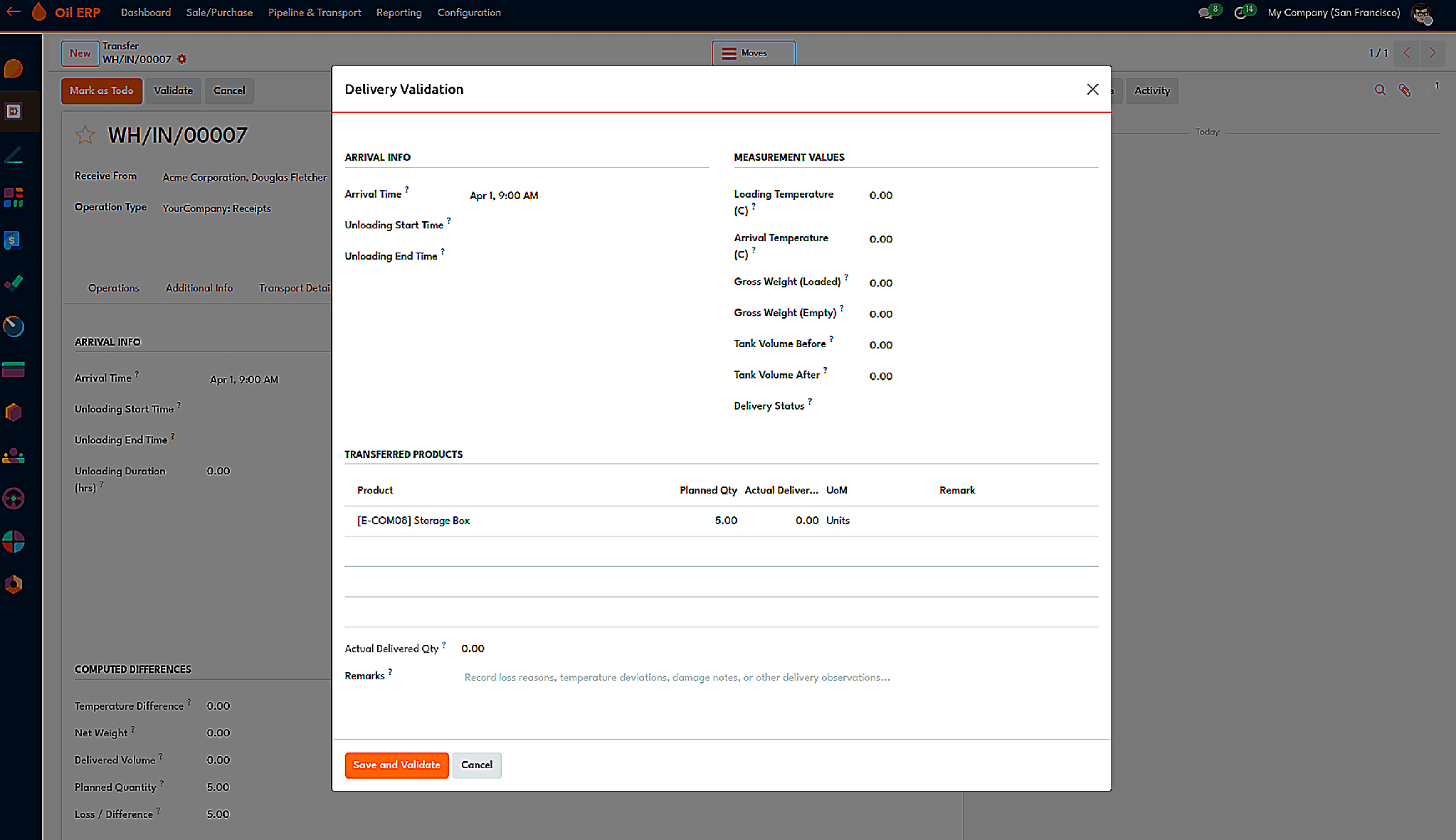
The Delivery Validation wizard that appears before a flagged transfer can be validated.
Utilizing these entries, the form is capable of determining the disparity in temperature, the total weight, the already exported volume, the volume which had to be transmitted, etc. The module can reject nonsensical propositions such as the arrival time which is before the departure time, the temperature below 0 degrees, the pressure below 0, the values of BSW percentage that exceed 100%, and GPS coordinates which do not fall in the right interval. Each transfer must be verified one by one, which is done on purpose since each journey needs separate readings.
Also, vehicles have their own history. When you open the truck, you can see all the gas and oil transfers made by it, which allows answering the question "what goods was this truck carrying last month?"
Pipeline
Not all items are transported by truck. The Pipeline functionality introduces a new method for transfers, so any movements that use pipelines will have their activity registered within the same stock transfer as activities that were conducted using trucks. By activating Pipeline Transfer, all pipeline-related activities would be allowed per transfer.
Pipelines are considered delivery options specifically. Every pipeline transportation company can be identified as a carrier of oil/gas via the pipeline and connected to the company that runs the pipeline. If the pipeline option was enabled, no other transport companies except for those engaged in pipeline transport would be allowed for shipment, thus avoiding any cheating in the transportation process.
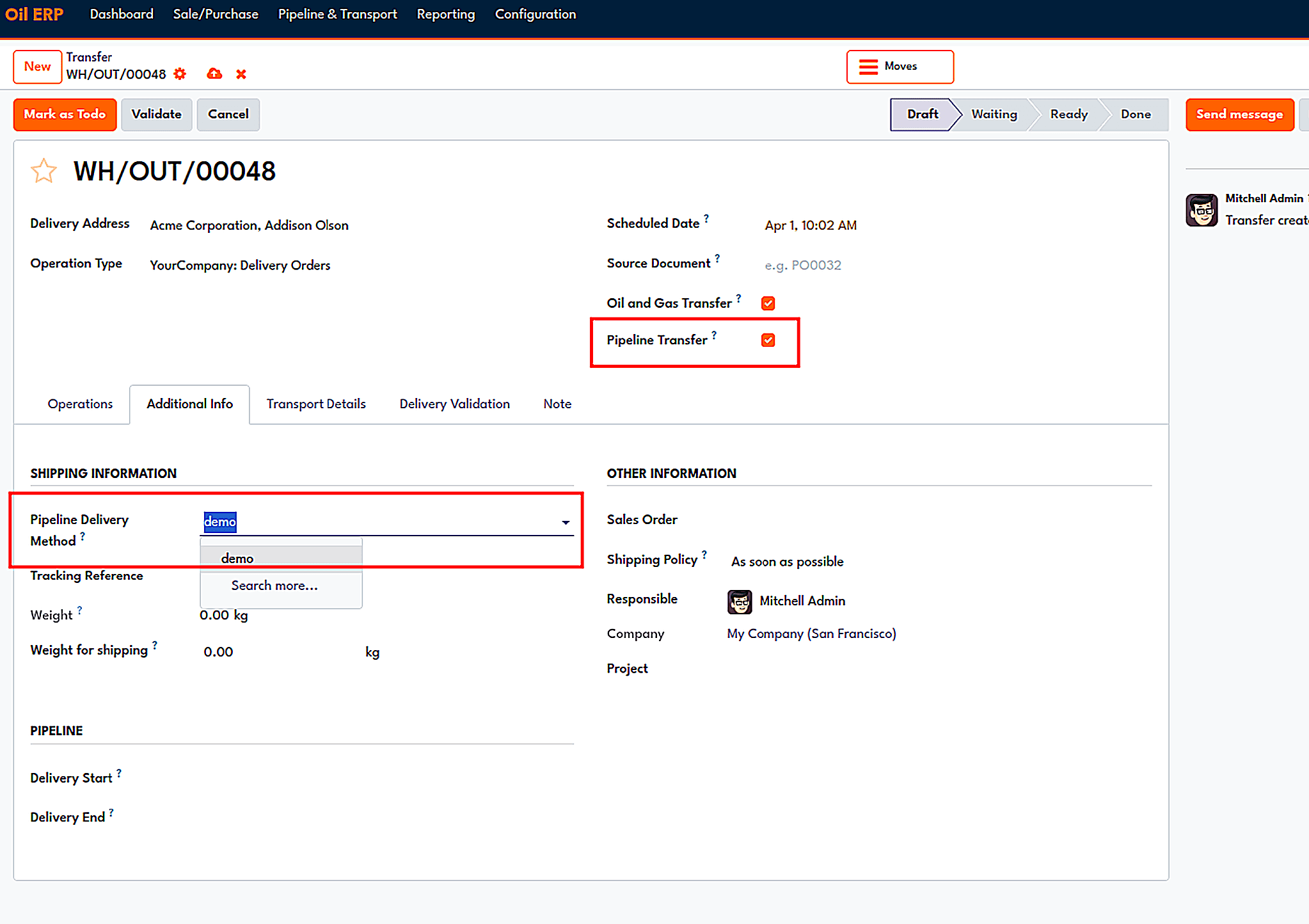
A pipeline transfer with the pipeline delivery method and delivery start and end times.
Nominations are an important phase in the pipeline. Simply put, the nomination is the process through which the owner of the product handles the request to move a specific amount of product through the pipeline within a certain time. Oil ERP is the system that has this nomination stored with the owner, the shipper, the amount of product requested, the approved amount, and the time of the process. The nomination passes through the stages of Draft, Submitted, Approved, or Expired, and the amount of product allocated, shipped, and remaining is updated along with the nomination.
Approval for a nomination is a prerequisite for a pipeline transfer. The carrier, the product, and the shipper involved in the transfer must correspond to the nomination. Moreover, the total volume for transfers cannot exceed the volume allowed. The module checks whether the planned weight does not exceed the carrier's allowed weight capacity and blocks validation when the load is overweight. However, nominations that are provided in the screenshots sent together with the module are not discussed.
On top of this is a midstream dashboard, which shows the pipeline transfers, completed moves of pipelines, the pipeline network by the operators, modes of transport used, completion percentage, and time taken for each delivery on an average basis.
HPM and ASTM Volume Correction
Heating oil increases its volume. Hence, the number of barrels available at 100 degrees Fahrenheit can never be the same as the number of barrels at 60 degrees Fahrenheit; that’s why all custody transfer transactions have to be completed at standard volumes rather than observed volumes. This module is the computing tool for this adjustment, and midstream modules depend on it.
The activation is done via the settings where the HPM Volume Correction feature is included. The setup is specific to the category of the product. For instance, when it comes to crude oil, the type of standardization is selected (ASTM D1250, which corresponds to API MPMS 11.1), the API group is chosen (Group A for crude oil), and the reference conditions are defined (60 degrees Fahrenheit, no pressure, and 34 degrees API in the window). The products take the configuration from their category but may change it one by one.
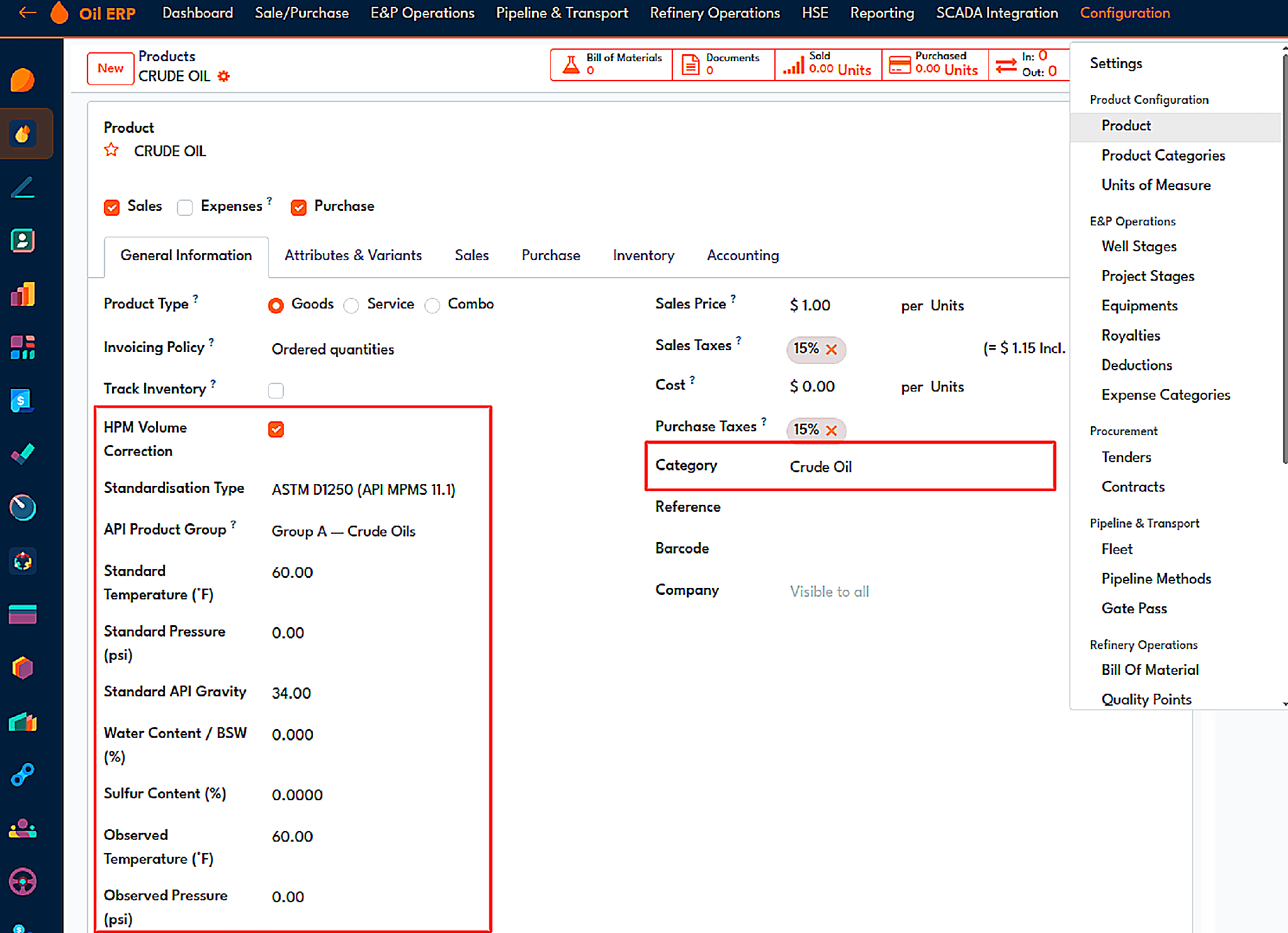
A product category configured for ASTM D1250 correction with its reference conditions.
The volume correction factor is thus determined once the data has been entered. In the Record Production wizard, the user provides the measured temperature and pressure and API gravity values, which then yield the VCF and the standard quantity values.
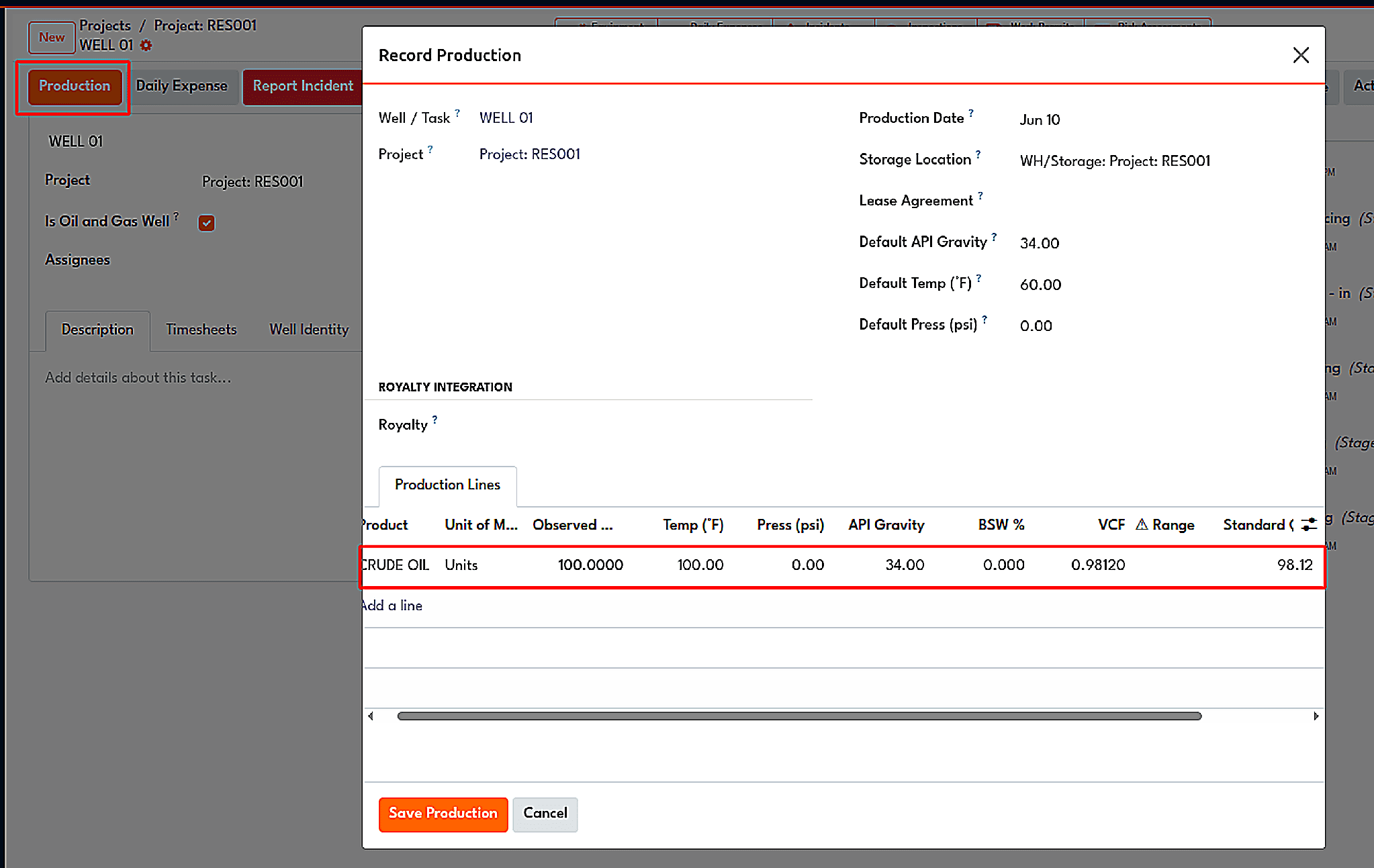
The Record Production wizard calculates the volume correction factor and standard quantity from observed readings.
The engine supports more than just crude oil production. It can be beneficial in accordance with the ASTM D1250 product groups A-F, OIML R117, and GPA TP-27 in terms of LPG and NGL with the CTL and CPL factors, AGA-8, and so on. For the gas, it gets the compressibility factor from the components (methane, ethane, propane, carbon dioxide, nitrogen, and H2S) using principles applied according to Kay's law and a simplified virial equation. Rounding is done based on the rules set in the relevant standard; the ASTM D1250 itself, for instance, uses six digits for the CTL and CPL and five for the VCF. If a value turns out to be too high or too low, it fails the test and sends a warning to avoid or at least minimize the impact of an erroneous value.
Custody Transfer
Custody transfer is the point at which both the ownership and responsibility of the product pass from one person to another; it is the cause of highly disputable moments. The module captures that moment with an individual document that guides the stock transfer, confirms it through approvals, and has an audit trail. This module is enabled in the settings, within the hydrocarbon correction section, while the menu of the module is found under the Pipeline and Transport module with options such as All Transfers, Active Transfers, Completed Transfers, and Audit Trail.
Creating the document
The process starts with an order for delivery with a flag. Once the pick process reaches its Ready mode, with the help of the Create Custody Transfer button, the custody record document can be generated, including the information on the process type, locations, and items. Also there is a point which spots down the purpose of the transfer (Commercial Sale, Inter-Facility, Emergency, Intercompany, Pipeline Injection and Other), the policy of approval and the measuring method (Manual or Automatic using SCADA). In case automatic measuring is applied, the temperature and the pressure in the source location are used, which requires a special SCADA module.
Ownership and parties
Ownership is expressed in terms of the legal owner, custodian, operator, and carrier. The demurrage hours and rate are stipulated in the same form and give rise to a demurrage charge. The Parties tab contains each participant as identified in the box with their designation (Buyer, Seller, Operator, Witness, Transporter), and the designation appears several times in the table in case there are several organizations involved in the transaction.
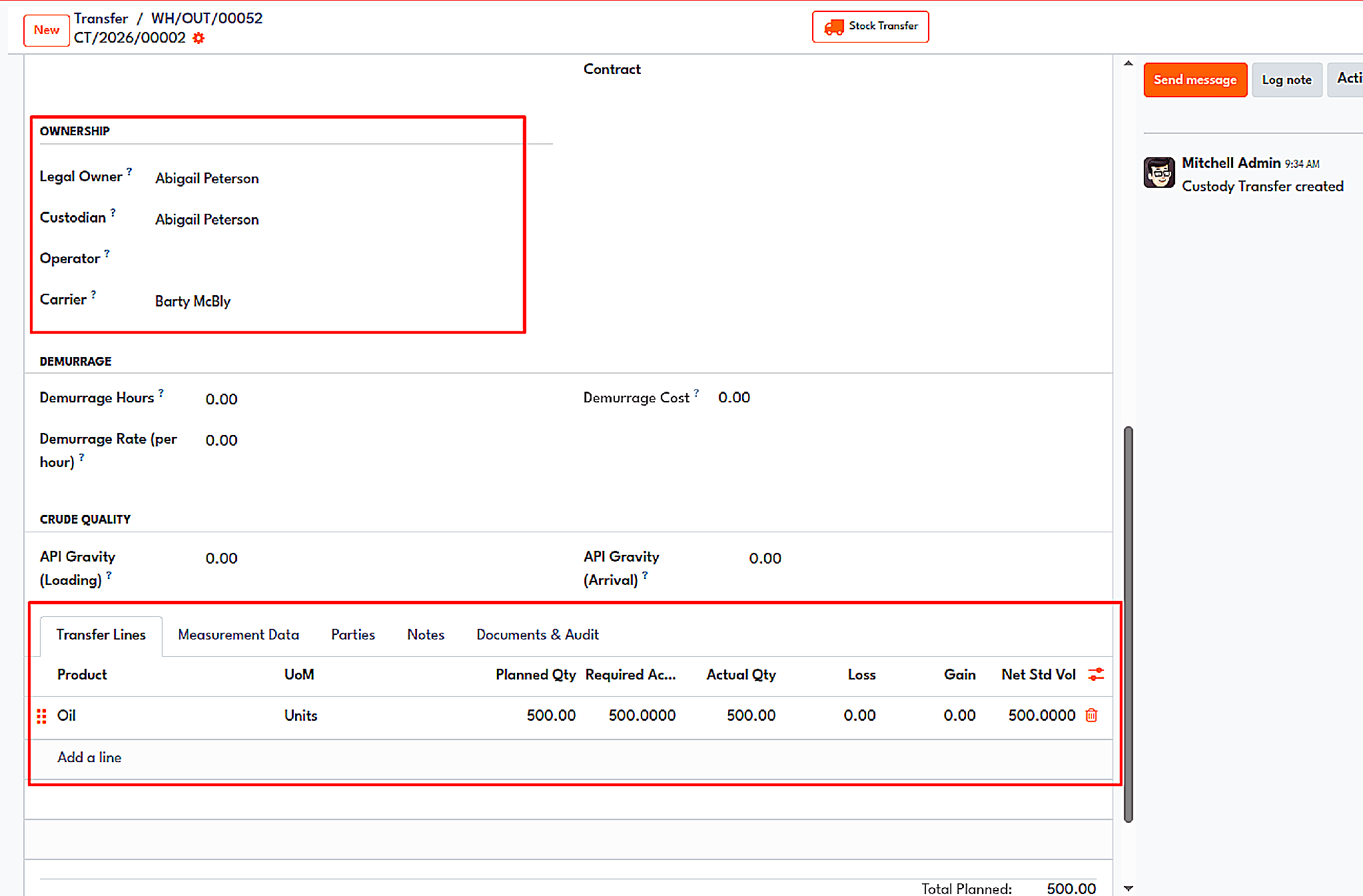
Ownership, demurrage, and transfer lines on a custody transfer.
The transfer lines display the planned amount, as well as the actual amount, loss, gain, and net standard volume. The Measurement Data tab provides more detail on each line, as it shows the actual amount, temperature, pressure, VCF, standard volume, API gravity, percentage of BSW, and net standard volume. The VCF figure is taken from the setting of the volume correction module category, so the number appearing in a custody document is identical to the one used throughout the system.
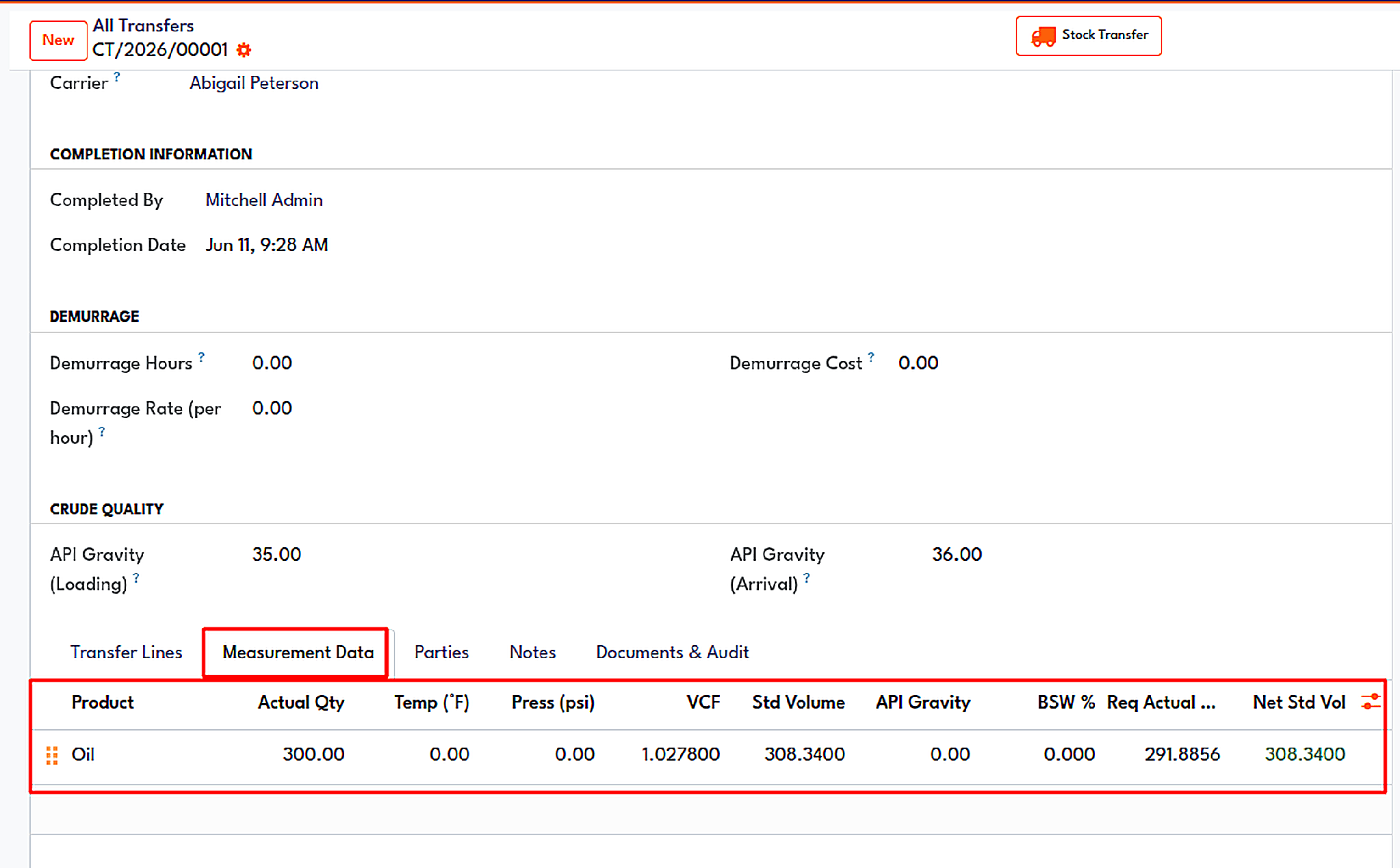
Measurement data on a completed transfer, with VCF, standard volume and net standard volume.
Approval and movement
The new custody transfer begins as a Draft and passes through Approved, In Progress, and Completed. The approval policy could either be single or dual. In case of a dual approval, an additional approver is also required, and the same user cannot approve the transfer. Once approved, users will have access to the Start Transfer, Complete, and Raise Dispute options available in the action bar. After the stock-picking process is completed, the Delivery Validation wizard collects the arrival and measurement data, which includes density, BSW, and sulphur levels.
Disputes and audit trail
In case of any disagreement regarding the amount, a transfer will be put in the Disputed status, which will be indicated by a red banner on the transfer’s screen. After that, it can be cancelled, resolved, or sent back for drafting. All communication is kept in the history of the dispute. Any changes are documented in the Audit Trail with the event type and description.
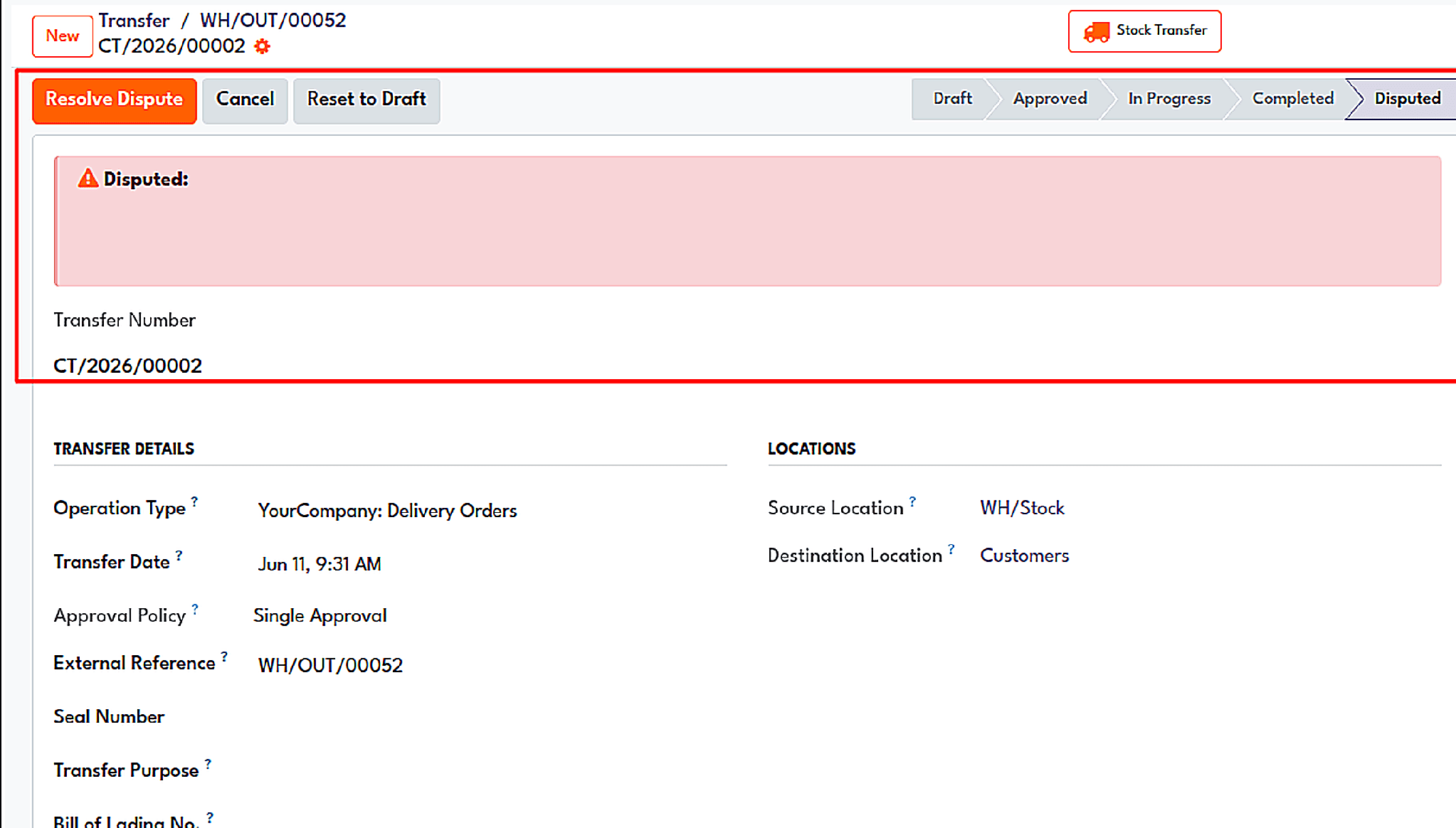
A custody transfer in the Disputed state, with Resolve Dispute, Cancel, and Reset to Draft available.
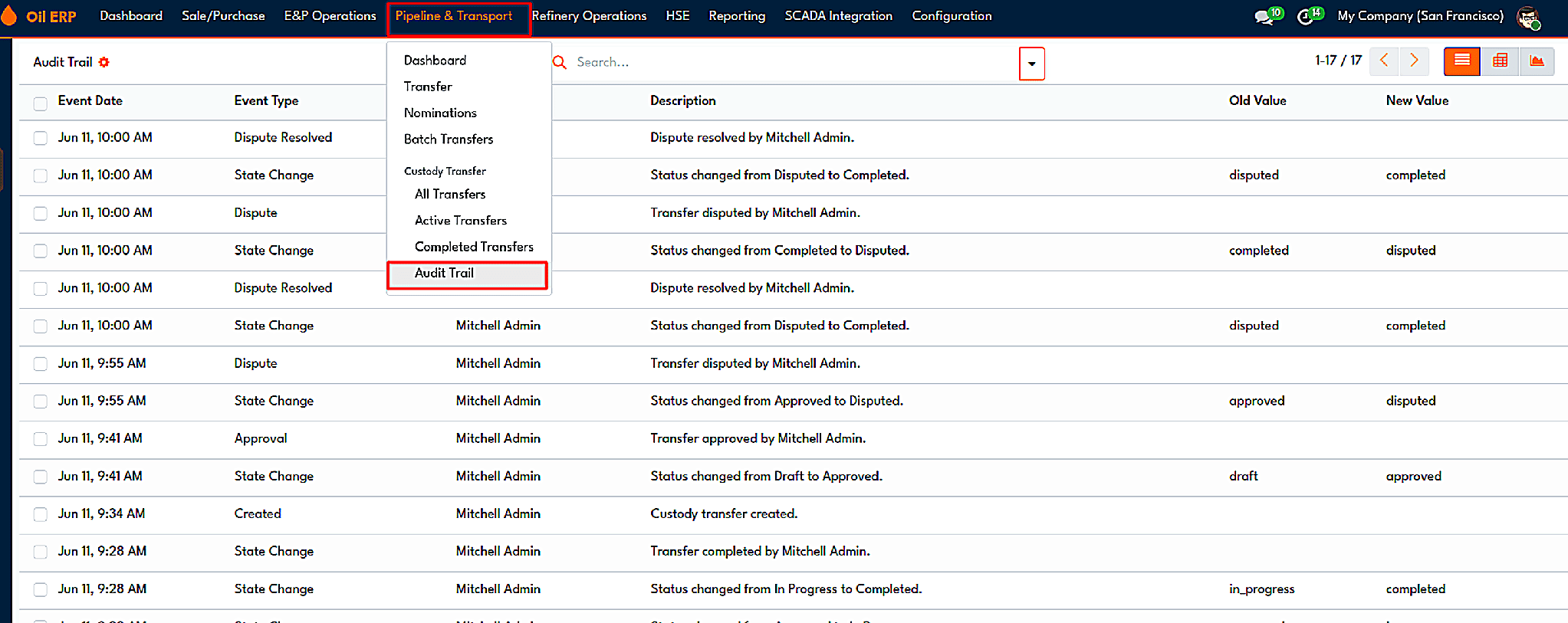
The Audit Trail lists: event type, description, and old and new values for each change.
Gate Pass
A product that departs from a place or enters a different one must go through a gate. Besides, it is necessary to be able to confirm what actually passed through a gate. The Gate Pass module does this and stores the information in Oil ERP. Once the application of the module is set up, the user can easily generate a gate pass from the stock picking screen, indicating details of the vehicle, the driver, products, and weight.
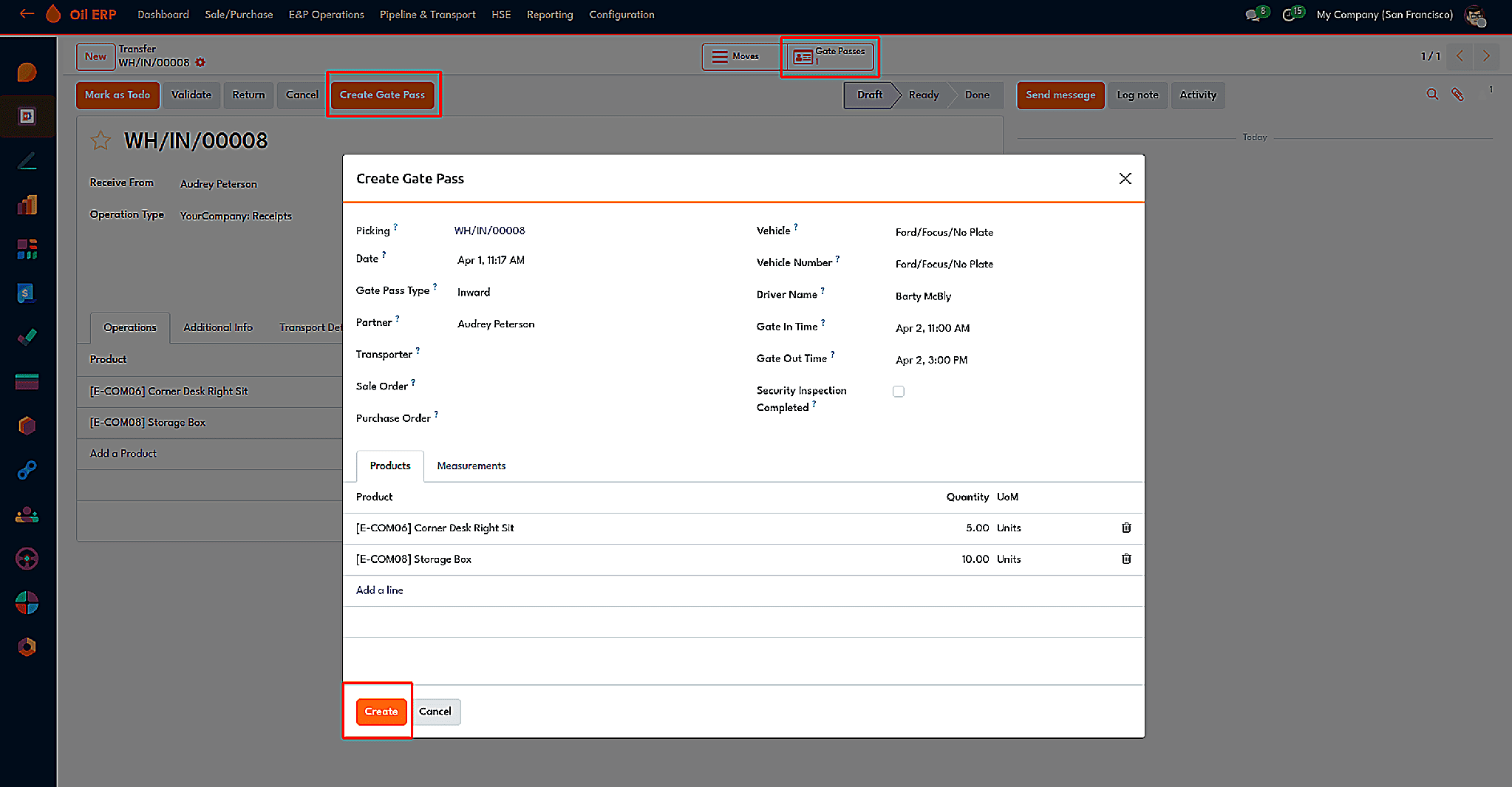
The wizard that creates a gate pass from stock picking.
A gate pass can be inward, outward, or internal type, and this runs through Draft, Approved, In Progress, Done, and Cancelled status. The vehicle number, tare and gross weight of the vehicle, container number, gate-in and gate-out time data, security guard data, escort data, and approving authority. The gate-out time must always be later than the gate-in time. A smart button will take us backward to the picking, and the Print Gate Pass option will generate the document in PDF or XLSX file format by checking the export box in the print wizard.
In the Checkpoints tab, this turns into an audit tool where checkpoints are checked in order, like gate entry check, vehicle check, and loading bay check, where for each entry time, the guard is on duty, and comments are recorded.
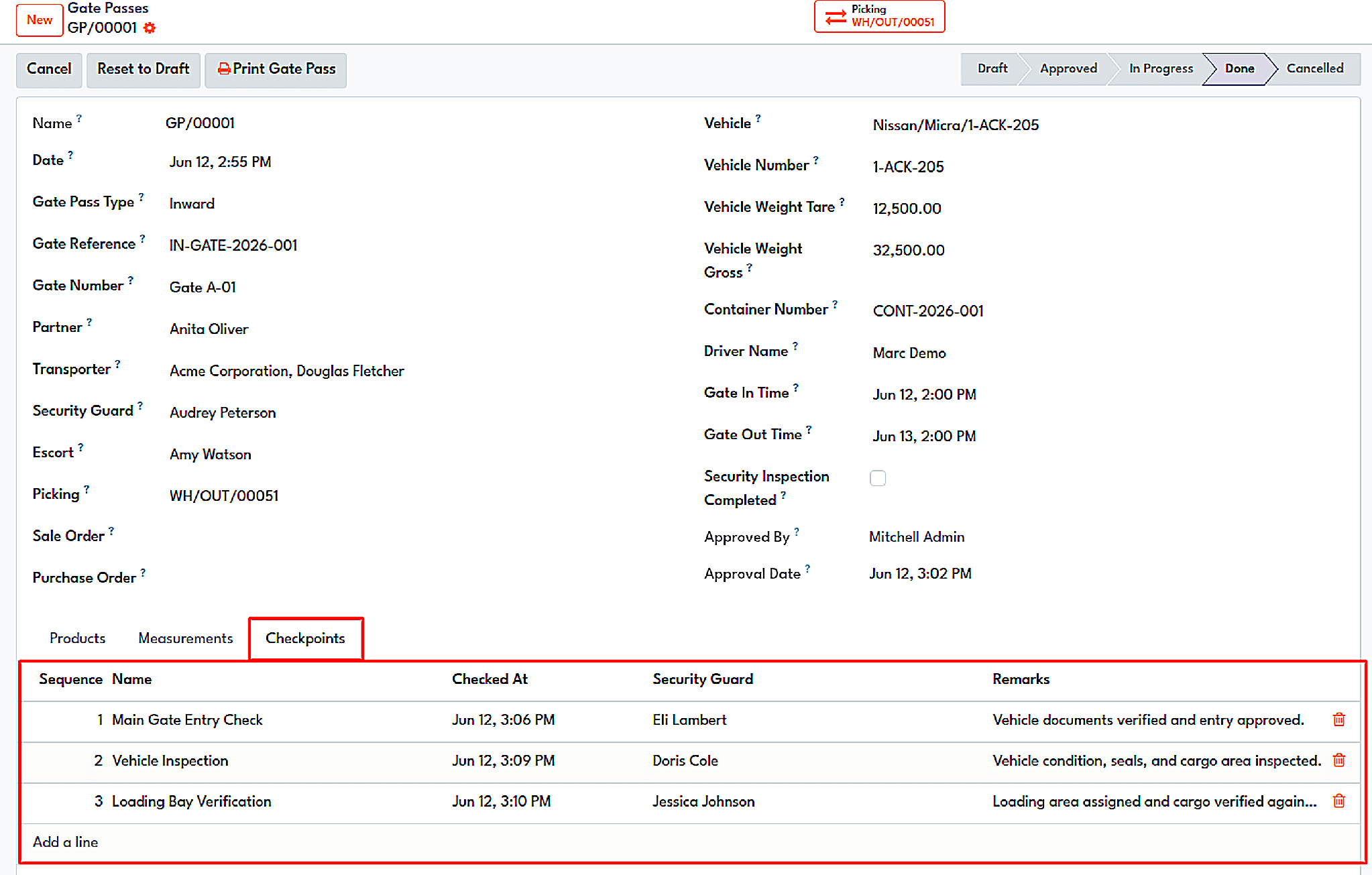
The checkpoint ledger of a completed gate pass, with time, guard, and remarks per checkpoint.
Fleet Live Tracking
As soon as a load starts its journey, the dispatchers want to know its location. Fleet Live Tracking serves to connect Odoo with Traccar, which is a GPS tracking server. Odoo is not dependent on internet services, since it has been designed to work in accordance with local or private cloud regulations.
To configure this system, the clients should fill in the required parameters, i.e., the Traccar base URL, token, secret of the webhook, and min time of the query. Traccar is set to send the information to an Odoo endpoint using specific features of webhooks.
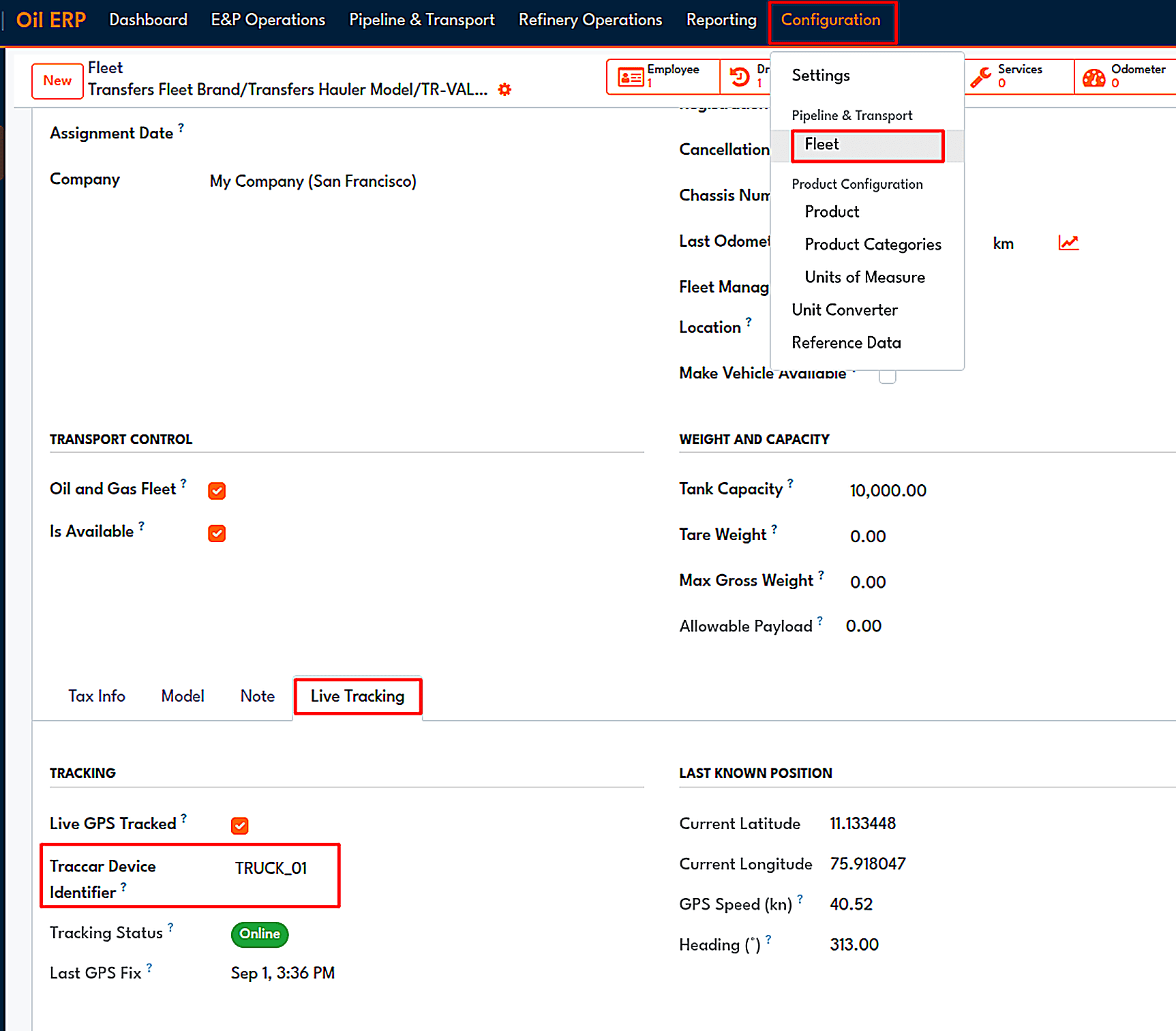
The Live Tracking tab on a fleet vehicle, with Traccar device identifier, status and last known position.
A fleet vehicle is linked with its own Traccar device by means of a unique identifier which has to be identical. The Live Tracking tab for the vehicle gives you access to its tracking situation with the exact time, coordinates, speed in knots, and direction. The status varies from Online, when a fix has come in by the threshold, to Stale when it has just exceeded the threshold, and finally to Offline when the fix was well overdue or never arrived at all.
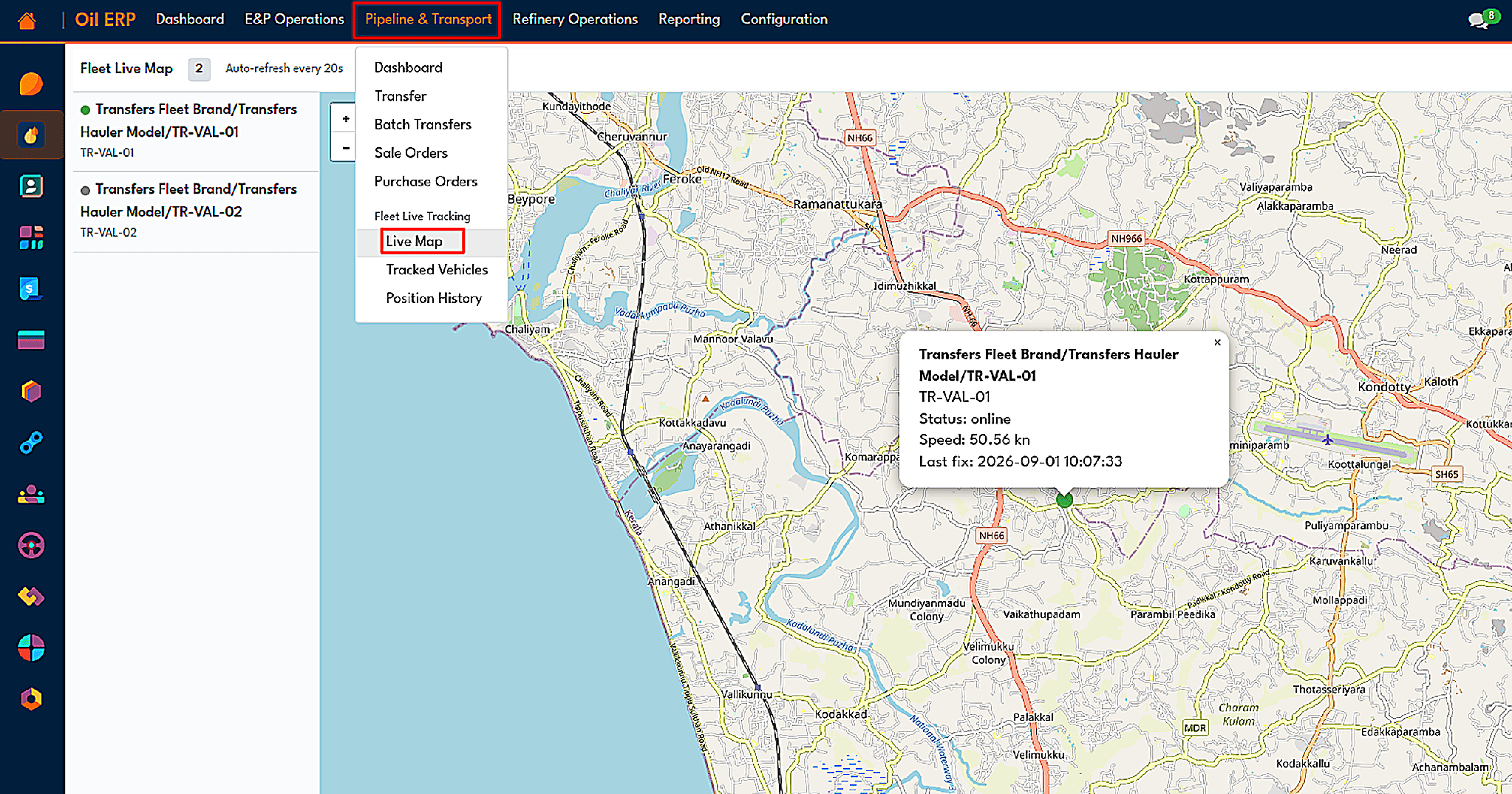
The live fleet map with a vehicle popup showing status, speed, and last fix.
Midstream is a business of moving product without losing track of it, and Oil ERP keeps every movement inside a standard Odoo stock transfer. One tick turns an ordinary transfer into an oil and gas transfer, adding transport details, delivery validation, and sanity checks on every reading. Pipeline nominations cap what can be shipped, and the HPM module converts observed volumes into standard volumes using recognized standards such as ASTM D1250.
Custody Transfer then records the moment ownership changes hands, with approvals, disputes, and a full audit trail, while Gate Pass and Fleet Live Tracking show what passed through the gate and where every truck is right now. Because each of these tools uses the same volume correction factors and the same transfer records, both sides of a handover can agree on the litres.
To read more about How Oil ERP Manages Upstream Operations from Reservoir to Decommissioning, refer to our blog How Oil ERP Manages Upstream Operations from Reservoir to Decommissioning.