What stands out about Odoo 19 is not just its ability to handle business operations. It functions more like a foundation. Because of the wide range of tools built into its API, linking Odoo to outside systems becomes possible, including mobile apps, different ERP software, payment processing services, online stores, smart devices, and delivery companies, among others. A fresh approach arrives in the form of the JSON-2 API, which is now presented as the updated method. Yet the older XML-RPC connection remains available too, helping to keep past integrations working smoothly.
This blog is a complete hands-on guide to every API protocol available in Odoo 19. You will learn:
- What each API protocol is and when to use it
- How to authenticate, both with credentials and the new API key system
- How to perform all CRUD operations on any Odoo model
- The brand-new /doc Runtime Documentation - Odoo 19's live interactive API explorer
- How to migrate from the deprecated XML-RPC / JSON-RPC to JSON-2
- Transactions, error handling, and database management via the API
- Integration patterns including webhooks, scheduled polling, and real-time sync
Deprecation Notice: The XML-RPC (/xmlrpc, /xmlrpc/2) and JSON-RPC (/jsonrpc) endpoints are scheduled for removal in Odoo 22 (fall 2028) and Online 21.1 (winter 2027). The External JSON-2 API is the official replacement. New integrations should use JSON-2
1. Odoo API Overview
Odoo 19 exposes three external API protocols.
| Protocol | Endpoint | Status in Odoo 19 | Best For |
| External JSON-2 | /json/2/<model>/<method> | New in 19 (recommended) | All new integrations |
| XML-RPC | /xmlrpc/2/common, /xmlrpc/2/object | Deprecated (will be removed in v22) | Legacy systems |
| JSON-RPC | /jsonrpc | Deprecated (removed in v22) | Legacy integrations |
Note: External API access is only available with custom Odoo pricing plans. It is not included in the One App Free or Standard plans.
2. The External JSON-2 API (New in Odoo 19)
With Odoo 19, the new external JSON-2 API replaces the XML-RPC and JSON-RPC. The external JSON-2 API is simpler to use. It follows HTTP standards, offers useful HTTP responses, and links to the /doc runtime documentation
How it Works
- URL structure: POST /json/2//
- Authentication: Bearer token (API key) in the 'Authorisation' header
- Arguments: Everything is named, there are no positional arguments in JSON-2
- Transactions: Each API call runs in its own SQL transaction
- HTTP status codes: Returns 200, 400, 401, 403, 404, 500, not always 200 like old APIs
- Required headers: Authorization, Content-Type: application/json, and, depending on your deployment, Host and X-Odoo-Database
Required Headers
Depending on your Odoo deployment, some headers may be required:
- Host: Required by HTTP/1.1. Needed when Odoo is installed alongside other web apps so the reverse proxy can route correctly. Most HTTP clients set this automatically.
- X-Odoo-Database: Required when a single Odoo server hosts multiple databases and dbfilter is not configured. Pass your database name here.
POST /json/2/res.partner/search_read HTTP/1.1
Host: localhost:8019
Authorization: Bearer <your_api_key>
Content-Type: application/json
X-Odoo-Database: my_odoo_db

{
    "domain": [["is_company", "=", true]],
    "fields": ["name", "email", "phone"],
    "limit": 10
}
Request Structure
The request body is just a JSON object, with every argument passed by name. The model and method go in the URL:
# Pattern: POST /json/2/<model>/<method>
# Body: JSON with named arguments

import requests

BASE     = 'http://localhost:8019'
API_KEY  = 'your_api_key_here'
DATABASE = 'my_odoo_db'

headers = {
    'Authorization':  f'Bearer {API_KEY}',
    'Content-Type':   'application/json',
    'X-Odoo-Database': DATABASE,
}

# search_read on res.partner
resp = requests.post(
    f'{BASE}/json/2/res.partner/search_read',
    headers=headers,
    json={
        'domain': [['is_company', '=', True]],
        'fields': ['name', 'email', 'phone', 'country_id'],
        'limit':  10,
        'offset': 0,
        'order':  'name asc',
    }
)

if resp.status_code == 200:
    partners = resp.json()
    for p in partners:
        print(p['name'], p.get('email', '-'))
else:
    print('Error:', resp.status_code, resp.text)
Response Structure
Unlike the old RPC APIs that always returned HTTP 200, JSON-2 uses proper HTTP status codes:
- 200 OK: The result is the raw JSON response body (a list, dict, int, bool, etc.)
- 400 Bad Request: Invalid arguments or missing required fields
- 401 Unauthorized: Missing or invalid API key
- 403 Forbidden: Authenticated, but you don't have sufficient permissions
- 404 Not Found: Model or method does not exist
- 500 Internal Server Error: Server-side error (check Odoo logs)
Getting the Current User
Since JSON-2 does not use a user ID in the request, you can know who the current API key belongs to by calling res.users/context_get with no arguments:
resp = requests.post(f'{BASE}/json/2/res.users/context_get',
    headers=headers,
    json={}
)
context = resp.json()
print('Current user ID:', context.get('uid'))
print('Language:', context.get('lang'))
print('Timezone:', context.get('tz'))
Full CRUD Examples with JSON-2
Search_read
# Search and read sale orders that are in 'sale' state
resp = requests.post(
    f'{BASE}/json/2/sale.order/search_read',
    headers=headers,
    json={
        'domain': [['state', '=', 'sale']],
        'fields': ['name', 'partner_id', 'amount_total', 'date_order'],
        'limit':  20,
        'order':  'date_order desc',
    }
)
orders = resp.json()
for order in orders:
    print(order['name'], order['amount_total'])
Create
resp = requests.post(
    f'{BASE}/json/2/res.partner/create',
    headers=headers,
    json={
        'vals_list': [
            {
                'name':       'Acme Corporation',
                'email':      'info@acme.com',
                'phone':      '+91-9876543210',
                'is_company': True,
                'street':     '123 Main St',
                'city':       'Bangalore'
            }
        ]
    }
)
new_id = resp.json()
print('Created partner with ID:', new_id)
write (update)
# Update multiple records at once
resp = requests.post(
    f'{BASE}/json/2/res.partner/write',
    headers=headers,
    json={
        'ids':    [42, 43, 44],
        'vals':   {'active': False, 'comment': 'Archived via API'}
    }
)
success = resp.json()   # True
unlink (delete)
resp = requests.post(
    f'{BASE}/json/2/res.partner/unlink',
    headers=headers,
    json={'ids': [42]}
)
success = resp.json()   # True
Search
# Returns list of IDs matching domain
resp = requests.post(
    f'{BASE}/json/2/product.template/search',
    headers=headers,
    json={
        'domain': [['sale_ok', '=', True], ['active', '=', True]],
        'limit':  50,
    }
)
product_ids = resp.json()   # [1, 3, 7, 12, ...]
Search_count
resp = requests.post(
    f'{BASE}/json/2/res.partner/search_count',
    headers=headers,
    json={'domain': [['customer_rank', '>', 0]]}
)
print('Total customers:', resp.json())
Read
# Read specific records by ID
resp = requests.post(
    f'{BASE}/json/2/sale.order/read',
    headers=headers,
    json={
        'ids':    [1, 2, 3],
        'fields': ['name', 'state', 'amount_total', 'partner_id'],
    }
)
records = resp.json()
fields_get - Inspect Model Fields
# Get all fields with metadata for a model
resp = requests.post(
    f'{BASE}/json/2/res.partner/fields_get',
    headers=headers,
    json={'attributes': ['string', 'help', 'type', 'required', 'readonly']}
)
fields = resp.json()
for field_name, meta in fields.items():
    print(f"{field_name}: [{meta['type']}] {meta['string']}")
3. API Keys and Authentication
Odoo 19 uses API keys as the primary authentication method for external integrations. API keys are safer than username/password because they are limited to a particular user’s permissions, can be given an expiration period, can be revoked without changing the user’s password, and are visible in access logs.
Creating an API Key
- Log in to your Odoo instance
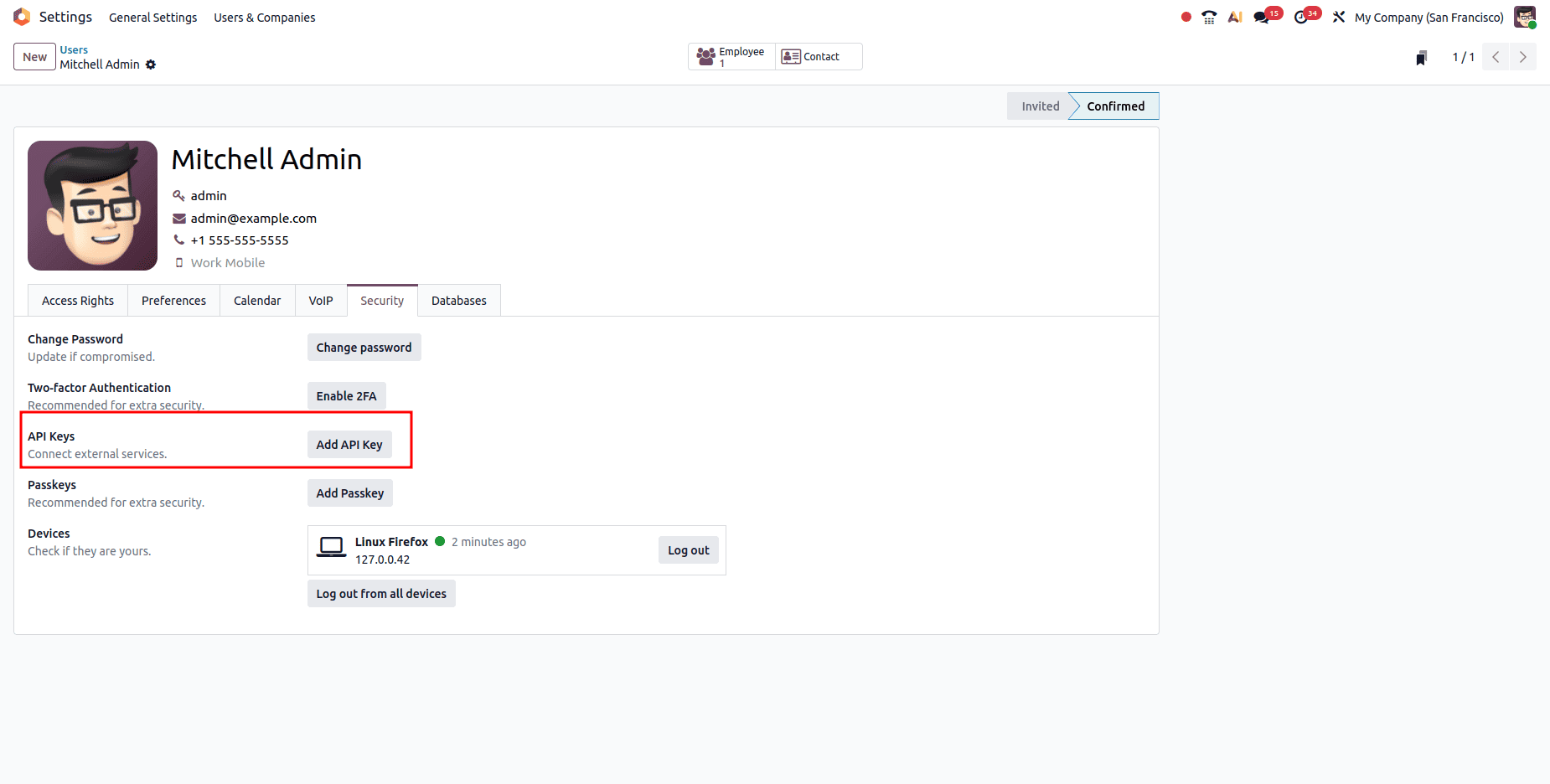
- Go to Settings > Users & Companies > Users > click your user
- Click the Account Security tab
- Click New API Key
- Enter a description (e.g., 'My test key') and an optional expiry date
- Copy the generated key (It is shown only once)
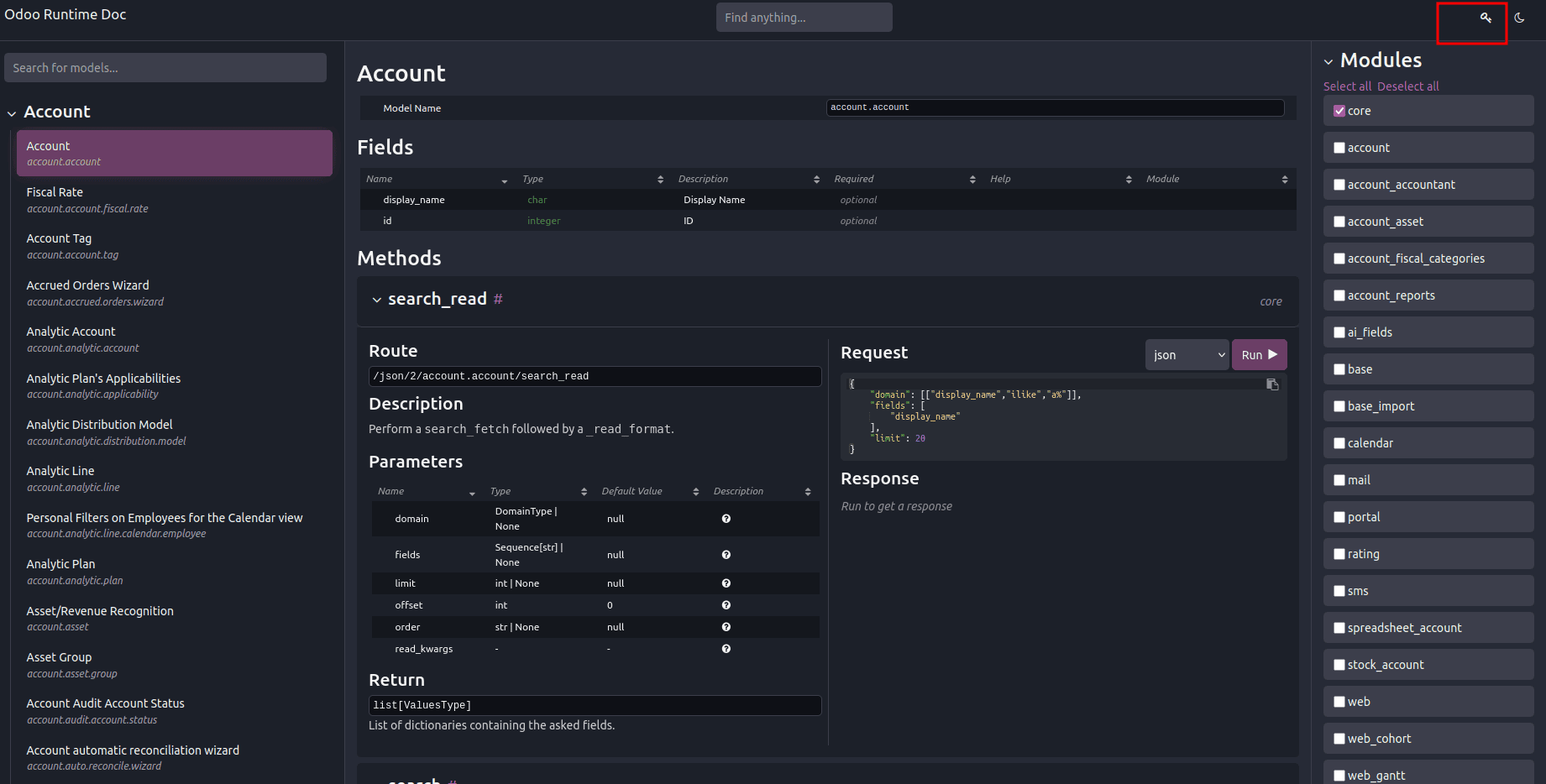
Alternative via /doc: In Odoo 19, you can also generate API keys directly from the /doc runtime documentation page by clicking the key icon in the top-right corner.
Using the API Key
The API key is passed as a Bearer token in the Authorization header:
import requests

headers = {
    'Authorization':  'Bearer YOUR_API_KEY_HERE',
    'Content-Type':   'application/json',
    'X-Odoo-Database': 'my_odoo_db',    # required for multi-db setups
}

resp = requests.post(
    'http://localhost:8019/json/2/res.partner/search_count',
    headers=headers,
    json={'domain': []}
)
print(f'Total partners: {resp.json()}')
Bot User Best Practices
For production integrations, create a dedicated 'bot' or 'API' user rather than using your own account:
- Create a new user (e.g., api_bot@yourcompany.com) in Settings > Users
- Grant only the minimum required permissions (access rights and record rules)
- Set the password to empty to disable direct login, reducing the attack surface
- Generate API keys for this bot account only
- The Access Log fields will show the bot user, making auditing easy
4. The /doc Runtime Documentation
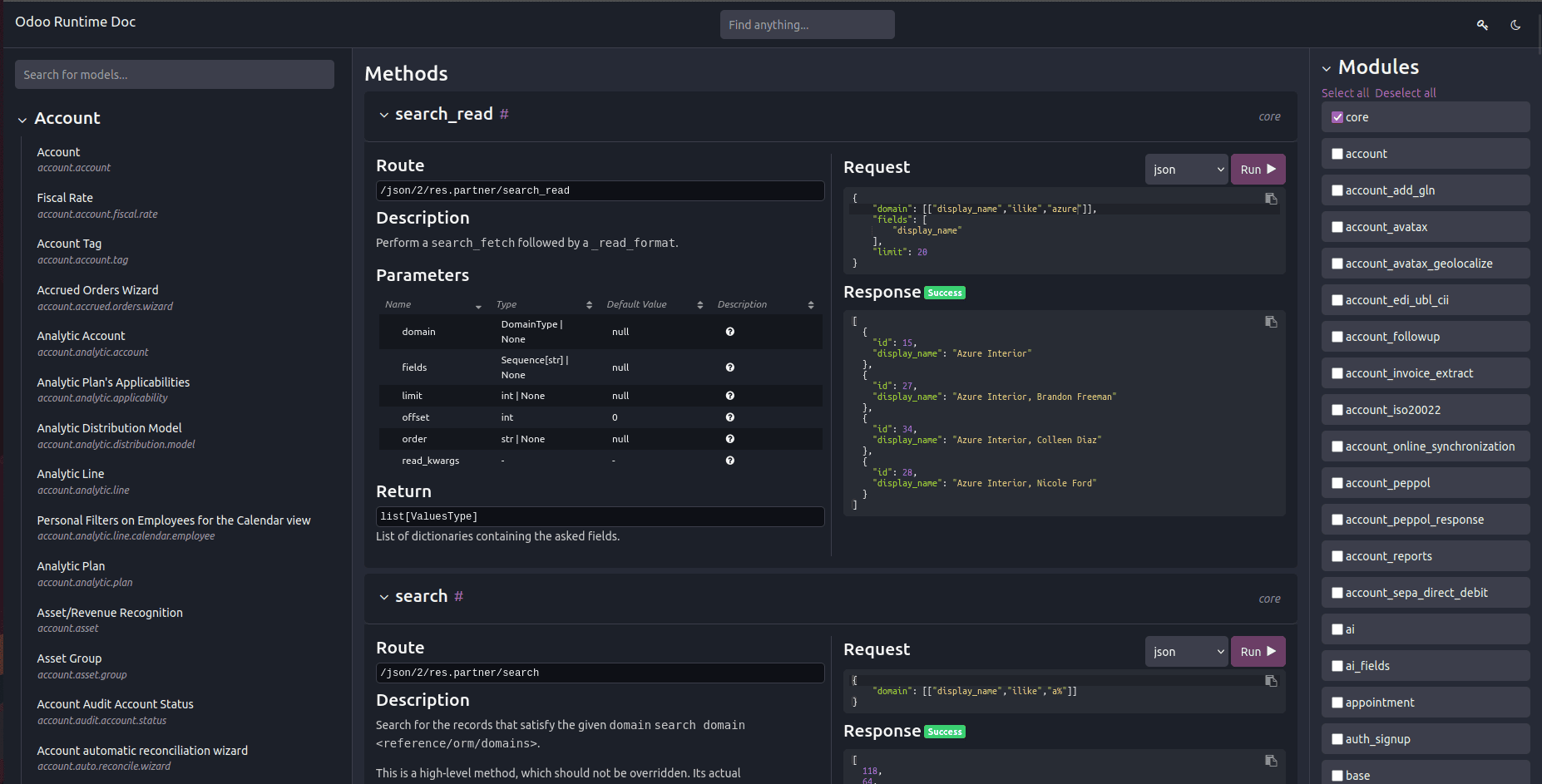
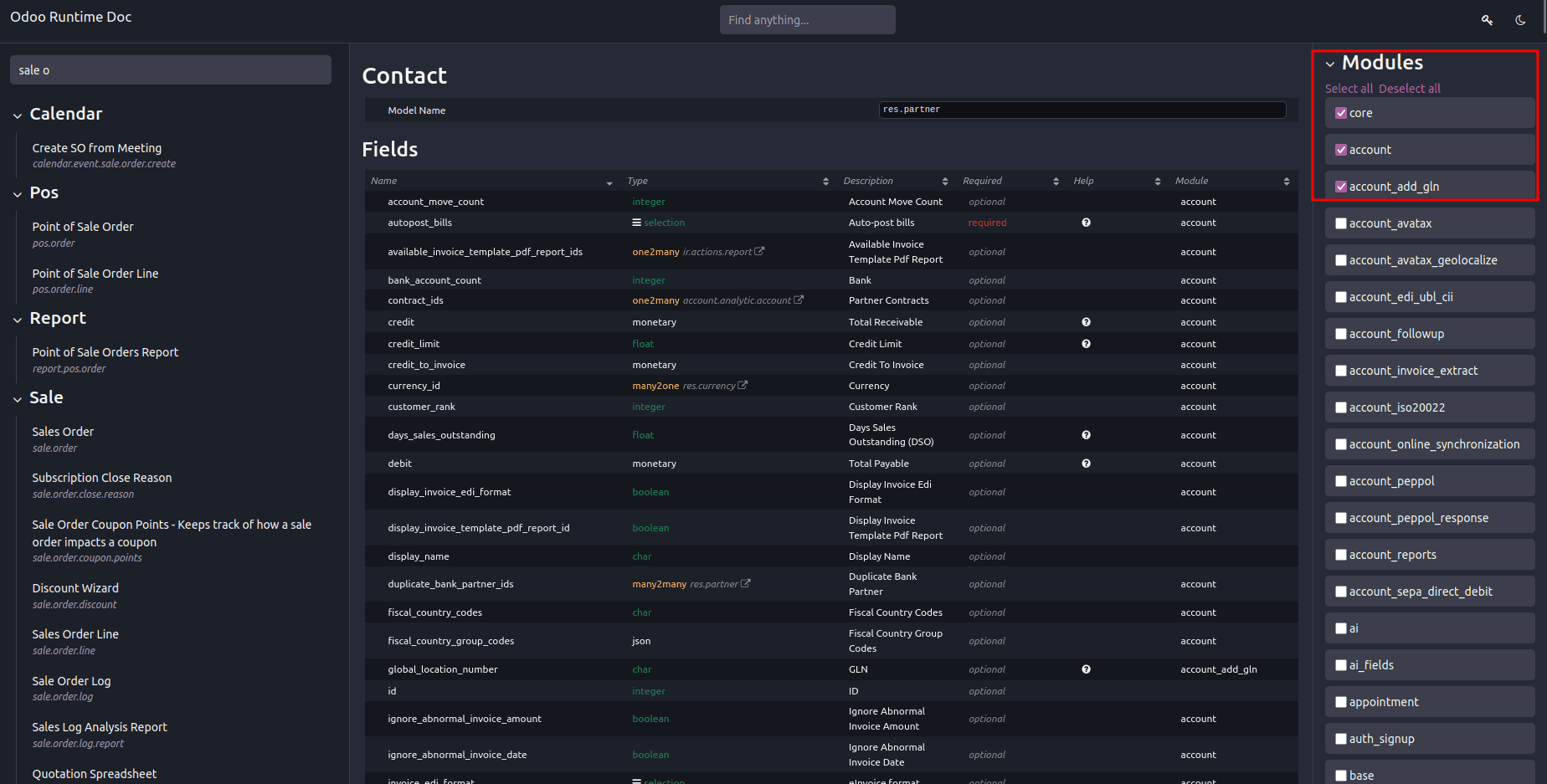
One of the most useful features introduced in Odoo 19 is the /doc page, which acts as live documentation for an API that is dependent on your database. This means that /doc shows all models, fields, and methods present in your database, including custom ones.
Accessing /doc
Navigate to: http://<your-odoo-instance>/doc
The /doc page is restricted to users in the Technical Documentation Users group. Make sure your user or API bot has this access.
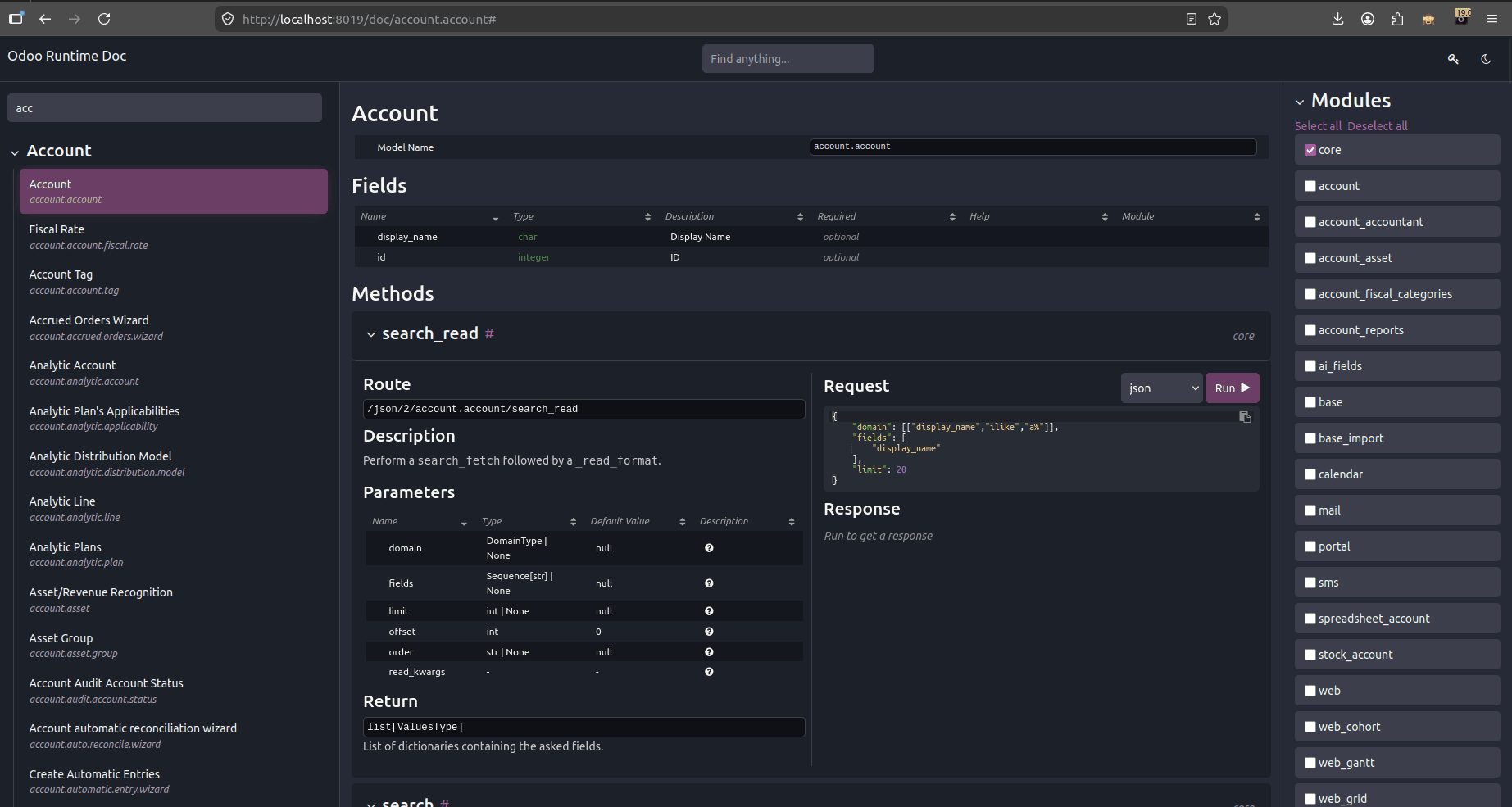
What You Can Do in /doc
- Browse all installed models (res.partner, sale.order, account.move, etc.)
- See all fields for each model with their types, labels, and descriptions
- View all available methods and their parameters
- See which methods are accessible via the external API
- Execute test API calls directly in the browser
- View auto-generated Python and curl code samples for each operation
- Generate and manage API keys (click the key icon)
Understanding the /doc Structure
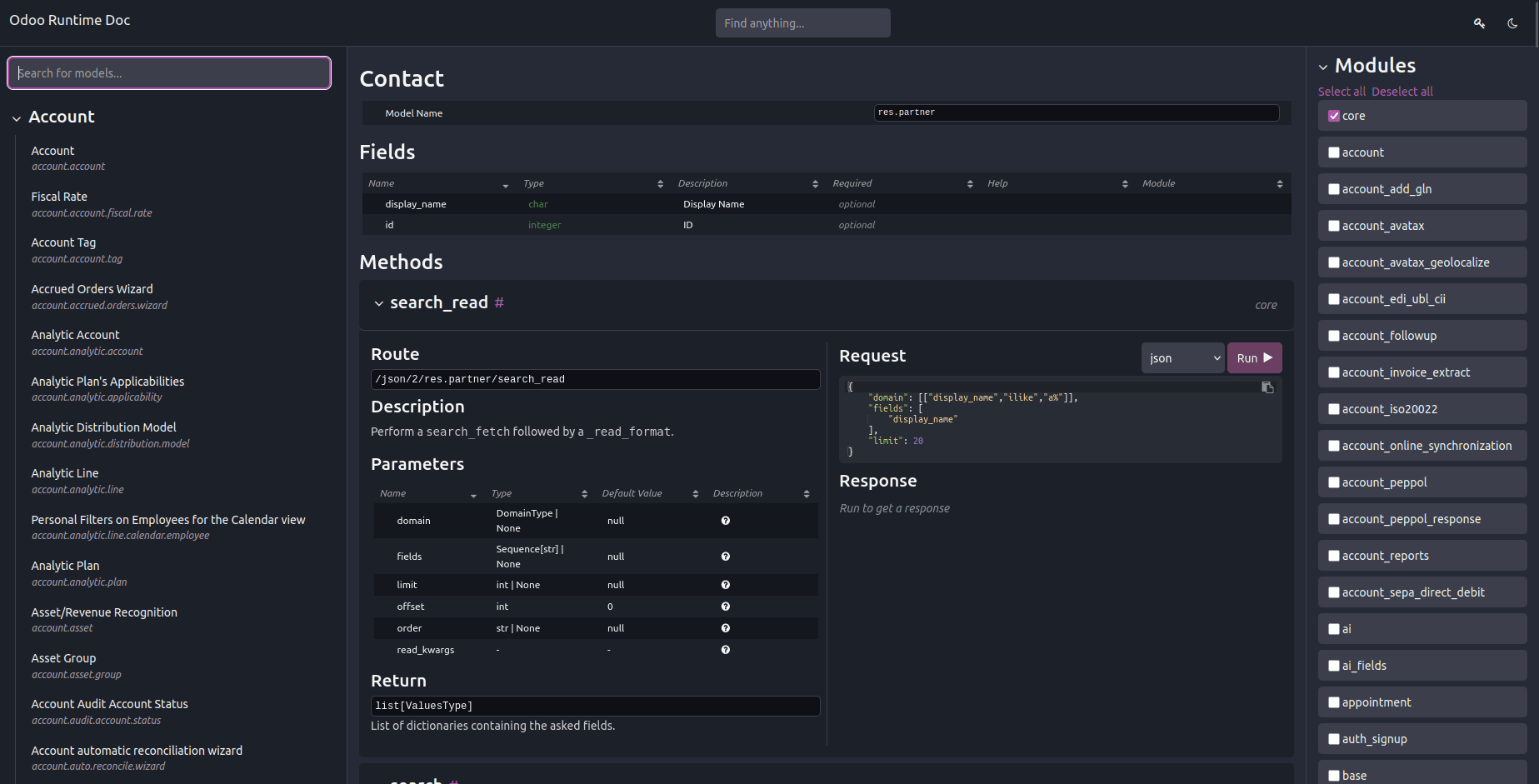
Each model page in /doc shows:
- Model name: Technical name (e.g., sale.order) and display name (Sales Order)
- Fields table: Field name, type (char, integer, many2one, etc.), label, required/optional, readonly
- Methods list: search, search_read, read, create, write, unlink, and any custom methods
- Code examples: Auto-generated Python and curl snippets you can copy directly
5. Database Management via API
Odoo 19 exposes database management controllers at /web/database. These accept HTTP POST with application/x-www-form-urlencoded content type and are protected by the master password.
At the service level, Odoo's db service defines these functions:
- create_database(master_pwd, db_name, demo, lang, user_password, login, country_code, phone)
- duplicate_database(master_pwd, db_original_name, db_name, neutralize_database)
- drop(master_pwd, db_name)
- dump(master_pwd, db_name, format)
- restore(master_pwd, db_name, data, copy)
- change_admin_password(master_pwd, new_password)
- rename(master_pwd, old_name, new_name)
- migrate_databases(master_pwd, databases)
- b_exist(db_name)
- list()
- list_lang()
- list_countries(master_pwd)
- server_version()
HTTP Controllers – application/x-www-form-urlencoded (POST)
These controllers accept standard form-encoded POST requests:
- /web/database/create – inputs: master_pwd, name, login, password, demo, lang, phone
- /web/database/duplicate – inputs: master_pwd, name, new_name, neutralize_database (not neutralized by default)
- /web/database/drop – inputs: master_pwd, name
- /web/database/backup – inputs: master_pwd, name, backup_format (zip by default); returns the backup file in the HTTP response
- /web/database/change_password – inputs: master_pwd, master_pwd_new
HTTP Controller – multipart/form-data (POST)
- /web/database/restore – inputs: master_pwd, name, copy (not copied by default), neutralize (not neutralized by default), plus a file input backup_file
HTTP Controller – application/json-rpc (POST)
- /web/database/list – takes an empty JSON object as input; returns the database list under the JSON response's result entry
Security note: All these controllers are protected by the master password (master_pwd), configured in your odoo.conf as admin_passwd. Never expose database management endpoints to the public internet without a firewall, IP allowlist, or VPN.
Code Examples
Create a Database
import requests
MASTER_PWD = 'your_master_password'
ODOO_URL   = 'http://localhost:8019'
resp = requests.post(
    f'{ODOO_URL}/web/database/create',
    data={
        'master_pwd': MASTER_PWD,
        'name':       'new_test_db',
        'login':      'admin',
        'password':   'admin123',
        'demo':       False,
        'lang':       'en_US',
        'phone':      '',
    }
)
print('Create result:', resp.status_code)
Duplicate a Database
resp = requests.post(
    f'{ODOO_URL}/web/database/duplicate',
    data={
        'master_pwd':           MASTER_PWD,
        'name':                 'production_db',
        'new_name':             'staging_db',
        'neutralize_database':  True,  # clears outgoing emails, crons, etc.
    }
)
print('Duplicate result:', resp.status_code)
Drop a Database
resp = requests.post(
    f'{ODOO_URL}/web/database/drop',
    data={'master_pwd': MASTER_PWD, 'name': 'staging_db'}
)
print('Drop result:', resp.status_code)
Backup a Database
resp = requests.post(
    f'{ODOO_URL}/web/database/backup',
    data={
        'master_pwd':    MASTER_PWD,
        'name':          'production_db',
        'backup_format': 'zip',   # default
    }
)
with open('production_db_backup.zip', 'wb') as f:
    f.write(resp.content)
print('Backup saved')
Restore a Database
with open('production_db_backup.zip', 'rb') as f:
    resp = requests.post(
        f'{ODOO_URL}/web/database/restore',
        data={
            'master_pwd': MASTER_PWD,
            'name':       'restored_db',
            'copy':       False,
            'neutralize': True,
        },
        files={'backup_file': f}
    )
print('Restore result:', resp.status_code)
Change Master Password
resp = requests.post(
    f'{ODOO_URL}/web/database/change_password',
    data={
        'master_pwd':     MASTER_PWD,
        'master_pwd_new': 'new_master_password',
    }
)
print('Password change result:', resp.status_code)
List Databases (JSON-RPC)
resp = requests.post(
    f'{ODOO_URL}/web/database/list',
    json={'jsonrpc': '2.0', 'method': 'call', 'id': 1, 'params': {}}
)
databases = resp.json()['result']
print('Available databases:', databases)
Odoo 19 brings major enhancements to its API design. The new External JSON-2 API is more straightforward, user-friendly, and simpler compared to earlier versions. It improves the process of creating integrations by including features such as secure API keys, the /doc runtime explorer, clear HTTP status codes, and named arguments, resulting in a more efficient and pleasant experience overall.
To read more about Overview of API Versioning in Controllers in Odoo 19, refer to our blog Overview of API Versioning in Controllers in Odoo 19.