When working with databases that evolve over time, identifying schema changes becomes critical. This is especially true in Odoo migrations, where each major version introduces new models, fields, constraints, and internal ORM changes. A reliable way to understand exactly what changed between versions is by comparing their database schemas.
In this guide, we will walk through creating a demo Odoo 13 database, copying it, migrating the copy to Odoo 14 using OpenUpgrade, and then comparing both schemas using PostgreSQL’s pg_dump along with diff, colordiff, and meld.
This guide is written for beginners and intermediate developers who want a simple and effective way to detect schema differences across database versions.
Creating the Databases for Comparison
The process begins with two PostgreSQL databases:
- A normal database created in Odoo 13 containing demo data
- An exact copy of this database
- The copied database migrated to Odoo 14 using OpenUpgrade
After migration, we now have:
Our goal is to detect what schema-level changes happened during the migration.
Dumping the Schema of Both Databases
PostgreSQL provides pg_dump with a schema-only option that exports only structural information such as tables, fields, indexes, constraints, and sequences.
You can easily check the version of the pg_dump by this command
postgres@cybrosys:/home/cybrosys$ pg_dump --version
You get result like this
pg_dump (PostgreSQL) 17.7 (Ubuntu 17.7-3.pgdg22.04+1)
Explore more about the pg_dump and its flags
postgres@cybrosys:/home/cybrosys$ pg_dump --help
Run the following commands:
pg_dump -s -U postgres -p 5433 -d odoo_13 > /tmp/odoo_13.sql
pg_dump -s -U postgres -p 5433 -d odoo_14_migrated > /tmp/odoo_14.sql
The -s flag ensures that only the schema is dumped.
The -p flag selects the correct PostgreSQL port if multiple clusters exist.
Now we have two SQL files representing the structure of each database.
Using the Diff Tool to Compare Schemas
The diff utility is the simplest and most widely available method to compare text files line by line.
To generate a unified diff:
diff -u /tmp/odoo_13.sql /tmp/odoo_14.sql > /tmp/schema_diff.txt
The schema_diff.txt file will contain all structural differences.
To view only whether files differ:
diff -q /tmp/odoo_13.sql /tmp/odoo_14.sql
Purpose:
This checks only whether the two files are identical or different.
It does not show line-by-line differences.
-q means:
Quiet mode
Show only if files are different or identical.
If the two files are different, you get output like this
Files /tmp/odoo_13.sql and /tmp/odoo_14.sql differ
To view side-by-side differences:
diff -y /tmp/odoo_13.sql /tmp/odoo_14.sql
You get result like this
CACHE 1;							    CACHE 1;

ALTER SEQUENCE public.ir_module_module_id_seq OWNER TO averig	ALTER SEQUENCE public.ir_module_module_id_seq OWNER TO averig
--								--
-- Name: ir_module_module_id_seq; Type: SEQUENCE OWNED BY; Sc	-- Name: ir_module_module_id_seq; Type: SEQUENCE OWNED BY; Sc
--								--
ALTER SEQUENCE public.ir_module_module_id_seq OWNED BY public	ALTER SEQUENCE public.ir_module_module_id_seq OWNED BY public

--								--
-- Name: ir_property; Type: TABLE; Schema: public; Owner: ave	-- Name: ir_property; Type: TABLE; Schema: public; Owner: ave
--								--
CREATE TABLE public.ir_property (				CREATE TABLE public.ir_property (
    id integer NOT NULL,					    id integer NOT NULL,
    name character varying,					    name character varying,
    res_id character varying,					    res_id character varying,
    company_id integer,						    company_id integer,
    fields_id integer NOT NULL,					    fields_id integer NOT NULL,
    value_float double precision,				    value_float double precision,
    value_integer integer,					    value_integer integer,
    value_text text,						    value_text text,
    value_binary bytea,						    value_binary bytea,
    value_reference character varying,				    value_reference character varying,
    value_datetime timestamp without time zone,			    value_datetime timestamp without time zone,
    type character varying NOT NULL,				    type character varying NOT NULL,
    create_uid integer,						    create_uid integer,
    create_date timestamp without time zone,			    create_date timestamp without time zone,
    write_uid integer,						    write_uid integer,
    write_date timestamp without time zone			    write_date timestamp without time zone
);								);

ALTER TABLE public.ir_property OWNER TO averigouser;		ALTER TABLE public.ir_property OWNER TO averigouser;
To ignore whitespace changes:
diff -u -w /tmp/odoo_13.sql /tmp/odoo_14.sql
To see all available options:
diff --help
You can also check your diff version:
diff --version
This helps in scripts and documentation where behavior might differ across versions.
Using Colordiff for Colorized Output
Diff outputs are often difficult to read. Colordiff enhances them with colors for improved visibility.
If colordiff is installed, run:
colordiff /tmp/odoo_13.sql /tmp/odoo_14.sql
This prints the differences with colored highlights.
To check if colordiff is installed:
colordiff --version
If it is not installed:
sudo apt install colordiff
Colordiff does not change functionality; it only improves readability.
Using Meld for GUI-Based Comparison
For a graphical, side-by-side comparison, Meld is one of the best tools available.
Before using Meld, ensure it is installed:
sudo apt install meld
Run Meld with:
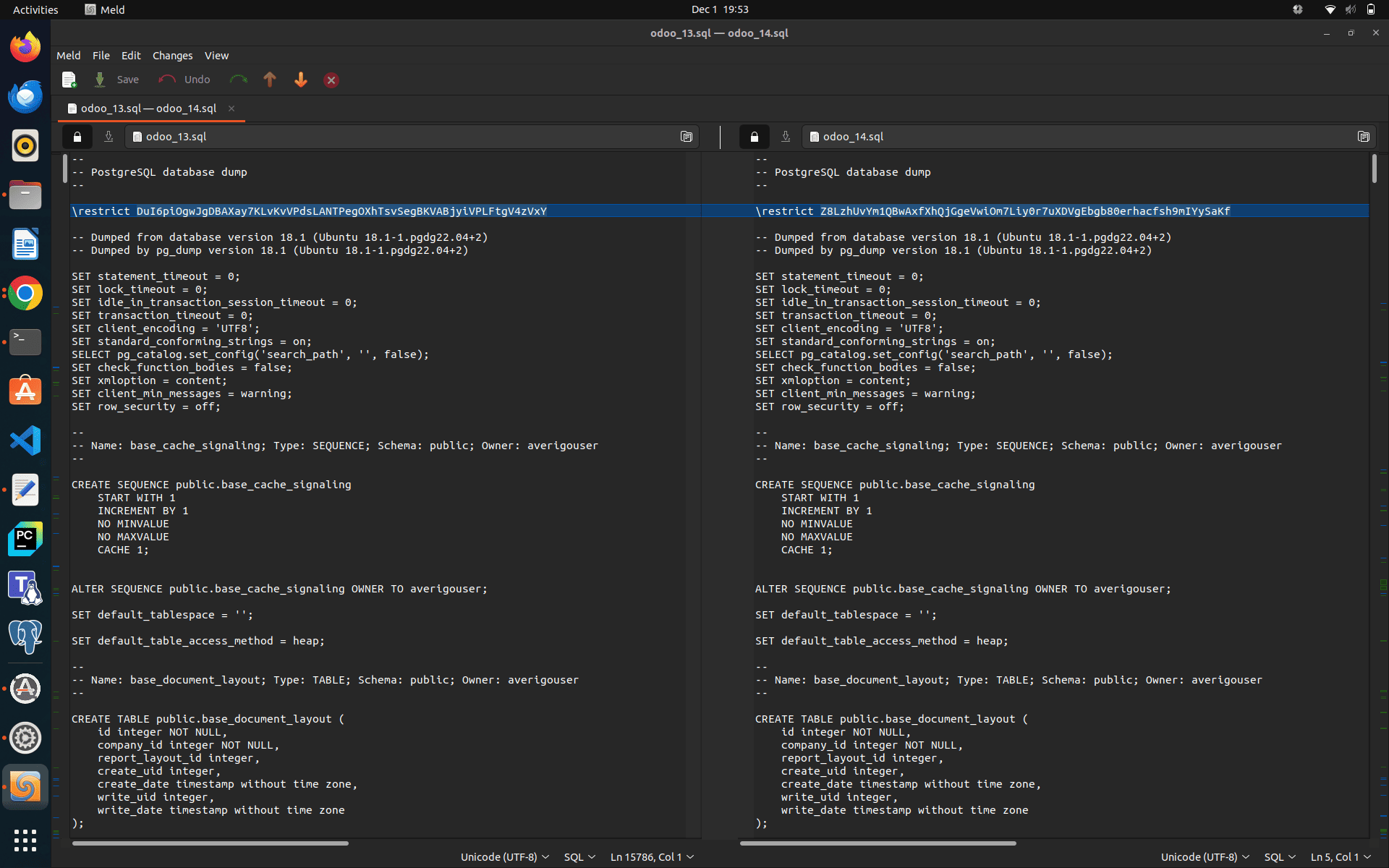
meld /tmp/odoo_13.sql /tmp/odoo_14.sql
Meld highlights differences visually and helps when dealing with long SQL dump files.
You get a gui like this
Understanding Schema Differences
When we compare two schema dump files using the unified diff command:
diff -u /tmp/odoo_13.sql /tmp/odoo_14.sql > /tmp/schema_diff.txt
PostgreSQL generates a structured output that shows exactly what changed between the two versions of the database. The diff output uses the following symbols:
- A line starting with - means this line existed in the Odoo 13 schema but does not exist in the Odoo 14 migrated schema.
- A line starting with + means this line was added in the Odoo 14 migrated schema.
- Lines without symbols are unchanged.
This allows you to understand field additions, field removals, constraints, defaults, comments, and other schema-level changes.
Entry Section of the Diff File Explained
Here is an example from the beginning of the diff file:
--- /tmp/odoo_13.sql	2025-12-01 19:11:55.825963915 +0530
+++ /tmp/odoo_14.sql	2025-12-01 19:12:00.962999616 +0530
@@ -2,7 +2,7 @@
 -- PostgreSQL database dump
 --
-\restrict DuI6piOgwJgDBAXay7KLvKvVPdsLANTPegOXhTsvSegBKVABjyiVPLFtgV4zVxY
+\restrict Z8LzhUvYm1QBwAxfXhQjGgeVwiOm7Liy0r7uXDVgEbgb80erhacfsh9mIYySaKf
How to read this section:
- The first two lines show which files are being compared.
- The line beginning with @@ indicates the line numbers in the original and new file.
- The two restrict lines differ, but these are internal pg_dump markers and do not represent any schema change. They can be ignored.
This initial part only shows metadata differences and not actual table structure changes.
Example: Understanding Changes in a Single Table (ir_attachment)
Below is a real example of schema changes detected in the ir_attachment table:
-    write_date timestamp without time zone
+    write_date timestamp without time zone,
+    original_id integer
And it’s related comment
+-- Name: COLUMN ir_attachment.original_id; Type: COMMENT; Schema: public; Owner: averigouser
+
+COMMENT ON COLUMN public.ir_attachment.original_id IS 'Original (unoptimized, unresized) attachment';
How to read this example:
- Field Removed vs Added
The line beginning with - shows that in Odoo 13 the table ended with the write_date field.
The lines beginning with + show that Odoo 14 added a new field named original_id.
- Meaning of the Change
The new field original_id is used by Odoo 14 to store the reference to the original attachment file before optimization.
- New Comment Added
Odoo provides a comment for the new column to describe its purpose.
This comment appears only in Odoo 14, so it is added in the diff output.
This is how you read and understand schema changes for each table, identify what lines were removed, added, or updated, and interpret what those changes mean in terms of database structure and system behavior.
Why This Method is Valuable
Comparing schemas using diff is often more reliable than reading migration scripts. It allows you to see exactly what changed in the database across versions without assumptions.
This method helps when:
- Troubleshooting migration errors
- Understanding Odoo ORM evolution
- Validating custom modules
- Documenting differences for upgrades
- Verifying OpenUpgrade behavior
- Identifying deprecated and new fields
This process works for any version upgrade, not just Odoo 13 to 14.
Conclusion
Schema comparison using pg_dump combined with diff, colordiff, and meld is one of the most effective and transparent ways to understand database changes in PostgreSQL. In real migration scenarios, such as upgrading from Odoo 13 to Odoo 14, this method reveals every field, constraint, index, and table that changed. It provides insights that are not immediately visible through ORM code or migration scripts.
With simple commands and freely available tools, you can analyze complex database structures and document upgrade paths with accuracy. Whether you are working on Odoo migrations, PostgreSQL version upgrades, or general database validation, schema diffing remains a powerful and essential technique.