When managing databases, especially during migrations, upgrades, or testing environments, one common challenge developers face is verifying whether two databases contain identical data. Manually checking thousands of rows across hundreds of tables is nearly impossible.
This is where pgCompare, an open-source tool by Crunchy Data, becomes incredibly useful. pgCompare allows you to compare two databases and identify any inconsistencies, missing data, or mismatched rows with high precision. It supports multiple database systems, including PostgreSQL, MySQL, Oracle, and SQL Server, making it suitable for multi-environment comparisons and data validation tasks.
In this guide, we’ll focus purely on comparing two PostgreSQL databases using pgCompare.
Understanding pgCompare
pgCompare is designed to verify data consistency between two databases. It does this by comparing tables, columns, and even individual rows through a hashing mechanism.
The process is divided into three key phases:
- Discovery: Scans both databases to identify common tables and their structures.
- Comparison: Calculates hash values for rows and compares them to detect mismatches.
- Reporting: Stores comparison results in a repository database and generates a detailed report (HTML or command-line summary).
To track every operation, pgCompare maintains a repository database (often named pgcompare). This database stores configuration, discovered metadata, and results from each comparison run, allowing you to review past comparisons anytime.
Step-by-Step Setup
Step 1: Clone the Repository
Start by cloning pgCompare from GitHub:
git clone https://github.com/CrunchyData/pgCompare.git
cd pgCompare/
Step 2: Configure the Properties File
Open the pgcompare.properties file:
nano pgcompare.properties
You can also explore all the configuration parameters by checking the file named pgcompare.properties.sample
Then define your repository, source, and target databases.
Example Configuration:
##################################
# Repository Database
##################################
repo-host=localhost
repo-port=5433
repo-dbname=pgcompare
repo-user=postgres
repo-password=yourpassword
repo-schema=pgcompare
##################################
# Source Database
##################################
source-type=postgres
source-host=localhost
source-port=5433
source-dbname=test_source
source-user=postgres
source-password=yourpassword
source-schema=public
##################################
# Target Database
##################################
target-type=postgres
target-host=localhost
target-port=5433
target-dbname=test_target
target-user=postgres
target-password=yourpassword
target-schema=public
In this example:
- test_source is your original database (perhaps from an older version or environment).
- test_target is the copy you want to validate after migration or data import.
Step 3: Build and Prepare the Environment
Build the pgCompare tool using Maven:
make build
# or
mvn clean package -DskipTests
After building, check for the output:
ls target/
pgcompare.jar
Step 4: Initialize the Repository
Before comparing, initialize the pgCompare repository schema:
psql -U postgres -p 5433 -d pgcompare -f database/postgres/pgcompare_schema.sql
This creates internal tables such as dc_project, dc_table, and dc_result in the pgcompare schema, which pgCompare uses to manage the comparison process.
Step 5: Discover Tables and Columns
Run discovery to let pgCompare identify tables and their structures:
java -jar target/pgcompare.jar discover pgcompare.properties
This scans both databases (test_source and test_target) and records common tables and their columns in the repository.
Step 6: Run the Comparison
Once discovery completes, start the data comparison:
java -jar target/pgcompare.jar compare pgcompare.properties
This process generates logs showing each table’s reconciliation status (in-sync, skipped, or mismatched).
If the comparison is successful, you get result like this
[2025-12-20 11:03:41] [INFO   ] [display-operations      ]   Job Summary:
[2025-12-20 11:03:41] [INFO   ] [display-operations      ]         Tables Processed: 103
[2025-12-20 11:03:41] [INFO   ] [display-operations      ]         Total Rows: 34,769
[2025-12-20 11:03:41] [INFO   ] [display-operations      ]         Out of Sync Rows: 34,764
[2025-12-20 11:03:41] [INFO   ] [display-operations      ]         Elapsed Time: 277 seconds
[2025-12-20 11:03:41] [INFO   ] [display-operations      ]         Throughput: 125 rows/second
[2025-12-20 11:03:41] [INFO   ] [compare-ctrl            ] Comparison operation completed successfully
[2025-12-20 11:03:41] [INFO   ] [main                    ] Shutting down
Step 7: Generate an HTML Report
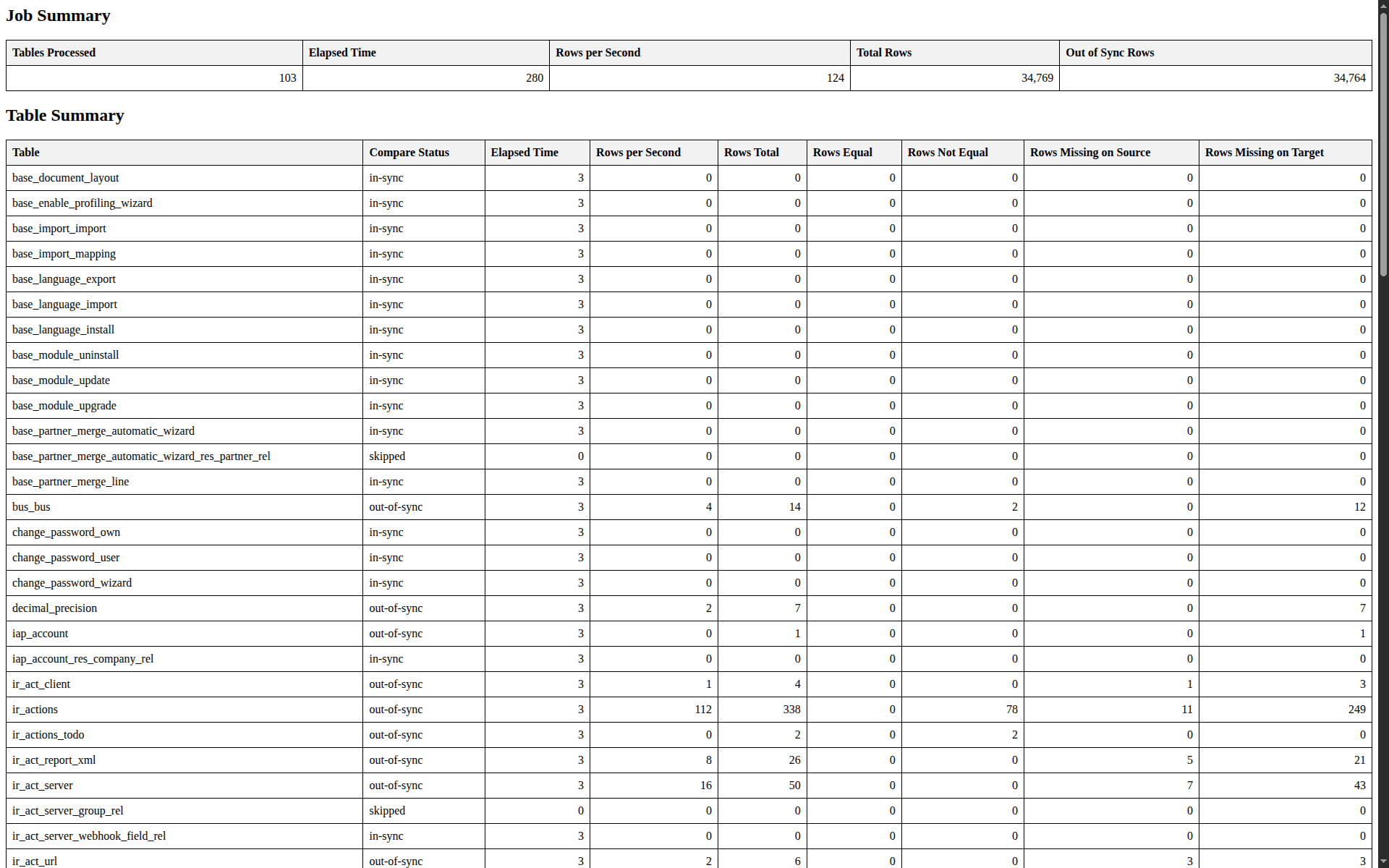
To produce a detailed, user-friendly report, run:
java -jar target/pgcompare.jar compare --report compare_report.html
Open the generated compare_report.html file in your browser. It lists all tables with their status and data counts.
You get a result like this
Understanding pgCompare Repository Tables
After running the comparison, the repository database (pgcompare) contains several internal tables that record metadata and results. Below is a breakdown of the most important ones.
1. dc_project
Stores project information and configuration.
SELECT * FROM pgcompare.dc_project;
You get a result like this
pgcompare=# SELECT * FROM pgcompare.dc_project;
-[ RECORD 1 ]--+--------
pid            | 1
project_name   | default
project_config |
2. dc_table
Lists all discovered tables that were included in the comparison.
SELECT * FROM pgcompare.dc_table LIMIT 1;
This table includes the table alias, batch number, and whether it’s enabled for comparison.
Example :
pgcompare=# SELECT * FROM pgcompare.dc_table LIMIT 1;
-[ RECORD 1 ]---+---------------------
pid             | 1
tid             | 6
table_alias     | base_document_layout
enabled         | t
batch_nbr       | 1
parallel_degree | 1
3. dc_table_column
Contains column-level metadata for each table.
SELECT * FROM pgcompare.dc_table_column LIMIT 3;
Each record identifies the column name (column_alias), its ID, and its status (enabled).
Example :
pgcompare=# SELECT * FROM pgcompare.dc_table_column LIMIT 3;
-[ RECORD 1 ]+------------
tid          | 6
column_id    | 1
column_alias | company_id
enabled      | t
-[ RECORD 2 ]+------------
tid          | 6
column_id    | 2
column_alias | create_date
enabled      | t
-[ RECORD 3 ]+------------
tid          | 6
column_id    | 3
column_alias | create_uid
enabled      | t
4. dc_table_column_map
Maps corresponding columns between the source and target tables, including datatype and precision.
SELECT * FROM pgcompare.dc_table_column_map LIMIT 1;
This ensures pgCompare aligns columns correctly during row comparisons.
pgcompare=# SELECT * FROM pgcompare.dc_table_column_map LIMIT 1;
-[ RECORD 1 ]-----+-----------
tid               | 6
column_id         | 1
column_origin     | target
column_name       | company_id
data_type         | int4
data_class        | numeric
data_length       | 32
number_precision  | 32
number_scale      | 0
column_nullable   | t
column_primarykey | f
map_expression    |
supported         | t
preserve_case     | f
map_type          | column
5. dc_source and dc_target
Hold hash values for each row in the source and target databases, respectively.
SELECT * FROM pgcompare.dc_source LIMIT 1;
pk_hash and column_hash are used to determine whether rows are identical or not.
Example :
pgcompare=# SELECT * FROM pgcompare.dc_source LIMIT 1;
-[ RECORD 1 ]--+---------------------------------
tid            | 72
table_name     | ir_module_module
batch_nbr      | 1
pk             | {"id": 616}
pk_hash        | 9f3b442d33035380df8bd4d819537272
column_hash    | cace216af393d0ad639c49ac23f6a127
compare_result | n
thread_nbr     | 0
6. dc_result
Stores summary results for each table comparison.
SELECT * FROM pgcompare.dc_result LIMIT 1;
pgcompare=# SELECT * FROM pgcompare.dc_result LIMIT 1;
-[ RECORD 1 ]------+---------------------------------
cid                | 15
rid                | 1766208129560
tid                | 22
table_name         | change_password_own
status             | in-sync
compare_start      | 2025-12-20 10:52:50.58333+05:30
equal_cnt          | 0
missing_source_cnt | 0
missing_target_cnt | 0
not_equal_cnt      | 0
source_cnt         | 0
target_cnt         | 0
compare_end        | 2025-12-20 10:52:53.654037+05:30
Key columns:
- table_name – Name of the compared table.
- status – Comparison result (e.g., in-sync, skipped, not-in-sync).
- equal_cnt, missing_source_cnt, missing_target_cnt – Counts of matching or mismatched rows.
7. dc_table_history
Logs comparison history with detailed metrics such as total rows processed, elapsed time, and success status.
SELECT * FROM pgcompare.dc_table_history LIMIT 1;
Example :
pgcompare=# SELECT * FROM pgcompare.dc_table_history LIMIT 1;
-[ RECORD 1 ]-+----------------------------------------------------------------------------------------------------------------------------------------------------------------------------------------------------------------
tid           | 114
batch_nbr     | 1
start_dt      | 2025-12-20 11:19:29.657752+05:30
end_dt        | 2025-12-20 11:19:32.77427+05:30
action_result | {"equal": 0, "status": "success", "notEqual": 0, "tableName": "res_lang_install_rel", "totalRows": 0, "elapsedTime": 3, "compareStatus": "in-sync", "missingSource": 0, "missingTarget": 0, "rowsPerSecond": 0}
row_count     | 0
Benefits of Using pgCompare
- Automated Validation: No need to manually check each record; pgCompare does it automatically with precision.
- Supports Multiple Databases: Although we used PostgreSQL here, pgCompare also works with Oracle, MySQL, and others — useful in multi-database ecosystems.
- Detailed Auditing: Every run is logged in the repository. You can review what was compared, when, and the results.
- Performance Optimized: pgCompare uses hashing and multi-threading for faster comparisons even on large datasets.
- Easy-to-Read Reports: HTML reports summarize everything — perfect for QA teams or migration validation.
- Data Integrity Assurance: Ideal for post-migration verification or testing staging vs. production data consistency.
Conclusion
pgCompare is a powerful and reliable solution for comparing data between PostgreSQL databases. It ensures that migrations, synchronization processes, or data imports maintain full data integrity.
By following these steps, from cloning to reporting, you can confidently validate data consistency across any two PostgreSQL databases.
Whether you’re testing backup restorations, verifying migrations, or ensuring environment synchronization, pgCompare provides clarity, automation, and accuracy every step of the way.