Creating a customized Odoo module is just the start of the process. The biggest problem for the developer is to guarantee that it will continue to function well even as the application grows and evolves. The customization might be functioning flawlessly right from the moment it was made, but just a minor code modification, a module update, or a configuration modification might create some unforeseen issues. This is particularly true for Odoo because the various business applications are interconnected. In Odoo, sales, purchases, inventory, accounting, manufacturing, and payroll are interconnected processes. Therefore, testing is a very important step in Odoo development. Instead of relying entirely on manual testing, Odoo 19 gives developers the option of using testing frameworks.
Having automated tests has facilitated the process of problem identification much earlier than before deployment. In addition, they are quite handy when you need to upgrade the modules, perform any refactoring, and add new functionality. After having created a test suite, it becomes much easier for developers to change anything, as automatic verification of the existing functionality becomes possible. Odoo 19 allows for a variety of testing procedures, starting with testing separate parts of business logic up to full-blown user tours with a browser.
In this blog, we will explain how testing works in Odoo 19. We will go through different types of tests available, how Odoo’s testing framework works, some useful testing practices, and strategies for creating reliable and maintainable Odoo applications.
What is Testing in Odoo 19
Testing in Odoo 19 makes sure that the system performs as expected in practical scenarios. This does not involve only checking whether a certain method is giving the correct result. The thing is that we have to check whether whole business workflows function properly, especially when there are many Odoo modules involved in the process. What distinguishes Odoo from regular web applications is that most of its modules are connected. A single operation in one module causes multiple processes to happen behind the scenes. For instance, while confirming a Sales Order, Odoo can make the stock reservation, create Purchase Orders, start manufacturing or purchase operations, create invoices, and make necessary accounting entries. In case an error occurs at one stage of the workflow, it will influence all the rest. That is why testing in Odoo should take into account not just individual operations but the entire business workflow itself.
Odoo 19 has been developed using the unittest library of Python, which serves as a base for the implementation of automated testing as well as other facilities dedicated to Odoo. Thus, we can develop test records, operate in the test environment, perform simulation of various business cases, and check the output results. In addition, the test environment is managed by the framework itself.
In simple terms, Odoo testing is built around three important ideas:
- Isolation: Each test should be independent, so a failure in one test does not affect another.
- Repeatability: A test should produce the same result when it is run again under the same conditions.
- Automation: Tests should run automatically so we don't have to manually verify the same functionality every time a change is made.
These points make automated testing especially useful when developing custom modules, modifying existing Odoo functionality, or upgrading an Odoo installation.
The diagram below gives a simple overview of how the testing process works in Odoo.
Odoo Module > Create Test Environment > Generate Test Records > Execute Business Operations > Validate Assertions > Rollback Database Changes
Of course, if we are working on our module development, then testing it with the help of real records is not an option. We will create a record of a sales order, make confirmation of it, create moves, do entries into accounting accounts, and modify several other records. It is clear that after every test we will need to clean up our database if all of this takes place in our actual database. The thing is that Odoo has its own way of solving this issue. Every test takes place within a transaction, which means that no records will remain after the test procedure is complete. For example, we can create a product, create a purchase order for it, receive it, and check the valuation of stock. All this can be undone once the test is complete, so we have our database ready for the next test.
The importance of this approach becomes apparent when there are several related actions after one action is performed. Let's consider the workflow of manufacturing. The confirmation of a manufacturing order will create moves and reservations and perform several other inventory operations. The same can be seen for accounting workflows.
However, there is no single method of Odoo module testing as well. Python tests can be applied to validate backend logic. In case controllers are present, the HTTP requests can be tested separately. OWL-based frontend code can be tested by using JavaScript tests. Odoo Tours can be applied in case it is necessary to test user activity in the browser. However, in reality, all types of tests do not have to be applied to each module. The key point here is the selection of proper tests that correspond to the functionality that is being developed. A number of good tests that cover key business processes may significantly save time in the future.
Why Testing Matters in ERP Development
Tests are important for all software applications, but testing becomes more important when using any ERP system such as Odoo. Different modules in any ERP system are interconnected with each other. Any changes made to one module may impact another module without our immediate knowledge.
To take the simplest example, let us consider a sales order.
When we confirm a Sales Order in Odoo, a lot more than just changing the status takes place depending on the configuration. This includes stock operation creation, procurement, creation of a manufacturing order, invoice creation, payment creation, and accounting updates.
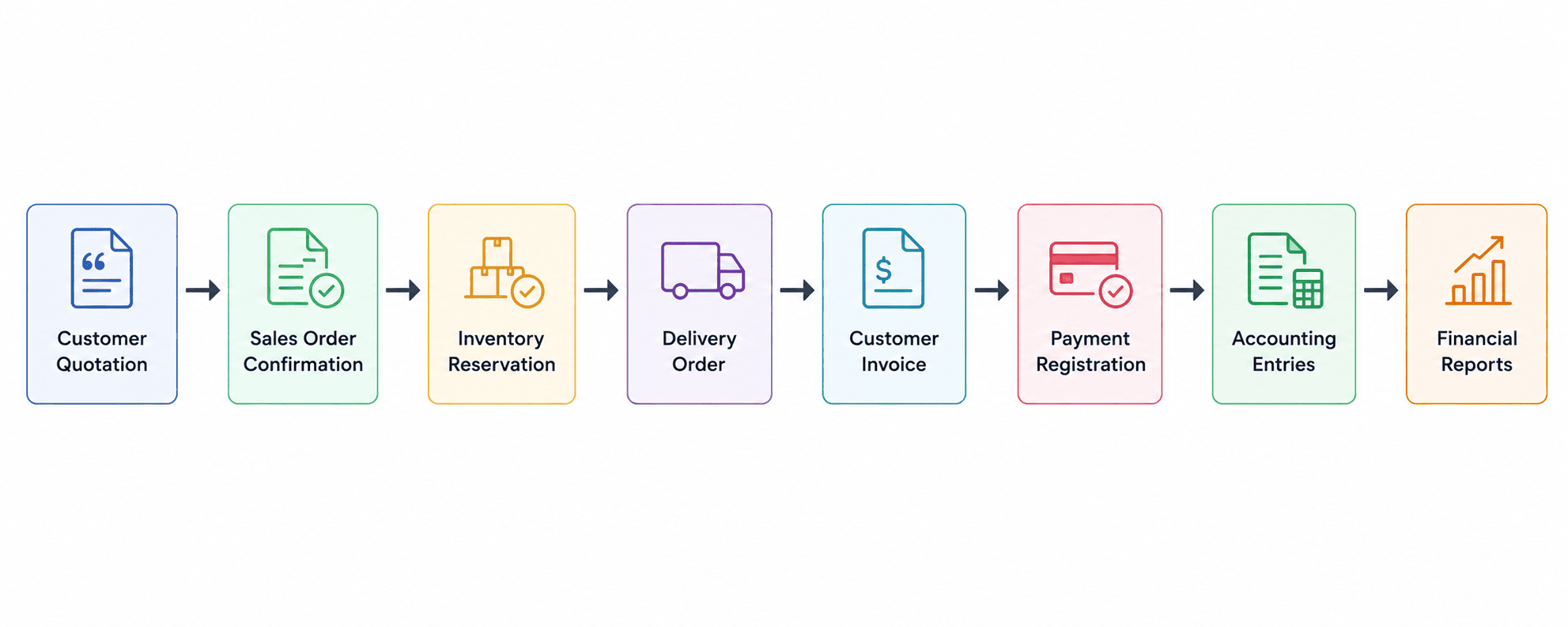
Now, imagine that there is a need to introduce an extra step of custom approval before the Sale Order is confirmed. The customization will seem quite simple and will work properly during the testing phase. However, if it prevents some pieces of Odoo's built-in confirmation logic from being executed, this will manifest elsewhere. Thus, the Sale Order may appear to be confirmed, but the warehouse will not receive a delivery order. The Accounting Department may not receive an invoice, while the procurement rule may not execute properly. All these issues will most likely emerge at the stage when another department starts to process the transaction.
This is where the tests become particularly helpful. It is possible to automate the process of checking if all those scenarios continue to work after each modification by creating corresponding tests that will execute the same transactions and check the results.
Benefits of Testing in Odoo 19
There are several practical reasons to include testing in an Odoo development project:
- Find bugs earlier: We can catch problems while the module is still being developed instead of finding them after deployment to the production database.
- Protect existing features: When new functionality is added, existing tests help to check that the old functionality is still working.
- Make upgrades safer: Tests can be run after an Odoo version upgrade to find issues caused by changes in the framework or standard modules.
- Check business processes: Tests can verify more than Python code. They can also cover workflows, access rights, accounting logic, and other business rules.
- Save development time: Once a test is written, it can be run again whenever the related code changes. This is much faster than manually repeating the same steps.
- Use tests in CI/CD: Automated tests can be included in a deployment pipeline so that code is checked before it is released.
Automated testing doesn't necessarily imply automation of all possibilities. The key thing is to recognize those business processes whose failure would lead to some trouble and develop test cases for them. In the case of Odoo customization, particularly when it comes to modules that communicate with Sales, Inventory, Accounting, Purchasing, or Manufacturing, such test cases will be really helpful in the future.
Architecture of the Odoo 19 Testing Framework
In addition, it should be emphasized that the Odoo testing framework is a component of the Odoo framework itself, and therefore we have the possibility to test our modules using the same ORM and environment as in the process of application development. That is, we can create an employee record, a sales order, call any method from the model, test the results of the workflow, and so on. This makes it possible to test Odoo's own code and business logic.
The framework uses the unittest module of the Python programming language as its basis. Nevertheless, Odoo provides its own set of testing modules that are designed to perform specific operations in ERP applications. Depending on the kind of test that we need to make, we can work with the database transactions and ORM records, test HTTP controllers, test the number of SQL queries generated by some code, test JavaScript and OWL components, or run browser-based Tours.
Therefore, we can say that the Odoo testing framework deals with various aspects of the application, not just Python code.
Automated testing is not like testing within the database. If you run any Odoo test, the modifications done in the test would be managed within a test transaction. Records would be created and updated within the test process, but they would be removed after finishing the test procedure. Therefore, you may use the test repeatedly without removing the data created through the previous process.
Test Classes in Odoo 19
Odoo uses different test classes based on the type of test we need to perform. Our test class selection is primarily based on the test we want to do and the way our test would interact with the database.
TransactionCase
TransactionCase is usually selected when we test the backend logic. Every test runs on a transaction that is rolled back after finishing the test process.
It works well for testing things such as:
- ORM operations
- Model methods
- Computed fields
- Business rules
- Approval workflows
- Create, update, and delete operations
For instance, if there is a test that generates a Sales Order and approves it, then the records generated in such a test will be removed from the database once the test execution is done.
SavepointCase
This can be very helpful in cases when a lot of tests are there in the test suite and generating the same data multiple times becomes a burden on us. In such a scenario, savepoint helps us in rolling back the data changes in an individual test and thus makes our tests fast. It is helpful when all the tests in the test suite have some common setup records.
SingleTransactionCase
In SingleTransactionCase, the test methods are executed within a single transaction. It can be very helpful in those specific testing scenarios where the state created in one test needs to be accessible to the other tests. But it is not generally required in case of day-to-day module testing.
HttpCase
HttpCase should be used when the code being tested is related to the web part of Odoo. It can be used to test controllers, website pages, portal functionality, and any other case when HTTP requests are needed. Also, it is needed in case the test should reproduce user actions in the browser rather than just calling model methods in Python.
For the common custom Odoo module, TransactionCase is a good option to start with. If the test suite becomes big and the setup of the database starts to affect its execution speed, it makes sense to use SavepointCase. In case controllers, portal features, and any other web functionality are needed, HttpCase should be used.
Test Files Organization
In case the Odoo module begins to become big, usually the number of test cases increases too. Putting all test cases in one file will make the code hard to read and maintain. Thus, it is better to organize test cases in accordance with the module structure.
One of the options is to create a tests directory within the module and place the test cases there. These files can be grouped in accordance with their functionality.
For example, a module could have files such as:
custom_module/
¦
+-- models/
+-- views/
+-- security/
+-- data/
+-- tests/
¦   +-- __init__.py
¦   +-- test_sale.py
¦   +-- test_inventory.py
¦   +-- test_account.py
¦   +-- test_security.py
¦   +-- test_api.py
¦
+-- __manifest__.py
This makes it easier to find the relevant tests when working on a particular part of the module. If a change is made to the inventory functionality, for example, the developer can go directly to test_inventory.py instead of searching through one large test file. For smaller modules, one or two test files may be enough. There is no need to create a separate file for every model. The main goal is to keep the tests easy to find and maintain as the module grows.
Test Tags
Odoo allows tests to be grouped using tags.
Tags make it possible to execute only specific categories of tests.
Example:
from odoo.tests import tagged
@tagged("-at_install", "post_install")
class TestWebsite(HttpCase):
   ...
Developers can then execute:
odoo-bin --test-tags post_install
This is particularly useful for:
- Long-running integration tests
- Website tests
- Performance tests
- Customer-specific test suites
Types of Testing in Odoo 19
There are different ways to test an Odoo module, and the type of test you use depends on what you are trying to verify. A backend method, for example, does not need the same kind of test as a website controller or a complete user workflow.
Unit Testing
Unit tests are useful when you want to check a small piece of code, such as a method or a particular business rule. The test focuses on the expected result of that piece of code without going through an entire Odoo workflow.
Functional Testing
Functional testing looks at the system from the user's point of view. Instead of checking just one method, you test a business operation from start to finish.
For example, you could create a quotation, confirm it, check the resulting delivery order, and then verify the invoice.
Transaction Testing
Tests based on transactions are often employed for backend Odoo development. Using the TransactionCase, you will be able to create records and perform business logic within the test transaction.
This approach is helpful for testing ORM operations, workflow, computed fields, and other backend stuff without leaving your test data in the database.
Integration Testing
There are many Odoo features that require more than one module. Integration tests can be helpful for verifying such dependencies.
For example, there could be interaction between the Sales Order, Inventory, and Accounting modules. The Purchase Order might create inventory moves and accounting transactions. You may want to test these interactions via an integration test.
HTTP Testing
But if there are controllers and a portal in your module, you may have to test the HTTP layer too. HTTP tests will be able to send a request to your controllers and check what response Odoo gives.
This can be useful for API, websites, and portals.
JavaScript Testing
Not all of Odoo works on the server side. There are JavaScript and OWL components in the web client that have to be tested too.
You can use JavaScript tests for frontend functionality, custom OWL components, views, and Point of Sale, for example.
Tour Testing
Sometimes the most obvious way of testing some feature is doing exactly the same thing that a regular user would do.
Odoo Tours enable you to automate browser actions such as opening menu items, filling in forms, clicking buttons, and checking the results.
Performance Testing
Performance tests are useful when a feature involves a large amount of data or a lot of database operations. They can help identify slow methods, unnecessary ORM calls, and excessive SQL queries.
For example, a method that works fine with 100 records may become very slow when it is executed for 100,000 records.
Security Testing
Security should also be part of testing, especially for modules that contain employee, financial, or other restricted information.
Tests can check access rights, record rules, and different user permissions. A feature may work correctly for an administrator but fail for a normal user, so testing with the appropriate user groups is important.
Writing tests is only part of the job. The tests also need to be kept simple and useful as the module changes.
Here are some practices that work well when developing Odoo modules:
- Add tests when developing a new feature instead of waiting until the end of the project.
- Keep a test focused on one particular behavior whenever possible.
- Give test methods names that make it clear what they are checking.
- Create common test records in setup methods when the same data is required by several tests.
- Check both the normal case and situations where the operation should fail.
- For important workflows, check the related Inventory, Accounting, or other module changes as well.
- Make sure one test does not depend on another test having run first.
- Avoid unnecessary records and operations that make the test suite slow.
- Run the tests regularly while developing instead of running everything only before deployment.
- Update the tests when the business logic changes.
Good tests can also make the code easier for another developer to understand. By looking at the tests, they can see what the module is expected to do and what happens when something goes wrong.
There are a few mistakes that can make an Odoo test suite less useful than it should be.
Depending Only on Manual Testing
Manual testing is still useful, especially for checking the user interface. But repeating the same checks manually after every code change takes time and makes it easy to miss something.
Depending on Test Order
A test should normally work on its own. If test_b only works because test_a created some records first, the test suite can become difficult to maintain.
Hardcoding Database IDs
Avoid writing tests that depend on IDs such as:
record_id = 25
Database IDs can be different between databases. It is better to create the record during the test or use an XML ID where appropriate.
Testing Only the Successful Case
A feature may work correctly when everything goes as expected but fail when the user enters invalid data or does not have permission.
For example, if a user is not allowed to approve a request, the test should verify that Odoo actually blocks the operation.
Ignoring Related Modules
When testing an Odoo workflow, don't stop at the record being created. Check what the operation is supposed to do afterwards.
For example, after confirming a Sales Order, you may also need to check the delivery order, stock reservation, invoice, or accounting entries depending on the configuration.
Creating Too Much Test Data
Tests that create hundreds or thousands of unnecessary records can slow down the whole test suite. Only create the data that is actually required for the scenario.
Not Running Tests Regularly
A test that is never run is not very useful. Running the relevant tests while developing makes it much easier to find which change introduced a problem.
Testing is an important part of Odoo development, particularly when a customization is connected to several business processes. A change that looks small in one module can sometimes affect another part of the system. Odoo 19 provides different testing options for these situations. Developers can test backend methods and ORM operations, check interactions between modules, test controllers and APIs, verify frontend code, and reproduce complete user actions through browser tours.
The goal is not to write a test for every single line of code. Instead, focus on the parts of the module where a failure would cause a real business problem. Sales, Inventory, Accounting, Purchase, Manufacturing, payroll, security, and important custom workflows are good examples. Having tests around these areas makes future development easier. When a developer changes existing code or upgrades the Odoo version, the tests provide a quick way to check whether the important functionality is still working. For custom Odoo projects, automated testing is therefore less about having a large number of tests and more about having the right tests for the important business processes.
To read more about How to Write a Test Case in Odoo 18 ERP, refer to our blog, How to Write a Test Case in Odoo 18 ERP.