Large Language Models (LLMs) are used in many places to automate processes, to be more productive, and to process Natural Language. However, large language models still have some limitations in generating responses or generating correct responses; here we have a solution to rectify these problems.
Retrieval-Augmented Generation (RAG) has emerged as one of the best approaches for developing AI assistants that can provide accurate, contextualized, and up-to-date responses. Unlike traditional language models that are confined to their training data, RAG systems merge the generative capabilities of large language models with real-time information retrieval from external knowledge bases.
Let's get into the steps of building a chatbot using RAG in Python.
These are the required packages for the chatbot.
langchain
langchain-openai
langchain-core
langchain-community
langchain-text-splitters
python-dotenv
faiss-cpu
sentence-transformers
pypdf
Here we are creating a simple chatbot that can process a PDF file with the company policies and Let’s see how the chatbot is generating responses for our questions.
import os
import warnings
The os module is used to work with the operating system. In this program, it checks if the PDF file exists and sets environment variables. The warnings module hides unnecessary warning messages, making the terminal output clean and easier to read.
warnings.filterwarnings("ignore")
os.environ["TOKENIZERS_PARALLELISM"] = "false"
warnings.filterwarnings("ignore") helped us ignore warning messages to keep the terminal cleaner... os.environ["TOKENIZERS_PARALLELISM"] = "false" prevents other tokenizations done by the Hugging Face tokenizer that results in more warning messages.
from dotenv import load_dotenv
from langchain_openai import ChatOpenAI
from langchain_core.messages import HumanMessage, SystemMessage
from langchain_community.document_loaders import PyPDFLoader
from langchain_community.vectorstores import FAISS
from langchain_community.embeddings import HuggingFaceEmbeddings
from langchain_text_splitters import RecursiveCharacterTextSplitter
This section includes the importation of libraries used for building the chatbot. load_dotenv() allows loading of the OpenAI API key stored in the .env file. ChatOpenAI is responsible for communicating with the language model while HumanMessage and SystemMessage describe the dialog process. PyPDFLoader extracts text from the PDF file, RecursiveCharacterTextSplitter splits it into smaller pieces, HuggingFaceEmbeddings creates vector representations of the documents, and FAISS stores them.
load_dotenv()
The load_dotenv() function loads all environment variables from the .env file in the project Directory. Hence, we do not need to hard code the API key in the code.
pdf_path = "documents/company_policy.pdf"
Set the path for the PDF: In this step, we are loading a PDF containing some generic company policies. If the path is found, then the chatbot retrieves RAG. If the path is None, then the chatbot does not retrieve any document and works like a conversational AI.
llm = ChatOpenAI(model="gpt-4o-mini", temperature=0.7)
retriever = None
It creates an instance of the Open AI language model using GPT-4o Mini. The temperature attribute is set to 0.7 for providing a correct answer. The retriever attribute is assigned None since it stores the FAISS vector DB after loading the PDF.
if pdf_path and os.path.exists(pdf_path):
    loader = PyPDFLoader(pdf_path)
    documents = loader.load()
    splitter = RecursiveCharacterTextSplitter(
        chunk_size=800,
        chunk_overlap=150
    )
    chunks = splitter.split_documents(documents)
    embedding = HuggingFaceEmbeddings(
        model_name="sentence-transformers/all-MiniLM-L6-v2"
    )
    retriever = FAISS.from_documents(chunks, embedding)
else:
    print("File not found! Starting in normal chat mode.")
This block loads the specified document, verifies whether it is a valid PDF, splits its content into smaller overlapping chunks, converts them into embeddings, stores them in a FAISS vector database for efficient retrieval, and enables RAG-based question answering.
def get_chat_response(user_input: str) -> str:
    """Generate a response using RAG when a document is available."""
    messages = [
        SystemMessage(
            content="You are a helpful and friendly AI assistant."
        )
    ]
    if retriever is None:
        messages.append(HumanMessage(content=user_input))
        return llm.invoke(messages).content
    # Retrieve relevant document sections
    retrieved_docs = retriever.similarity_search(user_input, k=4)
    document_context = "\n\n".join(
        doc.page_content for doc in retrieved_docs
    )
    prompt = f"""
Answer the user's question using the context below.
If the answer is not available in the context, say you don't know.
Keep the response brief.
Context:
{document_context}
Question:
{user_input}
"""
    messages.append(HumanMessage(content=prompt))
    return llm.invoke(messages).content
This block takes in the queries of the users and provides an answer from the language model. The block starts off by creating a system message for the behavior of the AI assistant. If there is any retriever available, the function will then do retrieval-augmented generation (RAG) by fetching the top four relevant document chunks from the vector database. These chunks are formed into the context which is added to the query of the user and sent as a prompt to the language model. In case there is no retriever available, then the function sends just the user’s query to the language model.
from flask import Flask, request, jsonify, render_template
from flask_cors import CORS
from bot import get_chat_response
app = Flask(__name__)
CORS(app)

@app.route('/')
def home():
    return render_template('index.html')

@app.route('/chat', methods=['POST'])
def chat():
    message = request.json.get('message', '').strip()
    if not message:
        return jsonify({"response": "Please enter a message."}), 400
    try:
        return jsonify({"response": get_chat_response(message)})
    except Exception as error:
        return jsonify({"error": str(error)}), 500

if __name__ == '__main__':
    app.run(debug=True, port=5000)
Developed web-based user interface for the chatbot using Flask framework. This app renders the user interface of the chatbot on the HTML page, receives messages from users with the help of POST requests, processes the messages with the help of the chatbot and returns the responses in JSON format. CORS configuration and basic validation of input messages were also added for smooth communication between frontend and backend.
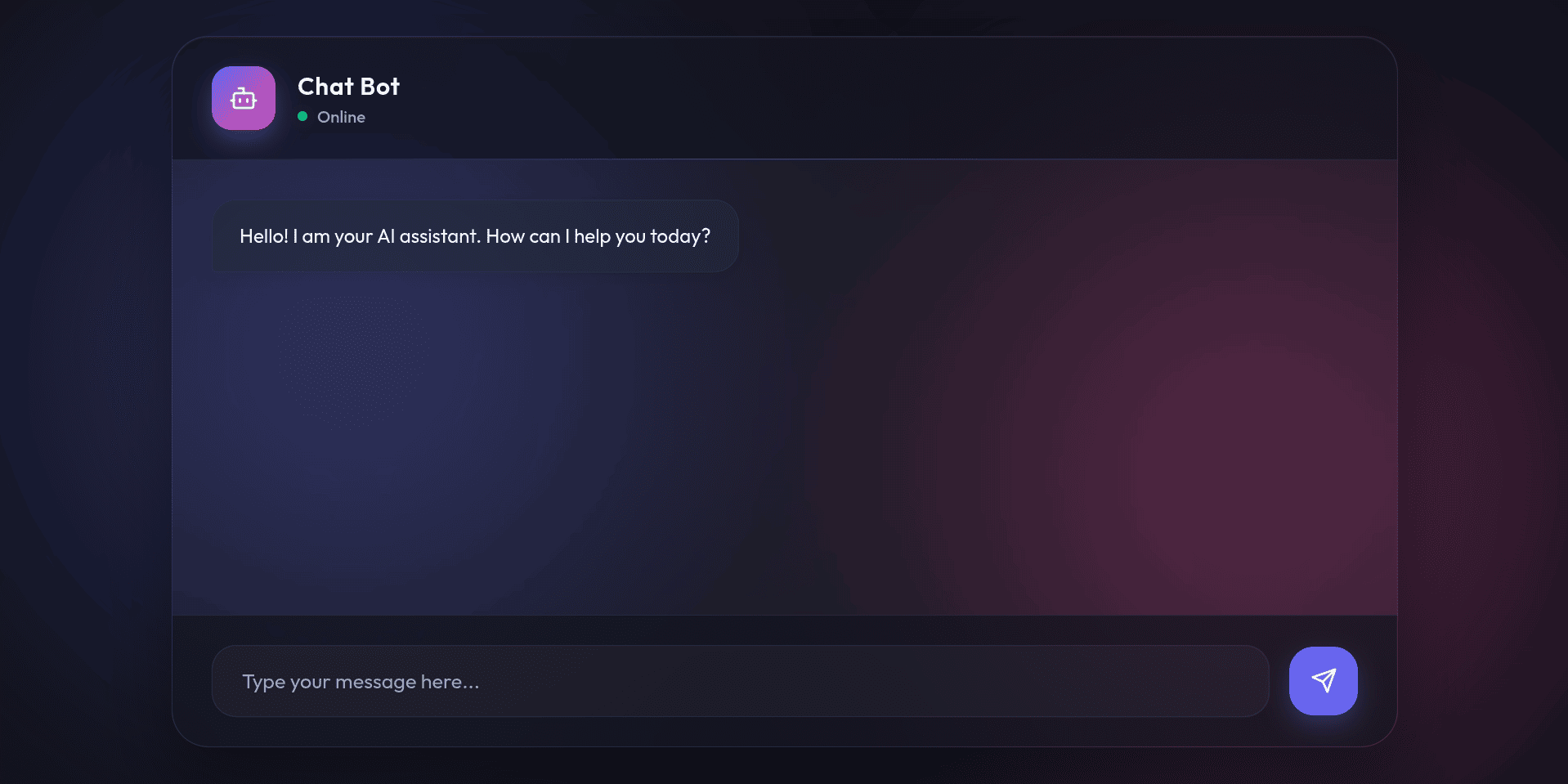
This is a sample user interface added for the chatbot.
I have asked a question like this:
“What kind of appearance does the company expect from its employees?”
And the Response was like this:
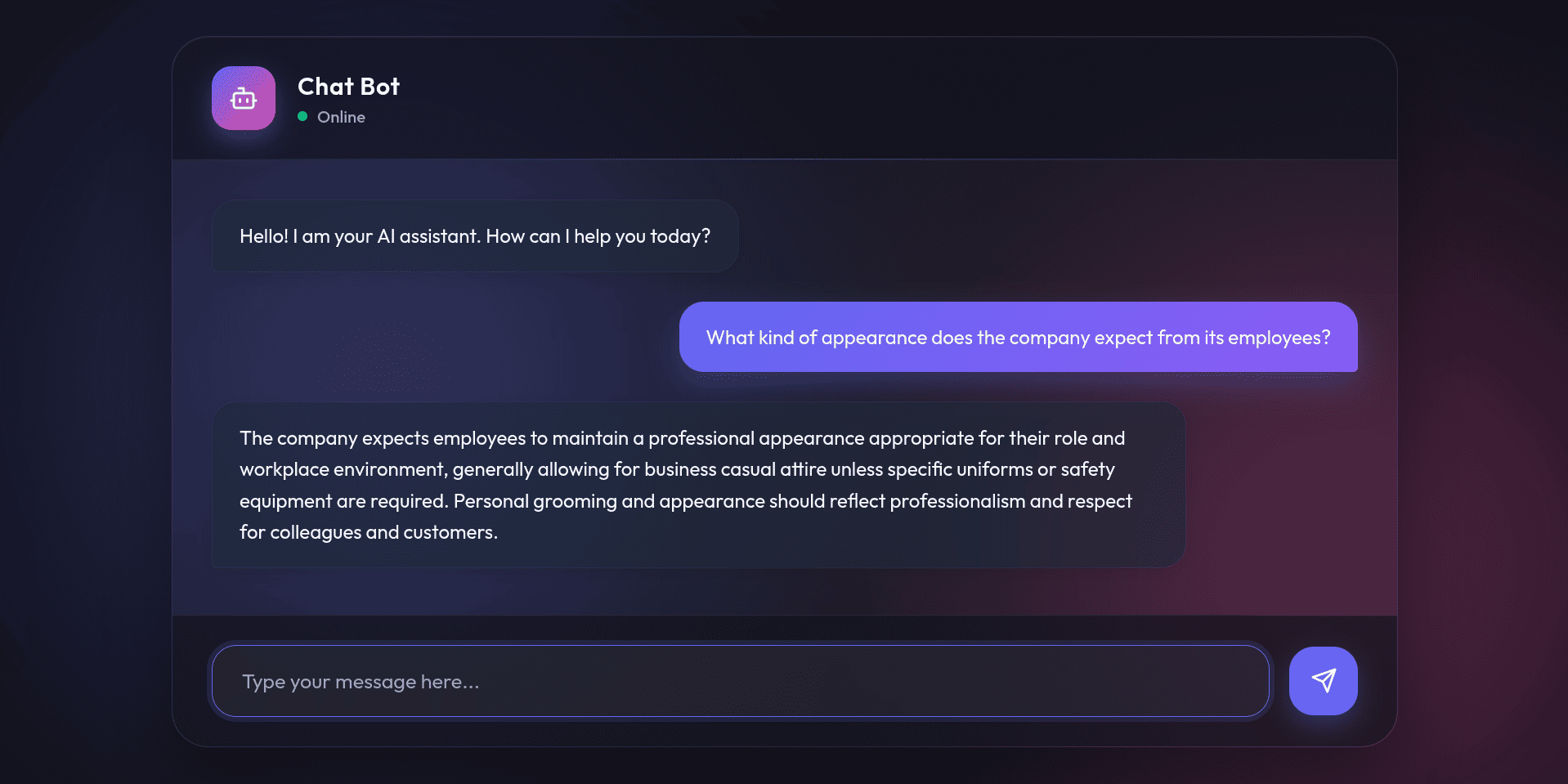
Like this, we can ask anything mentioned in the loaded document; the chatbot will generate the response correctly.
As can be seen, Retrieval Augmented Generation (RAG) is a highly useful AI technology that can enhance the capabilities of LLMs by generating appropriate responses and providing better language generation to improve interaction with the user. Being in the era of technology, every industry requires AI solutions such as RAG for accurate information without investing much.
To read more about Overview of LangChain, refer to our blog Overview of LangChain.