Pricing decisions play a vital role in shaping a company’s sales performance and overall profitability. Among these decisions, discounts stand out as a powerful tool to attract customers, encourage faster conversions, and build long-term business relationships. However, when discounts are applied without proper visibility into costs and margins, they can quickly erode profits. This is where Odoo 19 Sales becomes especially valuable, as it allows businesses to apply discounts systematically while clearly analyzing their impact on margins.
Odoo 19 Sales provides multiple discount mechanisms to suit different pricing strategies and business requirements. The Line Discount allows users to apply a percentage discount directly to individual product lines, making it ideal for item-specific promotions or negotiated pricing. The Global Discount applies a uniform discount across the entire quotation or sales order, which is useful for seasonal offers or bulk customer incentives. Additionally, the Fixed Amount Discount enables users to deduct a specific monetary value from the total order, offering greater control when percentage-based discounts are not suitable. Together, these discount types give businesses the flexibility to design tailored pricing strategies while maintaining transparency.
Beyond applying discounts, Odoo 19 also emphasizes the importance of margin analysis. Each discount directly affects the sales margin, and Odoo allows users to monitor this impact in real time before confirming a quotation. This ensures that sales teams remain aware of profitability while negotiating with customers. In this blog, we will explore how to apply different types of discounts in Odoo 19 Sales and analyze their effect on margins, helping businesses make informed decisions that support both sales growth and financial stability.
Before applying any type of discount in sales orders, the Discounts feature must be enabled from the Sales module settings in Odoo 19. To do this, navigate to Sales > Configuration > Settings, locate the Discounts option, and enable it.
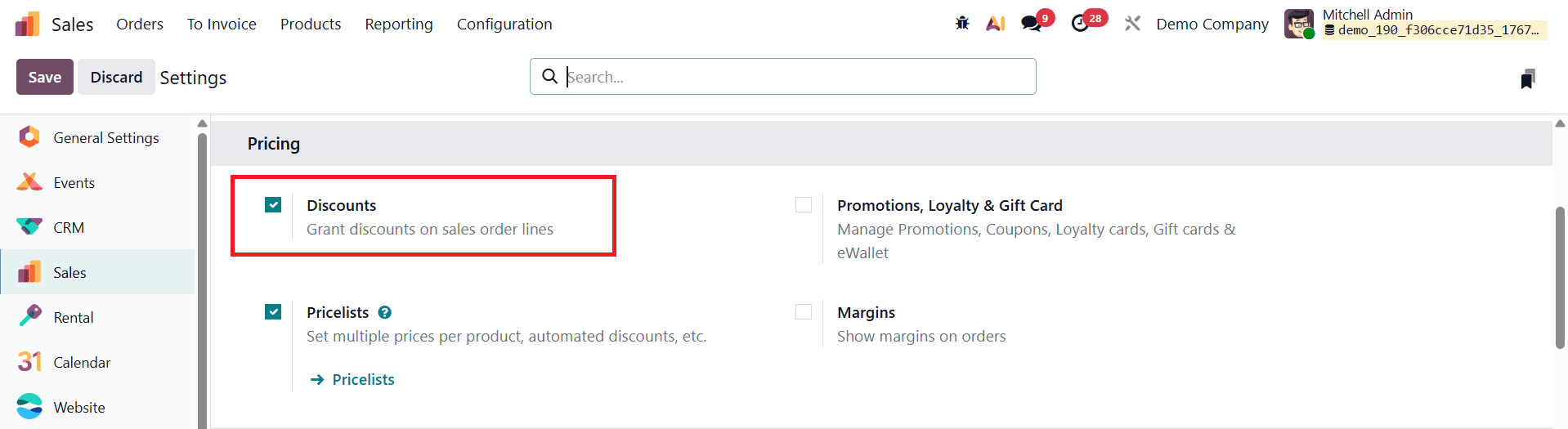
Once the setting is activated and saved, Odoo 19 makes discount-related options available within the sales workflow.
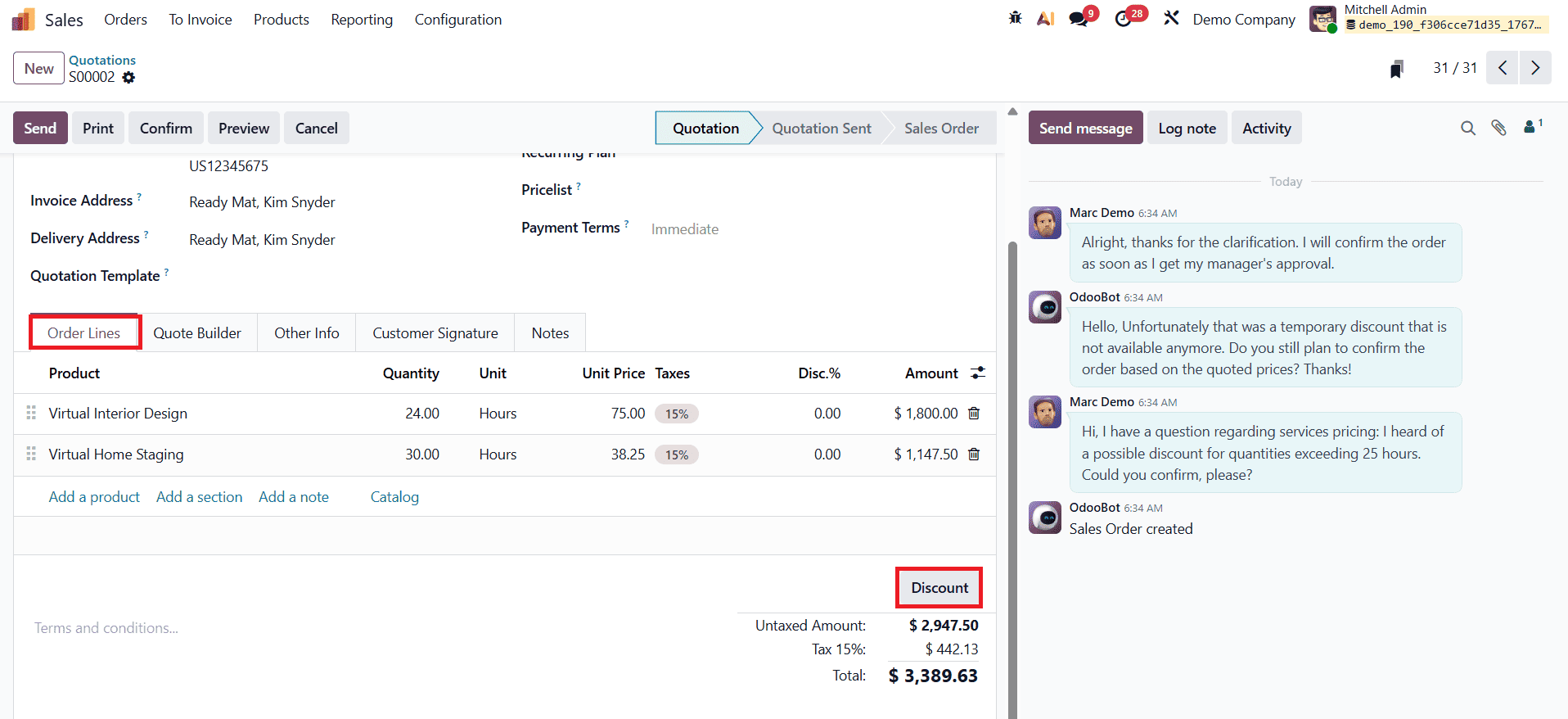
After enabling discounts, a Discount button becomes visible in the sales order form. To apply discounts, users can create a new sales order by selecting a customer and adding the required products to the order lines. Based on the configured discount options, discounts can then be applied directly to individual product lines or to the overall order.
Line Discount
In Odoo 19 Sales, line discounts allow users to apply percentage-based discounts to individual product lines within a sales order. This option is especially useful when different products in the same order require different discount rates, enabling flexible and precise pricing strategies without affecting the overall order value. Line discounts are commonly used in negotiated sales, product-specific promotions, or customer-specific pricing scenarios.
To apply a line discount in Odoo 19, users can click the Discount button available in the sales order form after enabling discounts in the Sales settings.
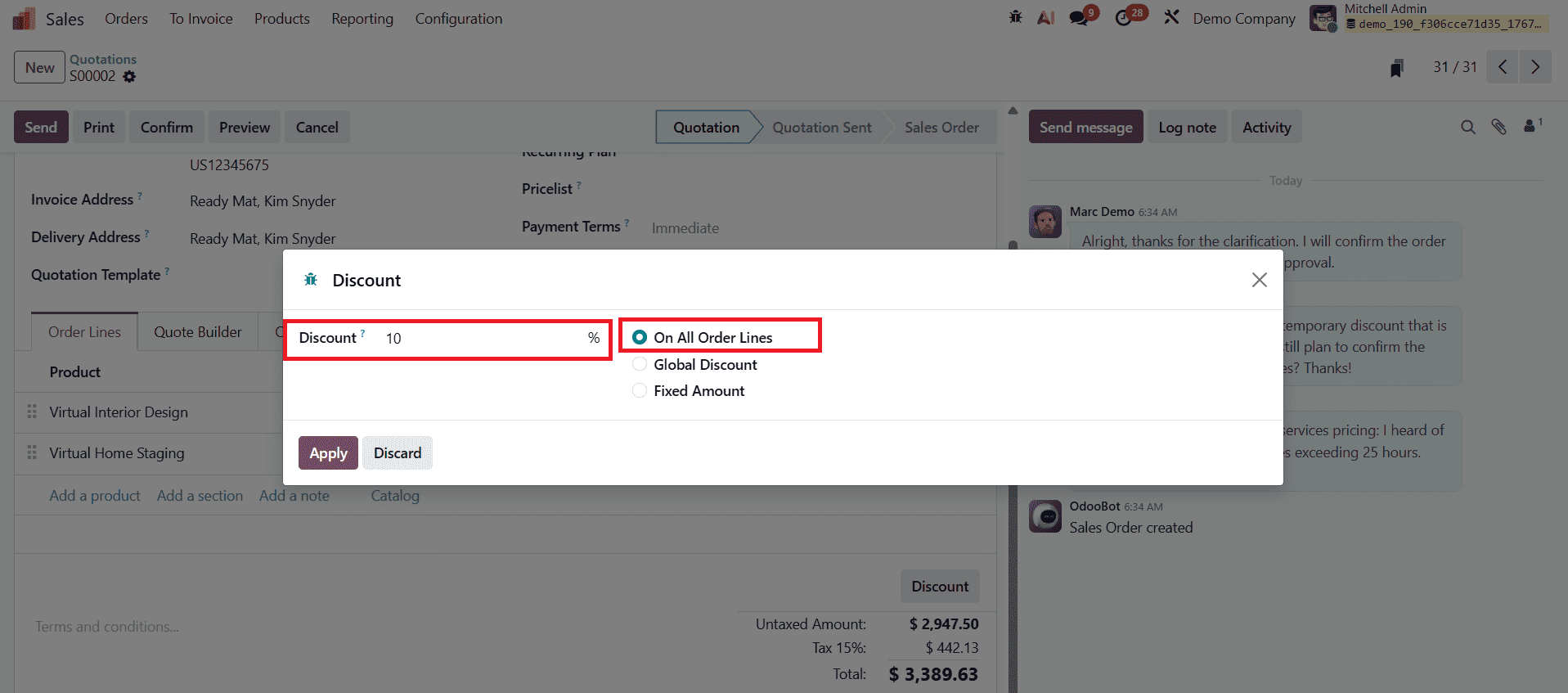
In the discount wizard, select the discount type as Apply on All Order Lines and enter the required discount percentage in the designated field. Once the Apply button is clicked, the specified percentage discount is automatically applied to each product line in the sales order, and the discounted values are reflected immediately.
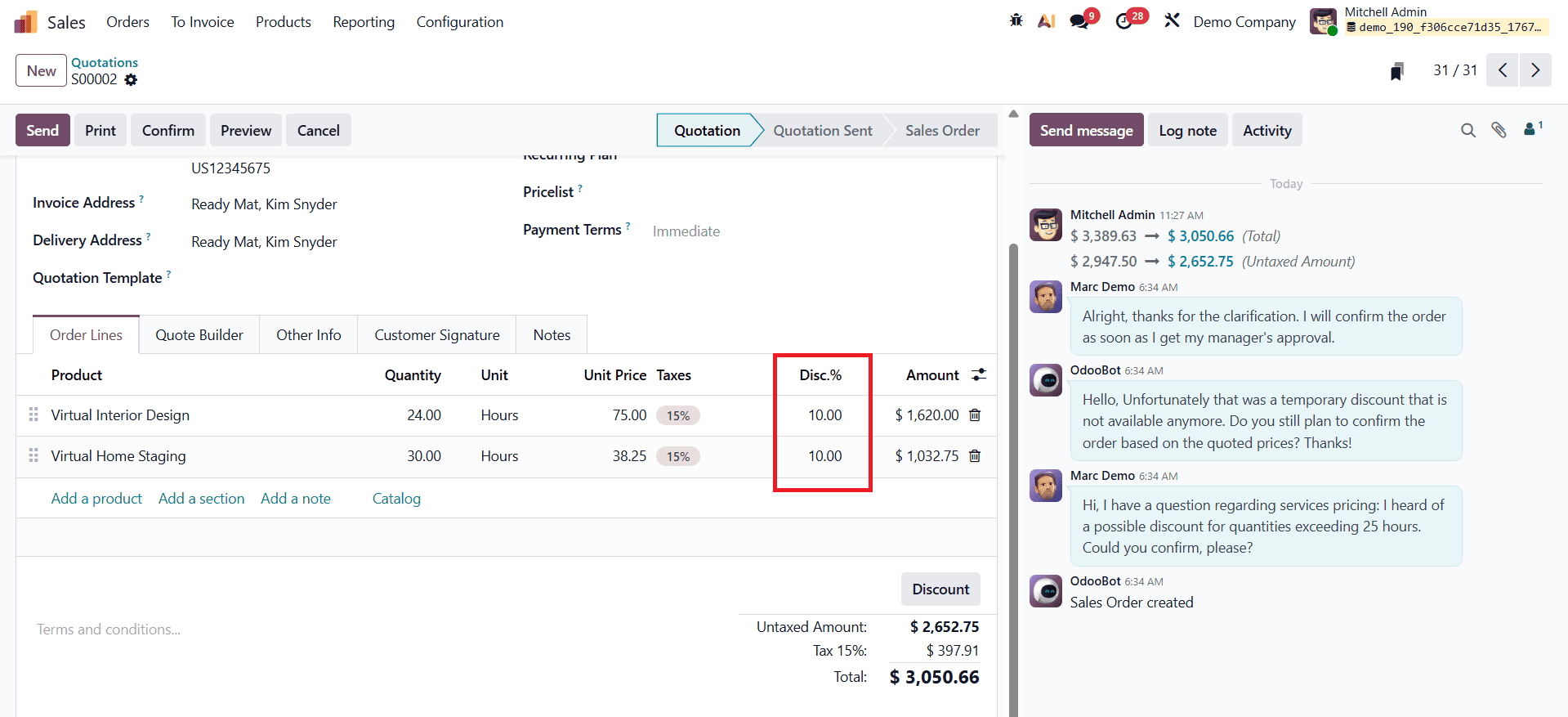
After applying the line discount, users can proceed to confirm the sales order and continue with the standard workflow, including delivery processing and invoice generation.
Global Discount
In Odoo 19 Sales, a global discount allows users to apply a single percentage-based discount to the entire sales order, instead of adjusting individual product lines. This approach is particularly effective for order-wide promotions, seasonal offers, or bulk purchase incentives where a uniform discount needs to be extended across all items in the order.
To apply a global discount, click the Discount button available on the sales order form.
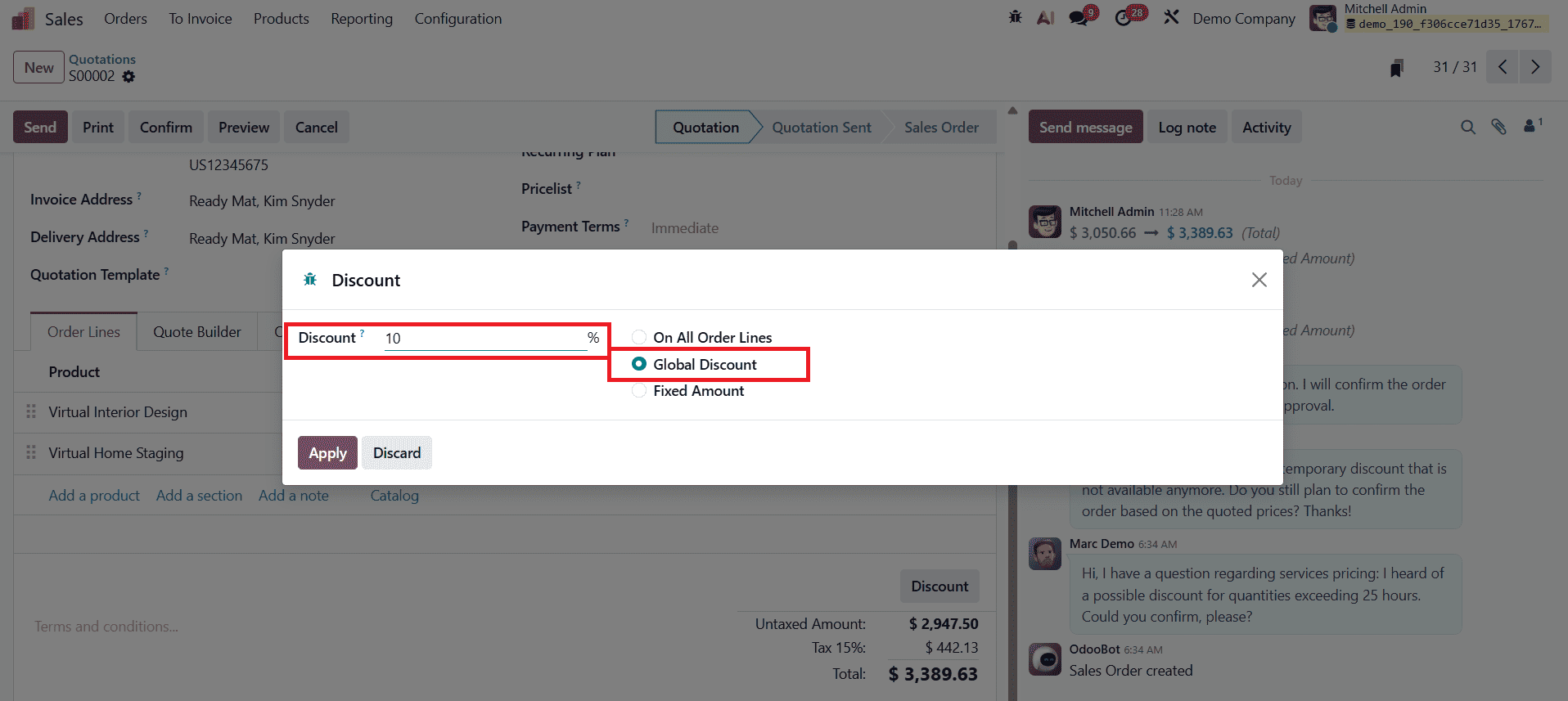
In the discount wizard, select the discount type as Global Discount and enter the required discount percentage in the corresponding field. Once the details are provided, click the Apply button to activate the discount.
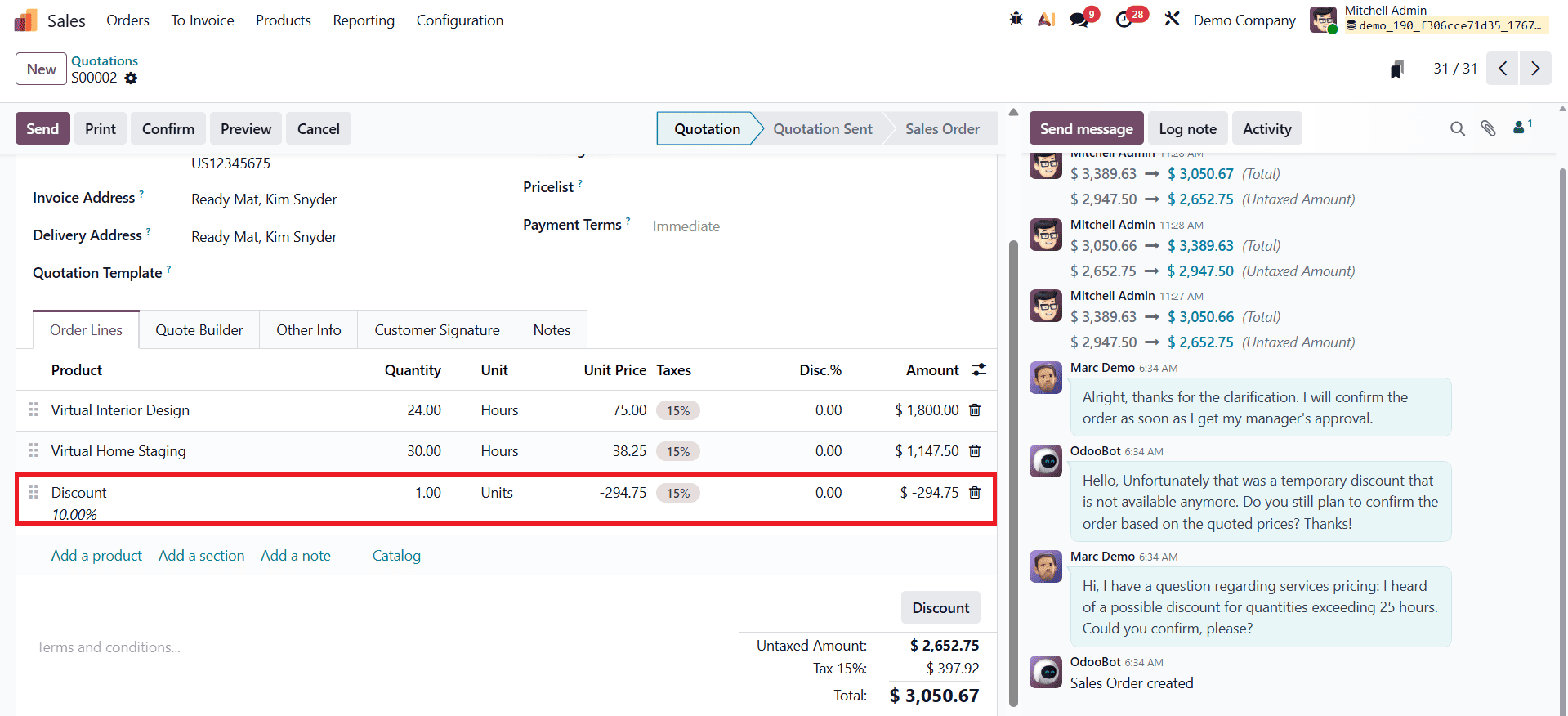
After applying the global discount, Odoo 19 automatically recalculates the order totals, reflecting the discounted amount across the entire sales order.
Fixed Amount Discount
In Odoo 19 Sales, the Fixed Amount Discount enables users to deduct a specific monetary value directly from the total sales order amount. Unlike percentage-based discounts, this method offers clear and predictable savings, making it easy for both businesses and customers to understand the exact benefit being provided. Fixed amount discounts are particularly useful for special concessions, goodwill adjustments, or flat promotional offers.
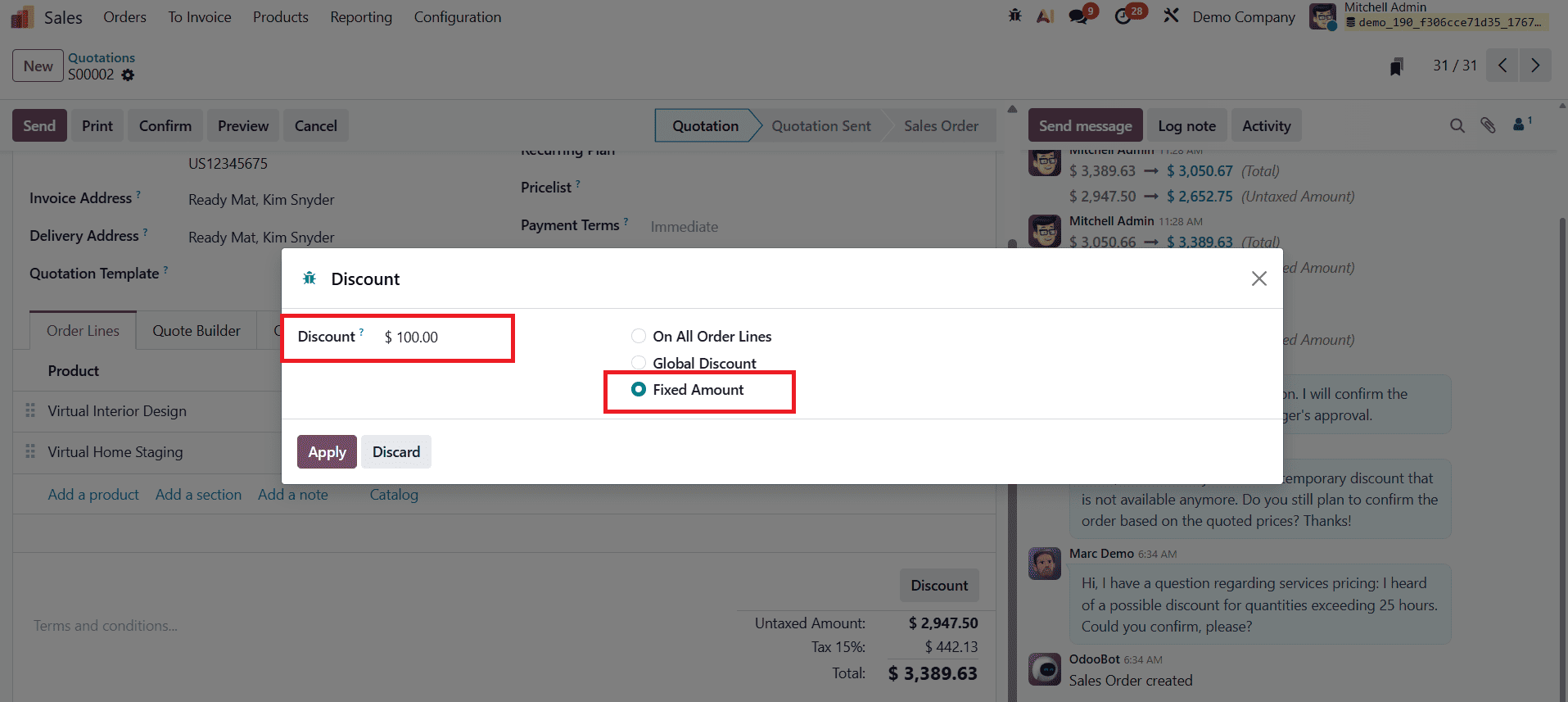
To apply a fixed amount discount, click the Discount button in the sales order form. In the discount wizard, select Fixed Amount as the discount type and enter the amount to be deducted from the total order value. Once the Apply button is clicked, Odoo 19 immediately subtracts the specified amount from the sales order total.
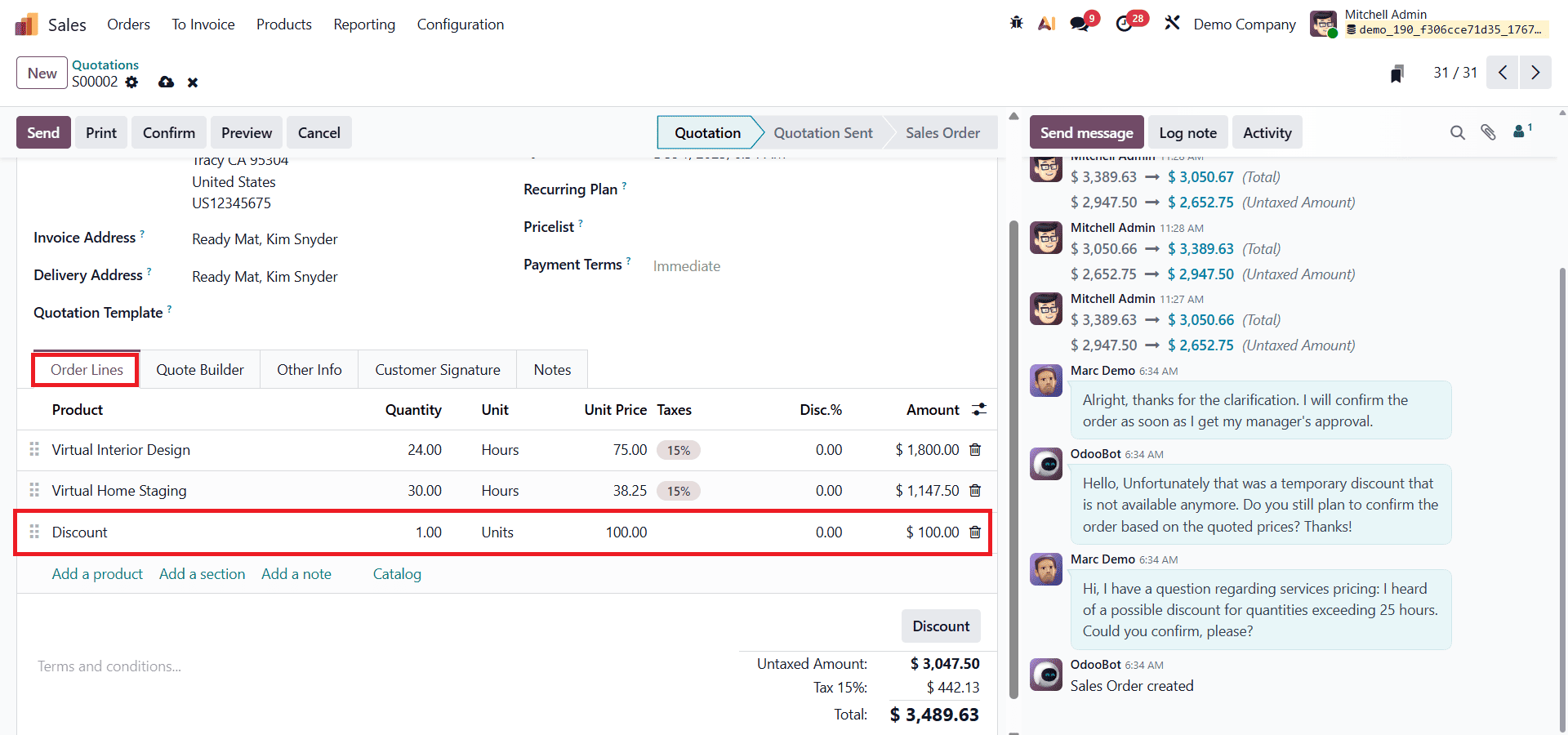
After the fixed amount discount is applied, the updated order value is reflected automatically, allowing users to proceed with order confirmation, delivery, and invoicing while maintaining full transparency over pricing and margin calculations.
Margins on Sales Orders
In Odoo 19 Sales, margin analysis helps businesses evaluate the profitability of each sales order by clearly showing the difference between the selling price and the cost of goods sold. This feature allows sales teams and managers to understand how pricing decisions and applied discounts affect overall profits, enabling more informed and strategic decision-making.
To analyze margins on sales orders, the Margins option must first be enabled from the Sales module settings. Navigate to Sales > Configuration > Settings, locate the Margins feature, and enable it. Once saved, margin-related information becomes available directly within the sales order interface.
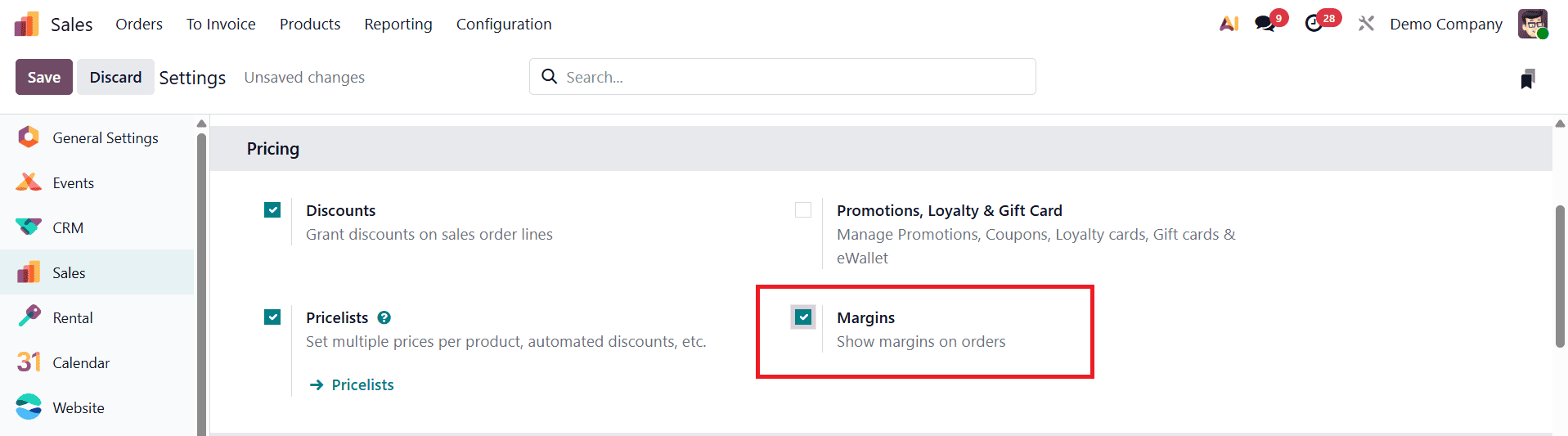
After enabling margins, Odoo 19 displays the total margin for the entire sales order within the sales order form.
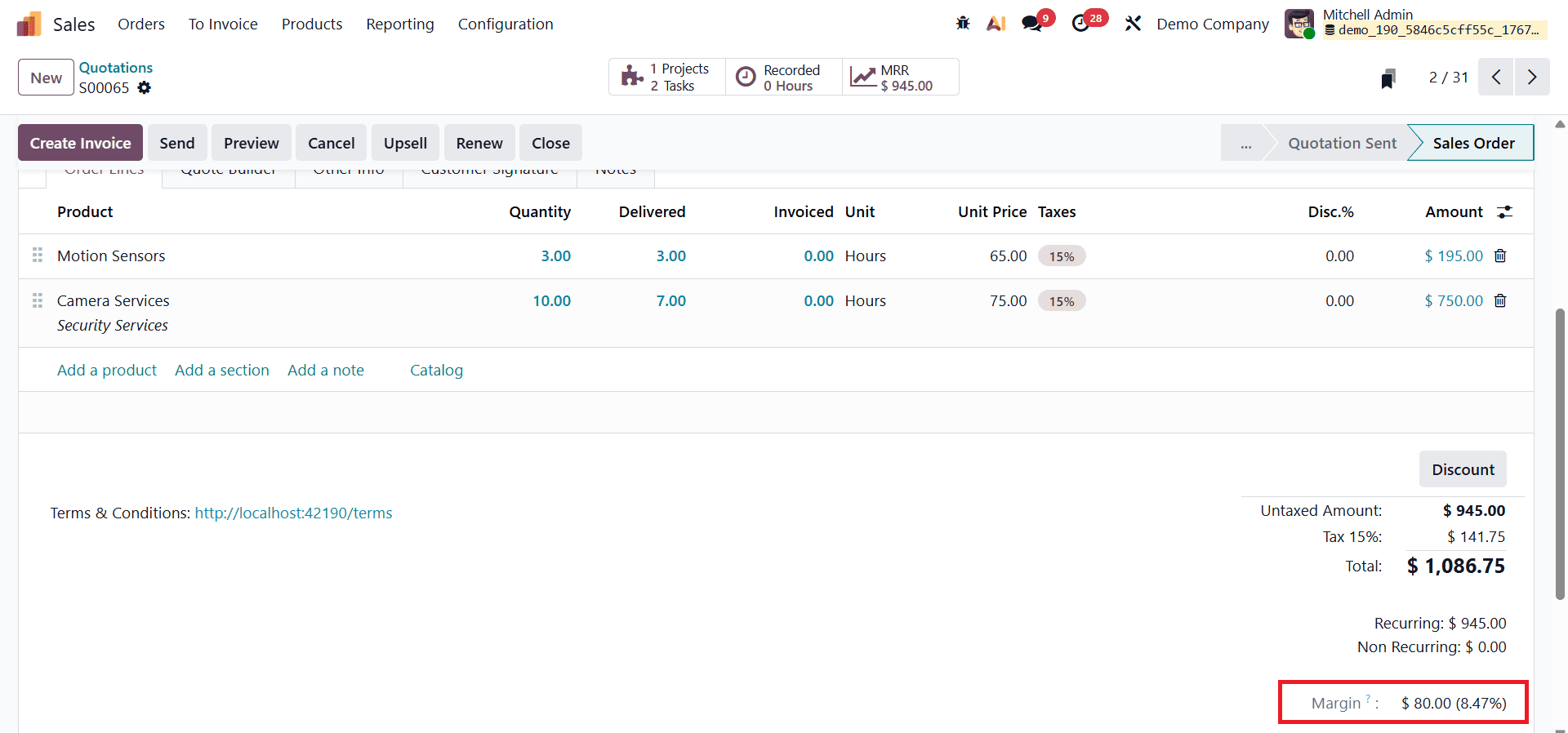
This provides an immediate overview of the order’s profitability before confirmation, helping users assess whether the deal aligns with business profit goals. In addition to the overall margin, Odoo 19 also shows line-level margin details for each product in the order lines.
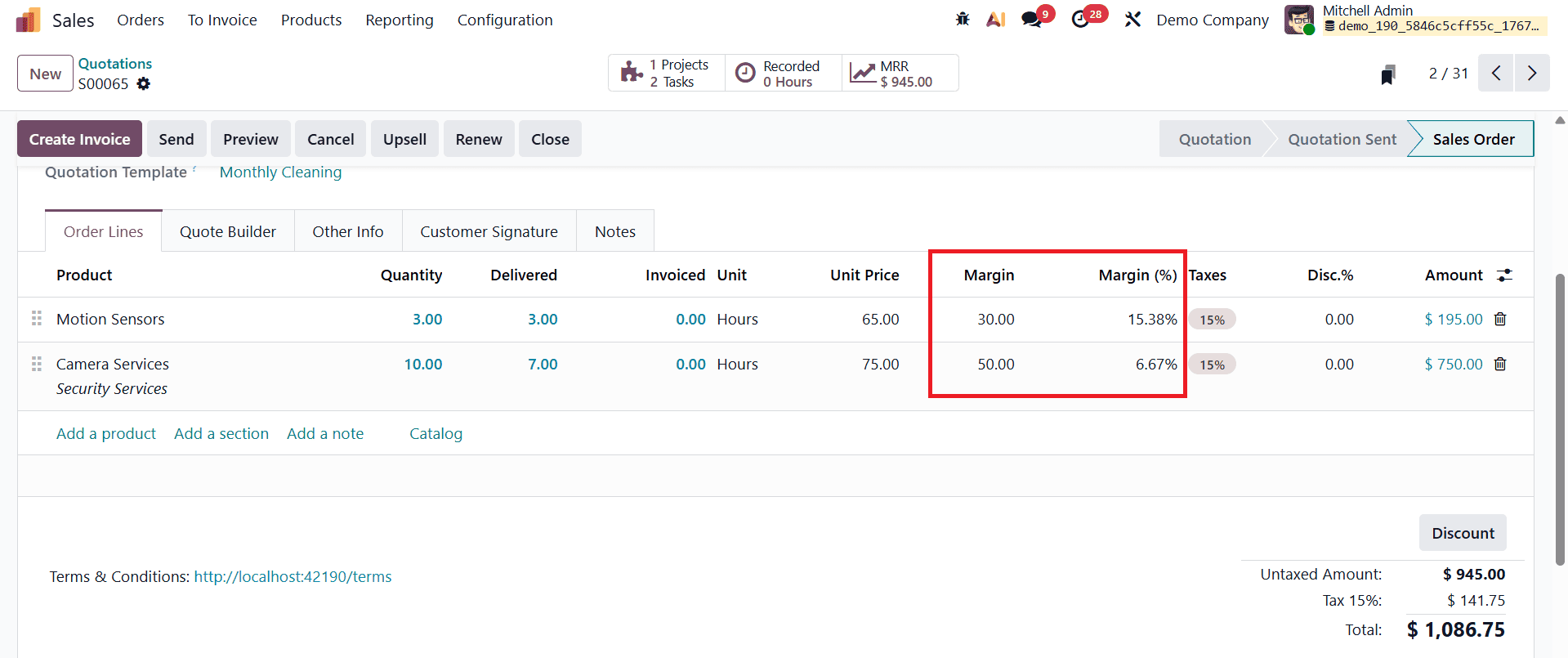
These margins are calculated based on the difference between the sales price and the product’s cost price, and they are displayed both as a monetary value and as a percentage. With this detailed margin visibility, users can easily analyze how individual products, discounts, and pricing adjustments impact profitability.
Applying discounts effectively while maintaining healthy profit margins is a critical balance for any business. With Odoo 19 Sales, this balance becomes easier to achieve through a well-structured discount system and built-in margin analysis tools. The availability of multiple discount types, Line Discount, Global Discount, and Fixed Amount Discount, allows businesses to adopt flexible pricing strategies that cater to different sales scenarios without compromising transparency or control.
At the same time, Odoo 19’s margin analysis feature ensures that the financial impact of these discounts is always visible. By displaying both order-level and line-level margins, businesses can assess profitability in real time, make informed pricing decisions, and avoid unintentional losses during negotiations or promotions. This integrated approach empowers sales teams to offer competitive discounts confidently while staying aligned with organizational profit objectives.
Odoo 19 Sales not only simplifies the process of applying discounts but also strengthens financial awareness across the sales workflow. By leveraging these features effectively, businesses can enhance customer satisfaction, close deals more efficiently, and sustain long-term profitability through data-driven sales management.
To read more about How to Apply Discounts & Margin Analysis in Odoo 18 Sales, refer to our blog How to Apply Discounts & Margin Analysis in Odoo 18 Sales