The Odoo Top Nav Bar has been known to club menus like Configuration and Reporting, among others, into a single dropdown list. This can pose some challenges when there are too many sub-menu options available in an app, such as Accounting or Inventory.
This module takes over the rendering of the dropdown of the web-ui default NavBar component. As a result, it will impact all the apps that club Configuration and Reporting menus in the navigation bar. In doing so, it changes the scrollable list into a conventional mega dropdown menu, which is divided into two columns on either side.
Step 1: Set up the module skeleton
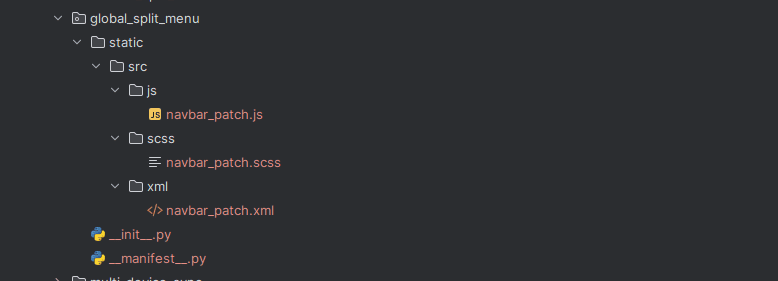
Step 2: Module manifest
# -*- coding: utf-8 -*-
{
   'name': 'Global Split Menu',
   'version': '19.0.1.0.0',
   'category': 'Tools',
   'summary': 'Renders every app grouped Configuration menu as a two-column split dropdown',
   'description': """ """,
   'author': 'Your Company',
   'depends': ['web'],
   'assets': {
       'web.assets_backend': [
           'global_split_menu/static/src/js/navbar_patch.js',
           'global_split_menu/static/src/xml/navbar_patch.xml',
           'global_split_menu/static/src/scss/navbar_patch.scss',
       ],
   },
   'installable': True,
   'application': False,
   'license': 'LGPL-3',
}
Patching the NavBar (navbar_patch.js)
/** @odoo-module **/
import { patch } from "@web/core/utils/patch";
import { NavBar } from "@web/webclient/navbar/navbar";
import { useState } from "@odoo/owl";
patch(NavBar.prototype, {
   setup() {
       super.setup(...arguments);
       this.splitMenuState = useState({ activeCategoryId: {} });
   },
   getSplitCategories(section) {
       const children = section.childrenTree || section.children || [];
       const categories = [];
       let general = null;
       for (const child of children) {
           const grandChildren = child.childrenTree || child.children || [];
           if (grandChildren.length) {
               categories.push({
                   id: child.id,
                   name: child.name,
                   items: grandChildren,
               });
           } else {
               if (!general) {
                   general = { id: "general", name: "General", items: [] };
                   categories.unshift(general);
               }
               general.items.push(child);
           }
       }
       return categories;
   },
   getActiveCategoryId(section) {
       const categories = this.getSplitCategories(section);
       return (
           this.splitMenuState.activeCategoryId[section.id] ||
           (categories[0] && categories[0].id)
       );
   },
   setActiveCategory(sectionId, categoryId) {
       this.splitMenuState.activeCategoryId[sectionId] = categoryId;
   },
   getSplitItems(section) {
       const categories = this.getSplitCategories(section);
       const activeId = this.getActiveCategoryId(section);
       const cat = categories.find((c) => c.id === activeId);
       return cat ? cat.items : [];
   },
      isSplittableSection(section) {
       return this.getSplitCategories(section).some((c) => c.id !== "general");
   },
   onSplitItemSelected(menu) {
       this.onNavBarDropdownItemSelection(menu);
   },
});
The navbar_patch.xml template
<?xml version="1.0" encoding="UTF-8"?>
<templates xml:space="preserve">
   <t t-name="global_split_menu.MenuContent">
       <t t-if="isSplittableSection(section)">
           <div class="o_split_menu_wrapper d-flex">
               <div class="o_split_menu_categories">
                   <t t-foreach="getSplitCategories(section)" t-as="cat" t-key="cat.id">
                       <div class="o_split_menu_category"
                            t-att-class="{ active: getActiveCategoryId(section) === cat.id }"
                            t-on-mouseenter="() => this.setActiveCategory(section.id, cat.id)"
                            t-on-click="() => this.setActiveCategory(section.id, cat.id)">
                           <span t-esc="cat.name"/>
                           <i t-if="cat.id !== 'general'" class="fa fa-chevron-right"/>
                       </div>
                   </t>
               </div>
               <div class="o_split_menu_items">
                   <t t-call="web.NavBar.SectionsMenu.Dropdown.MenuSlot">
                       <t t-set="items" t-value="getSplitItems(section)" />
                       <t t-set="decalage" t-value="20" />
                   </t>
               </div>
           </div>
       </t>
       <t t-else="">
           <!-- Fallback: original rendering, unchanged -->
           <t t-call="web.NavBar.SectionsMenu.Dropdown.MenuSlot">
               <t t-set="items" t-value="section.childrenTree" />
               <t t-set="decalage" t-value="20" />
           </t>
       </t>
   </t>
   <t t-inherit="web.NavBar.SectionsMenu" t-inherit-mode="extension">
       <xpath expr="//t[@t-call='web.NavBar.SectionsMenu.Dropdown.MenuSlot']" position="replace">
           <t t-call="global_split_menu.MenuContent" />
       </xpath>
   </t>
   <t t-inherit="web.NavBar.SectionsMenu.MoreDropdown" t-inherit-mode="extension">
       <xpath expr="//t[@t-call='web.NavBar.SectionsMenu.Dropdown.MenuSlot']" position="replace">
           <t t-call="global_split_menu.MenuContent" />
       </xpath>
   </t>
</templates>
The navbar_patch.scss style
.o_split_menu_wrapper {
   min-width: 380px;
}
.o_split_menu_categories {
   width: 170px;
   border-right: 1px solid #eee;
   padding: 4px 0;
   .o_split_menu_category {
       padding: 8px 14px;
       font-size: 13px;
       display: flex;
       justify-content: space-between;
       align-items: center;
       cursor: pointer;
       color: #333;
       .fa-chevron-right {
           font-size: 10px;
           color: #999;
       }
       &.active,
       &:hover {
           background: #f4f4f4;
       }
   }
}
.o_split_menu_items {
   min-width: 200px;
   padding: 4px 0;
}
First, you need to install the module. Then, you can open any app that has a grouped configuration menu. This menu should have sub-groupings. For example, the configuration menu for the module should have these sub-groupings. You can look for the module configuration in any app that has a grouped configuration menu with sub-groupings.
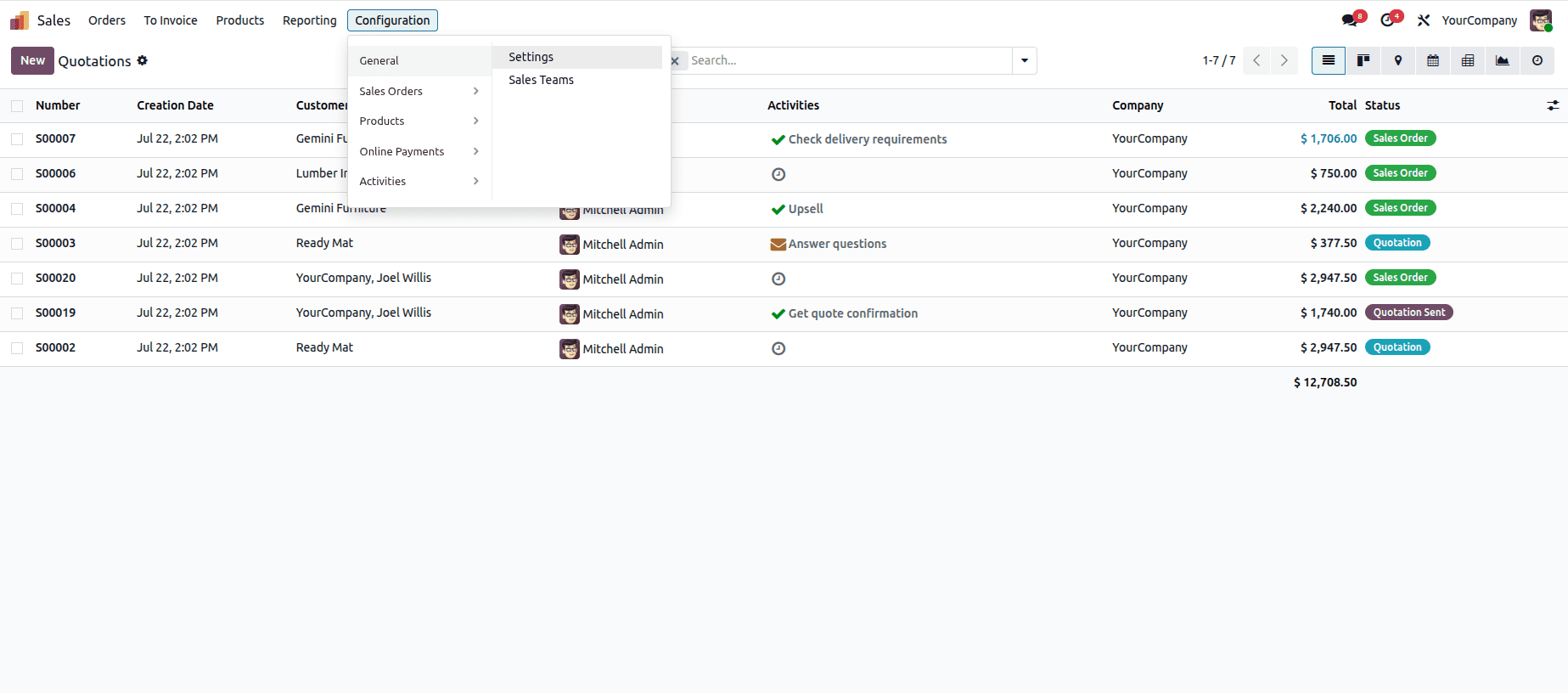
In the screenshot below, I will install the module, open the Sales app, and click the configuration menu. Here, you can see that the menus are split horizontally.
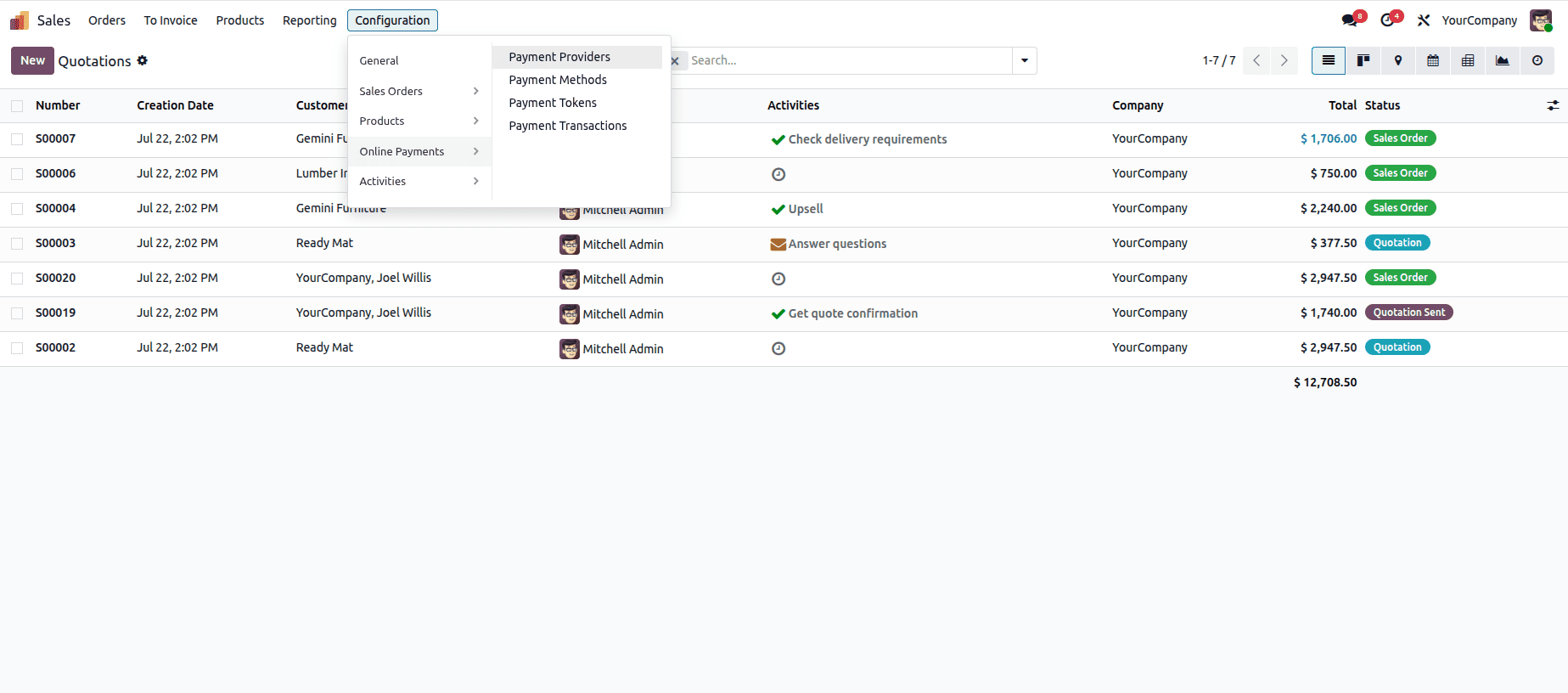
Hovering over the menus under the arrows will show the menus under the submenu.
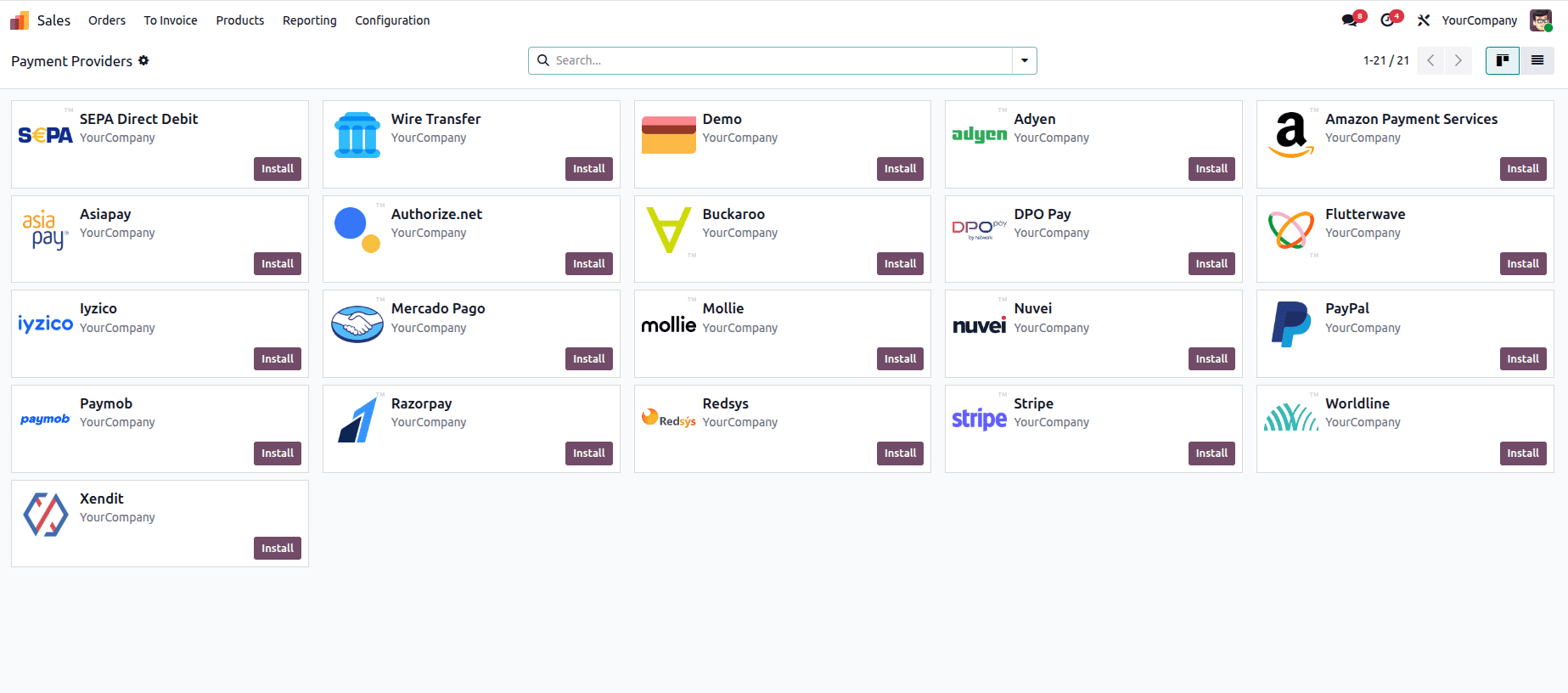
Clicking the submenus will redirect to that menu view.
While none of the category grouping, per-section active states, or split templates are particularly groundbreaking by themselves, together they allow for a truly powerful enhancement of the shared NavBar: automatically adjusting to the active level of the current app’s Configuration menu with no changes required in each app. And that’s where the real brilliance lies - it patches the prototype of the NavBar itself / MenuSlot, which means that all the dropdowns using it in the core will get this behaviour, right after the module is installed. The pattern of implementing grouping on the read, failing gracefully if it’s not needed, and delegating the actual rendering to Odoo’s templates is also a good one to use elsewhere when a global change to one UI element is needed in a way that would be too intrusive to implement in every place it appears.
To read more about Overview of Advanced OWL Components In Odoo 19, refer to our blog Overview of Advanced OWL Components In Odoo 19.