In the business world, earning a profit is essential for success, and one of the most important factors behind this is the concept of sales margin. Regardless of company size or industry, every successful business depends on this key financial measure to operate efficiently and stay competitive. Sales margin, also known as profit margin, shows how much profit a company makes from each sale and directly impacts its financial stability. It considers various costs such as production expenses, pricing strategies, employee wages, and marketing efforts, ultimately reflecting overall profitability and helping guide informed decisions about pricing and product offerings.
Odoo 19 and Sales Margin Management
The sales margin formula is simple yet critical, as it is calculated by subtracting the total cost of producing or delivering a product or service from its selling price.
In today’s fast-paced business environment, calculating this accurately and on time is essential to support growth and avoid pricing errors or losses. With the increasing use of digital tools, ERP systems have become vital for businesses, and Odoo 19 stands out as a powerful solution for sales margin management by simplifying margin calculations, supporting financial stability, and enabling more strategic sales decisions.
Also, the Sales managers play a crucial role in this process as a clear understanding of sales margins allows them to set accurate prices, offer appropriate discounts and promotions, and ultimately improve customer satisfaction and long-term loyalty.
Enabling the Margins Feature
For businesses that sell multiple products or services across different locations, managing margins can be challenging. Costs such as transportation can greatly affect final profits. Odoo ERP helps handle these challenges by offering a centralized system to manage margins and control profitability.
To use this feature, it is necessary to activate the Margins option. This can be done by going to the Settings menu in the Odoo 19 Sales module. Under the Pricing section, enable the Margin option and save the settings to apply the feature.
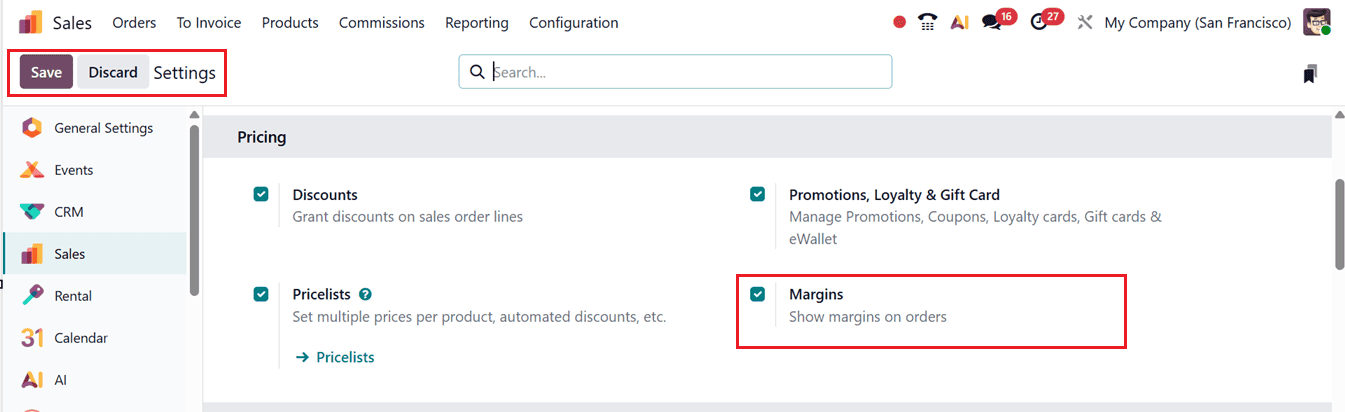
Managing sales margins starts with focusing on business growth. Margin calculation requires adding up various costs, including manufacturing, materials, advertising, and other expenses. The formula remains simple: Sales Margin = Sales Price – Cost Price. Setting accurate prices is crucial, as even small pricing errors can lead to large financial losses.
Using Odoo 19 for Practical Margin Calculation
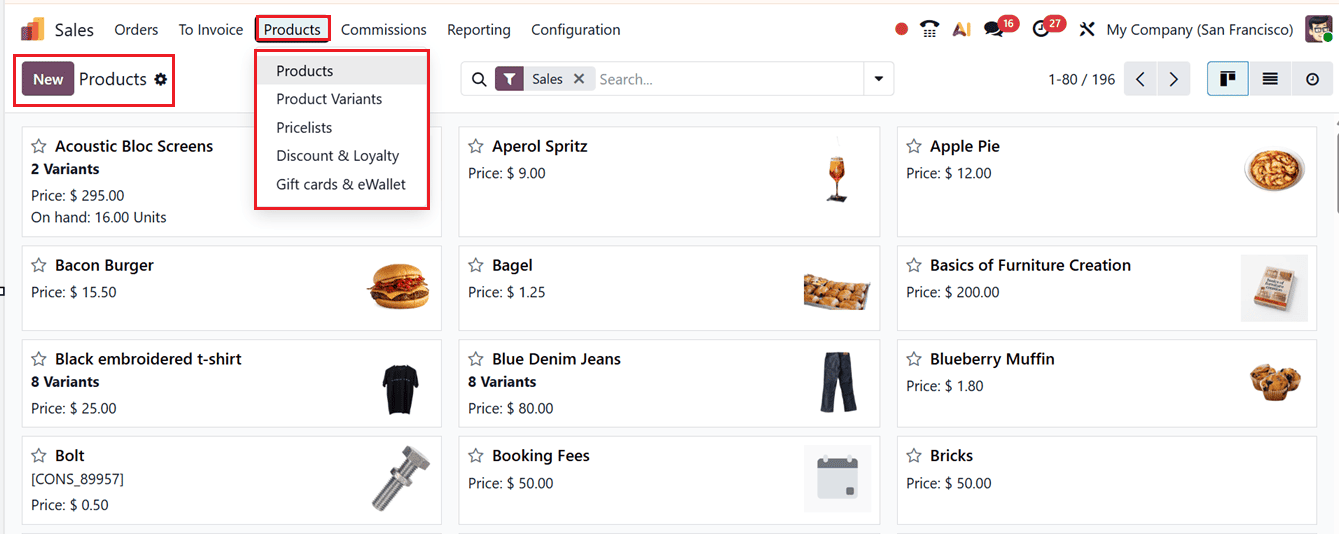
To analyze a product’s margin, check its cost and sales price by opening or creating a product from the Products menu, where you can view and update these details from the Kanban list.
Additionally, you can use the Mobo FullSuit or Mobo Sales mobile applications to manage all sales-related tasks, including margin management. You can simply manage sales and margins from your mobile device with these apps, which are available on the App Store and Play Store.
The New button in the upper right corner can be used to create a new product, or you can choose an existing one. From the product form, you can view or set the cost price and sales price.
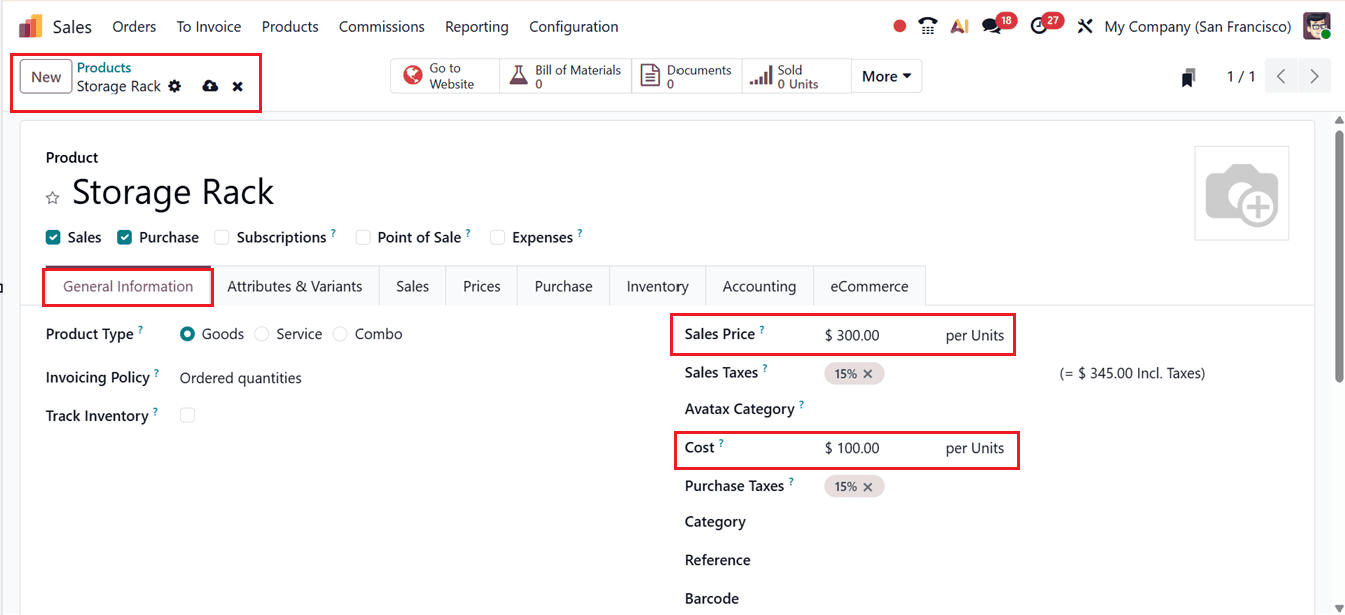
Sales margin is calculated by subtracting the total ‘Cost’ of products from their total ‘Sales Price.’
Calculating Margins from Sales Orders
In Odoo 19, margin calculation becomes even easier through sales orders. To do this, go to the Orders menu under the Orders tab.
Here, you will find a detailed list of sales orders showing important information such as order Numbers, Order Date, Customer names, Website, Salesperson and more. You can also switch the list view into the Kanban, Calendar, Pivot, Graph and Activity views, which displays sales orders in card, calendar and graphical and other formats with key details like customer name, total price, and order ID.
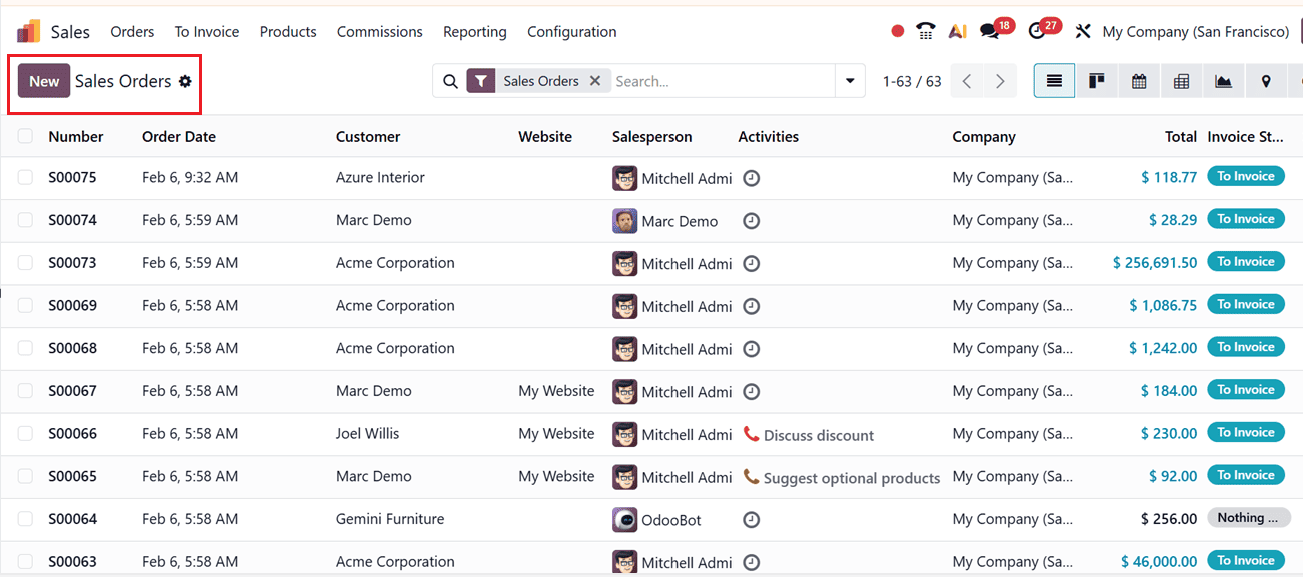
To create a new sales order, click the New button at the top left.When filling out a quotation with the required details, adding products automatically displays a Margin field at the bottom of the document, showing the order’s total margin and margin percentage in the configured currency. To view margin details for individual products, click the settings (adjust) icon in the Order Lines tab and enable the Margin and Margin (%) options, as shown in the screenshot below.
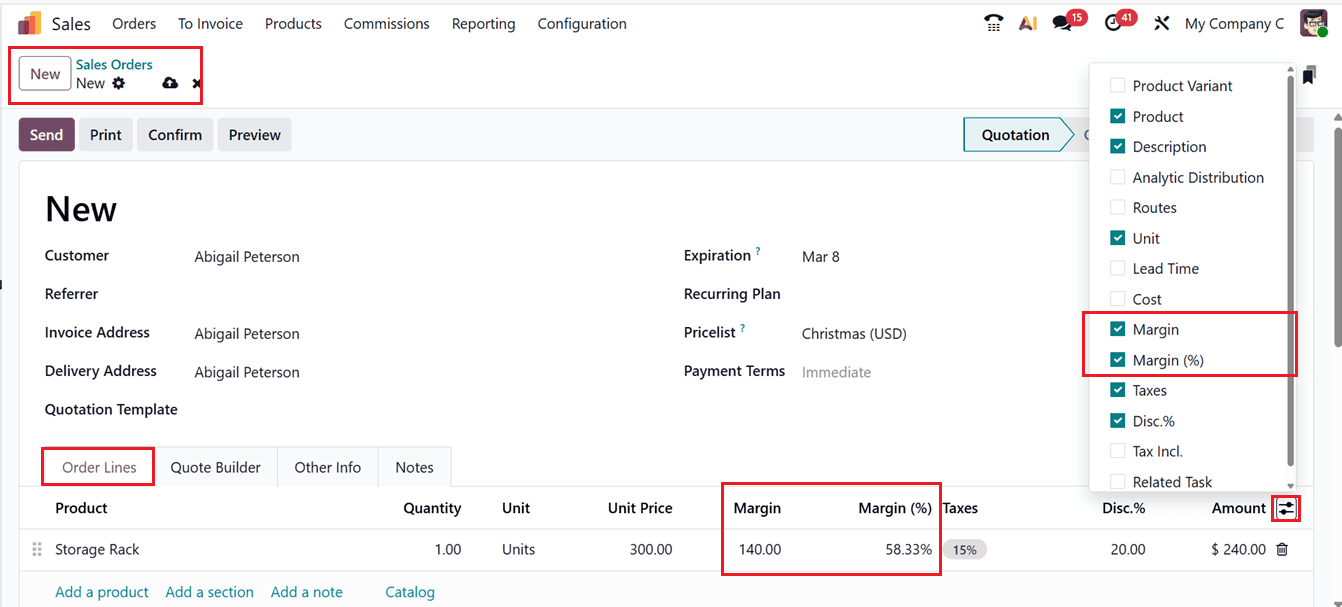
Once activated, the Margin column displays the profit earned from each sale after all related costs, while Margin (%) shows this value as a percentage, with the per-unit margin multiplied by the quantity to calculate the total line margin. Although these columns are not visible by default, enabling them makes them appear on all new and existing quotations and sales orders. The Margin and Margin (%) fields are automatically calculated and cannot be edited directly; any changes to their values require updating the underlying price or cost configuration.
Finally, you can confirm the Sales Order and move on to the next procedures as usual.
Margin Calculation with Pricelists
When a price list is applied, margin calculation adjusts accordingly. First, create a pricelist by navigating to the Pricelist option provided under the Products menu.
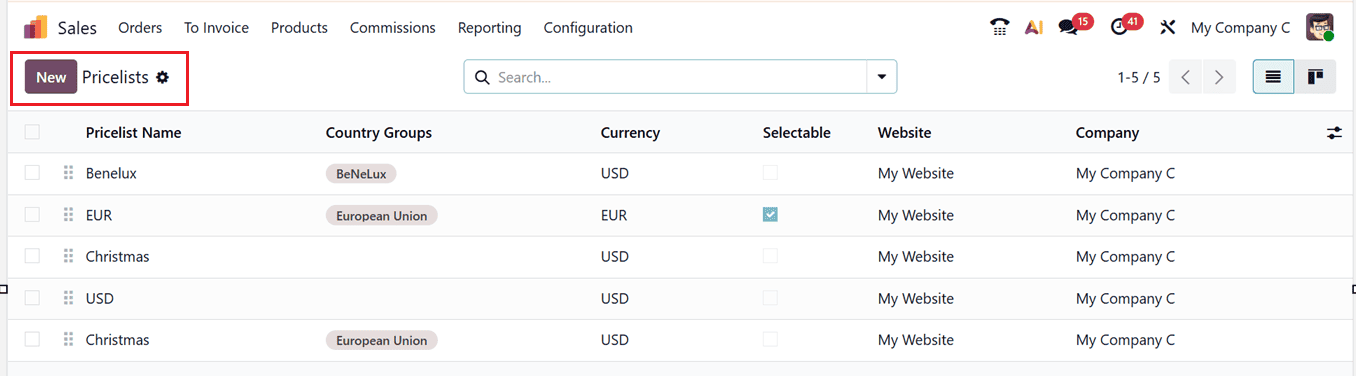
Then, click on the New button, give the pricelist a name, supporting Currency and the Country Groups that this particular currency is applicable.
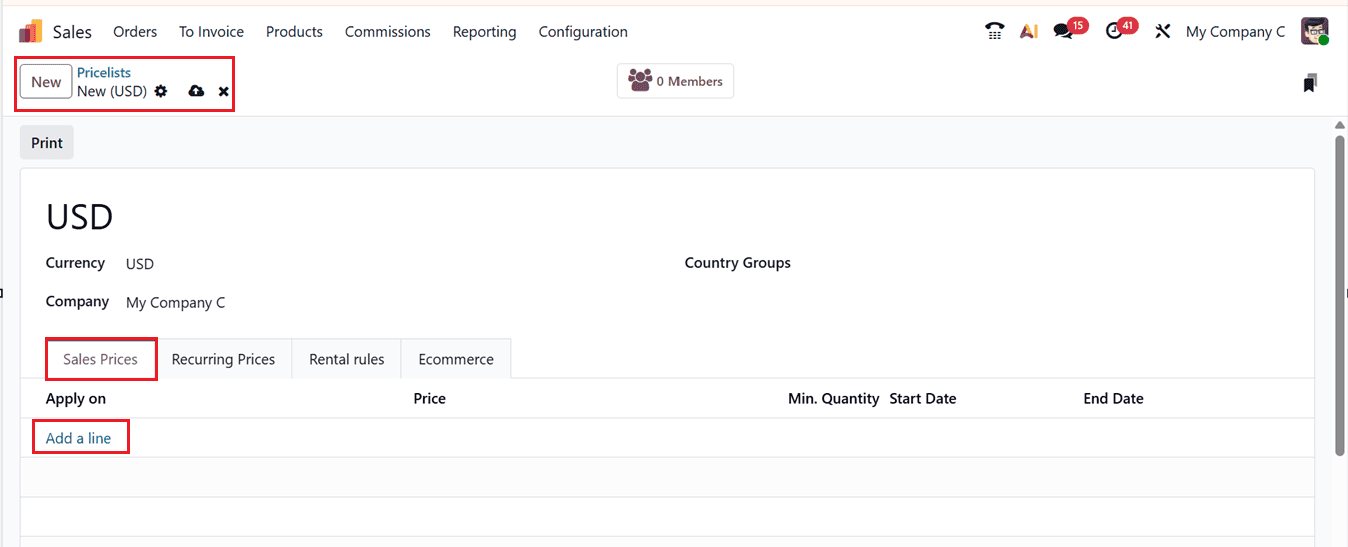
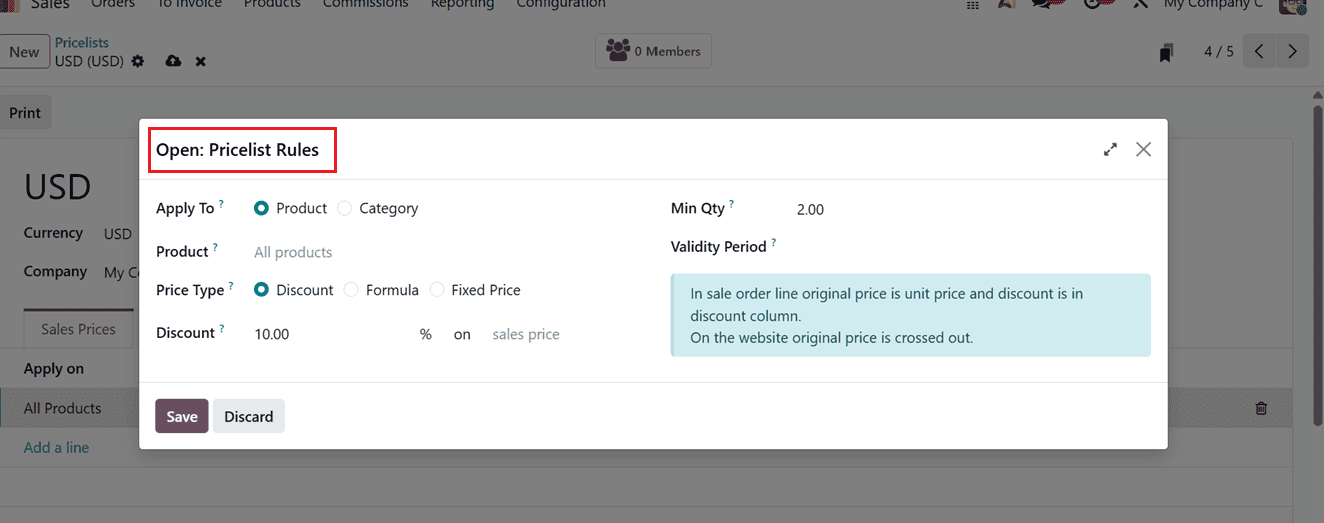
Then, create a customized sales price for this price list using the ‘Add a line’ button provided in the ‘Sales Prices’ tab. This will open a price rule creation window, where you can configure the conditions as required. For example, a pricing rule may apply only when the minimum quantity is one and offer a 10% discount based on the sales price in the Apply To, Product, Price Type, Discount, Min Qty and Validity Period fields, as shown in the screenshot below.
For a detailed workflow of configuring the pricelist rules, watch this Video:
Return to the sales order after saving the price list, choose the newly made price list in the "Pricelist" box, change the product quantity to "1" to comply with the rule, and then click the Update Prices button, as seen in the screenshot below.
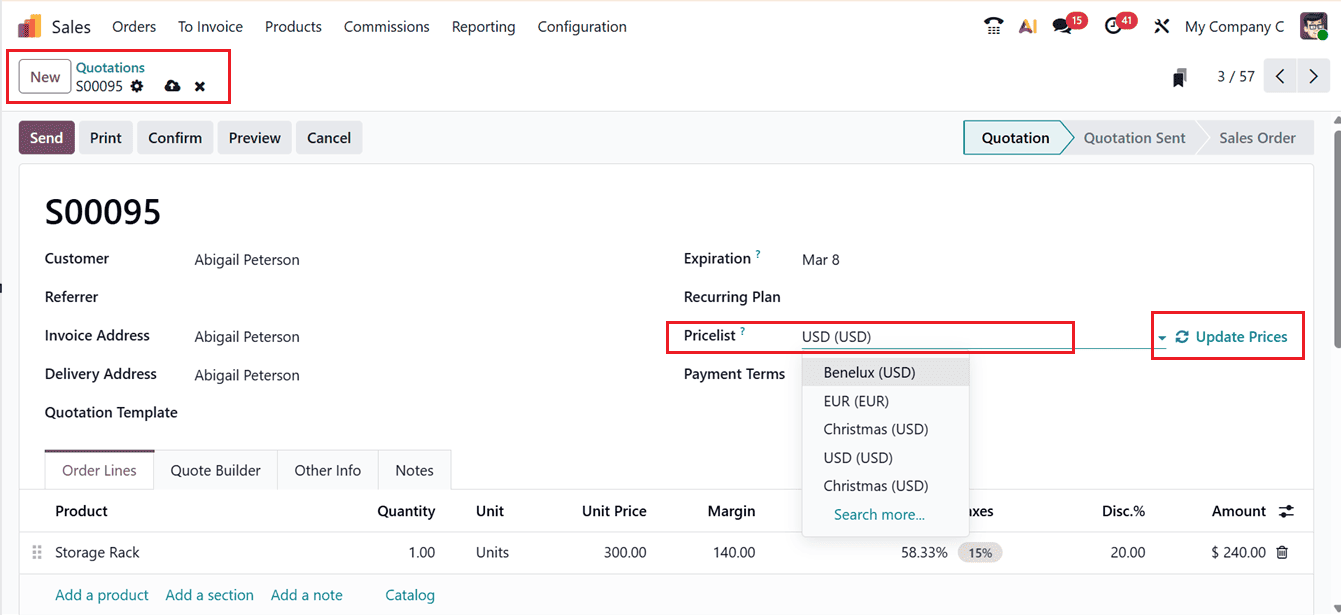
The product price and margin will therefore be automatically updated by the Odoo system and a notification verifying the price update will show up in the discussion after it has been updated.
You can then view the updated margin, discount amount, and discount percentage. For instance, if the original price was $300 and the cost was $100, the margin was $140 per unit. When a 10% discount is applied, the discount value is subtracted from the total margin, and the revised margin and margin percentage appear at the bottom of the order.
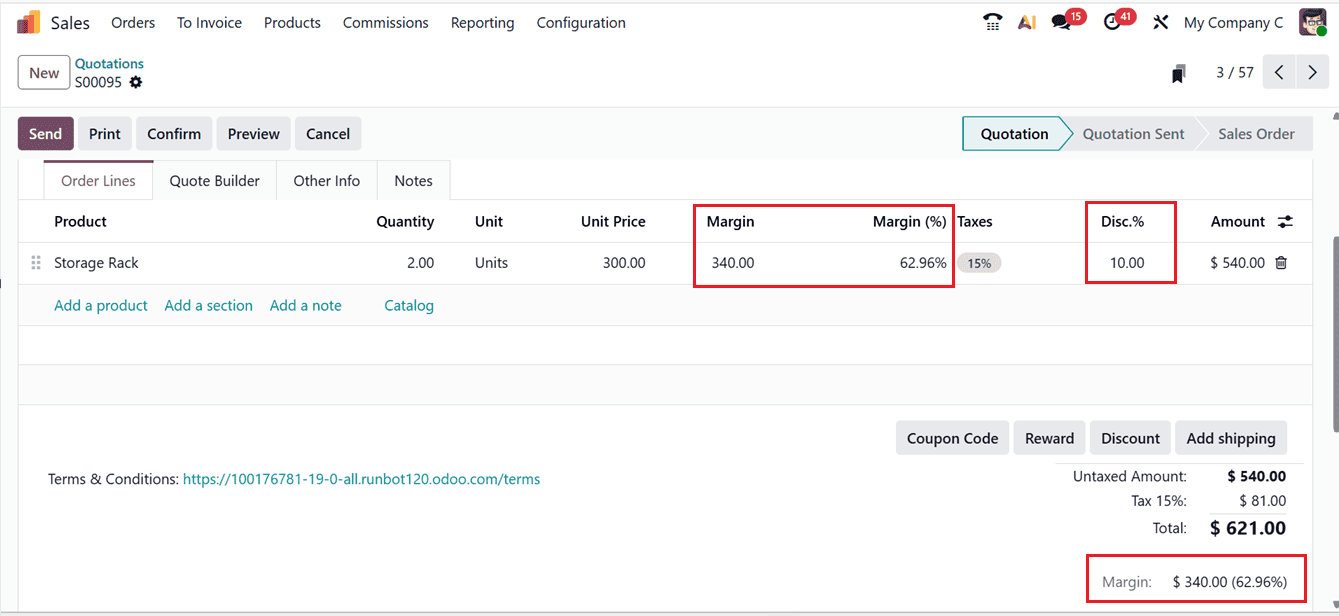
This means that when a price list is used, the margin is calculated using the discounted selling price against the product’s cost price. Once the order is confirmed, its status changes from Quotation to Sales Order. Then, you can proceed with the next sales procedures as usual.
One of the strongest features of Odoo 19 is automatic margin calculation. Once margin settings are configured, the system calculates margins automatically for each product. This gives real-time visibility into profitability and supports better business decisions. The transparent and dynamic calculation process simplifies daily operations and improves overall efficiency.
Sales Order Analysis
Odoo 19 also offers strong tools for sales analysis. By opening the Orders menu and switching to the Graph view, you can see visual reports of sales performance. You can also use the Pivot and List view for deeper analysis. Under the Measures menu, selecting the Margin option will allow you to analyze profit margins of every month, as shown in the screenshot below.
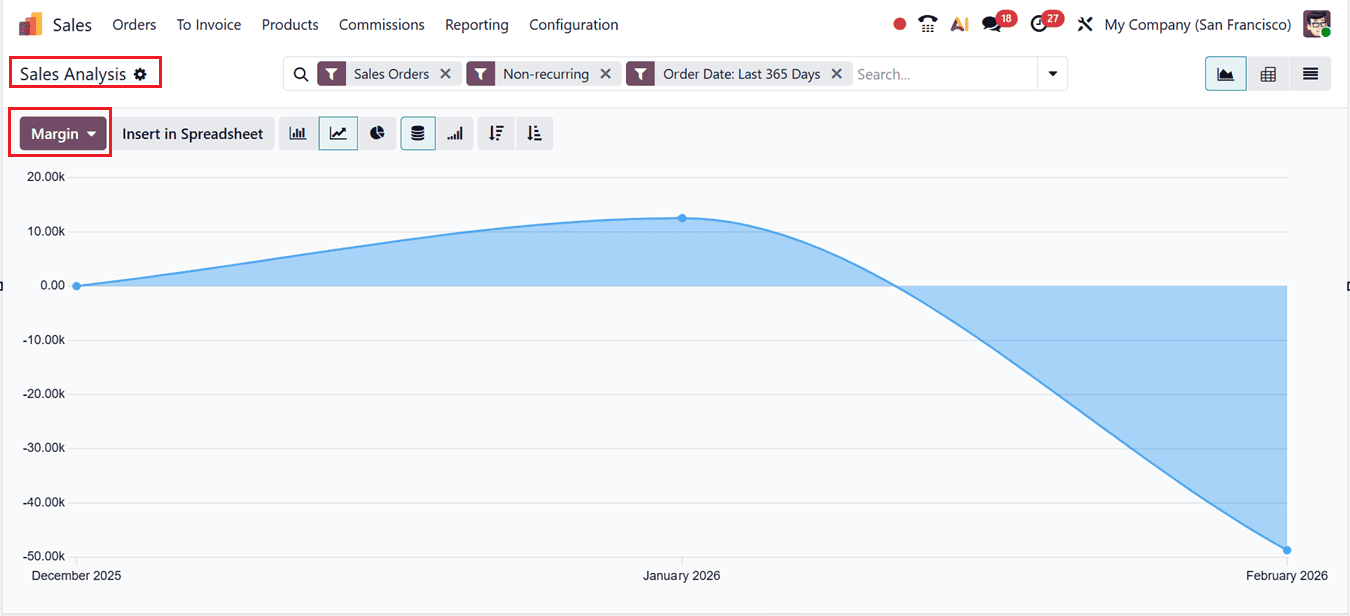
In this view, the X-axis shows the months of the current year, while the Y-axis displays total margin values. This helps businesses evaluate profit levels on a monthly basis and gain useful financial insights.
Monitoring profit margins is a critical part of running a successful and sustainable business, and Odoo 19 makes this process both simple and effective. By offering built-in margin calculation at the product, sales order, and pricelist levels, Odoo 19 provides businesses with real-time visibility into their profitability. With automatic calculations and powerful reporting tools, businesses can confidently control costs, optimize pricing strategies, and improve overall financial performance while staying competitive in a fast-moving market.
To read more about How to Identify the Margin From Sales Orders Using Odoo 18, refer to our blog How to Identify the Margin From Sales Orders Using Odoo 18.