Modern web applications are built from modular and reusable components. Odoo 19 has been developed using the OWL (Odoo Web Library) framework, and this framework has a component architecture design that helps developers to build complicated user interfaces with smaller, modular, and reusable components. This is called Compositional Composition.
What is Component Composition?
Component Composition: Building more complex components from simple, independent components. It is advantageous to the programmer to break up functions into several components instead of developing one component with all the features.
For instance, a dashboard page may contain several smaller components, like:
- Header Component
- Search Bar Component
- Statistics Card Component
- Activity List Component
Each component handles a specific part of the user interface, which simplifies development and maintenance.
Why Use Component Composition?
Component Composition has several advantages:
- Allows code reuse across multiple views.
- Maintenance is easier with the separation of responsibilities.
- Enhances readability and code organization.
- Easier to test individual components.
- It increases the scalability of large applications.
Creating a Child Component
We will make a simple child component that shows a welcome message.
import { Component, xml } from "@odoo/owl";
export class WelcomeMessage extends Component {
   static template = xml`
    <div>
        <h3>Welcome to Odoo 19</h3>
    </div> `
   ;
}
Using the Child Component in a Parent Component
The parent component can import the child component and render the child component in it.
import { Component, xml } from "@odoo/owl";
import { WelcomeMessage } from "./welcome_message";
export class Dashboard extends Component {
   static components = { WelcomeMessage };
   static template = xml`
       <div>
           <h2>Dashboard</h2> <WelcomeMessage/>
       </div> `
   ; }
In this case, the Dashboard component uses the WelcomeMessage component to build a larger UI component.
Passing Data Through Props
Sometimes components need to access data from their parent components. You can do this with props.
Child Component
import { Component, xml } from "@odoo/owl";
export class UserCard extends Component {
   static props = ["name"];
   static template = xml
       ` <div> <strong t-esc="props.name"/> </div> `
   ; }
Parent Component
import { Component, xml } from "@odoo/owl";
import { UserCard } from "./user_card";
export class Dashboard extends Component {
   static components = { UserCard };
   static template = xml`
    <div>
        <UserCard name="'John Doe'"/>
        </div> `
   ; }f
The child component receives the data from the parent component through the prop called ‘name’.
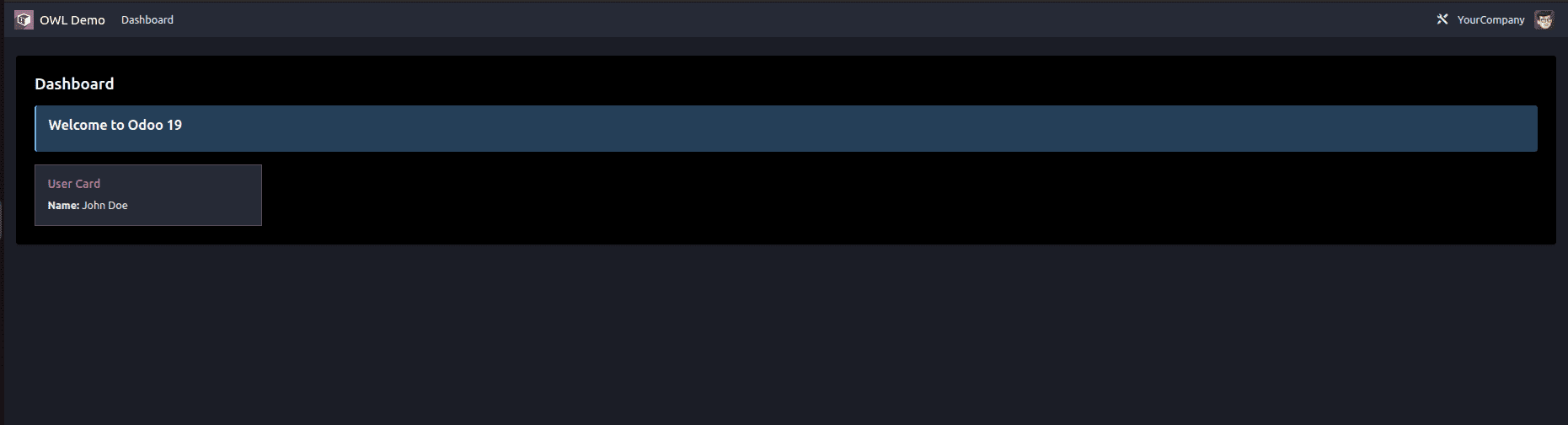
Component Hierarchy
A typical component hierarchy consists of a parent component that contains multiple child components. For example, a Dashboard (parent component) may include:
- Header - Displays the page title and navigation.
- SearchBar - Allows users to search records.
- UserCard - Displays user information.
- ActivityList - Shows the list of activities.
Each child component has its own logic and contributes to the overall UI design.
Component Composition is one of the important aspects in the OWL framework of Odoo 19. Developers apply the principle of composing small components to build complex interfaces to create sustainable, scalable, and efficient software solutions. To be able to create modern frontend apps and to customize the web client in Odoo, one needs to learn component composition.
To read more about Overview of Advanced OWL Components In Odoo 19, refer to our blog Overview of Advanced OWL Components In Odoo 19.