Multi-step wizards are one of the most effective ways to guide users through complex workflows in Odoo. Whether you're onboarding new employees, running multi-stage approvals, configuring products, or collecting structured data, multi-screen wizards provide clarity and structure.
In this blog, we’ll explore how to build multi-step wizards in Odoo 19, using a fully working example: an Employee Onboarding Wizard.
1. What Are Multi-Step Wizards?
Wizards in Odoo are temporary models (TransientModel) used to collect user input and run an action.
A multi-step wizard breaks this interaction into multiple screens or stages.
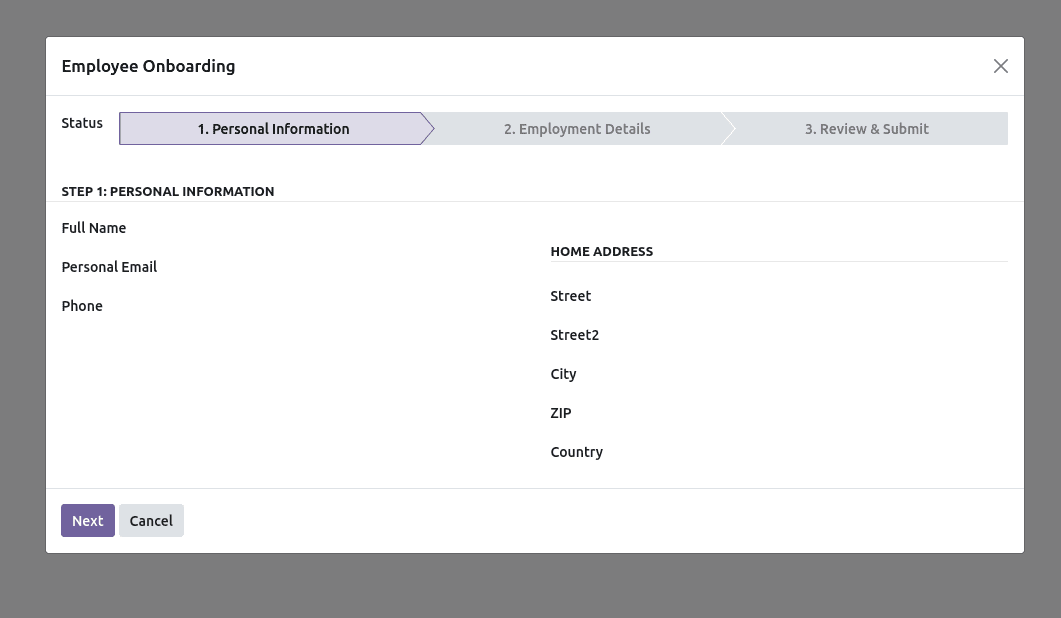
Each screen represents a step in the process. In our example:
- Step 1: Input personal details
- Step 2: Add employment information
- Step 3: Review & Submit
These steps are not stored permanently—they exist only during the wizard session.
2. When Should You Use Multi-Step Wizards?
Use a multi-screen wizard when:
- The workflow is too long or complex for one form
Breaking it down improves clarity.
- The user needs guidance
For example, onboarding HR staff through structured steps.
- Data must be collected incrementally
Some fields should appear only after earlier steps are filled.
- Validation must occur before moving forward
Example: Employee name must be completed before entering the next step.
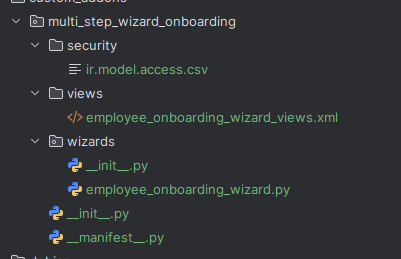
Let’s get started. The following is the complete structure of the module.
1. The Manifest File
File: __manifest__.py
# -*- coding: utf-8 -*-
{
   'name': 'Multi-Step Employee Onboarding Wizard',
   'version': '19.0.1.0.0',
   'summary': 'Employee onboarding via multi-step wizard',
   'category': 'Human Resources',
   'author': 'Your Company',
   'website': 'https://yourcompany.example.com',
   'license': 'LGPL-3',
   'depends': ['base', 'hr'],
   'data': [
       'security/ir.model.access.csv',
       'views/employee_onboarding_wizard_views.xml',
   ],
   'application': False,
   'installable': True,
}
2. The Wizard Model
File: wizard/employee_onboarding_wizard.py
# -*- coding: utf-8 -*-
from odoo import fields, models
from odoo.exceptions import UserError
class EmployeeOnboardingWizard(models.TransientModel):
   """
     Wizard for onboarding employees in three steps:
     personal info ? employment details ? review & submit.
     """
   _name = 'employee.onboarding.wizard'
   _description = 'Employee Onboarding Wizard'
   # Step/state management
   state = fields.Selection(
       selection=[
           ('personal', '1. Personal Information'),
           ('employment', '2. Employment Details'),
           ('review', '3. Review & Submit'),
       ],
       string='Status',
       default='personal',
       required=True,
   )
   # Step 1: Personal Information
   name = fields.Char(string='Full Name', required=True)
   personal_email = fields.Char(string='Personal Email')
   phone = fields.Char(string='Phone')
   street = fields.Char(string='Street')
   street2 = fields.Char(string='Street2')
   city = fields.Char(string='City')
   zip = fields.Char(string='ZIP')
   country_id = fields.Many2one('res.country', string='Country')
   # Step 2: Employment Details
   job_id = fields.Many2one('hr.job', string='Job Position')
   department_id = fields.Many2one('hr.department', string='Department')
   manager_id = fields.Many2one('hr.employee', string='Manager')
   work_email = fields.Char(string='Work Email')
   work_phone = fields.Char(string='Work Phone')
   # Step 3: Review & Notes
   notes = fields.Text(string='Notes')
   # Navigation helpers
   def _step_order(self):
       """Return the step order for navigation."""
       return ['personal', 'employment', 'review']
   def _reopen_form(self):
       """Reopen the wizard with the updated state."""
       return {
           'type': 'ir.actions.act_window',
           'res_model': self._name,
           'res_id': self.id,
           'view_mode': 'form',
           'target': 'new',
           'context': dict(self._context),
       }
   def action_next(self):
       """Move to the next step with basic validation."""
       self.ensure_one()
       steps = self._step_order()
       idx = steps.index(self.state)
       # Validate required fields before moving forward
       if self.state == 'personal' and not self.name:
           raise UserError(self.env._("Please provide the employee's full name before continuing."))
       if idx < len(steps) - 1:
           self.state = steps[idx + 1]
       return self._reopen_form()
   def action_previous(self):
       """Move to the previous step."""
       self.ensure_one()
       steps = self._step_order()
       idx = steps.index(self.state)
       if idx > 0:
           self.state = steps[idx - 1]
       return self._reopen_form()
   def action_submit(self):
       """Create hr.employee and related partner for home address."""
       self.ensure_one()
       # Create contact address partner (if any personal info provided)
       partner_vals = {
           'name': self.name or '',
           'email': self.personal_email or False,
           'phone': self.phone or False,
           'street': self.street or False,
           'street2': self.street2 or False,
           'city': self.city or False,
           'zip': self.zip or False,
           'country_id': self.country_id.id if self.country_id else False,
           'type': 'contact',
       }
       # Filter out completely empty partner to avoid clutter
       has_address_info = any([
           partner_vals.get('email'), partner_vals.get('phone'),
           partner_vals.get('street'), partner_vals.get('city'),
           partner_vals.get('zip'), partner_vals.get('country_id')
       ])

       if has_address_info:
           self.env['res.partner'].create(partner_vals)
       employee_vals = {
           'name': self.name,
           'work_email': self.work_email or False,
           'work_phone': self.work_phone or False,
           'job_id': self.job_id.id if self.job_id else False,
           'department_id': self.department_id.id if self.department_id else False,
           'parent_id': self.manager_id.id if self.manager_id else False,
           'private_email': self.personal_email or False,
           'mobile_phone': self.phone or False,

       }
       employee = self.env['hr.employee'].create(employee_vals)
       # Optional: post a note with the wizard notes
       if self.notes:
           employee.message_post(body=self.env._("Onboarding notes: %s") % (self.notes,))
       # Close wizard and open created employee
       return {
           'type': 'ir.actions.act_window',
           'res_model': 'hr.employee',
           'res_id': employee.id,
           'view_mode': 'form',
           'target': 'current',
       }
3. The Wizard View
File: views/employee_onboarding_wizard_views.xml
<?xml version="1.0" encoding="utf-8"?>
<odoo>
<record id="view_employee_onboarding_wizard_form" model="ir.ui.view">
<field name="name">employee.onboarding.wizard.form</field>
<field name="model">employee.onboarding.wizard</field>
<field name="arch" type="xml">
<form string="Employee Onboarding" class="o_onboarding_wizard">
<sheet>
<group>
<label for="state"/>
<div>
<field name="state" widget="statusbar" statusbar_visible="personal,employment,review"/>
</div>
</group>
<group invisible="state != 'personal'">
<separator string="Step 1: Personal Information"/>
<group>
<field name="name" required="1"/>
<field name="personal_email"/>
<field name="phone"/>
</group>
<group string="Home Address">
<field name="street"/>
<field name="street2"/>
<field name="city"/>
<field name="zip"/>
<field name="country_id"/>
</group>
</group>
<group invisible="state != 'employment'">
<separator string="Step 2: Employment Details"/>
<group>
<field name="job_id" options="{'no_open': True}"/>
<field name="department_id" options="{'no_open': True}"/>
<field name="manager_id" options="{'no_open': True}"/>
</group>
<group>
<field name="work_email"/>
<field name="work_phone"/>
</group>
</group>
<group invisible="state != 'review'">
<separator string="Step 3: Review & Submit"/>
<group string="Summary">
<field name="name" readonly="1"/>
<field name="personal_email" readonly="1"/>
<field name="phone" readonly="1"/>
<field name="job_id" readonly="1"/>
<field name="department_id" readonly="1"/>
<field name="manager_id" readonly="1"/>
<field name="work_email" readonly="1"/>
<field name="work_phone" readonly="1"/>
</group>
<group>
<field name="notes"/>
</group>
</group>
</sheet>
<footer>
<button name="action_previous"
string="Previous"
type="object"
class="btn-secondary"
invisible="state == 'personal'"/>
<button name="action_next"
string="Next"
type="object"
class="btn-primary"
invisible="state == 'review'"/>
<button name="action_submit"
string="Create Employee"
type="object"
class="btn-primary"
invisible="state != 'review'"/>
<button string="Cancel" class="btn-secondary" special="cancel"/>
</footer>
</form>
</field>
</record>
<record id="action_employee_onboarding_wizard" model="ir.actions.act_window">
<field name="name">Employee Onboarding</field>
<field name="res_model">employee.onboarding.wizard</field>
<field name="view_mode">form</field>
<field name="view_id" ref="view_employee_onboarding_wizard_form"/>
<field name="target">new</field>
<field name="context">{}</field>
</record>
<menuitem id="menu_employee_onboarding_root"
name="Employee Onboarding"
sequence="90"/>
<menuitem id="menu_employee_onboarding"
name="Start Onboarding"
parent="menu_employee_onboarding_root"
action="action_employee_onboarding_wizard"
sequence="10"/>
</odoo>
4. Security
File: security/ir.model.access.csv
id,name,model_id:id,group_id:id,perm_read,perm_write,perm_create,perm_unlink
access_employee_onboarding_wizard_user,access.employee.onboarding.wizard.user,model_employee_onboarding_wizard,base.group_user,1,1,1,1
Here, a state field to manage workflow steps. The core mechanism of a multi-step wizard is a state field, usually implemented as a Selection.
In our example, it is defined as
# Step/state management
state = fields.Selection(
   selection=[
       ('personal', '1. Personal Information'),
       ('employment', '2. Employment Details'),
       ('review', '3. Review & Submit'),
   ],
   string='Status',
   default='personal',
   required=True,
)
This field determines:
- Which UI elements to show
- Which step the user is currently on
- Which buttons should appear
In the XML view, each step is conditionally rendered based on state:
<group invisible="state != 'personal'"> ... </group>
<group invisible="state != 'employment'"> ... </group>
<group invisible="state != 'review'"> ... </group>
This is the standard pattern for multi-step wizard screens.
Implementing Navigation: “Next” & “Previous” Buttons
In our example, we use 2 navigation methods:
- action_next
- action_previous
These methods update the state and reopen the form.
Next Button Logic
def action_next(self):
   """Move to the next step with basic validation."""
   self.ensure_one()
   steps = self._step_order()
   idx = steps.index(self.state)
   # Validate required fields before moving forward
   if self.state == 'personal' and not self.name:
       raise UserError(self.env._("Please provide the employee's full name before continuing."))
   if idx < len(steps) - 1:
       self.state = steps[idx + 1]
   return self._reopen_form()
This demonstrates:
- Validation before moving forward
- Controlled step progression
- Re-rendering the wizard using action_window
Previous Button Logic
def action_previous(self):
   """Move to the previous step."""
   self.ensure_one()
   steps = self._step_order()
   idx = steps.index(self.state)
   if idx > 0:
       self.state = steps[idx - 1]
   return self._reopen_form()
In XML, buttons are conditionally visible:
<button name="action_previous" invisible="state == 'personal'"/>
<button name="action_next" invisible="state == 'review'"/>
<button name="action_submit" invisible="state != 'review'"/>
Passing Data Between Steps
All steps share the same TransientModel record.
As users move through steps, the same record is updated.
For example:
Building multi-step wizards in Odoo 19 is a powerful way to simplify complex workflows and guide users through structured processes. By combining a state-driven workflow, dynamic view rendering, and clear navigation logic, you can create intuitive, user-friendly interactions that improve data accuracy and enhance the overall user experience.
Our Employee Onboarding Wizard example demonstrates how a single TransientModel can handle multiple screens, maintain user input across steps, validate essential fields, and finally execute real business logic—such as creating employees and related records.
Whether you’re automating HR onboarding, approval flows, configuration processes, or multi-phase data collection, this pattern can be applied to countless real-world business needs. With these foundations in place, you can now build your own multi-step wizards that feel polished, consistent, and fully aligned with Odoo’s UX standards.
To read more about .How to Create and Manage Wizard in Odoo 18, refer to our blog How to Create and Manage Wizard in Odoo 18.