Offering discounts, coupons, and promotional programs is a powerful strategy to attract more customers; people are naturally drawn to great value. By using ERP software like Odoo 18, businesses can efficiently manage and optimize their coupon and promotion campaigns. Through features like promotional rules, gift cards, and discount programs, Odoo makes it easy to design incentives that increase sales and customer loyalty.
The Sales module in Odoo 18 lets you define promotion programs with precise conditions and rewards. For example, creating coupons for future orders, sending gift vouchers, or applying automatic discounts for qualifying purchases. These schemes can be tailored based on customer behavior, order totals, or product combinations, making them highly flexible.
When implemented well, such promotional tools help businesses achieve significant growth. They encourage repeat purchases, foster customer engagement, and boost revenue, without compromising on profitability. By automating promotion management through Odoo, entrepreneurs can run campaigns smoothly, measure their impact, and refine their strategy, leading to sustained business success.
Advantages of Promotion and Coupon Programs in Odoo 18
Promotion and coupon features in Odoo 18 allow businesses to run effective short-term marketing campaigns that boost visibility, increase demand, and improve overall sales performance. By configuring dynamic promotion rules, coupon codes, gift cards, and conditional discounts, Odoo helps companies execute targeted offers across various sales channels such as online stores, POS, and direct sales. Some key advantages include:
- Attract New Customers
Well-designed promotions, such as first-purchase discounts or special coupon codes, help businesses draw in new buyers and expand their customer base.
- Build Customer Loyalty
Rewarding repeat customers with coupons, loyalty discounts, or exclusive offers motivates them to return and continue purchasing.
- Gain Insights Into Customer Behavior
With Odoo’s reporting tools, businesses can track promotion usage, analyze redemption patterns, and understand what types of offers resonate most with their audience.
- Quickly Respond to Market Trends
Odoo allows companies to create or update promotions instantly, helping them take advantage of seasonal demand, competitor pricing, or sudden market shifts.
- Manage Stock More Efficiently
Promotions can be used to clear slow-moving items or reduce excess inventory, ensuring healthy stock turnover and improved warehouse efficiency.
Now, let’s discuss managing promotion and coupon programs in the Odoo 18 Sales module.
First, enable the Promotions, Loyalty & Gift Card option within the Pricing section of the settings window, as shown in the screenshot below.
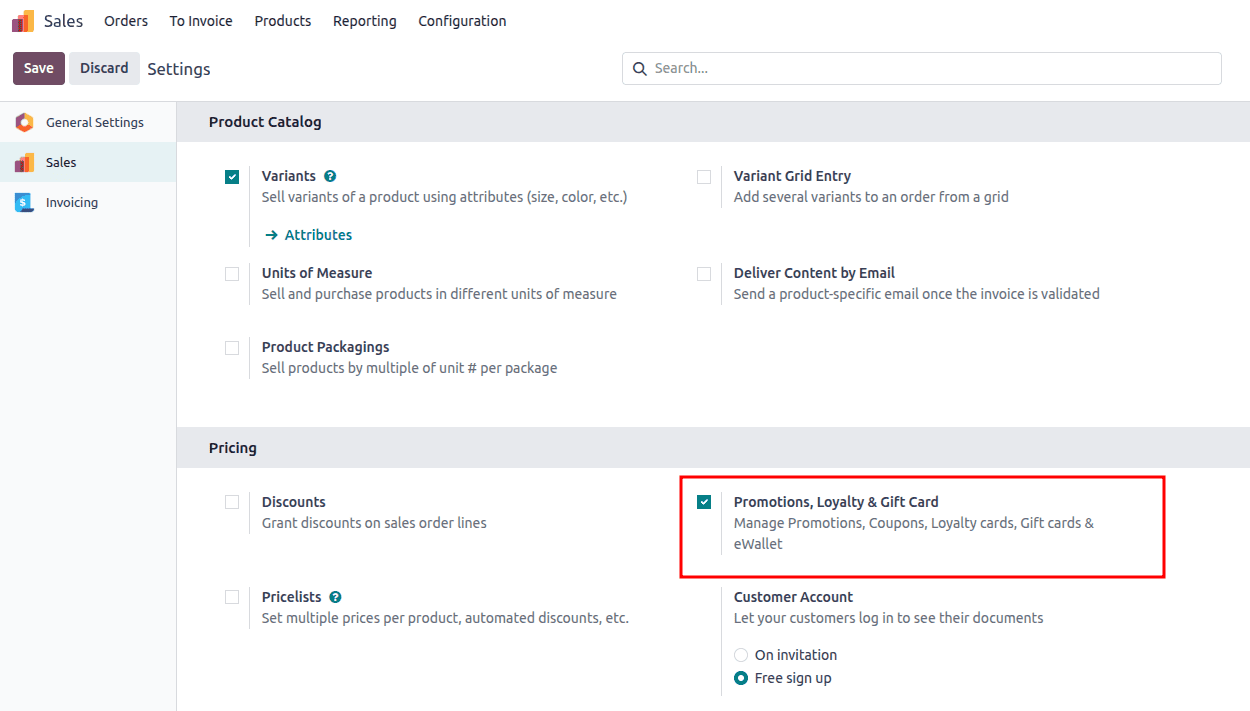
After enabling the Promotions, Loyalty & Gift Card option, users can efficiently manage gift cards, coupons, promotions, eWallets, and more. Save your changes in the Settings window to access and handle coupon and promotion programs in Odoo 18.
To Create a Coupon Program and Promotion in Odoo 18 Sales
Once activated, you can start setting up discount and loyalty programs by navigating to Sales > Products > Discount & Loyalty. If there are no existing programs, Odoo offers several templates to help you get started. You can either select a template or click "New" to create a program from scratch. For existing programs, simply choose one from the list to modify it as needed.

On the new screen, enter the Program Name as "10% Discount Coupons" and select "Coupons" as the Program Type. You can manually create and distribute coupons to be used in sales transactions.
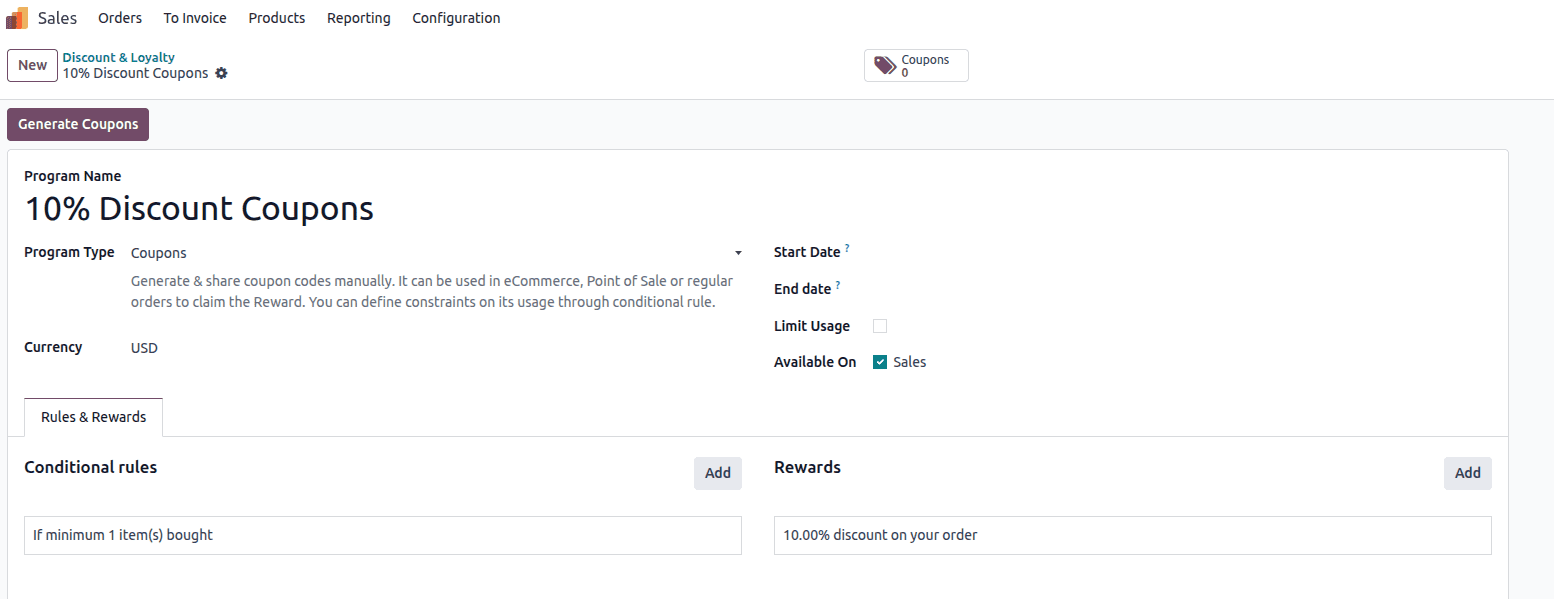
Users can define specific rules and rewards for the coupon by opening the Rules & Rewards tab in the Discount & Loyalty window. To create a new reward, click the Add icon located under the Rules & Rewards section, as shown in the screenshot below.
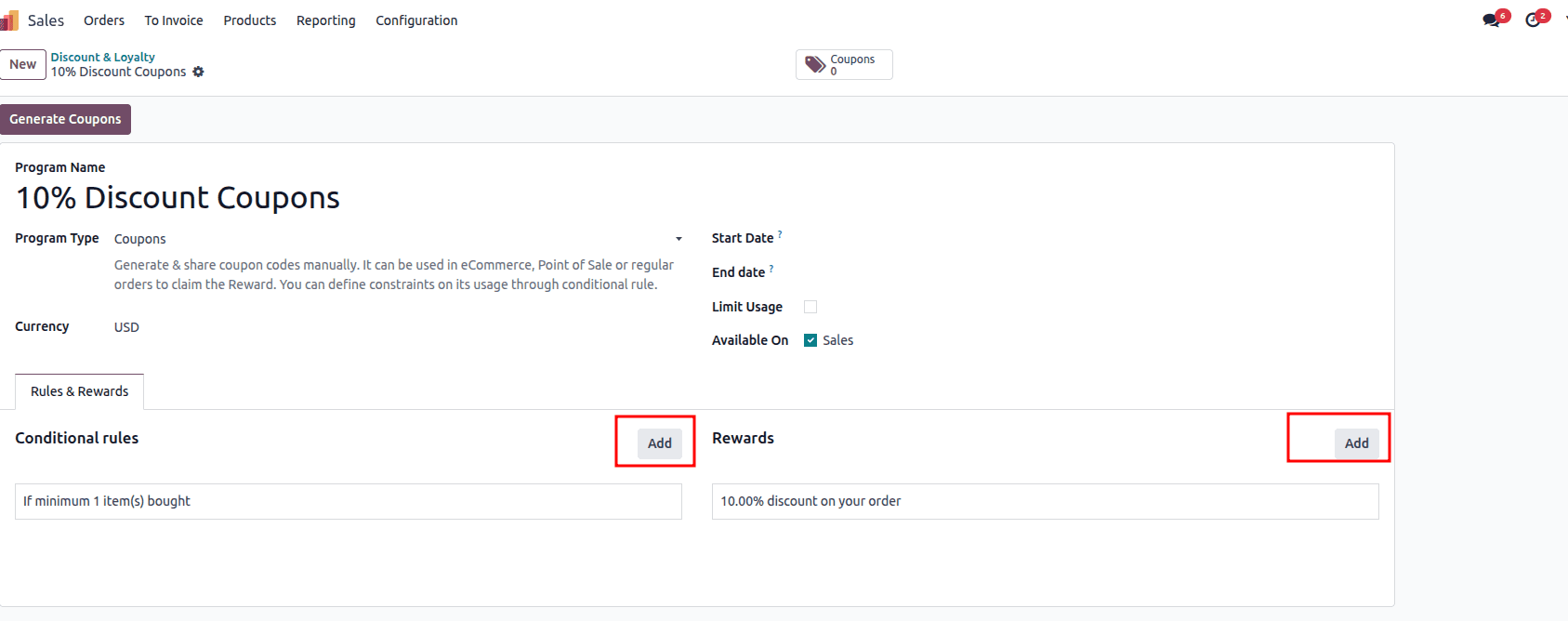
Click the Add button next to Conditional Rules to add specific conditions to the program. This will open a Create Conditional Rules pop-up window, where you can define the required parameters.
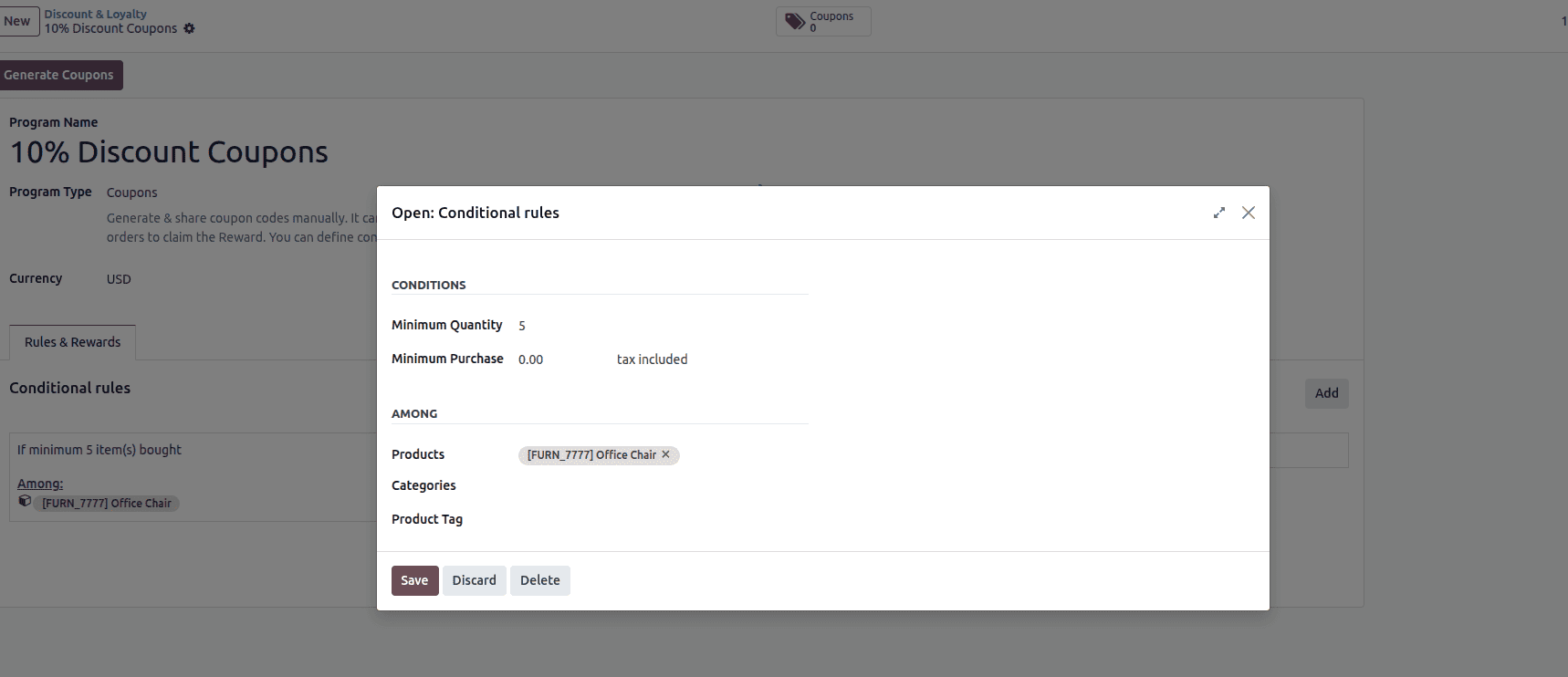
Here, you can define the conditions that must be met for a coupon program to apply. In this example, the rule requires a minimum quantity of 5 items and has no minimum purchase amount. Under the Among section, the rule is restricted to a specific product ‘Office Chair’ meaning the discount will apply only when purchasing at least five units of that product.
Click the Add button next to Rewards to add specific rewards to the program. This will open the Create Reward pop-up window, where you can define the reward.
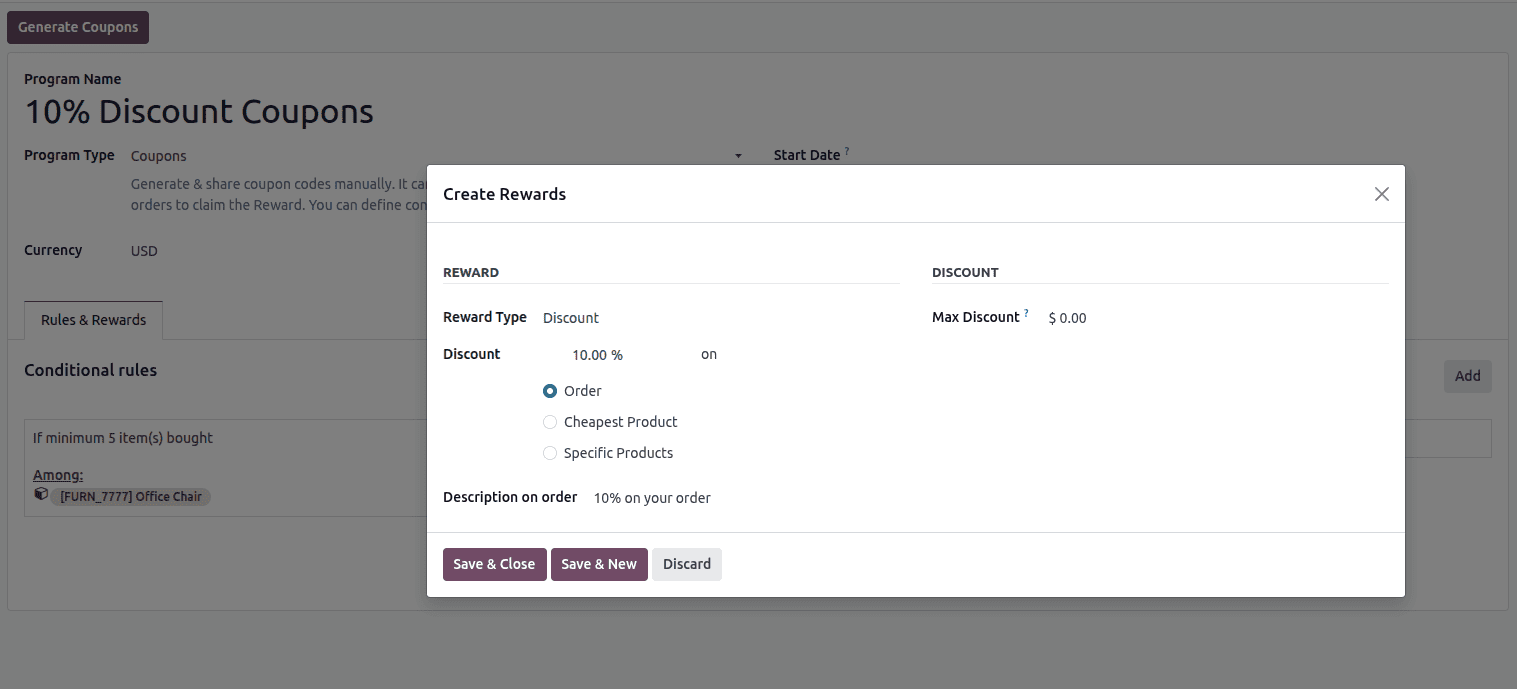
This window is used to define the reward that a customer will receive when a coupon is applied. In this example, the Reward Type is set to Discount, with a 10% discount applied on the entire order. Odoo also provides other options, such as applying the discount to the cheapest product or to specific products only. The Max Discount field allows you to limit the maximum discount amount (here it is set to $0.00, meaning no limit). The Description on order field defines the text that will appear on the sales order, helping customers clearly see the applied reward. Once configured, the reward can be saved and linked to the coupon program.
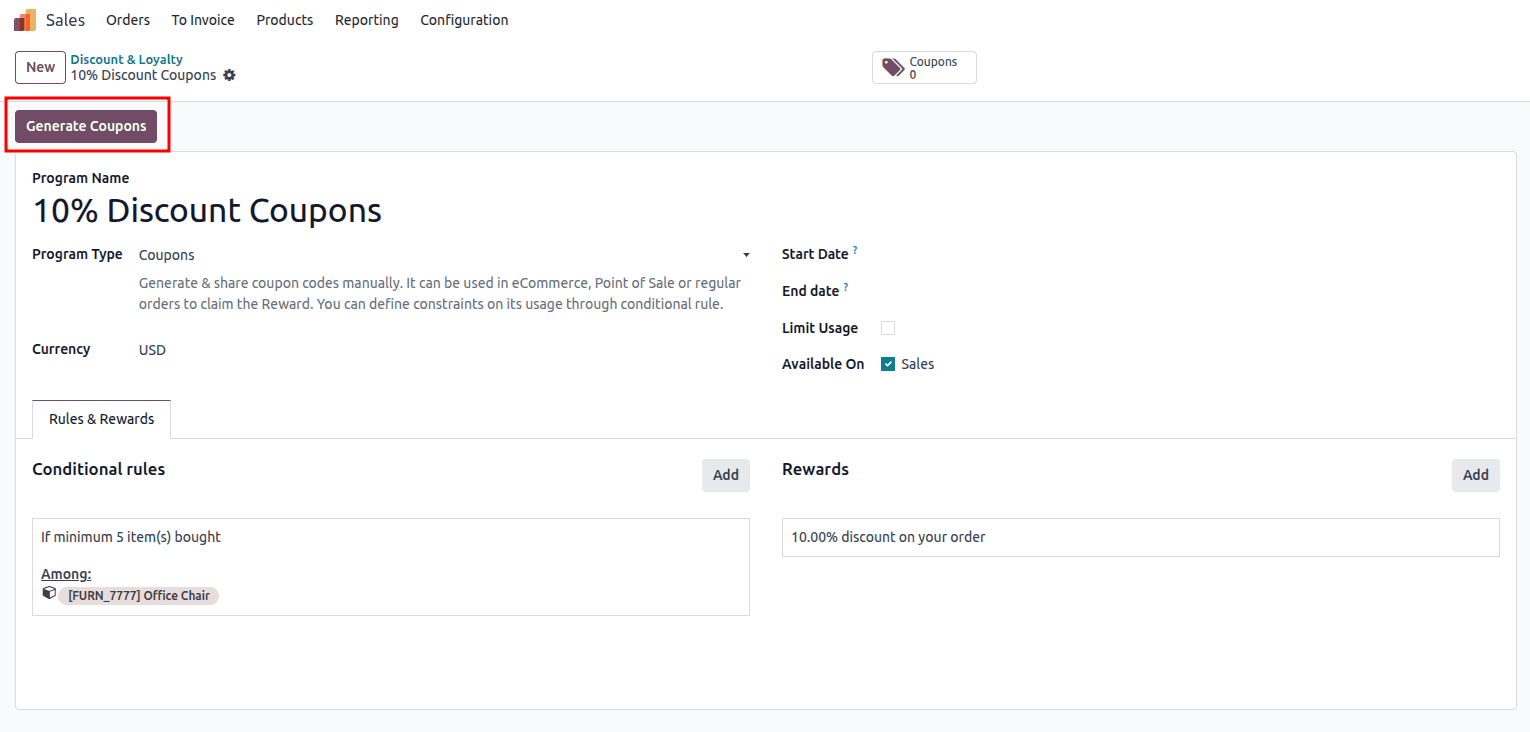
The Generate Coupon button in this window is used to create coupons. Clicking this button opens a pop-up window, as illustrated in the image below.
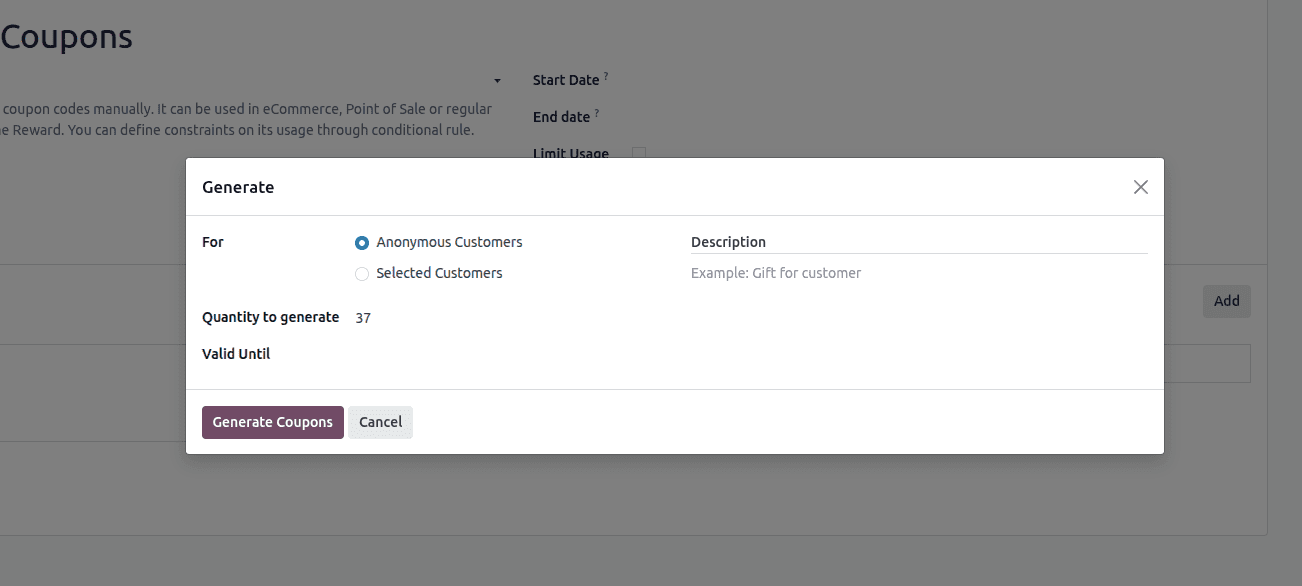
This window is used to create coupon codes for a coupon program. You can choose whether the coupons are intended for Anonymous Customers or for Selected Customers. The Quantity to generate field specifies how many unique coupon codes will be created, while the Valid Until field defines the expiration date of those coupons. An optional Description can be added to clarify the purpose of the coupons, such as a promotional gift for customers. Once all details are set, clicking Generate Coupons will create the coupons, and selecting Cancel will close the window without generating any codes.
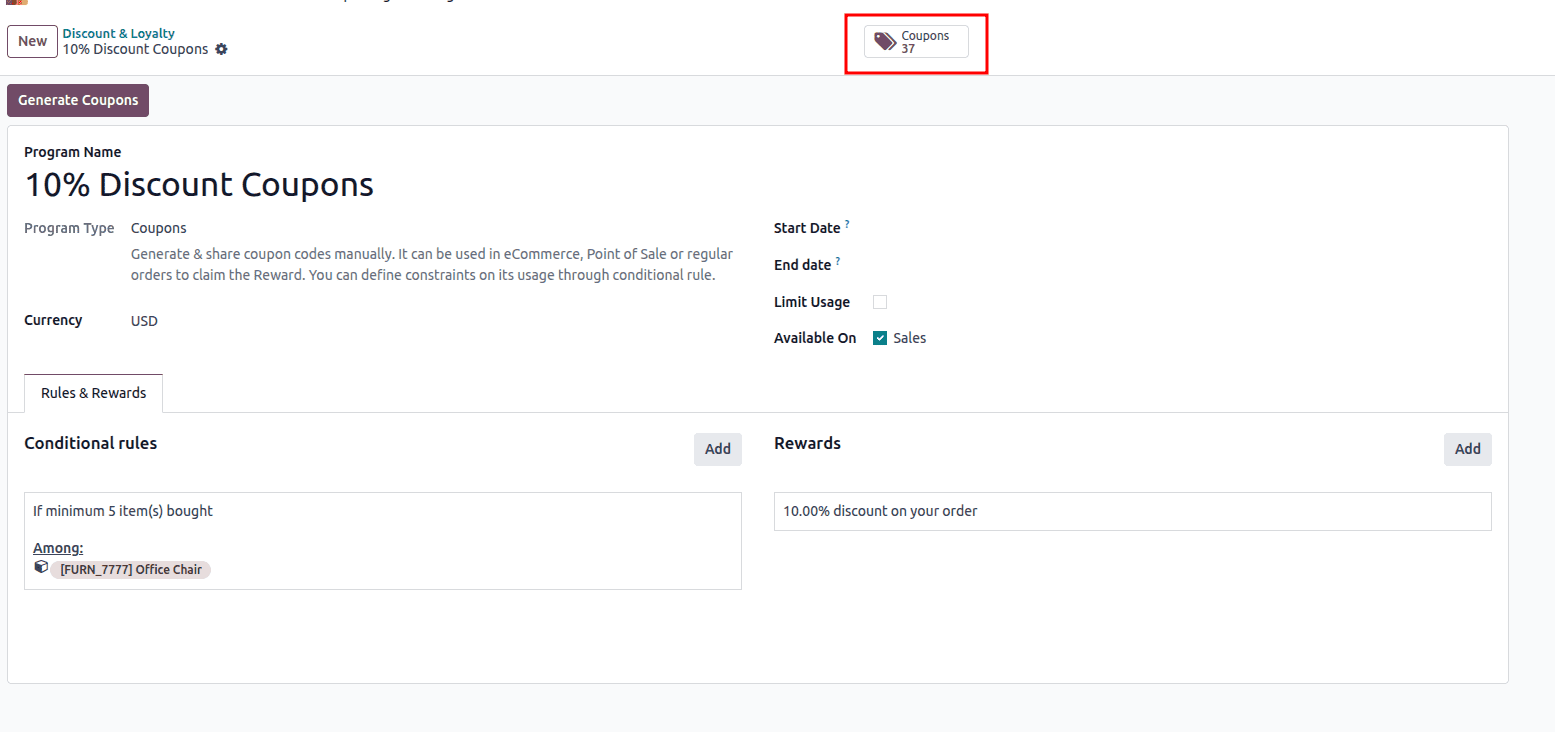
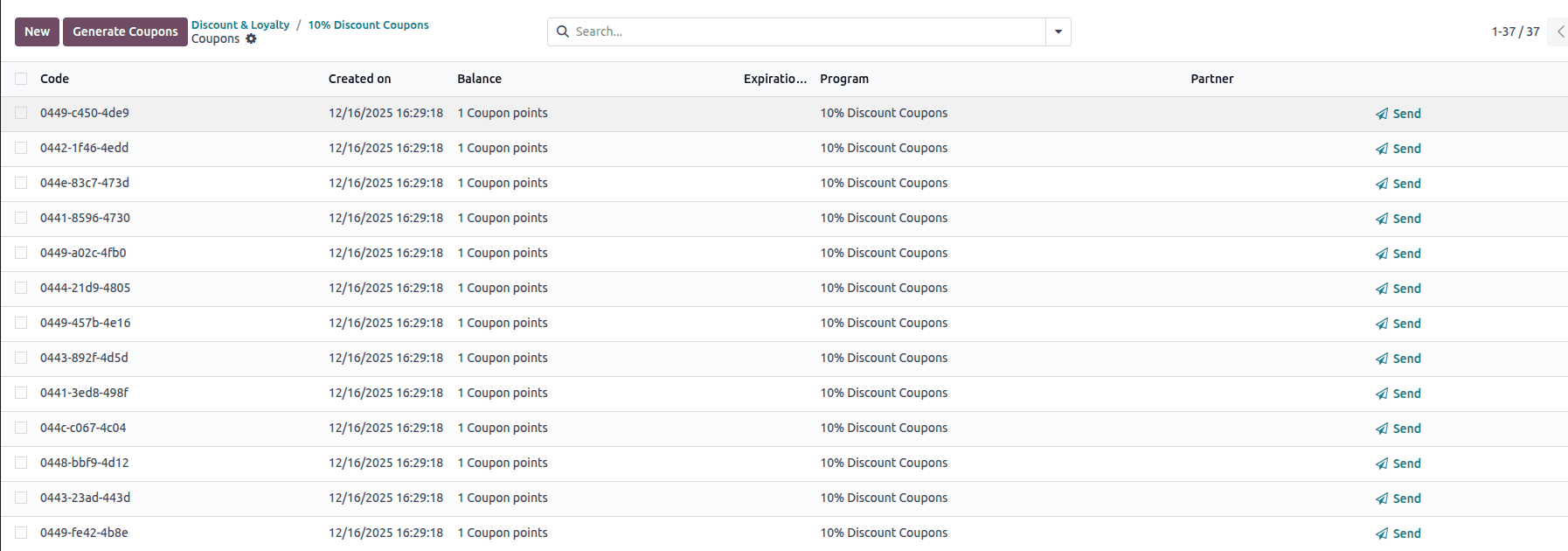
The smart button displays the total number of coupons generated for this program, which in this case is 37. By clicking this button, you can quickly access the list of all coupon codes created under this specific discount program, where you can view their details, status, and usage. This smart button helps in easily tracking and managing the coupons associated with the program.
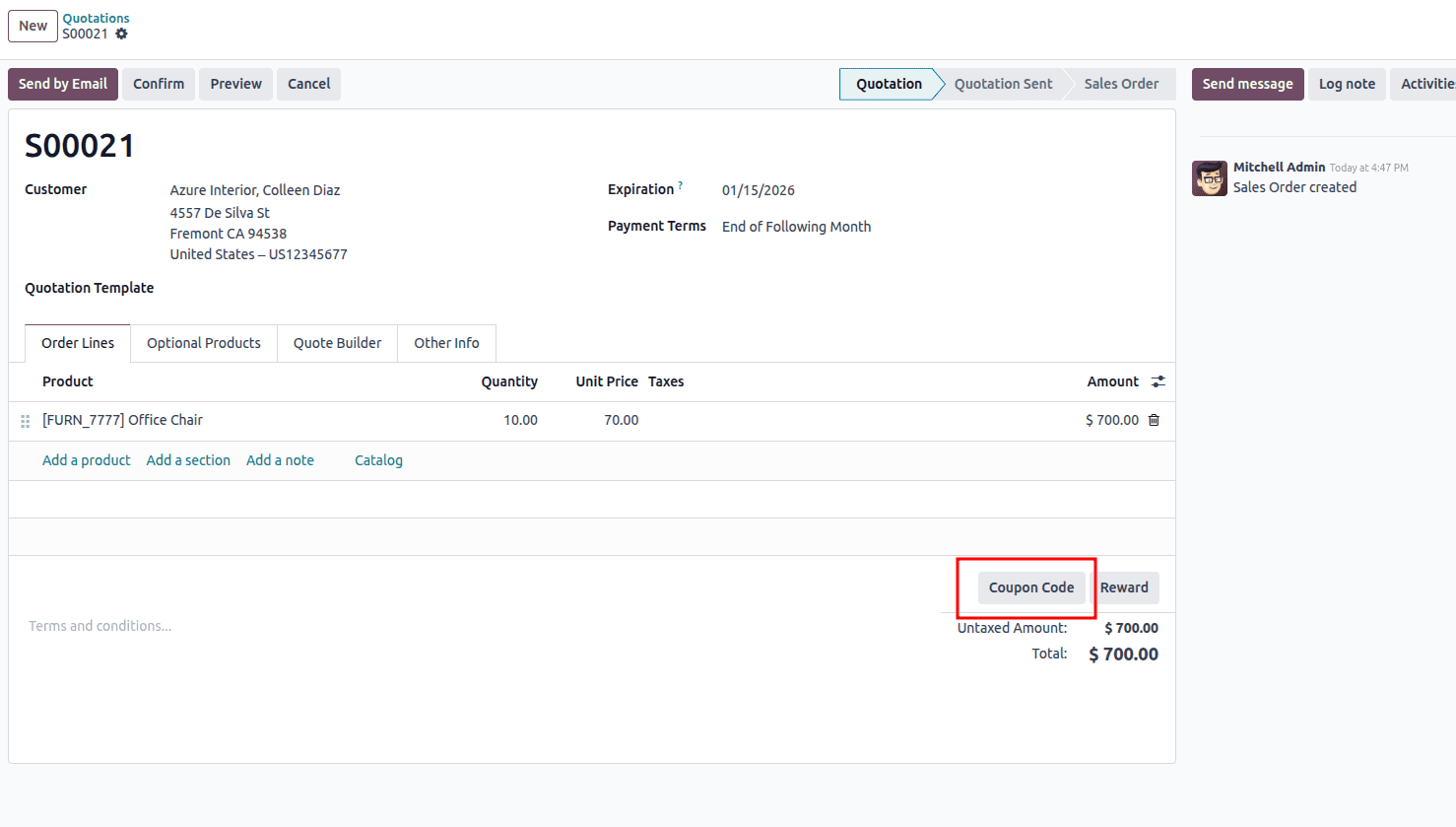
A sales order has been created for 10 units of the Office Chair. Since the coupon program includes a condition that grants a 10% discount when a minimum of 5 units are purchased, this order qualifies for the reward. You can apply the discount by clicking the Coupon Code button on the sales order and entering the valid coupon code.
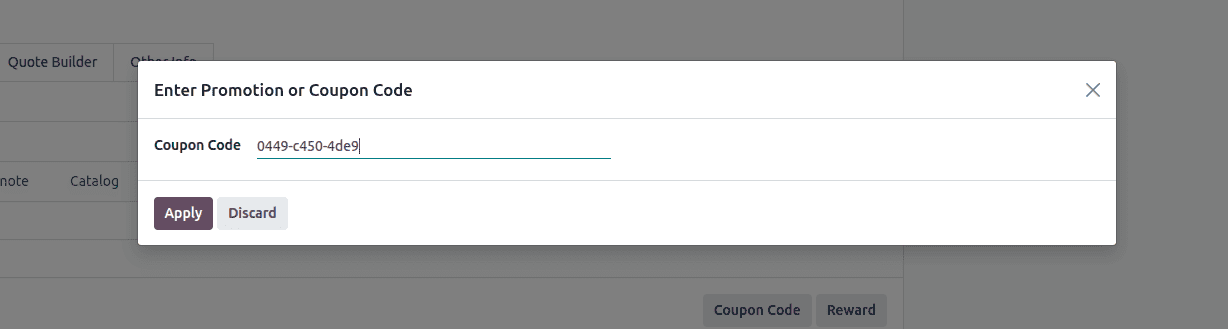
When you click the Coupon Code button, the Enter Promotion or Coupon Code pop-up window opens, allowing you to enter a valid coupon code in the Coupon Code field.
After clicking Apply, another window appears displaying the available rewards, from which you can select the reward to apply to the order.
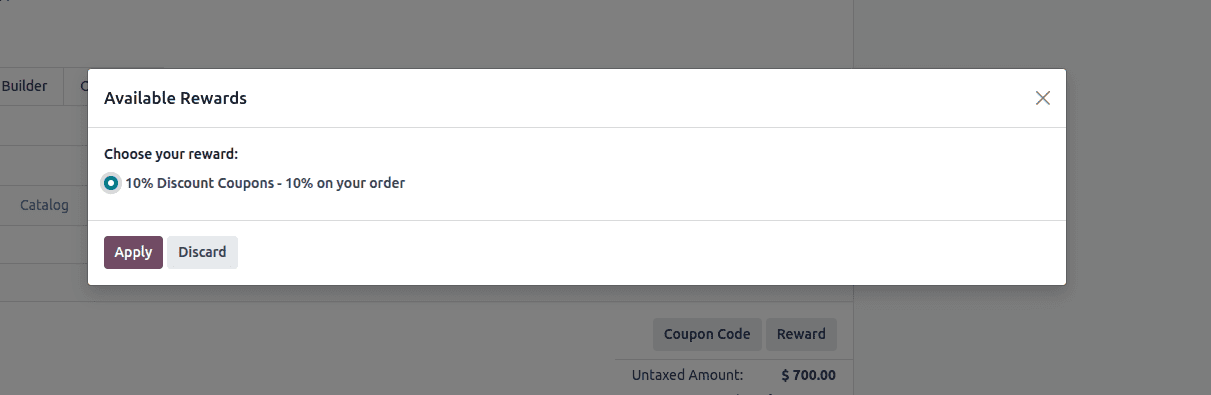
This window appears after a valid coupon code is applied. It lists the rewards that are available for the entered coupon and meet the order conditions. In this case, the reward shown is a 10% discount on the order. You can select the desired reward and click Apply to add it to the sales order, or choose Discard to close the window without applying any reward.
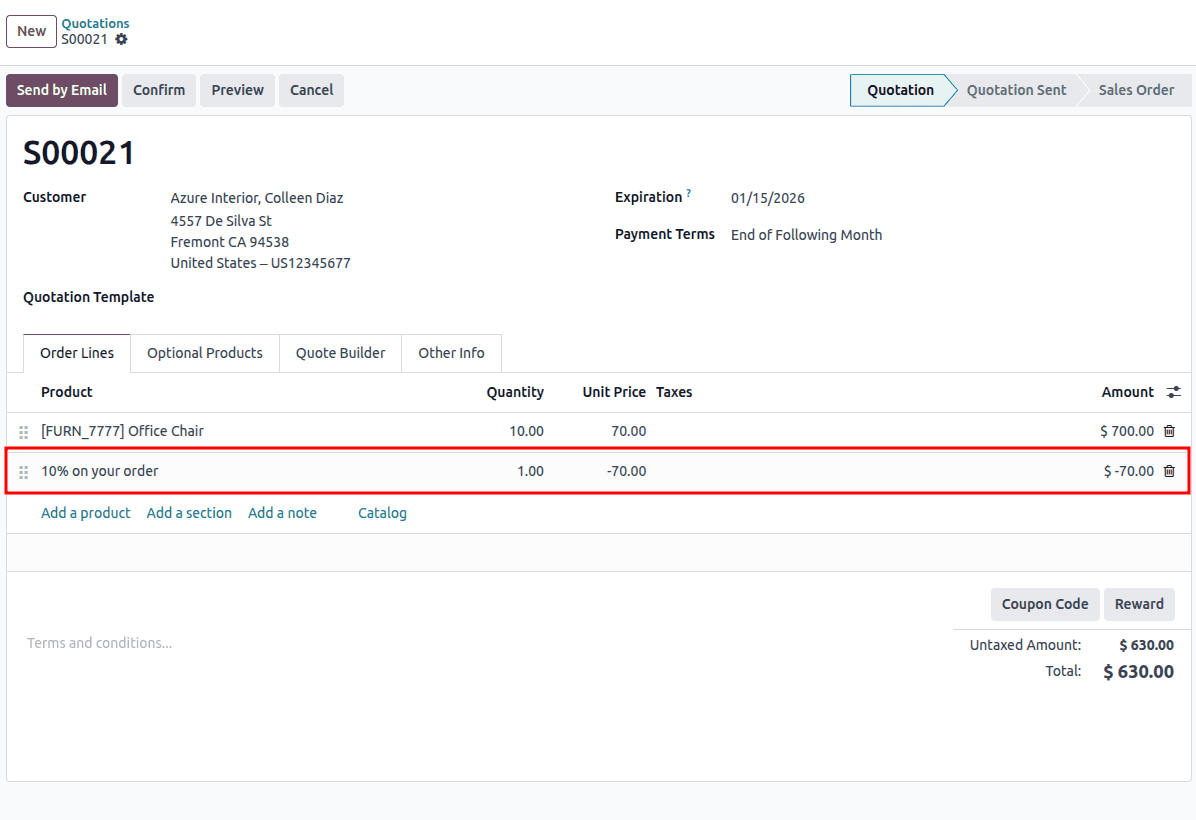
The image shows a sales quotation in Odoo after a coupon reward has been successfully applied. The order includes 10 units of the Office Chair with a total amount of $700.00. Below the product line, a separate line labeled “10% on your order” appears, which represents the coupon reward. This line shows a negative amount (–$70.00), indicating a 10% discount applied to the order value. As a result, the untaxed amount and total are reduced to $630.00. This confirms that the coupon conditions were met and the reward has been correctly applied to the quotation.
Promotion In Odoo 18 Sales
Create a Discount & Loyalty program by navigating to Sales > Products > Discount & Loyalty. From there, create a new program and set the Program Type to Promotions.

Complete the essential details of the Promotion Program, such as the Program Name, Program Type, Start Date, End Date, Usage Limits and available Platforms according to your business needs.
Within the Rules & Rewards tab, you can define the program logic and incentive structure. This includes setting conditions like minimum purchase values, applicable products, and reward types. As discussed in the Coupon scenario, use the Add option to create Conditional Rules and Rewards, then specify the required conditions and reward details in the configuration wizards that appear.
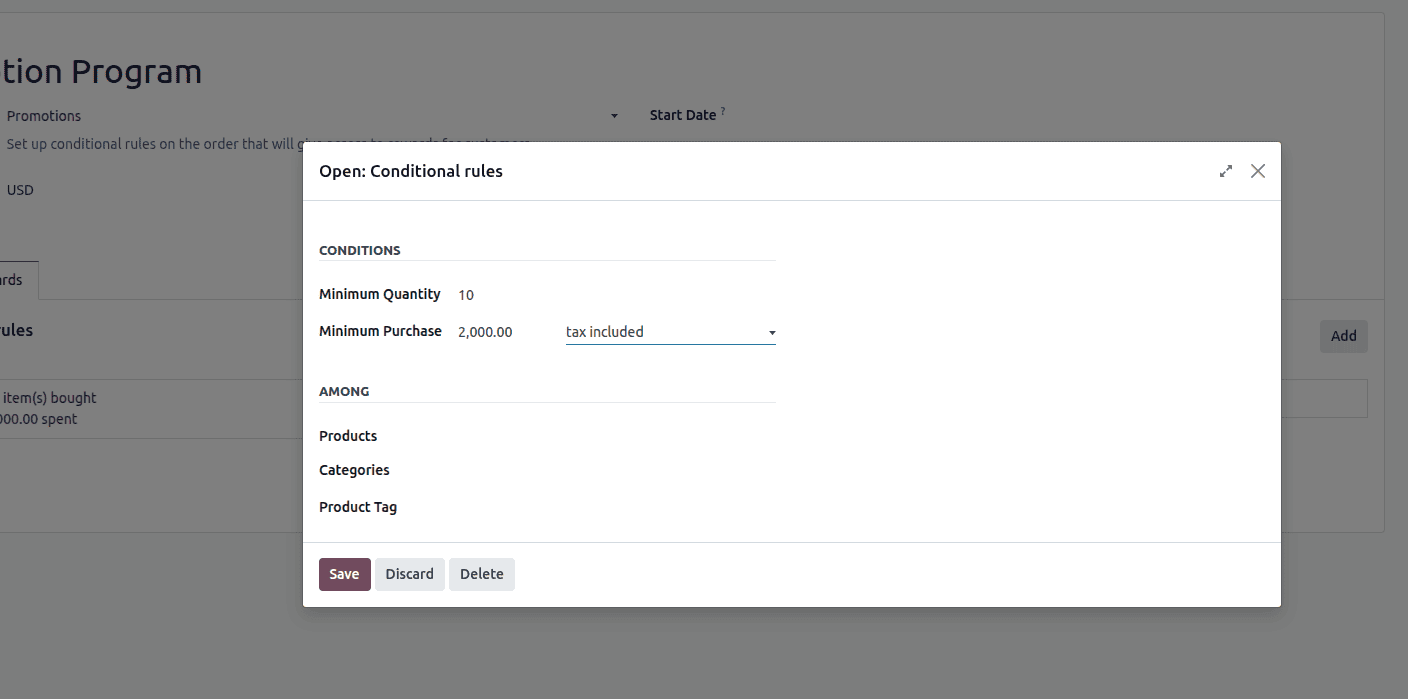
This window represents the Conditional Rules setup for a Promotion Program, where the eligibility criteria for applying a promotion are defined. The rule specifies that the promotion will be applied only when a minimum quantity of 10 items is purchased and the total order value reaches at least 2,000.00, calculated with taxes included. Additionally, the Among section allows you to limit the rule to specific products, product categories, or product tags, ensuring the promotion applies only to selected items. Once the conditions are configured, the rule can be saved, discarded, or deleted as needed.
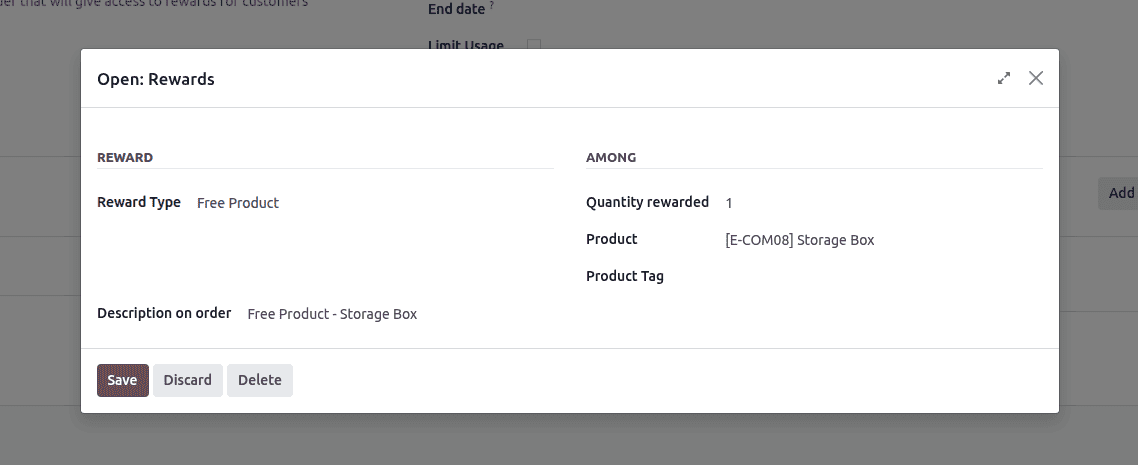
This window shows the Rewards configuration for a Promotion Program, where the benefit granted to the customer is defined. In this setup, the Reward Type is set to Free Product, meaning the customer receives an item at no additional cost when the promotion conditions are met. The system is configured to reward a quantity of 1 unit of the selected product, which is [E-COM08] Storage Box. The Description on order field specifies how the reward will appear on the sales order, clearly indicating that a free storage box has been added. This configuration ensures that once the related conditional rules are satisfied, the specified free product is automatically included in the customer’s order.
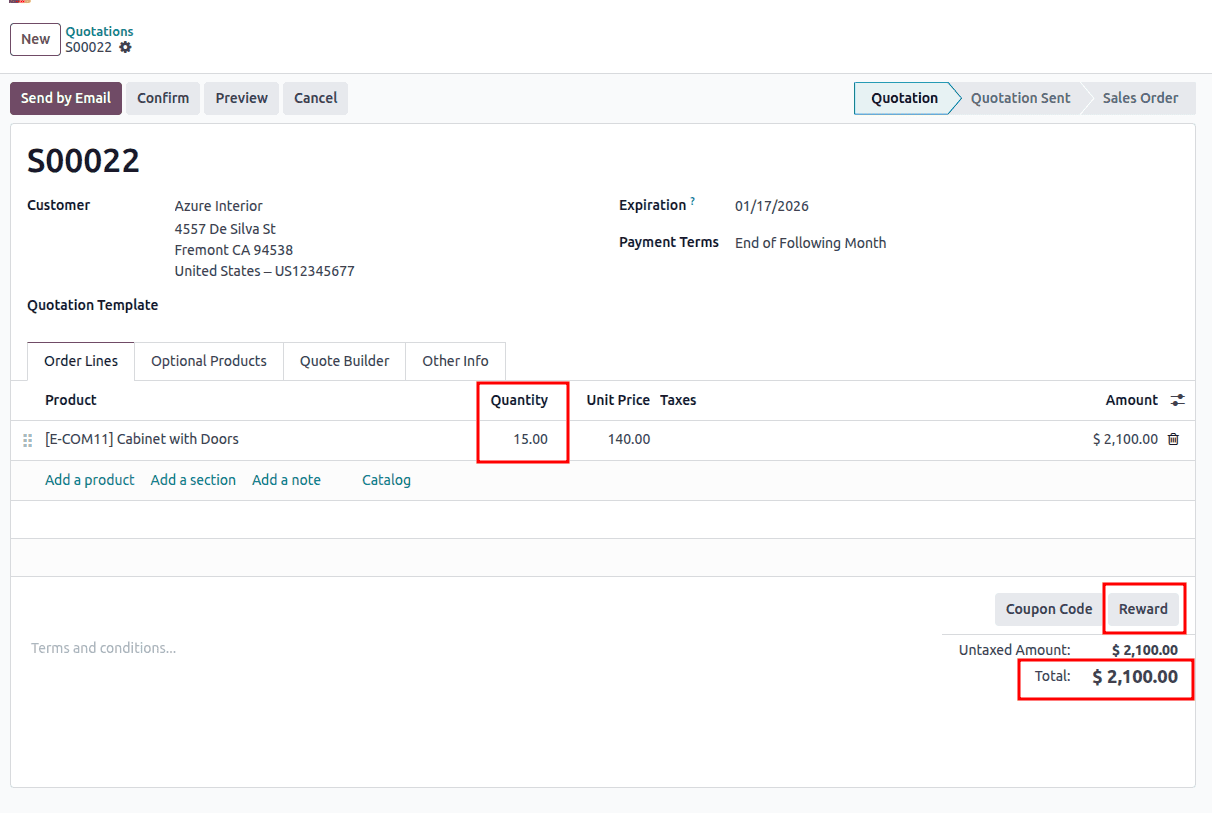
In this quotation, a sales order is created with a quantity of 15 units and a total order value of 2,100, which meets the minimum quantity and purchase amount defined in the promotion rules. Since the order satisfies all the promotion conditions, clicking the Reward button applies the eligible promotion to the order, and the configured reward is automatically added.
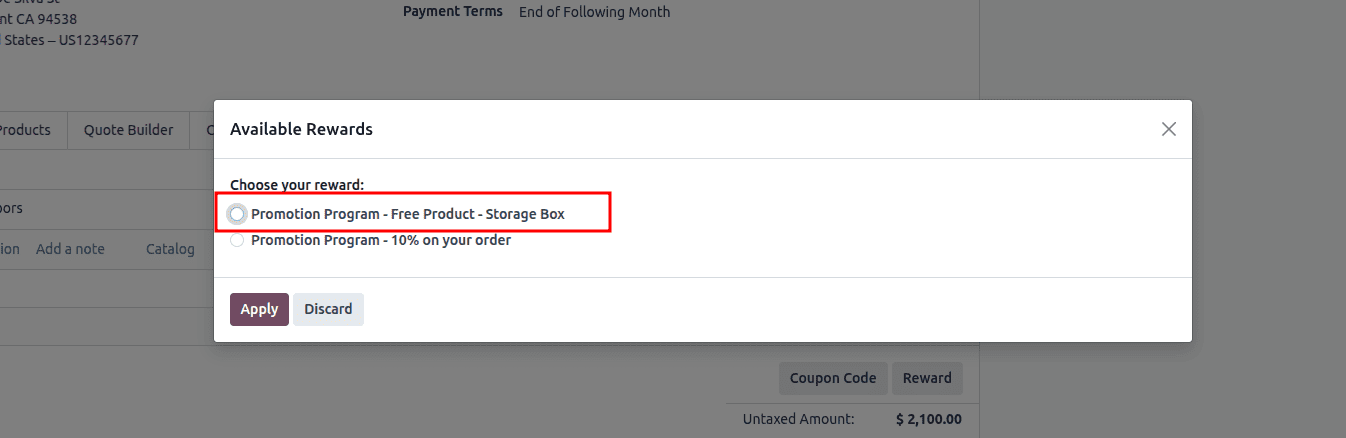
When you click the Reward button, a pop-up window appears allowing you to select the applicable reward. This wizard displays all available rewards based on the active promotion programs. From the list, choose the desired reward and then click the Apply button to add the selected reward to the sales order.
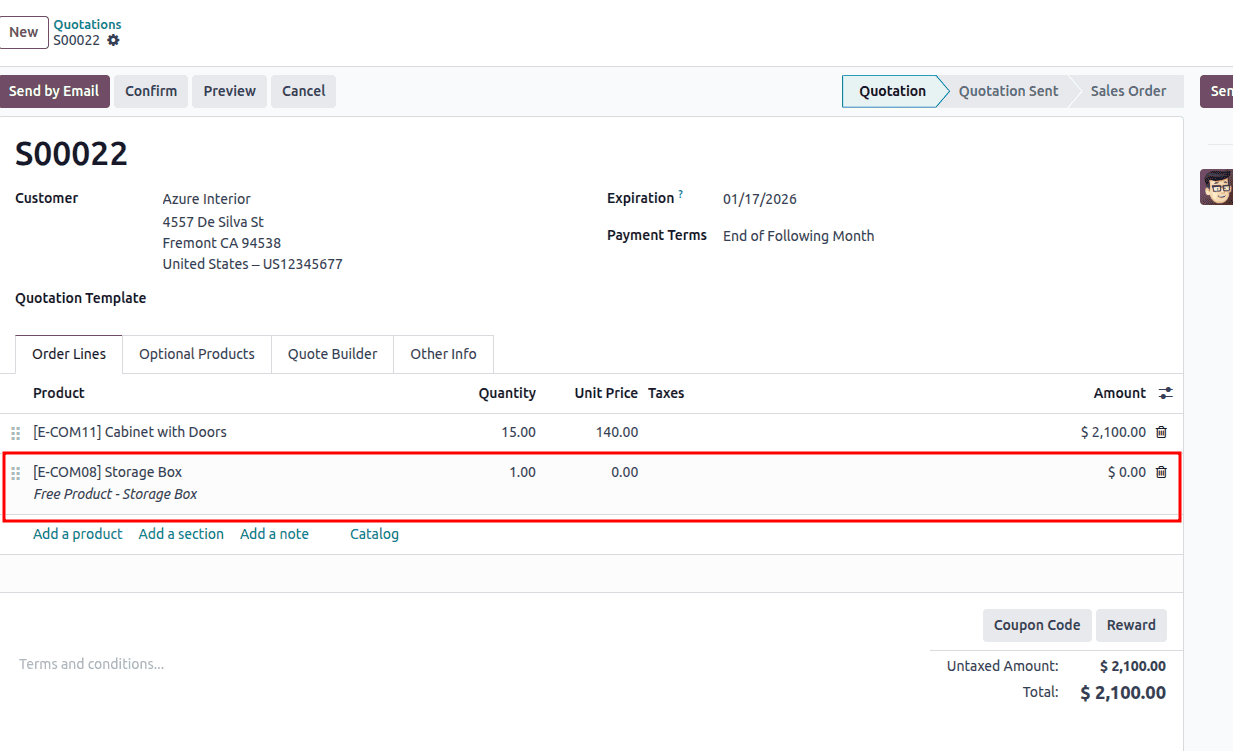
After the selected reward is applied, the promotion is reflected directly in the sales order. The free product [E-COM08] Storage Box is automatically added as a separate order line with a quantity of 1 and a unit price of 0.00, clearly indicating that it is provided at no cost. The line description shows it as a Free Product – Storage Box, distinguishing it from regular sale items. Since the reward item has zero value, it does not affect the untaxed amount or the total order value, while still ensuring the customer receives the promotional benefit.
The Promotion and Coupon programs in Odoo 18 provide businesses with a powerful and flexible way to drive sales, engage customers, and stay competitive in a dynamic market. By enabling targeted discounts, free products, coupon codes, and loyalty-based rewards, Odoo helps organizations design effective marketing strategies across multiple sales channels, including eCommerce, Point of Sale, and Sales Orders. In addition to boosting customer acquisition and retention, these programs offer valuable insights through detailed reporting and analytics, allowing businesses to refine their promotional strategies over time. Overall, Odoo 18’s promotion and coupon features empower companies to optimize revenue, improve inventory management, and deliver a better customer experience with minimal operational effort.
To read more about How to Manage Promotion & Coupon Programs Using Odoo 17 Sales, refer to our blog How to Manage Promotion & Coupon Programs Using Odoo 17 Sales.