When people use Odoo, they usually focus on forms, invoices, sales orders, inventory, or reports. But behind every click in the Odoo interface, a large number of SQL queries are executed inside PostgreSQL. Understanding how Odoo communicates with PostgreSQL is important for debugging slow systems, fixing locking issues, solving concurrent update errors, and improving production performance.
In this article, we will analyze real PostgreSQL logs captured from an Odoo environment and explain how Odoo executes queries, why it uses transactions, what REPEATABLE READ means etc.
Why This Analysis Matters
Odoo is an ERP system where multiple users work at the same time. In production environments:
- Many users create and update records simultaneously
- Background workers run scheduled jobs
- Inventory operations happen in parallel
- Accounting entries are posted continuously
- API integrations may also write data
Because of this, Odoo depends heavily on PostgreSQL transaction management.
Step 1: Enable Query Logging in PostgreSQL
To inspect what Odoo sends to PostgreSQL, query logging was enabled.
First, check the current setting:
SHOW log_statement;
Output:
none
This means PostgreSQL is not logging all SQL statements.
Now check the configuration file:
SHOW config_file;
Output:
/etc/postgresql/17/main/postgresql.conf
Edit the configuration:
sudo nano /etc/postgresql/17/main/postgresql.conf
Change:
log_statement = 'all'
Restart PostgreSQL:
sudo systemctl restart postgresql
Now monitor the logs:
tail -f /var/log/postgresql/postgresql-17-main.log
PostgreSQL Cluster Information
pg_lsclusters
Output:
17 main 5433 online postgres /var/lib/postgresql/17/main /var/log/postgresql/postgresql-17-main.log
This confirms:
- PostgreSQL version: 17
- Cluster name: main
- Port: 5433
- Log file path available
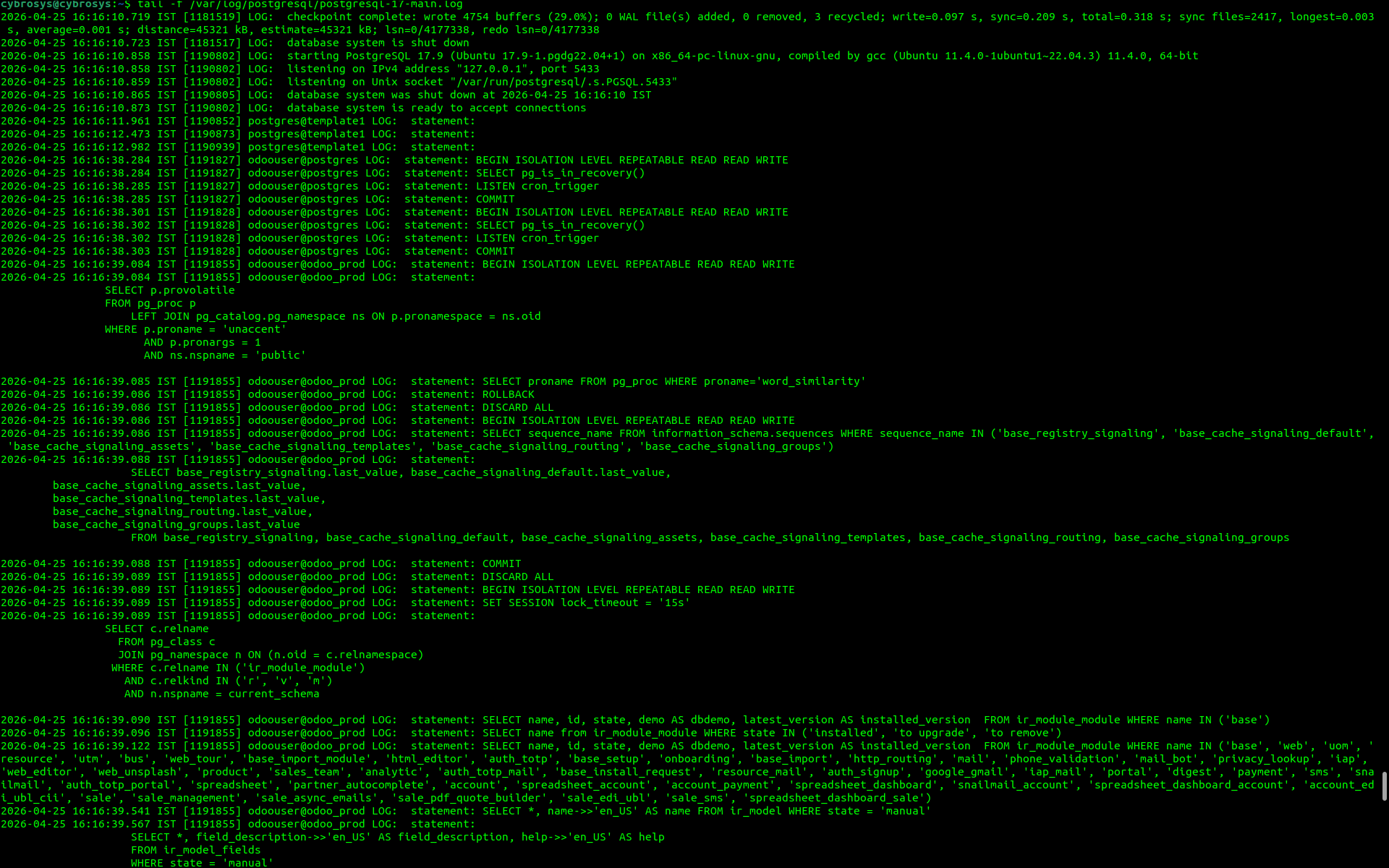
Result from the log of postgres after enabling log_statements as all
Important Observation: Odoo Executes Queries Inside Transactions
One of the most important findings from the postgres log is this:
BEGIN ISOLATION LEVEL REPEATABLE READ READ WRITE
This appears repeatedly.
That means Odoo does not run business queries randomly one by one. It groups operations inside database transactions.
A transaction guarantees:
- Atomicity
- Consistency
- Isolation
- Durability
If something fails, Odoo can roll back changes safely.
Real Log Example from Odoo Startup
From the logs:
2026-04-25 16:16:38.284 IST statement: BEGIN ISOLATION LEVEL REPEATABLE READ READ WRITE
2026-04-25 16:16:38.284 IST statement: SELECT pg_is_in_recovery()
2026-04-25 16:16:38.285 IST statement: LISTEN cron_trigger
2026-04-25 16:16:38.285 IST statement: COMMIT
Let us understand this step by step.
BEGIN
Odoo starts a transaction.
REPEATABLE READ
The transaction uses a strict isolation level.
SELECT pg_is_in_recovery()
Odoo checks whether PostgreSQL is running as a standby server or primary server.
LISTEN cron_trigger
Odoo subscribes to PostgreSQL notifications for scheduled jobs or background triggers.
COMMIT
Transaction completes successfully.
What Is REPEATABLE READ in PostgreSQL?
REPEATABLE READ is a transaction isolation level.
It ensures that once a transaction reads data, repeated reads inside the same transaction will see the same snapshot.
That means another transaction may commit changes in the background, but your current transaction continues seeing its original consistent view.
Example of Repeatable Read
Assume row quantity is:
stock = 10
Transaction A Starts
BEGIN ISOLATION LEVEL REPEATABLE READ;
SELECT stock FROM product WHERE id = 1;
Result:
10
Transaction B Updates Same Row
UPDATE product SET stock = 5 WHERE id = 1;
COMMIT;
Transaction A Reads Again
SELECT stock FROM product WHERE id = 1;
Still sees:
10
Because Transaction A works on its original snapshot.
This prevents inconsistent reads.
Why Odoo Uses Repeatable Read
Odoo handles complex business workflows:
- Confirm sales order
- Reserve stock
- Validate picking
- Create invoice
- Update accounting entries
- Trigger automated actions
If data changes halfway through the workflow, business logic may break.
So Odoo uses REPEATABLE READ to keep data consistent during execution.
Odoo Checks PostgreSQL Extensions and Functions
From the logs :
SELECT p.provolatile
FROM pg_proc p
LEFT JOIN pg_catalog.pg_namespace ns ON p.pronamespace = ns.oid
WHERE p.proname = 'unaccent'
AND p.pronargs = 1
AND ns.nspname = 'public';
This means Odoo checks whether the unaccent extension exists.
Why?
Because Odoo uses text search features where accents should be ignored.
Example:
- café = cafe
- résumé = resume
Useful for:
- Smart search
- Fuzzy matching
- Better partner/product lookup
In the source code of odoo, you can see this line
cr.execute("CREATE EXTENSION IF NOT EXISTS unaccent")Why Odoo Uses ROLLBACK and DISCARD ALL
This is normal.
ROLLBACK
If Odoo used a temporary transaction for checks, it can roll back safely.
DISCARD ALL
This resets session state:
- Temporary tables
- Prepared statements
- Session settings
- Cached resources
This is useful when reusing database connections.
Odoo Uses Sequences for Registry and Cache Signaling
From the postgres logs:
SELECT sequence_name
FROM information_schema.sequences
WHERE sequence_name IN (
'base_registry_signaling',
'base_cache_signaling_default',
'base_cache_signaling_assets'
...)
Then:
SELECT base_registry_signaling.last_value, ...
FROM base_registry_signaling, ...
This shows Odoo uses PostgreSQL sequences not only for IDs, but also for signaling.
These sequences help detect:
- Registry changes
- Cache invalidation
- Shared state updates between workers
In multi-worker environments, this is very important.
Odoo Loads Installed Modules
From the postges logs:
SELECT name, id, state, demo AS dbdemo, latest_version AS installed_version
FROM ir_module_module
WHERE name IN ('base');
And later:
SELECT name from ir_module_module WHERE state IN ('installed', 'to upgrade', 'to remove');This means Odoo checks which modules are installed and whether upgrades are pending.
This happens during startup and registry loading.
Odoo ORM Generates SQL Automatically
From the postgres log:
SELECT "ir_module_module"."id", "ir_module_module"."name"
FROM "ir_module_module"
WHERE (
("ir_module_module"."state" = 'installed')
AND ("ir_module_module"."imported" IS NULL
OR "ir_module_module"."imported" = FALSE)
)
ORDER BY "ir_module_module"."name"
This is ORM-generated SQL.
Developers write Python code like:
self.env['ir.module.module'].search(...)
Odoo converts it into SQL automatically.
Multiple Transactions in a Very Short Time
In a very short time, check how many transactions are executed in postgres by using this command
cat /var/log/postgresql/postgresql-17-main.log | grep "BEGIN ISOLATION LEVEL REPEATABLE READ READ WRITE"
The output is like this
cybrosys@cybrosys:~$ cat /var/log/postgresql/postgresql-17-main.log | grep "BEGIN ISOLATION LEVEL REPEATABLE READ READ WRITE"
2026-04-25 16:16:38.284 IST [1191827] odoouser@postgres LOG:  statement: BEGIN ISOLATION LEVEL REPEATABLE READ READ WRITE
2026-04-25 16:16:38.301 IST [1191828] odoouser@postgres LOG:  statement: BEGIN ISOLATION LEVEL REPEATABLE READ READ WRITE
2026-04-25 16:16:39.084 IST [1191855] odoouser@odoo_prod LOG:  statement: BEGIN ISOLATION LEVEL REPEATABLE READ READ WRITE
2026-04-25 16:16:39.086 IST [1191855] odoouser@odoo_prod LOG:  statement: BEGIN ISOLATION LEVEL REPEATABLE READ READ WRITE
2026-04-25 16:16:39.089 IST [1191855] odoouser@odoo_prod LOG:  statement: BEGIN ISOLATION LEVEL REPEATABLE READ READ WRITE
2026-04-25 16:16:39.711 IST [1191855] odoouser@odoo_prod LOG:  statement: BEGIN ISOLATION LEVEL REPEATABLE READ READ WRITE
2026-04-25 16:16:39.767 IST [1191855] odoouser@odoo_prod LOG:  statement: BEGIN ISOLATION LEVEL REPEATABLE READ READ WRITE
2026-04-25 16:16:39.793 IST [1191855] odoouser@odoo_prod LOG:  statement: BEGIN ISOLATION LEVEL REPEATABLE READ READ WRITE
2026-04-25 16:16:39.796 IST [1191855] odoouser@odoo_prod LOG:  statement: BEGIN ISOLATION LEVEL REPEATABLE READ READ WRITE
2026-04-25 16:16:40.089 IST [1191855] odoouser@odoo_prod LOG:  statement: BEGIN ISOLATION LEVEL REPEATABLE READ READ WRITE
2026-04-25 16:16:40.091 IST [1191855] odoouser@odoo_prod LOG:  statement: BEGIN ISOLATION LEVEL REPEATABLE READ READ WRITE
2026-04-25 16:16:40.136 IST [1191887] odoouser@postgres LOG:  statement: BEGIN ISOLATION LEVEL REPEATABLE READ READ WRITE
2026-04-25 16:16:40.138 IST [1191855] odoouser@odoo_prod LOG:  statement: BEGIN ISOLATION LEVEL REPEATABLE READ READ WRITE
2026-04-25 16:16:40.294 IST [1191855] odoouser@odoo_prod LOG:  statement: BEGIN ISOLATION LEVEL REPEATABLE READ READ WRITE
2026-04-25 16:16:40.296 IST [1191855] odoouser@odoo_prod LOG:  statement: BEGIN ISOLATION LEVEL REPEATABLE READ READ WRITE
Now check the total count of transactions like this
cybrosys@cybrosys:~$ grep -c "BEGIN ISOLATION LEVEL REPEATABLE READ READ WRITE" /var/log/postgresql/postgresql-17-main.log
Result :
285
This means:
- Odoo opens many short transactions
- Each request may create multiple database interactions
- Workers operate independently
- PostgreSQL handles many concurrent sessions
This is normal in active production systems.
What This Reveals About Odoo Architecture
From these logs, we learn that Odoo is not a simple CRUD application.
It uses PostgreSQL deeply for:
- Transaction isolation
- Row locking
- Metadata storage
- Module registry
- Cache signaling
- Worker communication
- Safe concurrency control
PostgreSQL is a core part of Odoo architecture.
- Odoo executes most operations inside transactions.
- It uses REPEATABLE READ for consistency.
- PostgreSQL logs are powerful for debugging Odoo internals.
- Odoo queries system catalogs like pg_proc, pg_class, and sequences.
- PostgreSQL prevents data corruption through locking and transaction rules.
If you want to understand Odoo deeply, study PostgreSQL logs. Every click in Odoo becomes SQL. Every workflow becomes a transaction. Every concurrency issue becomes a database story.
When you read the logs carefully, you stop seeing Odoo as only Python code. You begin to see the real engine underneath: PostgreSQL managing consistency, concurrency, and reliability for the entire ERP system.
That is where real performance tuning and real debugging begin.