Database security is one of the most critical responsibilities of a PostgreSQL administrator. Misconfigured authentication, weak logging, or incorrect permissions can expose sensitive data or allow unauthorized access. The pgdsat (PostgreSQL Database Security Assessment Tool) helps administrators audit their PostgreSQL clusters by analyzing configuration settings and comparing them against security best practices and CIS benchmark recommendations.
This guide explains how to install the pgdsat tool, generate a report, and understand each security category included in the assessment. All examples are based on a real environment where multiple PostgreSQL clusters and Odoo-related databases are analyzed.
What is pgdsat
pgdsat is a command-line security auditing tool designed to analyze PostgreSQL clusters. It collects configuration data, inspects runtime parameters, and produces an HTML report describing potential risks and improvements.
The report is divided into eight major categories:
- Installation and Patches
- Directory and File Permissions
- Logging and Auditing
- User Access and Authorization
- Connection and Login
- PostgreSQL Settings
- Replication
- Special Configuration Considerations
Each category highlights warnings, critical issues, and successful checks.
Installing pgdsat
Below are the installation steps used in the example environment.
git clone https://github.com/HexaCluster/pgdsat.git
cd pgdsat
generates the Makefile
perl Makefile.PL
Build and install this project
make
sudo make install
Verify installation:
pgdsat v1.2
You get result like this
pgdsat v1.2
Explore more about this pgdsat tool
pgdsat --help
You get results like this. Each option you can use with the pgdsat tool, and you can see its description for better understanding
Usage: pgdsat [options]
    PostgreSQL Database Security Assessment Tool.
Options:
    -a | --allow   : database to include into the report in parts 4.3 to 4.5.
                     Can be used multiple time and regexp are supported.
    -d | --database: name of the database to connect to PostgreSQL.
    -D | --pgdata  : path to the PostgreSQL cluster PGDATA to analyze.
    -e | --exclude : database to exclude from the report in parts 4.3 to 4.5.
                     Can be used multiple time and regexp are supported.
    -f | --format  : output format, can be: text or html. Default: html.
    -h | --host    : PostgreSQL serveur ip address if not listening on localhost
    -l | --lang    : language used for the output (en_US, fr_FR, zh_CN). Default: en_US
    -o | --output  : output file where to write the report. Default stdout.
    -p | --port    : port where PostgreSQL is listening, default: 5432.
    -P | --psql    : full path to the psql command if not found in PATH.
    -r | --remove  : check to remove from the report, it can be used multiple
                     time. The value can be the number of a check or a regexp.
    -T | --title   : set title to use to differentiate the reports. Default is
                     to use "on `hostname`".
    -U | --user    : PostgreSQL user to use with the psql command.
    -v | --version : show version of pgdsat and exist.
    -V | --cluster : PostgreSQL Cluster version, ex: 15.4.
    --help         : show usage and exit.
    --no-pg-version-check : disable check for PostgreSQL minor versions. Useful
                     when connecting to Internet is not permitted.
Example:
    pgdsat -U postgres -h localhost -d postgres -o report.html
or
    pgdsat -U postgres -h localhost -d postgres -f html > report.html
If you have several PostgreSQL cluster installed you must give the running
version that you want to test:
    pgdsat -U postgres -h localhost -d postgres -f html -V 15.4 > report.html
If you want, for example, to remove all checks of section 1 from the report:
    pgdsat -U postgres -h localhost -d postgres -V 15.4 -o report.html -r '1.*'
Example command used to generate the report:
sudo pgdsat -U postgres -h localhost -d odoo_production -p 5433 \
-D /var/lib/postgresql/18/main/ -o odoo_production_db.html
This command connects to the database odoo_production, inspects the PGDATA directory, and generates an HTML security assessment report.
Understanding the pgdsat Report Structure
The tool evaluates PostgreSQL security through several categories. Each section focuses on different aspects of system hardening and operational safety.
This is the main interface of this report generated by the pgdsat tool
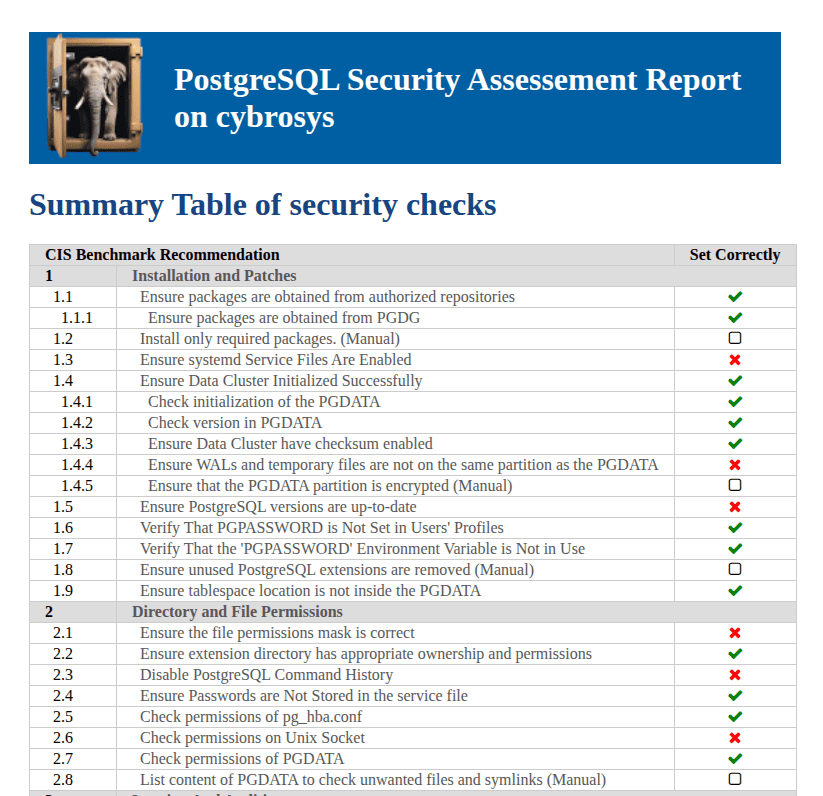
1. Installation and Patches
This section verifies how PostgreSQL is installed and maintained.
Security Checks Included
- Packages obtained from authorized repositories (PGDG)
- Installed packages and extensions
- Systemd service configuration
- Data cluster initialization
- Checksums enabled
- WAL and temporary file placement
- Disk encryption status
- PostgreSQL version updates
- Environment variables security
- Tablespace location
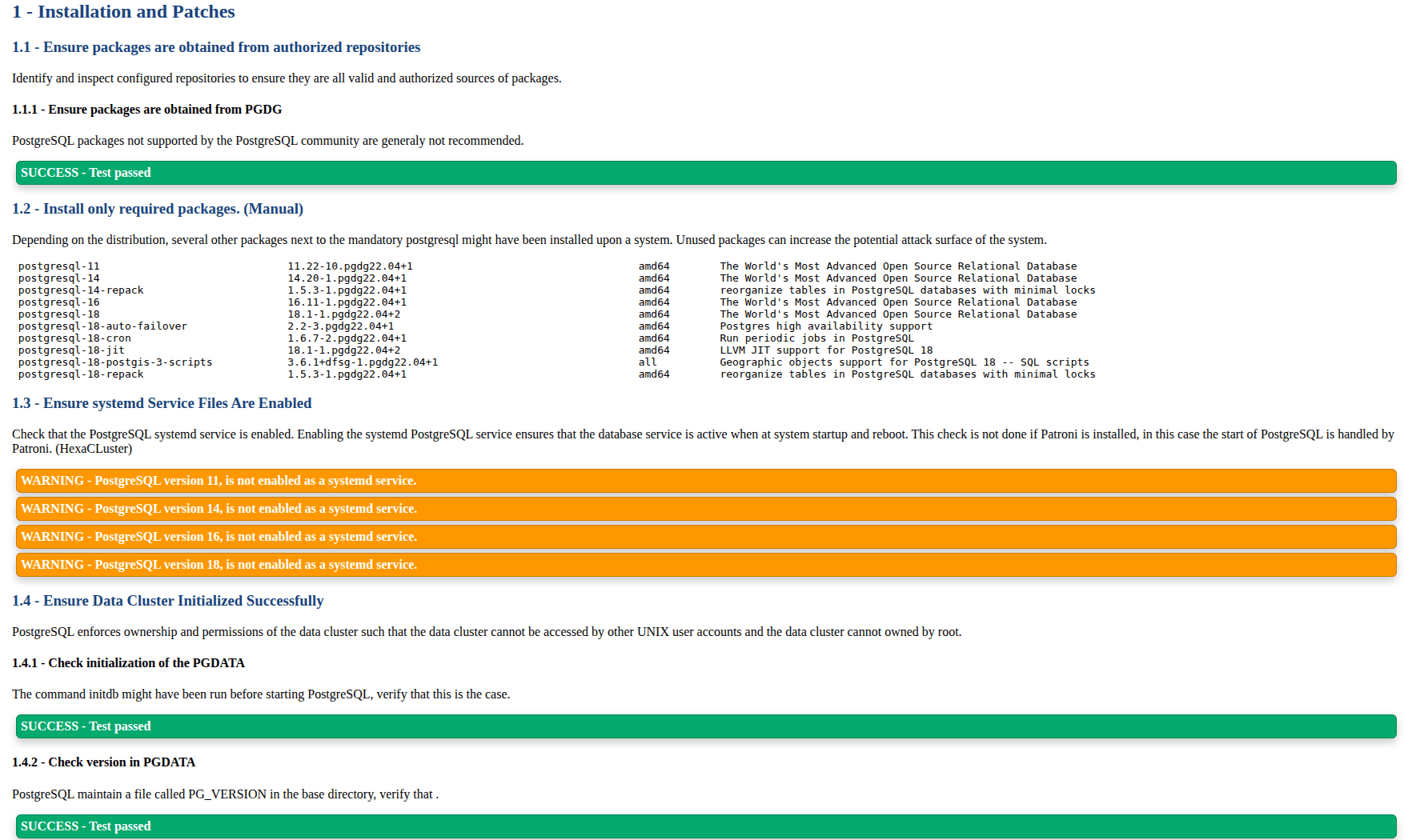
Proper installation sources ensure software integrity. Outdated versions introduce known vulnerabilities. Separating WAL files improves both performance and data safety. Encryption protects disks if hardware is stolen.
This section helps administrators:
- Detect unsupported PostgreSQL versions
- Reduce attack surface from unused packages
- Confirm secure cluster initialization
2. Directory and File Permissions
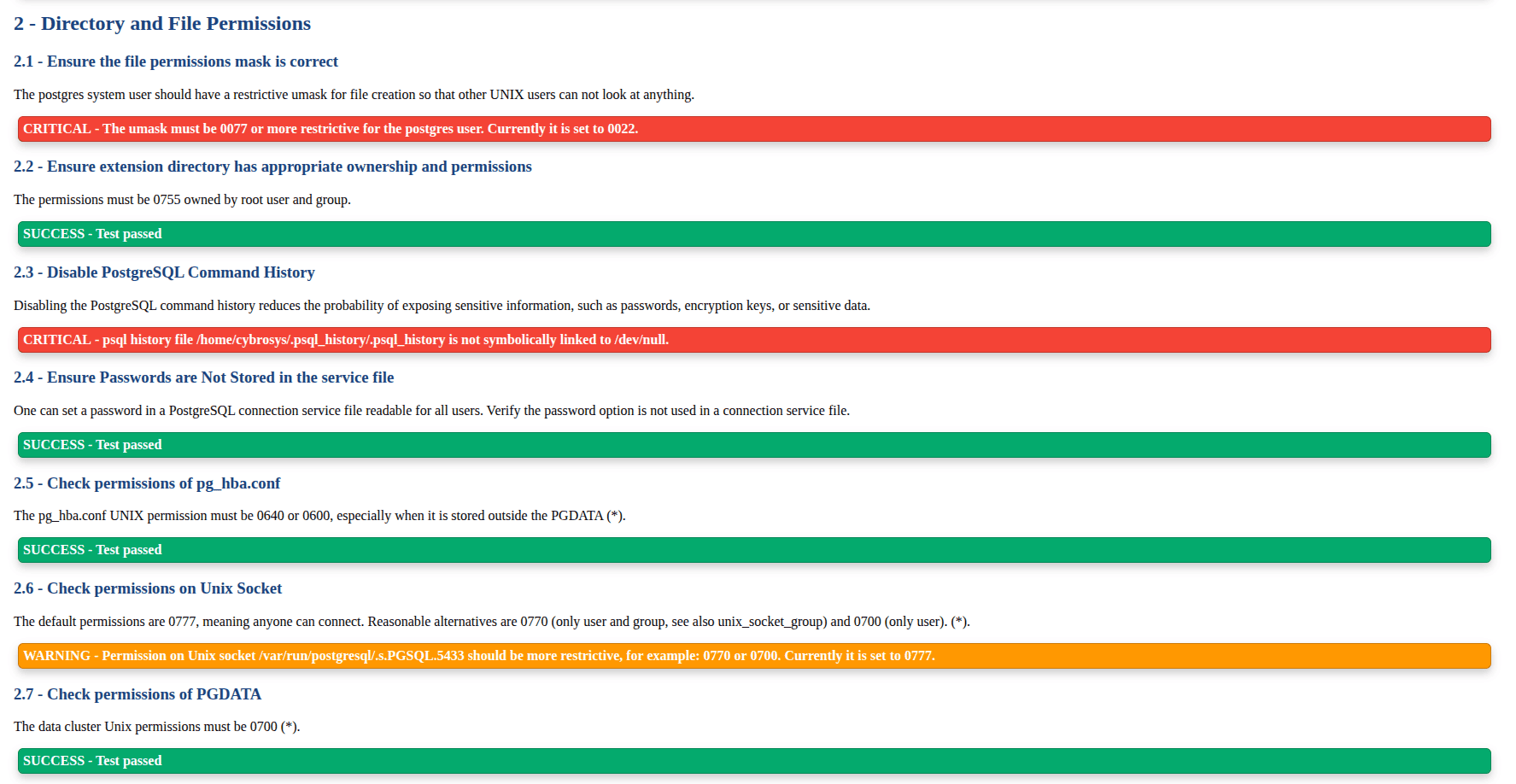
This category inspects filesystem security.
Security Checks Included
- umask configuration
- pg_hba.conf permissions
- Extension directory ownership
- Unix socket permissions
- PGDATA directory access control
- Command history exposure
- List content of PGDATA
Incorrect permissions allow unauthorized OS users to read or modify database files. A permissive socket allows anyone on the system to attempt connections.
This section helps administrators:
- Prevent data leakage through file access
- Restrict database connection points
- Remove accidental exposure through shell history
3. Logging and Auditing
Logging is essential for incident analysis and compliance.
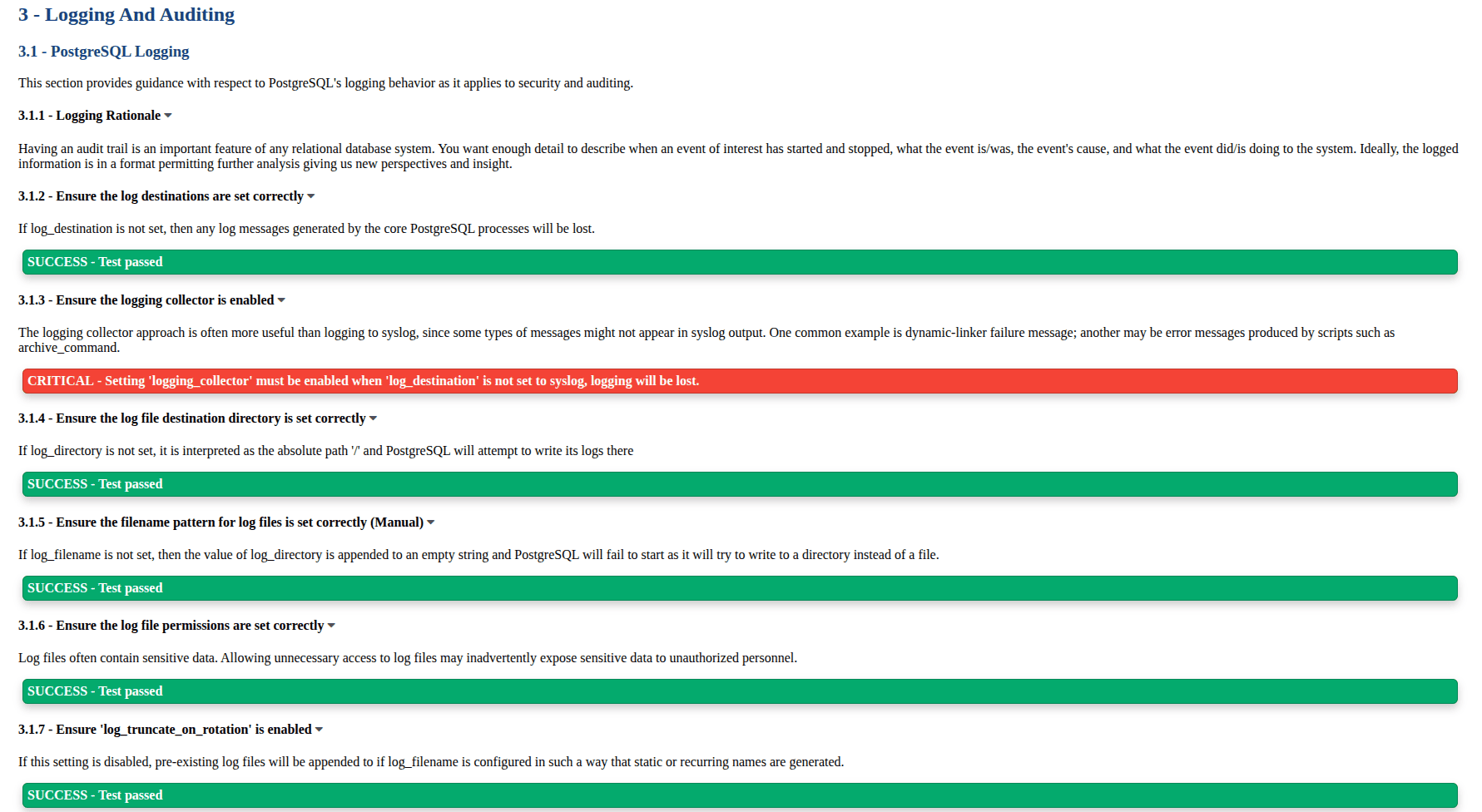
Security Checks Included
- logging_collector configuration
- log destinations and directories
- log rotation settings
- debug logging parameters
- connection and disconnection logs
- log_line_prefix format
- timezone settings
- pgAudit extension usage
Without proper logging, attacks cannot be traced. Detailed logs help identify suspicious behavior, long sessions, or unauthorized queries.
This section helps administrators:
- Improve forensic visibility
- Enable auditing requirements
- Standardize log format for analysis tools
4. User Access and Authorization
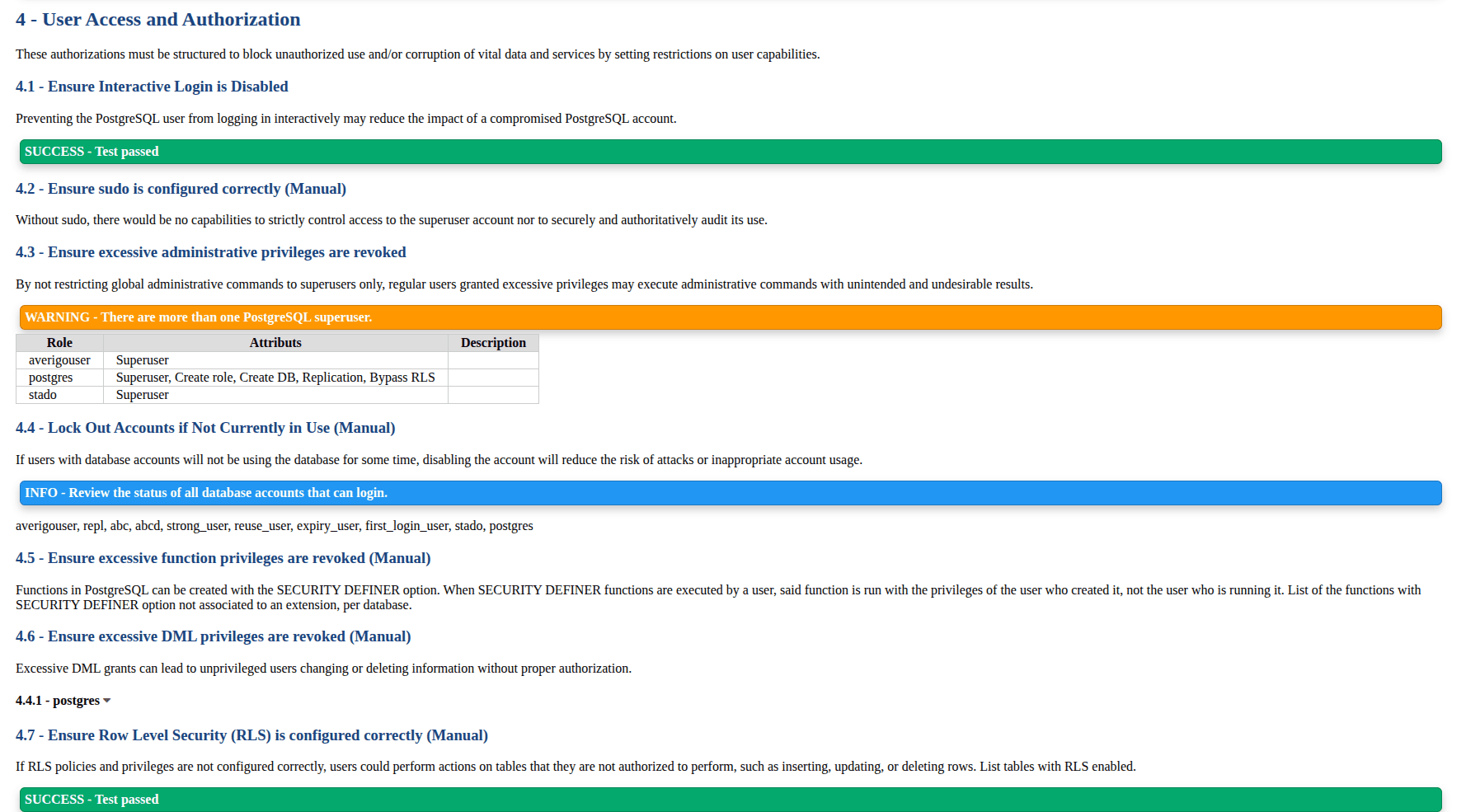
This section evaluates role management and privilege configuration.
Security Checks Included
- Interactive login restrictions
- Excessive superuser roles
- Public schema permissions
- Row Level Security policies
- set_user extension recommendation
- Role privilege audits
Too many superusers increase risk. Limiting privileges reduces damage if an account is compromised. Public schema misuse can allow arbitrary object creation.
This section helps administrators:
- Enforce least privilege access
- Track elevated permissions
- Secure shared schemas
5. Connection and Login
This category focuses on authentication methods and connection rules.
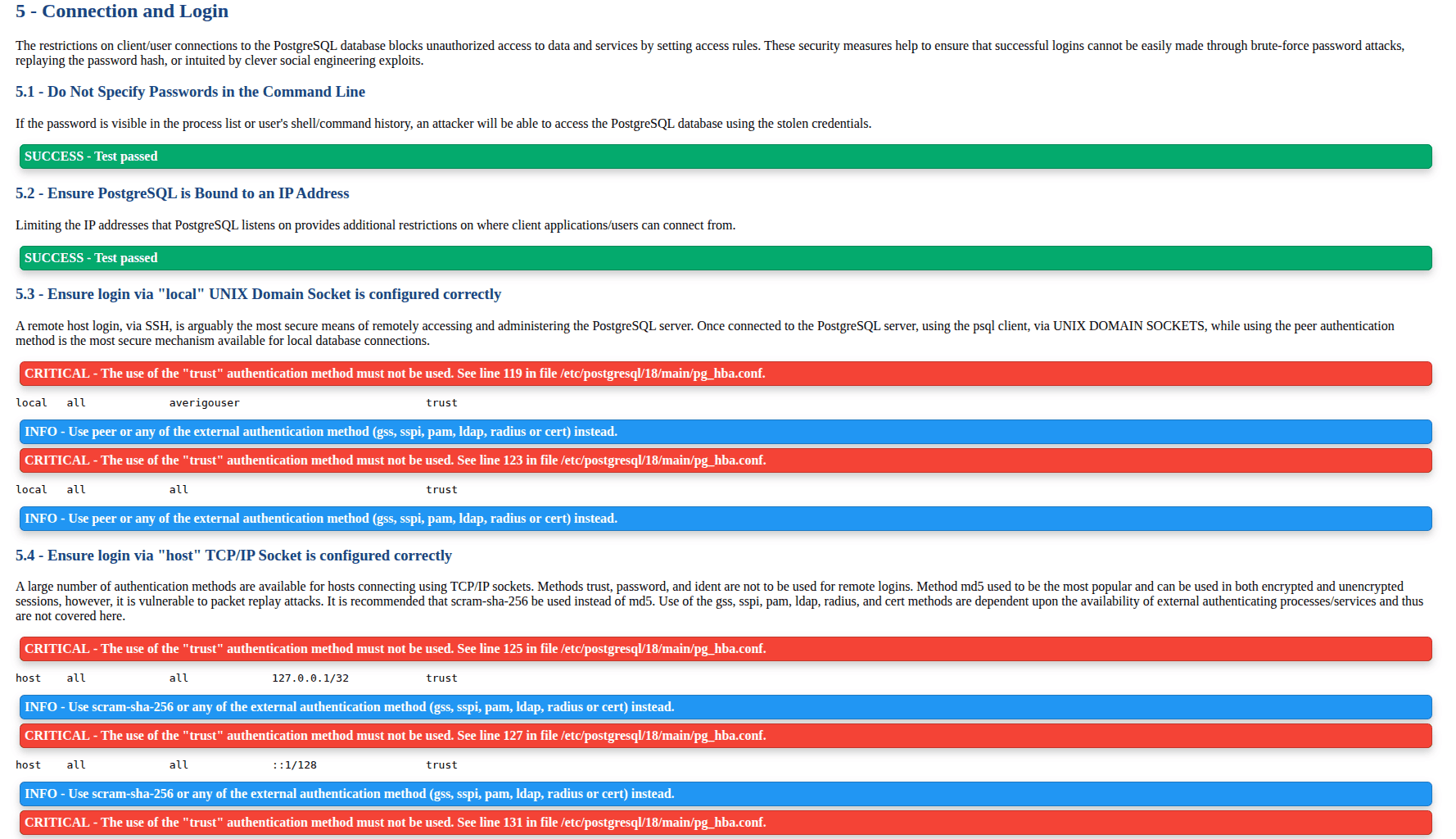
Security Checks Included
- pg_hba.conf authentication methods
- Password encryption settings
- SSL enforcement
- Connection limits per user
- Authentication timeout and delay
- Allowed IP ranges
Using trust authentication bypasses passwords completely. Weak encryption or missing SSL exposes credentials over the network.This section helps administrators such as
- Harden authentication methods
- Enforce secure password hashing
- Limit brute force attacks
6. PostgreSQL Settings
This section audits runtime parameters and configuration risks.
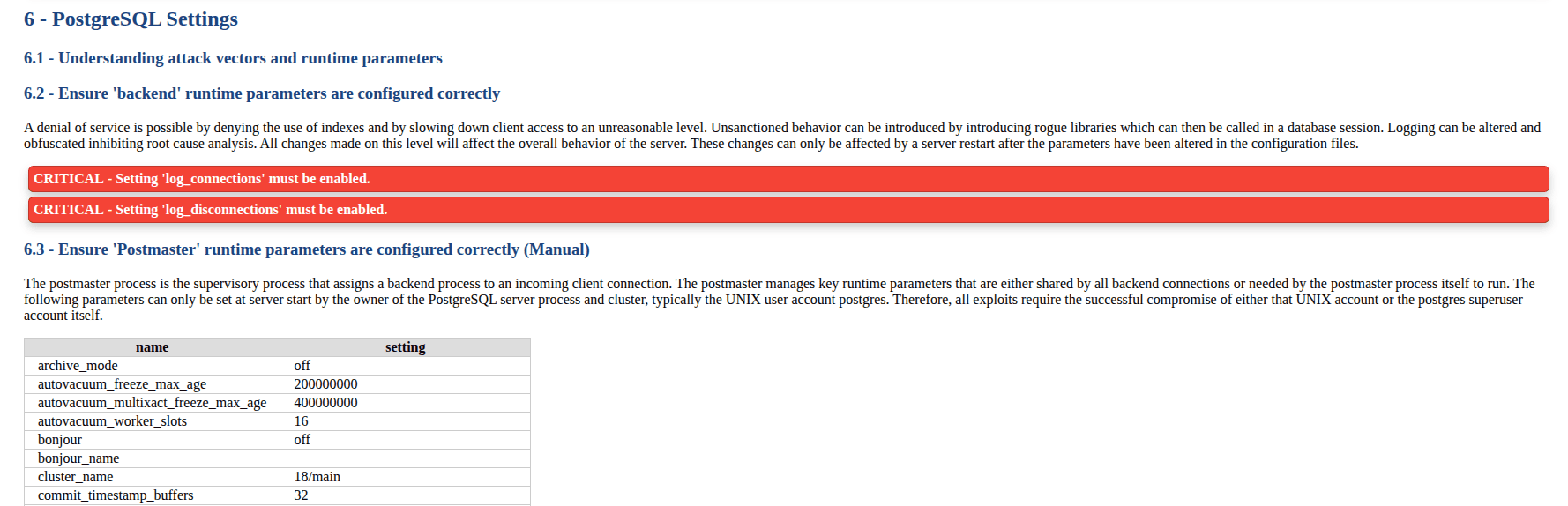
Security Checks Included
- backend parameters
- postmaster parameters
- SIGHUP runtime settings
- superuser-level configuration
- user-level parameters
- FIPS cryptography support
- TLS configuration
- data anonymization extensions
Improper runtime parameters can lead to denial of service or unsafe behavior. TLS misconfiguration exposes data in transit.
This section helps administrators:
- Detect insecure runtime changes
- Ensure encrypted connections
7. Replication
Replication security ensures safe data synchronization between servers.
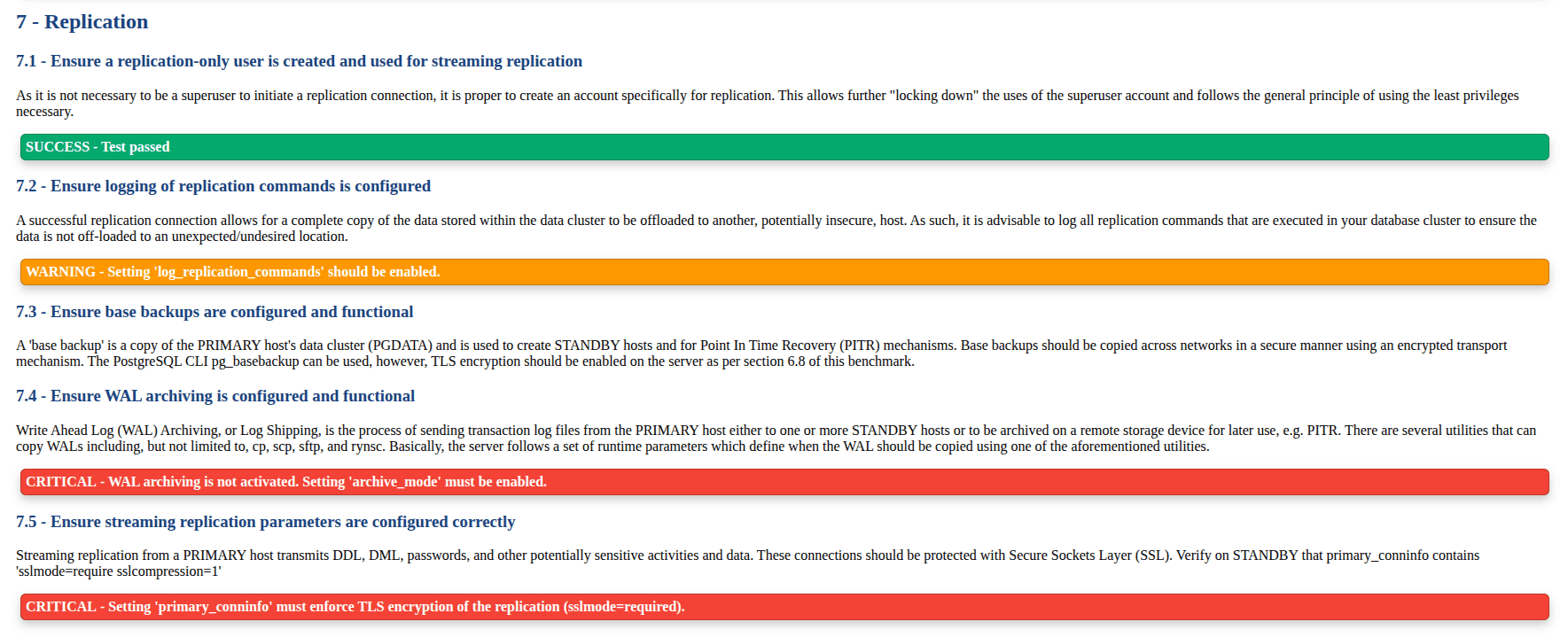
Security Checks Included
- Dedicated replication users
- Replication logging
- Base backup configuration
- WAL archiving
- Streaming replication encryption
Replication streams contain full database data. Without encryption or logging, sensitive information may leak to unauthorized systems.
This section helps administrators:
- Secure replication channels
- Enable disaster recovery readiness
- Monitor data movement
8. Special Configuration Considerations
This section checks optional but recommended enterprise practices.
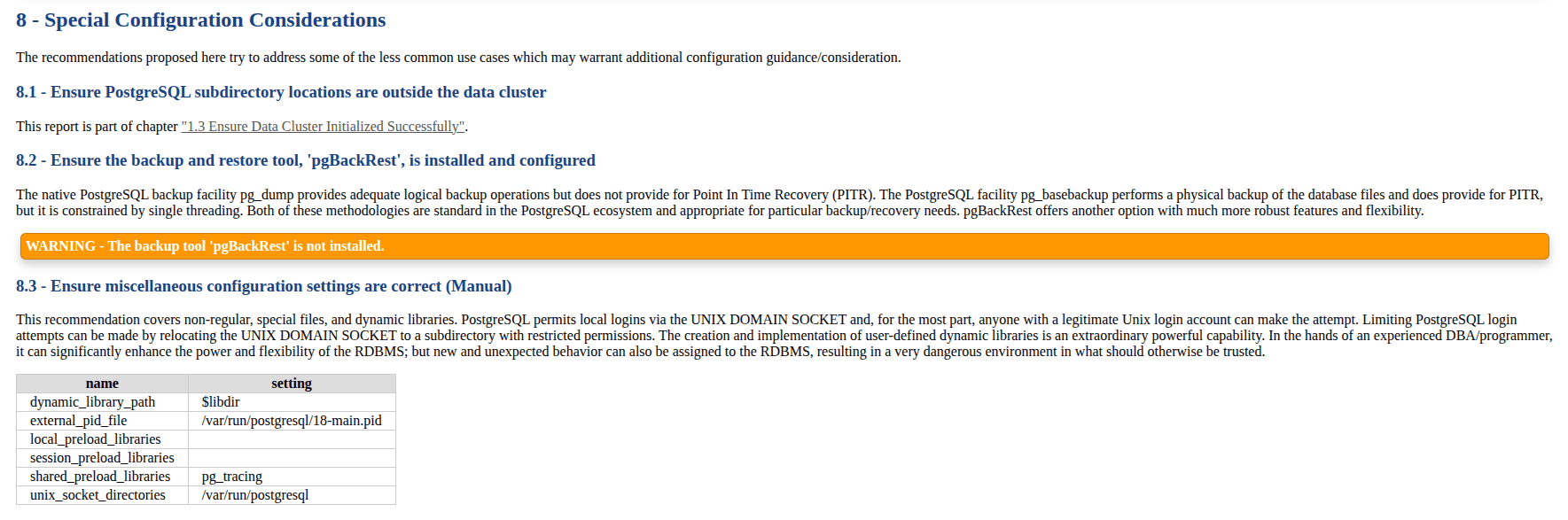
Security Checks Included
- pgBackRest installation
- dynamic library configuration
- unix_socket location
- preload libraries security
Backup automation and controlled library loading prevent data loss and malicious extensions.
This section helps administrators:
- Improve backup strategy
- Maintain controlled runtime environments
Benefits of Using pgdsat for Database Administration
Running pgdsat provides several advantages:
- Centralized security audit in one report
- Quick identification of configuration mistakes
- Guidance aligned with CIS benchmark practices
- Useful for enterprise audits, especially for Odoo-specific databases
In environments managing multiple clusters or versions, the tool highlights outdated installations, unsafe authentication methods, and missing logging configurations.
pgdsat is a practical security auditing tool for PostgreSQL administrators. It analyzes installation methods, permissions, authentication policies, runtime settings, replication configuration, and logging practices. By reviewing each category carefully, administrators can strengthen database security and ensure consistent configuration standards.