Every change made in Postgres is first written to the WAL file (write-ahead log file) before it reaches the actual database files. This mechanism is one of the core reasons for the reliability of PostgreSQL. If the server crashes unexpectedly, PostgreSQL can replay the WAL records during recovery and restore the database to a consistent state.
Although WAL files are primarily intended for crash recovery and replication, they are also extremely useful for database administrators and PostgreSQL developers. By examining WAL records, we can understand how postgres records inserts, updates, deletes, checkpoints, index modifications, and many other internal operations.
We can check the current WAL file’s log sequence number. The ‘lsn’ uniquely identifies a location inside the ‘wal’.
SELECT pg_current_wal_lsn();
Result:
 pg_current_wal_lsn
--------------------
 0/347A6DB0
(1 row)
We can easily get the WAL file name by passing the log sequence number of the WAL file.
SELECT pg_walfile_name(pg_current_wal_lsn());
Result:
     pg_walfile_name
--------------------------
 000000010000000000000034
(1 row)
The folders related to the WAL files actually exist inside the PostgreSQL cluster.
We can see the path of the cluster from psql by using this command.
show data_directory;
Result:
       data_directory
-----------------------------
 /var/lib/postgresql/18/main
(1 row)
We can see all the files related to the postgres inside the cluster.
ls /var/lib/postgresql/18/main/
Result :
base		  global  pg_commit_ts	pg_logical    pg_notify    pg_serial	 pg_stat      pg_subtrans  pg_twophase	pg_wal	 postgresql.auto.conf  postmaster.pid
current_logfiles  log	  pg_dynshmem	pg_multixact  pg_replslot  pg_snapshots  pg_stat_tmp  pg_tblspc    PG_VERSION	pg_xact  postmaster.opts
Here we can see the pg_wal directory, and it stores the WAL files.
Check the contents inside the pg_wal directory.
ls /var/lib/postgresql/18/main/pg_wal/
Result:
000000010000000000000034  000000010000000000000036  000000010000000000000038  00000001000000000000003A	00000001000000000000003C  archive_status
000000010000000000000035  000000010000000000000037  000000010000000000000039  00000001000000000000003B	00000001000000000000003D  summaries
Each WAL file is 16 MB in size.
ls -lh /var/lib/postgresql/18/main/pg_wal/
Result:
total 161M
-rw------- 1 postgres postgres  16M Jul 10 00:03 000000010000000000000034
-rw------- 1 postgres postgres  16M Jul  8 21:21 000000010000000000000035
-rw------- 1 postgres postgres  16M Jul  8 21:19 000000010000000000000036
-rw------- 1 postgres postgres  16M Jul  8 21:21 000000010000000000000037
-rw------- 1 postgres postgres  16M Jul  8 21:21 000000010000000000000038
-rw------- 1 postgres postgres  16M Jul  8 21:21 000000010000000000000039
-rw------- 1 postgres postgres  16M Jul  8 21:21 00000001000000000000003A
-rw------- 1 postgres postgres  16M Jul  8 21:19 00000001000000000000003B
-rw------- 1 postgres postgres  16M Jul  8 22:41 00000001000000000000003C
-rw------- 1 postgres postgres  16M Jul  8 22:41 00000001000000000000003D
drwx------ 2 postgres postgres 4.0K Jul  4 17:04 archive_status
drwx------ 2 postgres postgres 4.0K Jul  4 17:04 summaries
In PostgreSQL, the binaries are actually stored in this path /usr/lib/postgresql/18/bin
Inspect the contents inside this directory.
ls /usr/lib/postgresql/18/bin/
Result:
check_unique_constraint.py  dropdb             oid2name           pgbench           pg_config            pg_ctl      pg_isready      pg_restore      pg_upgrade       postgres   vacuumlo
clusterdb                   dropuser           pg_amcheck         pg_bsd_indent     pg_controldata       pg_dump     pg_receivewal   pg_rewind       pg_verifybackup  psql       vacuum_maintenance.py
createdb                    dump_partition.py  pg_archivecleanup  pg_checksums      pgcopydb             pg_dumpall  pg_recvlogical  pg_test_fsync   pg_waldump       reindexdb
createuser                  initdb             pg_basebackup      pg_combinebackup  pg_createsubscriber  pgindent    pg_resetwal     pg_test_timing  pg_walsummary    vacuumdb
Here we can see the pg_waldump binary file. This binary file can be used to read the contents of the WAL file
/usr/lib/postgresql/18/bin/pg_waldump /var/lib/postgresql/18/main/pg_wal/000000010000000000000034
Result:
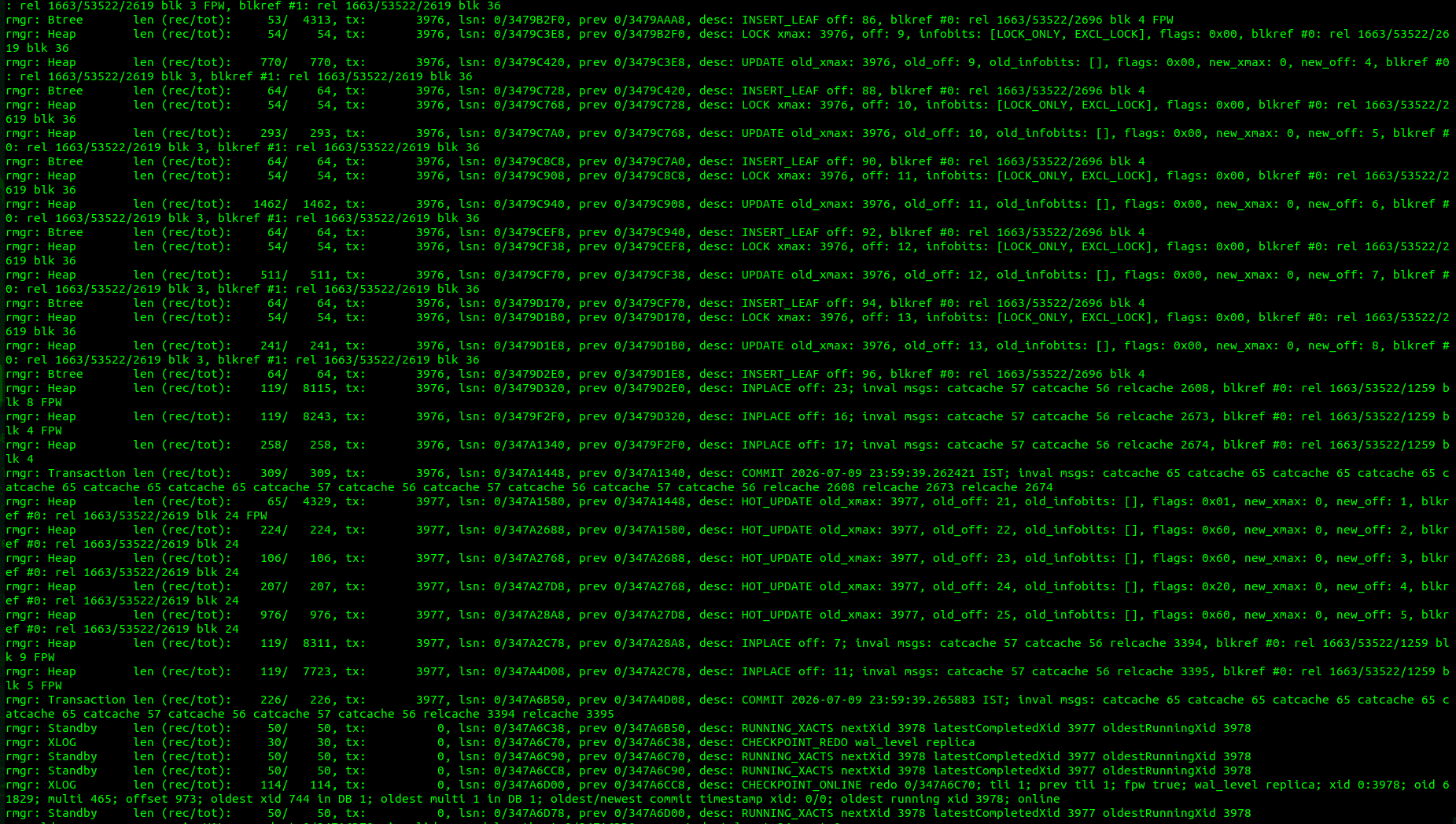
Understanding a WAL Record
A single WAL record contains several fields.
rmgr: Heap
The Resource Manager identifies which PostgreSQL subsystem generated the record.
Common values include:
- Heap is related to the table row operations
- Btree is related to the Index modifications
- Transaction has mainly two types of finalization named commit and rollback
- Heap2 indicates the vacuum operations
- XLOG is related to the checkpoints and WAL switches
- Sequence is related to the Sequence updates
- Database is related to the database creation
- Tablespace in WAL files indicates the tablespace operations
Transaction ID
Every WAL record belongs to a transaction.
If many records have the same transaction ID, they all belong to the same transaction until a COMMIT record appears.
LSN
The Log Sequence Number uniquely identifies the location of this WAL record.
PostgreSQL uses the LSN during:
- crash recovery
- streaming replication
- Backups
- point-in-time recovery
Each WAL record stores a pointer to the previous record.
This creates a linked chain that recovery processes can follow efficiently.
Record Length
The first number is the size of the WAL record itself.
The second number is the total space occupied after adding any backup block images.
Operation Description
This field describes the operation.
Examples include:
- INSERT
- UPDATE
- DELETE
- HOT_UPDATE
- MULTI_INSERT
- LOCK
- TRUNCATE
Tuple Offset
This indicates the tuple slot inside the page.
It is not the row number in the table.
Relation Identifier
rel 1663/53522/53622
The three numbers represent:
- Database OID
- Tablespace OID
- Relation OID
The relation OID can be mapped back to a table.
SELECT oid, relname
FROM pg_class
WHERE oid = 53622;
This identifies which table or index generated the WAL record.
Block Number
blk 550
This is the page number inside the relation file.
Since PostgreSQL pages are usually 8 KB, block 550 corresponds to:
550 × 8192 bytes from the beginning of the relation.
Information that WAL files do not contain
A common misconception is that WAL files store SQL statements.
For example, executing the following:
INSERT INTO employee VALUES (1,'marc demo');
This does not produce a wal record containing that sql command.
Instead, postgresql records the physical effect:
- Which table page changed
- Which tuple slot received the new row
- Which transaction performed the operation
This physical representation is sufficient for recovery and replication.
The write-ahead log is much more than a recovery mechanism. It records the physical history of every modification made to the database. Using pg_waldump, developers can inspect those changes and observe how PostgreSQL transforms SQL operations into low-level page modifications.
Understanding WAL records provides valuable insight into postgres internals, from tuple inserts and index maintenance to checkpoints and transaction commits. Whether you are debugging storage behavior, studying the database engine, or developing postgres extensions, learning to interpret WAL records is an essential skill that reveals how Postgres maintains consistency, durability, and reliability behind the scenes.