Extension management in postgres becomes increasingly challenging as the project evolves. Many applications make use of many different extensions, each having dependencies and version compatibilities. Custom postgres docker image creation normally requires manual installation of all required extensions and rebuilds of the image whenever there is an update on either postgres or any particular extension.
The process of building postgres docker images becomes much simpler due to the appearance of the pglayers project in the postgres community. It is a project that provides docker layers for all postgres extensions, which could be reused while building postgres docker images. Rather than keeping one big image with several dozen compiled extensions, developers have an opportunity to create images by using only the necessary extensions.
At first, we are going to explore the pglayers docker image related to postgres 17. So, before that, check the extensions in the normal system installed postgres version 17.
Update the packages, install postgres 17, and create the postgres cluster.
sudo apt update
sudo apt install postgresql-17
sudo pg_createcluster 17 main
Result :
Creating new PostgreSQL cluster 17/main ...
/usr/lib/postgresql/17/bin/initdb -D /var/lib/postgresql/17/main --auth-local peer --auth-host scram-sha-256 --no-instructions
The files belonging to this database system will be owned by user "postgres".
This user must also own the server process.
The database cluster will be initialized with locale "en_IN".
The default database encoding has accordingly been set to "UTF8".
The default text search configuration will be set to "english".
Data page checksums are disabled.
fixing permissions on existing directory /var/lib/postgresql/17/main ... ok
creating subdirectories ... ok
selecting dynamic shared memory implementation ... posix
selecting default "max_connections" ... 100
selecting default "shared_buffers" ... 128MB
selecting default time zone ... Asia/Kolkata
creating configuration files ... ok
running bootstrap script ... ok
performing post-bootstrap initialization ... ok
syncing data to disk ... ok
Ver Cluster Port Status Owner    Data directory              Log file
17  main    5434 down   postgres /var/lib/postgresql/17/main /var/log/postgresql/postgresql-17-main.log
You can check the status of the postgres clusters by using the command below.
pg_lsclusters
Result :
Ver Cluster Port Status Owner    Data directory               Log file
17  main    5434 down   postgres /var/lib/postgresql/17/main  /var/log/postgresql/postgresql-17-main.log
18  main    5432 online postgres /var/lib/postgresql/18/main  /var/log/postgresql/postgresql-18-main.log
18  main2   5433 online postgres /var/lib/postgresql/18/main2 /var/log/postgresql/postgresql-18-main2.log
Start the postgres 17 cluster
sudo systemctl start postgresql@17-main.service
Check the status.
pg_lsclusters
Result :
Ver Cluster Port Status Owner    Data directory               Log file
17  main    5434 online postgres /var/lib/postgresql/17/main  /var/log/postgresql/postgresql-17-main.log
18  main    5432 online postgres /var/lib/postgresql/18/main  /var/log/postgresql/postgresql-18-main.log
18  main2   5433 online postgres /var/lib/postgresql/18/main2 /var/log/postgresql/postgresql-18-main2.log
Now the postgres version 17 runs on port 5434.
Now enter the normal system, installed postgres version 17, and check its extension count.
sudo su postgres
psql -p 5434
psql (18.4 (Ubuntu 18.4-1.pgdg22.04+1), server 17.10 (Ubuntu 17.10-1.pgdg22.04+1))
Type "help" for help.
postgres=#  select count(*) from pg_available_extensions;
Result :
 count
-------
    45
(1 row)
In the normal postgres version 17, we have only access to the 45 extensions.
Now, let’s try the pglayer docker image of postgres version 17.
sudo docker run -d -e POSTGRES_PASSWORD=secret ghcr.io/pglayers/pglayers-full:17
Check the containers.
sudo docker ps
Result :
CONTAINER ID   IMAGE                               COMMAND                  CREATED          STATUS          PORTS      NAMES
0c3e0890e8d7   ghcr.io/pglayers/pglayers-full:17   "/usr/local/bin/pgla..."   19 seconds ago   Up 19 seconds   5432/tcp   ecstatic_leavitt
Enter the psql terminal inside this container and check the extensions count.
sudo docker exec -it 0c3e0890e8d7 bash
psql -U postgres -d postgres
psql (17.10 (Debian 17.10-1.pgdg13+1))
Type "help" for help.
postgres=# select count(*) from pg_available_extensions;
Result :
 count
-------
   124
(1 row)
Now, we can see that nearly 124 extensions can be used here. Now check the value of the shared_preload_libraries.
show shared_preload_libraries ;
Result :
-[ RECORD 1 ]------------+----------------------------------------------------------------------
shared_preload_libraries | age,anon,credcheck,pg_documentdb_core,pg_documentdb,pg_documentdb_gw_host,pg_cron,pg_duckdb,pg_durable,pg_failover_slots,pg_hint_plan,pg_extension_base,pg_net,pg_partman_bgw,pg_qualstats,pg_squeeze,pg_stat_monitor,pg_textsearch,pg_wait_sampling,pgaudit,pglogical,pgsodium,plprofiler,timescaledb
This parameter lists the extensions that are loaded automatically when the PostgreSQL server starts. In the pglayers image, several commonly used extensions such as pg_cron, pg_partman, pglogical, pgaudit, timescaledb, and pg_stat_monitor are already configured, making them ready to use immediately after the container.
Now, check the pglayer docker image of postgres version 18.
Creates and starts a new container based on the pglayer docker image.
sudo docker run -d -e POSTGRES_PASSWORD=secret ghcr.io/pglayers/pglayers-full:18
Check the container.
sudo docker ps
Result :
CONTAINER ID   IMAGE                               COMMAND                  CREATED         STATUS         PORTS      NAMES
18f7f9773dbf   ghcr.io/pglayers/pglayers-full:18   "/usr/local/bin/pgla..."   9 seconds ago   Up 8 seconds   5432/tcp   stoic_benz
0c3e0890e8d7   ghcr.io/pglayers/pglayers-full:17   "/usr/local/bin/pgla..."   3 hours ago     Up 3 hours     5432/tcp   ecstatic_leavitt
Now, enter the psql terminal of this new container and check the count of this extension.
sudo docker exec -it 18f7f9773dbf bash
psql -U postgres -d postgres
psql (18.4 (Debian 18.4-1.pgdg13+1))
Type "help" for help.
select version();
                                                      version
--------------------------------------------------------------------------------------------------------------------
 PostgreSQL 18.4 (Debian 18.4-1.pgdg13+1) on x86_64-pc-linux-gnu, compiled by gcc (Debian 14.2.0-19) 14.2.0, 64-bit
(1 row)
select count(*) from pg_available_extensions;
Result :
 count
-------
   125
(1 row)
The extension exists in the postgres 17 pglayers image and not in postgres 18 pglayer image is pg_logicalinspect.
pg_logicalinspect is a postgres extension that inspects and analyzes logical decoding data. It is mainly intended for debugging, development, and understanding logical replication, rather than for everyday database administration. This extension has newly come in postgres version 18.
Check the metadata of this extension from postgres.
select * from pg_available_extensions where name = 'pg_logicalinspect';
Result :
       name        | default_version | installed_version |                     comment
-------------------+-----------------+-------------------+--------------------------------------------------
 pg_logicalinspect | 1.0             | 1.0               | functions to inspect logical decoding components
(1 row)
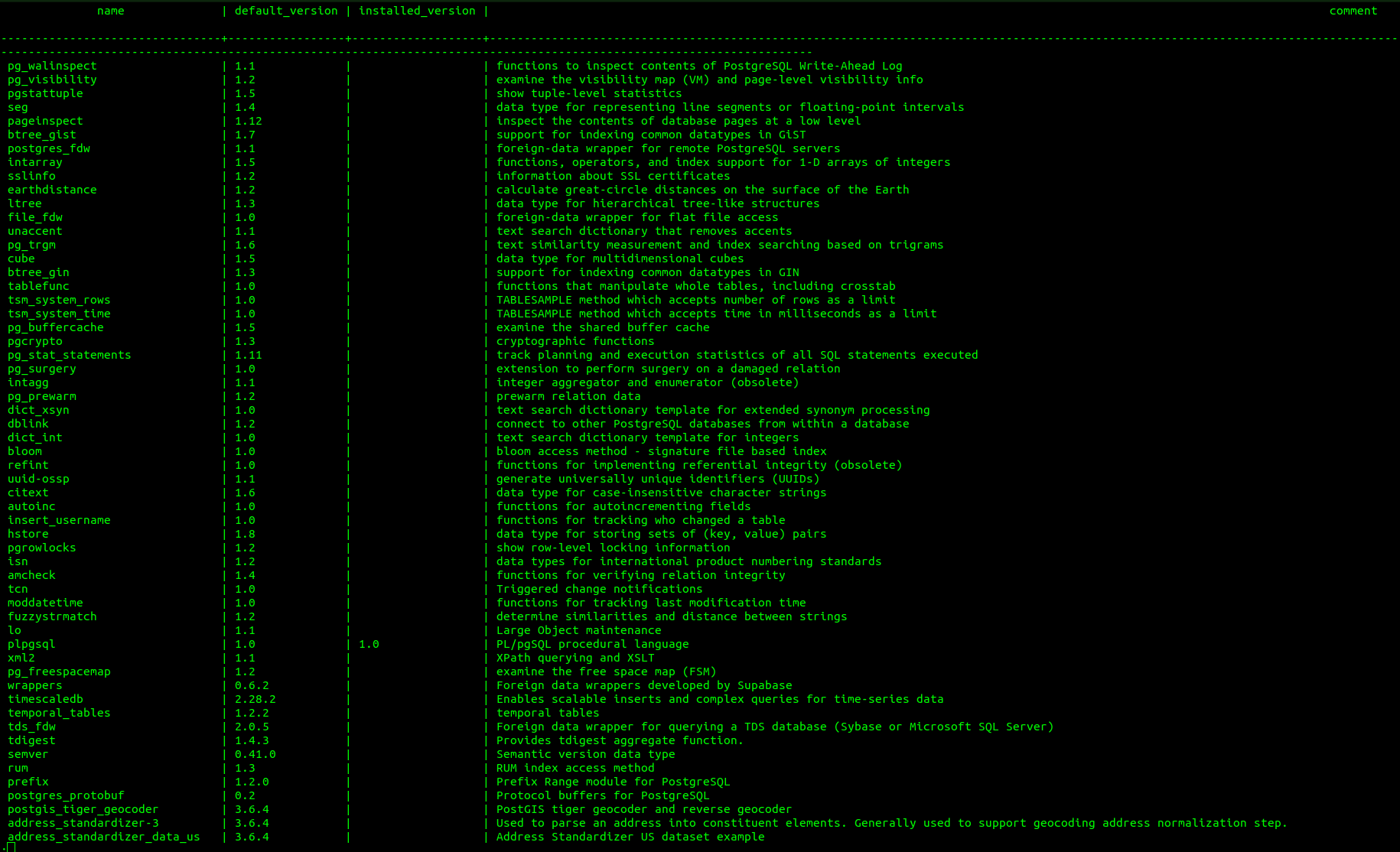
Now, check the available extensions inside the psql terminal of pglayer docker image.
select * from pg_available_extensions;
Result :
The use of PostgreSQL extensions is quite difficult, especially when you have multiple projects that require different extensions. Here in the blog, we looked at an installation of PostgreSQL 17 and then compared it with the pglayers docker images of PostgreSQL 17 and 18.
We discovered that when a basic PostgreSQL 17 is installed, it only has 45 available extensions. However, PostgreSQL 17 pglayers image offers many more. 124 Extensions. If PostgreSQL 18 pglayers image is used, there would be more extensions available as well. 125 Extensions. This is due to the fact that the postgres 18 pglayers image provides the pg_logicalinspect extension.
Pglayers usage allows getting access to numerous postgres extensions without installing them one by one manually. Since all the necessary extensions are pre-installed, it becomes possible to start using the scheduling, partitioning, and monitoring features right after starting the container. PostgreSQL extensions are very helpful. They are ready to use right away.
Some of the PostgreSQL extensions that are really useful are:
- postgis - This adds data types and GIS functions to PostgreSQL.
- pg_cron - This lets you schedule SQL jobs directly inside PostgreSQL.
- pg_partman - This automates partition creation and maintenance for PostgreSQL.
- pgvector - This supports vector data types for AI and search workloads in PostgreSQL.
- timescaledb - This optimizes PostgreSQL for time-series data and analytics.
In conclusion, pglayers can be considered an option for developers, database managers, and even people who deal with postgresql extensions. This way, it becomes easier to configure your working environment, saves time spent on maintenance, and provides a platform for exploring all postgres extensions available. PostgreSQL extensions play a crucial role in postgresql capabilities, and pglayers simplifies the process of using them.