While exploring the PostgreSQL source code, we recently came across an interesting command-line flag:
postgres --describe-config
This option is not commonly used by regular PostgreSQL users or DBAs, yet it provides deep insight into PostgreSQL’s internal configuration system.
This discovery came directly from PostgreSQL’s backend source:
src/backend/main/main.c
Inside main() we can see:
/*
 * In addition to the above, we allow "--describe-config" and "-C var"
 * to be called by root.  This is reasonably safe since these are
 * read-only activities.
 */
if (strcmp(argv[1], "--describe-config") == 0)
    do_check_root = false;
This tells us something important:
PostgreSQL explicitly allows --describe-config to be executed even as root because it is a read-only operation.
That design choice already hints at its real purpose.
What --describe-config actually does
When you run:
/usr/lib/postgresql/18/bin/postgres --describe-config
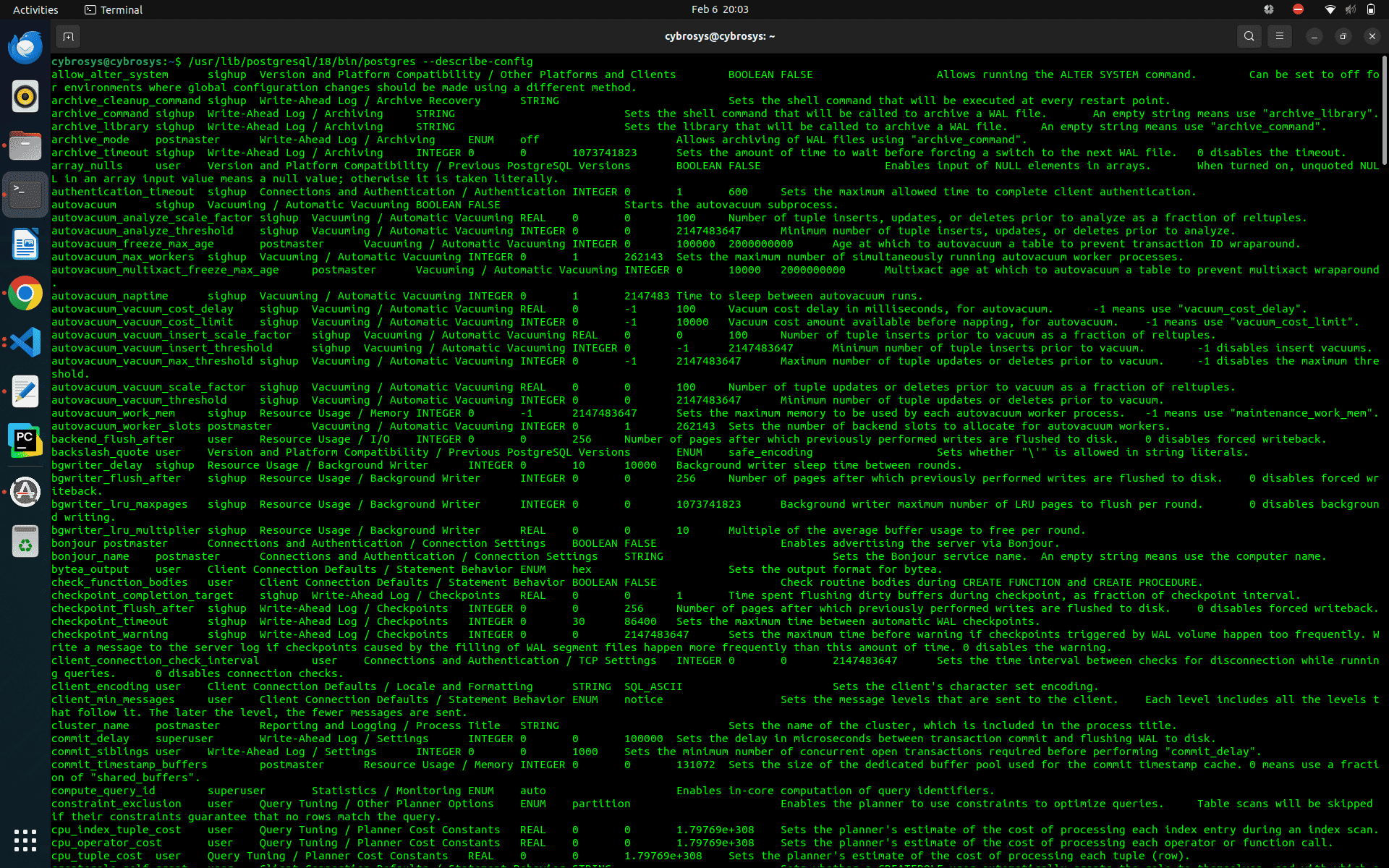
PostgreSQL prints a complete catalog of every configuration parameter compiled into that binary.
For each parameter, it shows:
- Name
- Context (postmaster, sighup, user, etc.)
- Category (Vacuuming, Memory, Logging…)
- Data type
- Minimum value
- Maximum value
- Default value
- Short description
You get a result like this
Example:
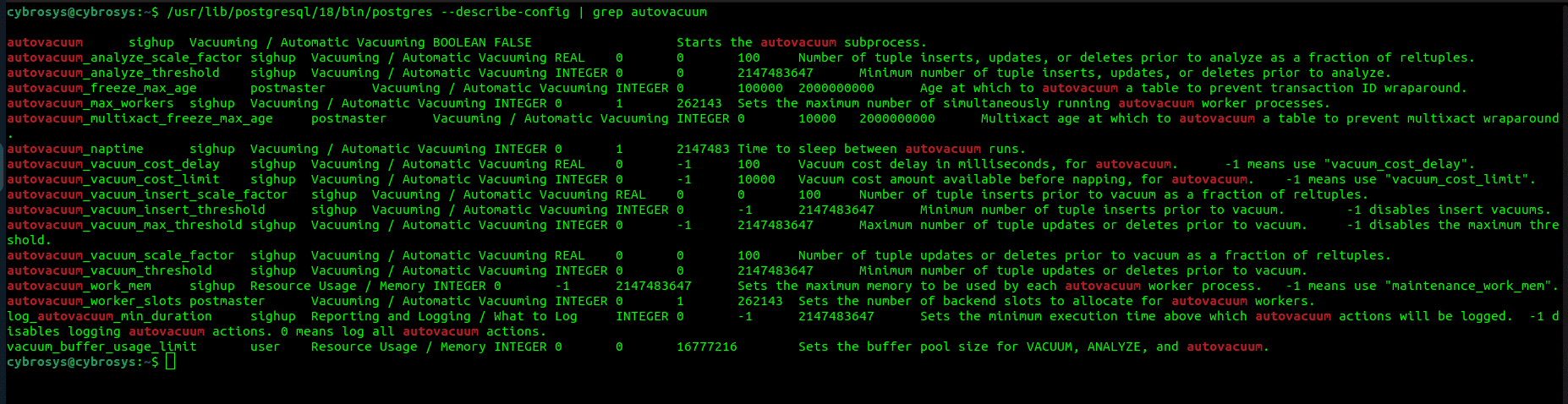
/usr/lib/postgresql/18/bin/postgres --describe-config | grep autovacuum
This outputs all autovacuum-related parameters along with their metadata.
Example :
Important distinction:
This does NOT show live runtime values.
Instead, it shows PostgreSQL’s internal configuration registry — essentially what the server supports, not what it is currently using.
Why This Exists (and Who It’s For)
This flag is mainly intended for:
PostgreSQL core developers
To verify the new GUC parameters after adding them in source code.
Distribution maintainers
To confirm default values or patched parameters.
Tool builders
Monitoring tools and configuration UIs use this output to auto-discover parameters instead of hardcoding lists.
Source-level explorers
If you are reading PostgreSQL internals (like guc_tables.c, autovacuum code, or planner settings), this gives instant visibility into what is registered.
In other words:
This is developer infrastructure, not a DBA feature.
That’s why most PostgreSQL users never encounter it.
Filtering Parameters with grep
Because --describe-config outputs everything, filtering becomes essential.
Example:
/usr/lib/postgresql/18/bin/postgres --describe-config | grep vacuum
Now you see only vacuum-related settings.
You can also export this to a file:
/usr/lib/postgresql/18/bin/postgres --describe-config > /tmp/postgres_conf.txt
Or filter first:
/usr/lib/postgresql/18/bin/postgres --describe-config | grep checkpoint > /tmp/checkpoint.txt
Why this is useful:
- Easy offline reference
- Difference between PostgreSQL versions
- Compare vanilla vs custom builds
- Share parameter catalogs with teammates
For example, after adding a custom GUC in C, you can immediately confirm it appears in this output.
Comparing the Three Ways to Access PostgreSQL Configuration
PostgreSQL exposes configuration through three very different mechanisms. Each serves a different purpose.
Let’s look at all three.
1. postgres --describe-config
Example:
/usr/lib/postgresql/18/bin/postgres --describe-config
Characteristics:
- Works without starting PostgreSQL
- Does not require psql
- Shows compiled defaults and limits
- Shows parameter metadata
- Read-only
This is static information baked into the server.
2. pg_settings (runtime view)
From inside PostgreSQL:
SELECT * FROM pg_settings;
Or:
SHOW autovacuum;
Characteristics:
- Requires a running server
- Requires connecting as a PostgreSQL user
- Shows current active values
- Includes overrides from ALTER SYSTEM
- Includes session-level changes
This is the live configuration state.
DBAs typically rely on this.
3. postgresql.conf (configuration file)
Example:
SHOW config_file;
Output:
/etc/postgresql/17/main/postgresql.conf
Then:
sudo nano /etc/postgresql/17/main/postgresql.conf
Characteristics:
- File-based configuration
- Manual editing
- Requires reload or restart
This is the persistent configuration source.
Although all three approaches relate to PostgreSQL configuration, they serve very different purposes. The --describe-config flag reveals what the PostgreSQL binary itself supports at compile time, including every available parameter along with its default values, limits, and change context. It represents PostgreSQL’s built-in configuration capabilities, independent of any running server. In contrast, pg_settings reflects the current runtime state of a live PostgreSQL instance, showing which values are actively in use after considering postgresql.conf, ALTER SYSTEM, and session-level overrides.Finally, the postgresql.conf file represents the administrator’s intended configuration, defining what PostgreSQL should load at startup or reload time. Together, these three layers provide a complete picture: what PostgreSQL can support, what it is currently using, and what it has been configured to use.
Why --describe-config Is Special
Unlike pg_settings, this flag:
- Works without connecting to a database
- Works even as root
- Does not depend on cluster state
- Reflects internal limits and defaults
- Mirrors GUC definitions directly from C source
That’s why PostgreSQL explicitly allows it inside main.c.
It is designed as a safe introspection mechanism for developers and automation.
postgres --describe-config is not a replacement for pg_settings or postgresql.conf.
Instead, it exposes PostgreSQL’s internal configuration registry straight from the server binary.
You can think of PostgreSQL configuration as having three layers:
- Compiled capabilities (--describe-config)
- Runtime state (pg_settings)
- Persistent file settings (postgresql.conf)
Most users only need the last two.
But if you are exploring PostgreSQL internals, building tools, or modifying source code, --describe-config becomes extremely powerful, especially when combined with grep and text exports.
Sometimes the most useful features are the ones hidden in plain sight inside the source tree.