In PostgreSQL, taking a backup from one server and cloning it into another server takes much more time in the case of a big-sized database. So there is a tool named "pgcopydb tool" that can be used to easily clone a database from one server to another, and it has several options, like cloning a specific schema or cloning data based on our criteria.
We can install this tool in two different ways.
By using sudo apt command, you can install pgcopydb like this:
sudo apt-get install pgcopydb
Now check the version of the installed pgcopydb tool
pgcopydb --version
Result:
16:33:14.487 212037 INFO   Running pgcopydb version 0.18-1.pgdg22.04+1 from "/usr/bin/pgcopydb"
pgcopydb version 0.18-1.pgdg22.04+1
compiled with PostgreSQL 18.4 (Ubuntu 18.4-1.pgdg22.04+1) on x86_64-pc-linux-gnu, compiled by gcc (Ubuntu 11.4.0-1ubuntu1~22.04.3) 11.4.0, 64-bit
compatible with Postgres 14, 15, 16, 17, and 18
You can also explore more about this pgcopydb tool's features by using the - - help flag.
pgcopydb --help
Result:
16:33:16.856 212069 INFO   Running pgcopydb version 0.18-1.pgdg22.04+1 from "/usr/bin/pgcopydb"
pgcopydb: pgcopydb tool
usage: pgcopydb [ --verbose --quiet ]

Available commands:
  pgcopydb
    clone     Clone an entire database from source to target
    fork      Clone an entire database from source to target
    follow    Replay changes from the source database to the target database
    snapshot  Create and export a snapshot on the source database
  + compare   Compare source and target databases
  + copy      Implement the data section of the database copy
  + dump      Dump database objects from a Postgres instance
  + restore   Restore database objects into a Postgres instance
  + list      List database objects from a Postgres instance
  + stream    Stream changes from the source database
    ping      Attempt to connect to the source and target instances
    help      Print help message
    version   Print pgcopydb version
You can also install the pgcopydb tool by compiling its source code.
Clone the repository.
git clone https://github.com/dimitri/pgcopydb.git
Move to its folder.
cd pgcopydb
Compile and install
make
sudo make install
Now its binary is installed in this path
cybrosys@cybrosys:~/pgcopydb$ /usr/lib/postgresql/18/bin/pgcopydb --version
Result:
16:54:02.266 230363 INFO   Running pgcopydb version 0.18.8.gd8c1ec5 from "/usr/lib/postgresql/18/bin/pgcopydb"
pgcopydb version 0.18.8.gd8c1ec5
compiled with PostgreSQL 18.4 (Ubuntu 18.4-1.pgdg22.04+1) on x86_64-pc-linux-gnu, compiled by gcc (Ubuntu 11.4.0-1ubuntu1~22.04.3) 11.4.0, 64-bit
compatible with Postgres 14, 15, 16, 17, and 18
cybrosys@cybrosys:~/pgcopydb$
cybrosys@cybrosys:~/pgcopydb$ /usr/lib/postgresql/18/bin/pgcopydb --help
16:54:48.184 230839 INFO   Running pgcopydb version 0.18.8.gd8c1ec5 from "/usr/lib/postgresql/18/bin/pgcopydb"
pgcopydb: pgcopydb tool
usage: pgcopydb [ --verbose --quiet ]

Available commands:
  pgcopydb
    clone     Clone an entire database from source to target
    fork      Clone an entire database from source to target
    follow    Replay changes from the source database to the target database
    snapshot  Create and export a snapshot on the source database
  + compare   Compare source and target databases
  + copy      Implement the data section of the database copy
  + dump      Dump database objects from a Postgres instance
  + restore   Restore database objects into a Postgres instance
  + list      List database objects from a Postgres instance
  + stream    Stream changes from the source database
    ping      Attempt to connect to the source and target instances
    help      Print help message
    version   Print pgcopydb version
You can see more options provided by the pgcopydb tool by using a normal help command like this.
pgcopydb help
Result:
16:55:17.606 231159 INFO   Running pgcopydb version 0.18-1.pgdg22.04+1 from "/usr/bin/pgcopydb"
  pgcopydb
    clone     Clone an entire database from source to target
    fork      Clone an entire database from source to target
    follow    Replay changes from the source database to the target database
    snapshot  Create and export a snapshot on the source database
  + compare   Compare source and target databases
  + copy      Implement the data section of the database copy
  + dump      Dump database objects from a Postgres instance
  + restore   Restore database objects into a Postgres instance
  + list      List database objects from a Postgres instance
  + stream    Stream changes from the source database
    ping      Attempt to connect to the source and target instances
    help      Print help message
    version   Print pgcopydb version
  pgcopydb compare
    schema  Compare source and target schema
    data    Compare source and target data
  pgcopydb copy
    db           Copy an entire database from source to target
    roles        Copy the roles from the source instance to the target instance
    extensions   Copy the extensions from the source instance to the target instance
    schema       Copy the database schema from source to target
    data         Copy the data section from source to target
    table-data   Copy the data from all tables in database from source to target
    blobs        Copy the blob data from the source database to the target
    sequences    Copy the current value from all sequences in database from source to target
    indexes      Create all the indexes found in the source database in the target
    constraints  Create all the constraints found in the source database in the target
  pgcopydb dump
    schema  Dump source database schema as custom files in work directory
    roles   Dump source database roles as custome file in work directory
  pgcopydb restore
    schema      Restore a database schema from custom files to target database
    pre-data    Restore a database pre-data schema from custom file to target database
    post-data   Restore a database post-data schema from custom file to target database
    roles       Restore database roles from SQL file to target database
    parse-list  Parse pg_restore --list output from custom file
  pgcopydb list
    databases    List databases
    extensions   List all the source extensions to copy
    collations   List all the source collations to copy
    tables       List all the source tables to copy data from
    table-parts  List a source table copy partitions
    sequences    List all the source sequences to copy data from
    indexes      List all the indexes to create again after copying the data
    depends      List all the dependencies to filter-out
    schema       List the schema to migrate, formatted in JSON
    progress     List the progress
  pgcopydb stream
    setup     Setup source and target systems for logical decoding
    cleanup   Cleanup source and target systems for logical decoding
    prune     Remove already-applied CDC files from disk to reclaim disk space
    prefetch  Stream changes from the source database into the SQLite CDC store
    catchup   Transform and apply prefetched changes from the SQLite CDC store to the target
    replay    Replay changes from the source to the target database, live
  + sentinel  Maintain a sentinel table
    receive   Stream changes from the source database
    apply     Apply changes from the replayDB to the target database, or stdout
  pgcopydb stream sentinel
    setup  Setup the sentinel table
    get    Get the sentinel table values
  + set    Set the sentinel table values
  pgcopydb stream sentinel set
    startpos  Set the sentinel start position LSN
    endpos    Set the sentinel end position LSN
    apply     Set the sentinel apply mode
    prefetch  Set the sentinel prefetch mode
Check your postgres clusters in your system by using the following command pg_lsclusters
pg_lsclusters
Result:
Ver Cluster Port Status Owner    Data directory               Log file
18  main    5432 online postgres /var/lib/postgresql/18/main  /var/log/postgresql/postgresql-18-main.log
18  main2   5433 online postgres /var/lib/postgresql/18/main2 /var/log/postgresql/postgresql-18-main2.log
Set the password for the postgres user as postgres in these two clusters
postgres@cybrosys:/home/cybrosys$ psql
psql (18.4 (Ubuntu 18.4-1.pgdg22.04+1))
Type "help" for help.
postgres=# ALTER USER postgres PASSWORD 'postgres';
ALTER ROLE
postgres=# \q
postgres@cybrosys:/home/cybrosys$ psql -p 5433
psql (18.4 (Ubuntu 18.4-1.pgdg22.04+1))
Type "help" for help.
postgres=# ALTER USER postgres PASSWORD 'postgres';
ALTER ROLE
Now use the ping option provided by the pgcopydb tool to check that the connection between these two clusters is actually possible or not.
pgcopydb ping \
  --source "postgres://postgres:postgres@localhost:5432/postgres" \
  --target "postgres://postgres:postgres@localhost:5433/postgres"
Result:
16:57:44.822 232754 INFO   Running pgcopydb version 0.18-1.pgdg22.04+1 from "/usr/bin/pgcopydb"
16:57:44.846 232770 INFO   Successfully could connect to source database Postgres 18.4 (Ubuntu 18.4-1.pgdg22.04+1) at "postgres://postgres@localhost:5432/postgres?keepalives=1&keepalives_idle=10&keepalives_interval=10&keepalives_count=60"
16:57:44.848 232771 INFO   Successfully could connect to target database Postgres 18.4 (Ubuntu 18.4-1.pgdg22.04+1) at "postgres://postgres@localhost:5433/postgres?keepalives=1&keepalives_idle=10&keepalives_interval=10&keepalives_count=60"
This result shows that the connection between these two clusters is possible using the pgcopydb tool.
Now create a new database in the port 5432 and create some tables and insert some values
CREATE DATABASE company;
Connect to the database.
\c company
Create table.
CREATE TABLE department
(
    id serial PRIMARY KEY,
    name text
);
CREATE TABLE employee
(
    id serial PRIMARY KEY,
    name text,
    salary numeric,
    dept_id int REFERENCES department(id)
);
Create index
CREATE INDEX emp_salary_idx
ON employee(salary);
Create a simple view
CREATE VIEW employee_view AS
SELECT *
FROM employee;
Insert some data
INSERT INTO department(name)
SELECT 'Department '||g
FROM generate_series(1,20) g;
INSERT INTO employee(name,salary,dept_id)
SELECT
'Employee '||g,
random()*100000,
(random()*19+1)::int
FROM generate_series(1,1000000) g;
Now in port 5433 create the database named company
psql -p 5433
create database company;
Now use pgcopydb to clone the database from port 5432 to 5433.
pgcopydb clone --source "postgres://postgres:postgres@localhost:5432/company" --target "postgres://postgres:postgres@localhost:5433/company"
Result:
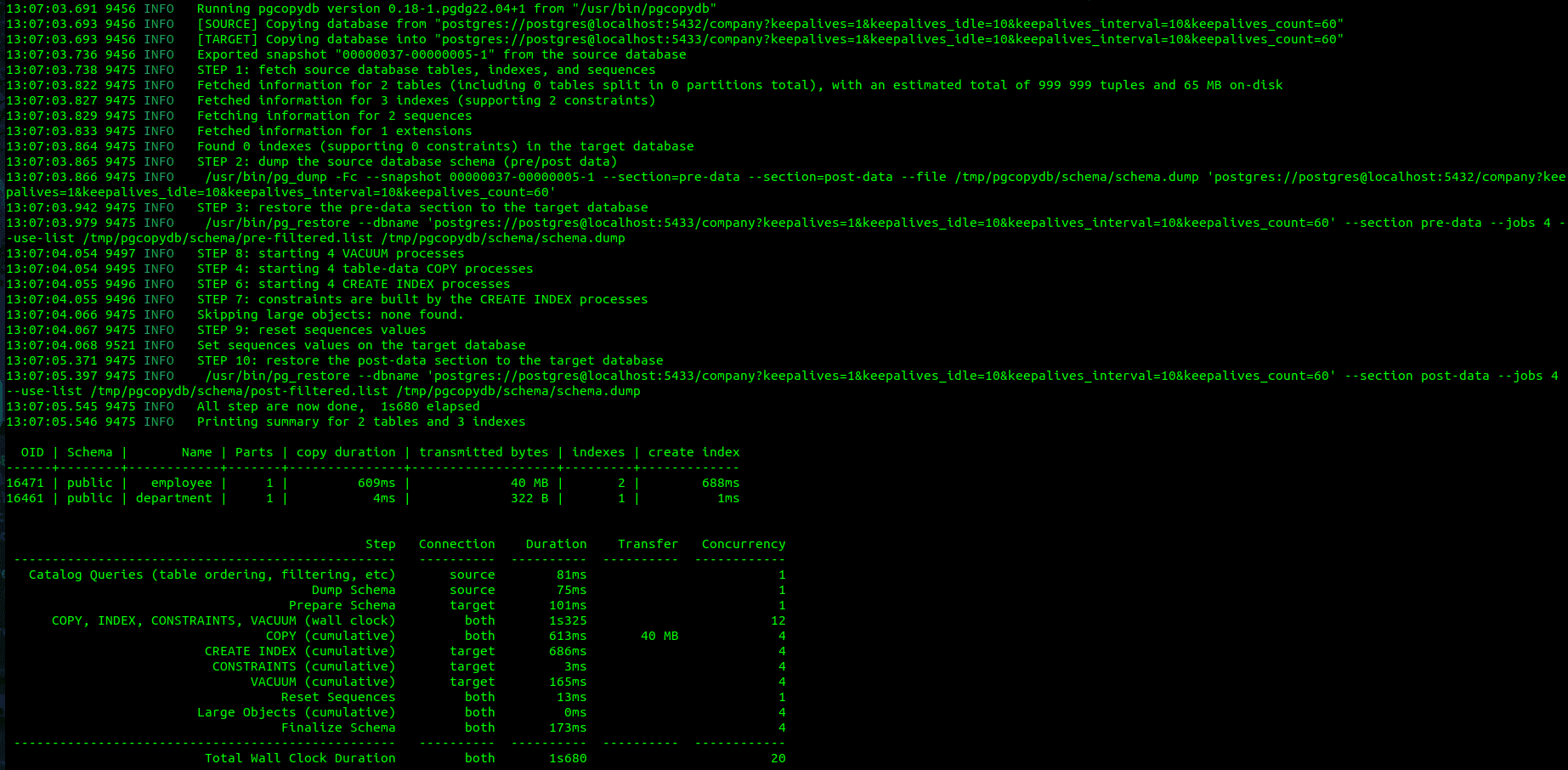
Now check the tables, indexes and view are actually cloned in to the port 5433
postgres@cybrosys:/home/cybrosys$ psql -p 5433
psql (18.4 (Ubuntu 18.4-1.pgdg22.04+1))
Type "help" for help.
postgres=# \c company
You are now connected to database "company" as user "postgres".
company=# \d
                List of relations
 Schema |       Name        |   Type   |  Owner
--------+-------------------+----------+----------
 public | department        | table    | postgres
 public | department_id_seq | sequence | postgres
 public | employee          | table    | postgres
 public | employee_id_seq   | sequence | postgres
 public | employee_view     | view     | postgres
(5 rows)
company=# \d+
                                             List of relations
 Schema |       Name        |   Type   |  Owner   | Persistence | Access method |    Size    | Description
--------+-------------------+----------+----------+-------------+---------------+------------+-------------
 public | department        | table    | postgres | permanent   | heap          | 48 kB      |
 public | department_id_seq | sequence | postgres | permanent   |               | 8192 bytes |
 public | employee          | table    | postgres | permanent   | heap          | 65 MB      |
 public | employee_id_seq   | sequence | postgres | permanent   |               | 8192 bytes |
 public | employee_view     | view     | postgres | permanent   |               | 0 bytes    |
(5 rows)
company=# \di
                     List of indexes
 Schema |      Name       | Type  |  Owner   |   Table
--------+-----------------+-------+----------+------------
 public | department_pkey | index | postgres | department
 public | emp_salary_idx  | index | postgres | employee
 public | employee_pkey   | index | postgres | employee
(3 rows)
company=# \dv
              List of views
 Schema |     Name      | Type |  Owner
--------+---------------+------+----------
 public | employee_view | view | postgres
(1 row)
Now we can see the exact data from port 5432 are actually cloned into the port 5433.
Now try to use some simple functionalities of pgcopydb
List all databases
pgcopydb list databases \
--source "postgres://postgres:postgres@localhost:5432/postgres"
Result:
13:11:32.242 9629 INFO   Running pgcopydb version 0.18-1.pgdg22.04+1 from "/usr/bin/pgcopydb"
13:11:32.271 9629 INFO   A previous run has run through completion
13:11:32.306 9629 INFO   Fetched information for 2 databases
       OID |        Database Name |         On-disk size
-----------+----------------------+---------------------
     16459 |              company |               132 MB
         5 |             postgres |              7958 kB
List all tables in a specific database
pgcopydb list tables \
--source "postgres://postgres:postgres@localhost:5432/company"
Result:
13:12:13.736 9655 INFO   Running pgcopydb version 0.18-1.pgdg22.04+1 from "/usr/bin/pgcopydb"
13:12:13.764 9655 INFO   A previous run has run through completion
13:12:13.764 9655 INFO   Re-using catalog caches
13:12:13.765 9655 INFO   Fetched information for 2 tables, with an estimated total of 999 999 tuples and 65 MB on-disk
     OID |          Schema Name |           Table Name |  Est. Row Count |    On-disk size
---------+----------------------+----------------------+-----------------+----------------
   16471 |               public |             employee |         1000000 |           65 MB
   16461 |               public |           department |              -1 |           16 kB
List all indexes
pgcopydb list indexes \
--source "postgres://postgres:postgres@localhost:5432/company"
Result:
13:12:44.009 9677 INFO   Running pgcopydb version 0.18-1.pgdg22.04+1 from "/usr/bin/pgcopydb"
13:12:44.038 9677 INFO   A previous run has run through completion
13:12:44.038 9677 INFO   Re-using catalog caches
     OID |     Schema |           Index Name |      Constraint Name |                Constraint | DDL
---------+------------+----------------------+----------------------+---------------------------+---------------------
   16478 |     public |        employee_pkey |        employee_pkey |          PRIMARY KEY (id) | CREATE UNIQUE INDEX employee_pkey ON public.employee USING btree (id)
   16485 |     public |       emp_salary_idx |                      |                           | CREATE INDEX emp_salary_idx ON public.employee USING btree (salary)
   16468 |     public |      department_pkey |      department_pkey |          PRIMARY KEY (id) | CREATE UNIQUE INDEX department_pkey ON public.department USING btree (id)
List all sequences
pgcopydb list sequences \
--source "postgres://postgres:postgres@localhost:5432/company"
Result:
13:13:14.714 9702 INFO   Running pgcopydb version 0.18-1.pgdg22.04+1 from "/usr/bin/pgcopydb"
13:13:14.743 9702 INFO   A previous run has run through completion
13:13:14.744 9702 INFO   Re-using catalog caches
     OID |          Schema Name |                  Sequence Name |   Owned By |   attrelid |    attroid
---------+----------------------+--------------------------------+------------+------------+-----------
   16460 |               public |              department_id_seq |      16461 |      16461 |      16464
   16470 |               public |                employee_id_seq |      16471 |      16471 |      16474
List all extensions
pgcopydb list extensions \
--source "postgres://postgres:postgres@localhost:5432/company"
Result:
13:13:33.901 9722 INFO   Running pgcopydb version 0.18-1.pgdg22.04+1 from "/usr/bin/pgcopydb"
13:13:33.929 9722 INFO   A previous run has run through completion
13:13:33.930 9722 INFO   Re-using catalog caches
       OID |                      Name |               Schema |      Count | Config
-----------+---------------------------+----------------------+------------+-----------
     13594 |                   plpgsql |           pg_catalog |          0 |
Compare the data of two databases
pgcopydb compare data \
--source "postgres://postgres:postgres@localhost:5432/company" \
--target "postgres://postgres:postgres@localhost:5433/company"
Result:
13:15:14.973 9835 INFO   Running pgcopydb version 0.18-1.pgdg22.04+1 from "/usr/bin/pgcopydb"
13:15:14.997 9835 INFO   SOURCE: Connecting to "postgres://postgres@localhost:5432/company?keepalives=1&keepalives_idle=10&keepalives_interval=10&keepalives_count=60"
13:15:15.001 9835 INFO   A previous run has run through completion
13:15:15.001 9835 INFO   Re-using catalog caches
13:15:15.002 9835 INFO   Starting 4 table compare processes
                    Table Name | ! |                                                  Source Checksum |                                                  Target Checksum
-------------------------------+---+------------------------------------------------------------------+-----------------------------------------------------------------
       company.public.employee |   | 2f8e0a4bee98bf95799f3eee660a32cead21a07de3eb7bb8b7f1ae90632e9b59 | 2f8e0a4bee98bf95799f3eee660a32cead21a07de3eb7bb8b7f1ae90632e9b59
     company.public.department |   | 21fba56a02bb1a7358cfb0fc664382ad7c695f42c529c64aa712fc06a64d542d | 21fba56a02bb1a7358cfb0fc664382ad7c695f42c529c64aa712fc06a64d542d
Here we can see that the both tables have the same checksum, that means both tables have the same data.
Now we are using the parallel copy option to copy an Odoo database from port 5432 to 5433.
postgres@cybrosys:/home/cybrosys$ psql
psql (18.4 (Ubuntu 18.4-1.pgdg22.04+1))
Type "help" for help.
postgres=# \l+
                                                                                  List of databases
   Name    |  Owner   | Encoding | Locale Provider | Collate | Ctype | Locale | ICU Rules |   Access privileges   |  Size   | Tablespace |                Description
-----------+----------+----------+-----------------+---------+-------+--------+-----------+-----------------------+---------+------------+--------------------------------------------
 company   | postgres | UTF8     | libc            | en_IN   | en_IN |        |           |                       | 132 MB  | pg_default |
 odoo      | postgres | UTF8     | libc            | C       | en_IN |        |           |                       | 48 MB   | pg_default |
 postgres  | postgres | UTF8     | libc            | en_IN   | en_IN |        |           |                       | 7958 kB | pg_default | default administrative connection database
 template0 | postgres | UTF8     | libc            | en_IN   | en_IN |        |           | =c/postgres          +| 7670 kB | pg_default | unmodifiable empty database
           |          |          |                 |         |       |        |           | postgres=CTc/postgres |         |            |
 template1 | postgres | UTF8     | libc            | en_IN   | en_IN |        |           | =c/postgres          +| 7742 kB | pg_default | default template for new databases
           |          |          |                 |         |       |        |           | postgres=CTc/postgres |         |            |
(5 rows)
Here we have a database named Odoo, and the size of the database is 48 MB.
Now create the same database in the port 5433.
postgres@cybrosys:/home/cybrosys$ psql -p 5433
psql (18.4 (Ubuntu 18.4-1.pgdg22.04+1))
Type "help" for help.

postgres=# create database odoo;
CREATE DATABASE
postgres=# \l+
                                                                                  List of databases
   Name    |  Owner   | Encoding | Locale Provider | Collate | Ctype | Locale | ICU Rules |   Access privileges   |  Size   | Tablespace |                Description
-----------+----------+----------+-----------------+---------+-------+--------+-----------+-----------------------+---------+------------+--------------------------------------------
 company   | postgres | UTF8     | libc            | en_IN   | en_IN |        |           |                       | 124 MB  | pg_default |
 odoo      | postgres | UTF8     | libc            | en_IN   | en_IN |        |           |                       | 7585 kB | pg_default |
 postgres  | postgres | UTF8     | libc            | en_IN   | en_IN |        |           |                       | 7670 kB | pg_default | default administrative connection database
 template0 | postgres | UTF8     | libc            | en_IN   | en_IN |        |           | =c/postgres          +| 7513 kB | pg_default | unmodifiable empty database
           |          |          |                 |         |       |        |           | postgres=CTc/postgres |         |            |
 template1 | postgres | UTF8     | libc            | en_IN   | en_IN |        |           | =c/postgres          +| 7742 kB | pg_default | default template for new databases
           |          |          |                 |         |       |        |           | postgres=CTc/postgres |         |            |
(5 rows)
Now use the parallel copy option to copy the Odoo database between these clusters.
pgcopydb clone --table-jobs 8 --index-jobs 4 --source "postgres://postgres:postgres@localhost:5432/odoo" --target "postgres://postgres:postgres@localhost:5433/odoo"
Result:
13:22:05.344 10932 INFO   All step are now done,  7s800 elapsed
13:22:05.344 10932 INFO   Printing summary for 394 tables and 905 indexes
  OID | Schema |                                                        Name | Parts | copy duration | transmitted bytes | indexes | create index
------+--------+-------------------------------------------------------------+-------+---------------+-------------------+---------+-------------
16695 | public |                                               ir_model_data |     1 |          73ms |           1966 kB |       3 |         77ms
16947 | public |                                                  ir_ui_view |     1 |         109ms |           3664 kB |       5 |         12ms
16657 | public |                                            ir_module_module |     1 |          31ms |            388 kB |       4 |         22ms
16774 | public |                                             ir_model_fields |     1 |          53ms |           1371 kB |       7 |         57ms
17106 | public |                                               ir_attachment |     1 |          27ms |            344 kB |       5 |         23ms
16679 | public |                                 ir_module_module_dependency |     1 |          22ms |             27 kB |       2 |         13ms
16759 | public |                                                    ir_model |     1 |          17ms |            135 kB |       2 |         13ms
16829 | public |                                         ir_model_constraint |     1 |          24ms |            193 kB |       6 |         36ms
16814 | public |                                   ir_model_fields_selection |     1 |          17ms |             99 kB |       3 |         15ms
17393 | public |                                           res_country_state |     1 |          16ms |            142 kB |       2 |          6ms
16734 | public |                                                 res_partner |     1 |          14ms |             17 kB |      28 |         72ms
16580 | public |                                               ir_act_window |     1 |          15ms |             97 kB |       2 |          4ms
20587 | public |                                                mail_message |     1 |          12ms |             93 kB |       8 |         12ms
16711 | public |                                                res_currency |     1 |          12ms |             24 kB |       2 |          4ms
16858 | public |                                             ir_model_access |     1 |          14ms |             58 kB |       4 |         10ms
16914 | public |                                                  ir_ui_menu |     1 |          14ms |             28 kB |       3 |          5ms
20710 | public |                                               mail_template |     1 |          13ms |             53 kB |       2 |          5ms
You get a summary of all the tables being copied. Here we can see each table’s metadata, like duration of copy, bytes transmitted, and index creation-related metadata also.
At the end we can see a final summary of this parallel copy like this.
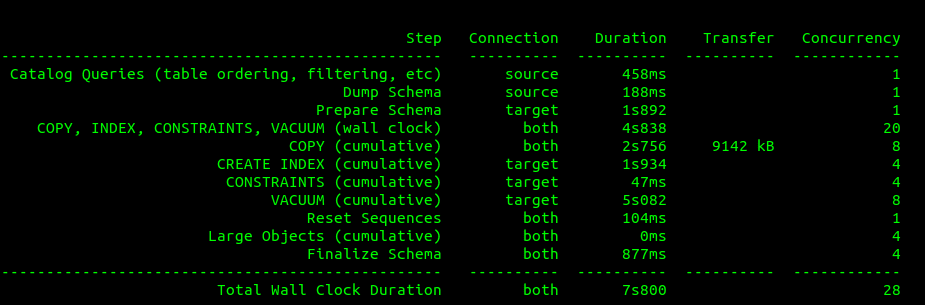
This result shows the total time taken for each process execution during the database cloning.
By using this tool, the database administrators and also the postgres developers can easily clone database from one postgres cluster to another very fast, and this tool solves the issue of taking manual database backups and restoration.