Row-level locking is a core concept in PostgreSQL that helps multiple users work with the same data safely at the same time. When a transaction updates or deletes a row, PostgreSQL places a lock only on that specific row, not on the entire table. This is why PostgreSQL can handle high-traffic systems like ERPs, banking apps, and inventory systems very efficiently.
In PostgreSQL, we can actually see the locks related metadata from the postgres system catalogue named pg_locks.
select * from pg_locks;
Result :
  locktype  | database | relation | page | tuple | virtualxid | transactionid | classid | objid | objsubid | virtualtransaction |  pid  |      mode       | granted | fastpath | waitstart
------------+----------+----------+------+-------+------------+---------------+---------+-------+----------+--------------------+-------+-----------------+---------+----------+-----------
 relation   |    16385 |    12073 |      |       |            |               |         |       |          | 8/11               | 87531 | AccessShareLock | t       | t        |
 virtualxid |          |          |      |       | 8/11       |               |         |       |          | 8/11               | 87531 | ExclusiveLock   | t       | t        |
(2 rows)
In PostgreSQL, there are actually 4 types of row-level locks.
FOR KEY SHARE
FOR KEY SHARE is the weakest row-level lock in PostgreSQL. It allows other transactions to update non-key columns of the row, but it prevents operations that modify or delete the key values of the row.
Example:
CREATE TABLE employees (
    id SERIAL PRIMARY KEY,
    name TEXT,
    salary INT
);
Insert values
INSERT INTO employees (name, salary)
VALUES
('Alice', 5000),
('Bob', 6000),
('Charlie', 7000);
Open another session
BEGIN;
SELECT *
FROM employees
WHERE id = 1
FOR KEY SHARE;
Now, in the first session, try these queries below
 SELECT *
FROM employees
WHERE id = 1
FOR KEY SHARE;
Result :
 id | name  | salary
----+-------+--------
  1 | Alice |   5000
(1 row)
Now try the delete command.
 DELETE FROM employees
WHERE id = 1;
Result: it will wait for the locks release to execute the delete query
Now, at the same time, check the locks from pg_locks
Select * from pg_locks;
Result:
   locktype    | database | relation | page | tuple | virtualxid | transactionid | classid | objid | objsubid | virtualtransaction |  pid  |        mode         | granted | fastpath |            waitstart
---------------+----------+----------+------+-------+------------+---------------+---------+-------+----------+--------------------+-------+---------------------+---------+----------+----------------------------------
 relation      |    16385 |    19908 |      |       |            |               |         |       |          | 8/17               | 87531 | RowExclusiveLock    | t       | t        |
 relation      |    16385 |    19901 |      |       |            |               |         |       |          | 8/17               | 87531 | RowExclusiveLock    | t       | t        |
 virtualxid    |          |          |      |       | 8/17       |               |         |       |          | 8/17               | 87531 | ExclusiveLock       | t       | t        |
 relation      |    16385 |     2684 |      |       |            |               |         |       |          | 18/3               | 97864 | AccessShareLock     | t       | t        |
 relation      |    16385 |    19908 |      |       |            |               |         |       |          | 18/3               | 97864 | RowShareLock        | t       | t        |
 relation      |    16385 |    12073 |      |       |            |               |         |       |          | 18/3               | 97864 | AccessShareLock     | t       | t        |
 relation      |    16385 |     2685 |      |       |            |               |         |       |          | 18/3               | 97864 | AccessShareLock     | t       | t        |
 relation      |    16385 |    19901 |      |       |            |               |         |       |          | 18/3               | 97864 | RowShareLock        | t       | t        |
 relation      |    16385 |     2662 |      |       |            |               |         |       |          | 18/3               | 97864 | AccessShareLock     | t       | t        |
 relation      |    16385 |     3455 |      |       |            |               |         |       |          | 18/3               | 97864 | AccessShareLock     | t       | t        |
 relation      |    16385 |     2663 |      |       |            |               |         |       |          | 18/3               | 97864 | AccessShareLock     | t       | t        |
 relation      |    16385 |     2615 |      |       |            |               |         |       |          | 18/3               | 97864 | AccessShareLock     | t       | t        |
 relation      |    16385 |     1259 |      |       |            |               |         |       |          | 18/3               | 97864 | AccessShareLock     | t       | t        |
 virtualxid    |          |          |      |       | 18/3       |               |         |       |          | 18/3               | 97864 | ExclusiveLock       | t       | t        |
 transactionid |          |          |      |       |            |          3770 |         |       |          | 8/17               | 87531 | ExclusiveLock       | t       | f        |
 transactionid |          |          |      |       |            |          3767 |         |       |          | 18/3               | 97864 | ExclusiveLock       | t       | f        |
 transactionid |          |          |      |       |            |          3767 |         |       |          | 8/17               | 87531 | ShareLock           | f       | f        | 2026-06-03 19:30:08.524337+05:30
 tuple         |    16385 |    19901 |    0 |     1 |            |               |         |       |          | 8/17               | 87531 | AccessExclusiveLock | t       | f        |
Session 97864 executed SELECT ... FOR KEY SHARE and acquired a row-level key share lock on the row with id = 1.
Session 87531 executed DELETE FROM employees WHERE id = 1.
The DELETE operation requires a stronger lock because deleting a row changes its row identity.
PostgreSQL allowed the DELETE session to place a tuple-level AccessExclusiveLock on the row, but the DELETE could not proceed immediately.
The DELETE session became blocked while waiting for transaction 3767 owned by session 97864 to finish.
This waiting state is visible in pg_locks through:
transactionid | 3767 | ShareLock | granted = f
granted = f indicates the lock request is waiting and has not yet been granted.
Once the session holding the FOR KEY SHARE lock commits or rolls back, the waiting DELETE operation can continue execution.
FOR SHARE
FOR SHARE is a shared lock that allows multiple transactions to read and lock the same row simultaneously. However, it prevents other transactions from updating or deleting the row.
Example: in session - 1
BEGIN;
SELECT *
FROM employees
WHERE id = 1
FOR SHARE;
Result:
 id | name  | salary
----+-------+--------
  1 | Alice |   5000
(1 row)
In session 2
SELECT *
FROM employees
WHERE id = 1
FOR SHARE;
Result:
 id | name  | salary
----+-------+--------
  1 | Alice |   5000
(1 row)
Try the update query, and you can see the query execution is waiting for the lock release
 UPDATE employees
SET salary = 9000
WHERE id = 1;
Now check the locks from the session - 1
  pid  |   locktype    |       mode       | granted |    relation    | page | tuple
-------+---------------+------------------+---------+----------------+------+-------
 87531 | virtualxid    | ExclusiveLock    | t       |                |      |
 87531 | relation      | RowShareLock     | t       | employees_pkey |      |
 87531 | relation      | RowShareLock     | t       | employees      |      |
 87531 | transactionid | ExclusiveLock    | t       |                |      |
 87531 | relation      | AccessShareLock  | t       | pg_locks       |      |
 97864 | tuple         | ExclusiveLock    | t       | employees      |    0 |     1
 97864 | transactionid | ExclusiveLock    | t       |                |      |
 97864 | relation      | RowExclusiveLock | t       | employees_pkey |      |
 97864 | relation      | RowExclusiveLock | t       | employees      |      |
 97864 | virtualxid    | ExclusiveLock    | t       |                |      |
 97864 | transactionid | ShareLock        | f       |                |      |
(11 rows)
Here we can see that there is rowsharelock and rowexclusivelock are exists in the employee table and its primary key also.
Purpose:
Used for safe concurrent reading
Prevents row modifications during the transaction
FOR NO KEY UPDATE
FOR NO KEY UPDATE is used when a transaction intends to update a row without changing its key columns. This lock is automatically acquired by normal UPDATE statements that do not modify primary key values.
Example - session 1:
BEGIN;
UPDATE employees
SET salary = 8000
WHERE id = 1;
Do not commit the transaction
Check the queries below in the other session
 SELECT *
FROM employees
WHERE id = 1
FOR UPDATE;
UPDATE employees
SET salary = 10000
WHERE id = 1;
Purpose:
Allows updating non-key columns
Prevents other transactions from modifying the same row
FOR UPDATE
FOR UPDATE is the strongest row-level lock in PostgreSQL. It prevents all other transactions from acquiring conflicting row locks or modifying the locked row.
Example - session 1:
BEGIN;
SELECT *
FROM employees
WHERE id = 1
FOR UPDATE;
In session 2 try these queries
UPDATE employees
SET salary = 15000
WHERE id = 1;
This also waits:
SELECT *
FROM employees
WHERE id = 1
FOR UPDATE;
Both queries are in the waiting stage
Now check the current activities from pg_stat_activity
In session - 1 try these queries
);
Result :
  pid  | state  | wait_event_type |  wait_event   |                query
-------+--------+-----------------+---------------+-------------------------------------
 87531 | active |                 |               | SELECT                             +
       |        |                 |               |     pid,                           +
       |        |                 |               |     state,                         +
       |        |                 |               |     wait_event_type,               +
       |        |                 |               |     wait_event,                    +
       |        |                 |               |     query                          +
       |        |                 |               | FROM pg_stat_activity              +
       |        |                 |               | WHERE datname = current_database();
 90020 | idle   | Client          | ClientRead    | COMMIT
 97864 | active | Lock            | transactionid | SELECT *                           +
       |        |                 |               | FROM employees                     +
       |        |                 |               | WHERE id = 1                       +
       |        |                 |               | FOR UPDATE;
(3 rows)
Purpose:
Provides exclusive access to the row
Used before updating or deleting critical rows
Lock Strength Order:
- FOR KEY SHARE
- FOR SHARE
- FOR NO KEY UPDATE
- FOR UPDATE
The strength increases from top to bottom.
What is a deadlock in PostgreSQL?
A deadlock happens when two or more transactions wait for each other forever, and none of them can proceed. PostgreSQL detects this situation automatically and cancels one of the transactions to break the deadlock
We can get the count of the total number of deadlocks happening in the database by the following query.
select * from pg_stat_database where datname = current_database();
Result :
-[ RECORD 1 ]--------------+-------------
datid                      | 16385
datname                    | odoo
numbackends                | 3
xact_commit                | 5862
xact_rollback              | 68
blks_read                  | 4258
blks_hit                   | 486437
tup_returned               | 2769838
tup_fetched                | 353660
tup_inserted               | 32321
tup_updated                | 4305
tup_deleted                | 207
conflicts                  | 0
temp_files                 | 0
temp_bytes                 | 0
deadlocks                  | 0
checksum_failures          | 0
checksum_last_failure      |
blk_read_time              | 0
blk_write_time             | 0
session_time               | 15646942.008
active_time                | 2442268.777
idle_in_transaction_time   | 3119368.384
sessions                   | 16
sessions_abandoned         | 1
sessions_fatal             | 0
sessions_killed            | 4
parallel_workers_to_launch | 0
parallel_workers_launched  | 0
stats_reset                |
Now, let’s create an example to understand the deadlock in more detail.
Create a test table and insert values
CREATE TABLE deadlock_test (
   id int PRIMARY KEY,
   name text
);
INSERT INTO deadlock_test VALUES
(1, 'A'),
(2, 'B');
Session 1
BEGIN;
UPDATE deadlock_test
SET name = 'S1'
WHERE id = 1;
Session 2
BEGIN;UPDATE deadlock_testSET name = 'S2'WHERE id = 2;
Session 1
UPDATE deadlock_test
SET name = 'S1'
WHERE id = 2;
NOW THIS SESSION MUST HANG.
Do not touch it.
Wait 2 seconds.
Session 2
UPDATE deadlock_test
SET name = 'S2'
WHERE id = 1;
Result :
ERROR:  deadlock detected
DETAIL:  Process 97864 waits for ShareLock on transaction 3897; blocked by process 87531.
Process 87531 waits for ShareLock on transaction 3898; blocked by process 97864.
HINT:  See server log for query details.
CONTEXT:  while updating tuple (0,1) in relation "deadlock_test"
Now, check the deadlocks count in the current database using the query below
SELECT deadlocks
FROM pg_stat_database
WHERE datname = current_database();
Result:
 deadlocks
-----------
         1
In PostgreSQL there is a parameter named deadlock timeout.
show deadlock_timeout ;
Result :
deadlock_timeout
------------------
 1s
(1 row)
Check the metadata from pg_settings.
select * from pg_settings where name = 'deadlock_timeout';
Result :
-[ RECORD 1 ]---+--------------------------------------------------------------
name            | deadlock_timeout
setting         | 1000
unit            | ms
category        | Lock Management
short_desc      | Sets the time to wait on a lock before checking for deadlock.
extra_desc      |
context         | superuser
vartype         | integer
source          | default
min_val         | 1
max_val         | 2147483647
enumvals        |
boot_val        | 1000
reset_val       | 1000
sourcefile      |
sourceline      |
pending_restart | f
We can set the time for checking the deadlock detection mechanism based on our workload by using this parameter.
Also, in postgres there is another parameter named log_lock_waits.
show log_lock_waits ;
Result:
 log_lock_waits
----------------
 off
Check more about this parameter from pg_settings
select * from pg_settings where name = 'log_lock_waits';
Result :
-[ RECORD 1 ]---+------------------------------------
name            | log_lock_waits
setting         | off
unit            |
category        | Reporting and Logging / What to Log
short_desc      | Logs long lock waits.
extra_desc      |
context         | superuser
vartype         | bool
source          | default
min_val         |
max_val         |
enumvals        |
boot_val        | off
reset_val       | off
sourcefile      |
sourceline      |
pending_restart | f
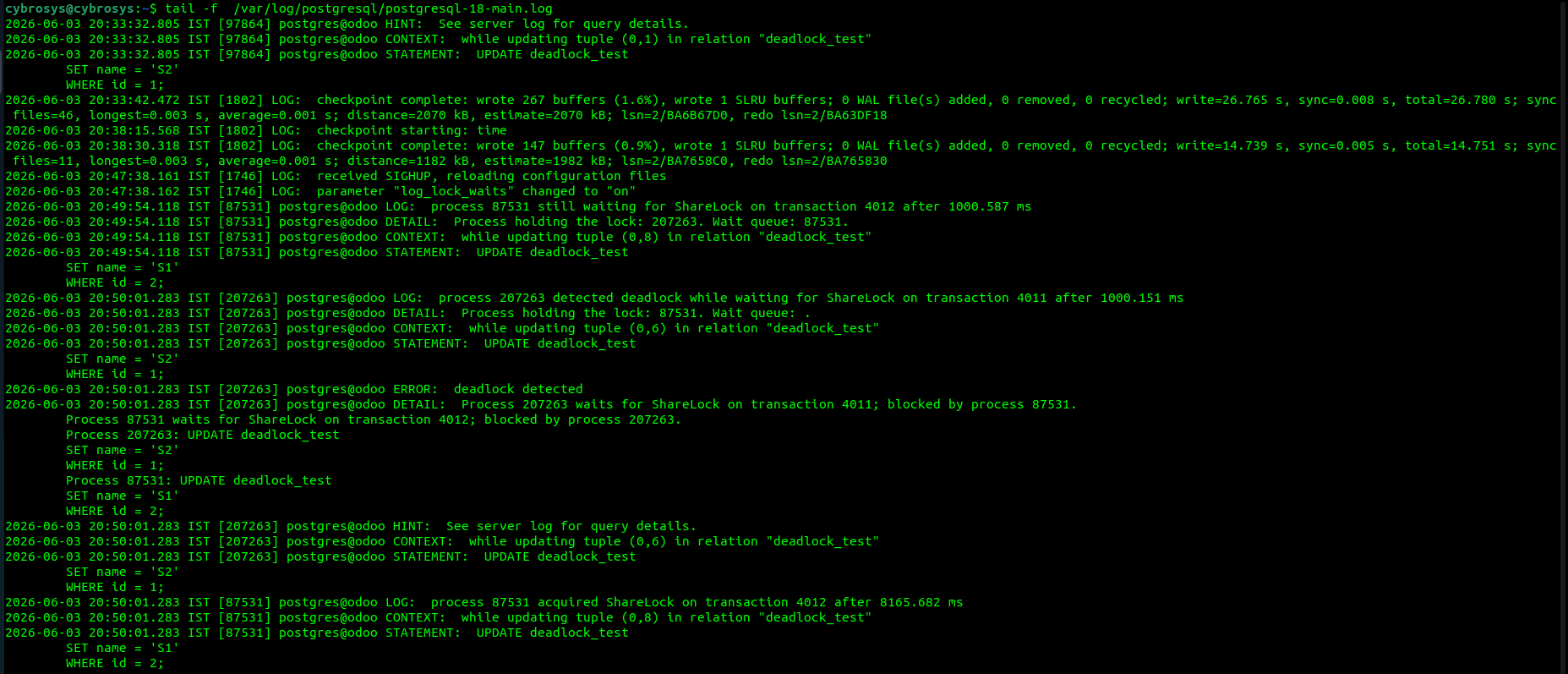
Now activate this parameter to check what is actually logs in postgres logfile during deadlocks
alter system set log_lock_waits = 'on';
select pg_reload_conf();
Check again if the value is correctly changed or not.
show log_lock_waits ;
-[ RECORD 1 ]--+---
log_lock_waits | on
Now execute the same deadlock detection scenario and check what is logs in postgres life
An example :
To avoid row-level lock issues and deadlocks, developers should follow a few simple best practices. First, always access tables and rows in a consistent order across the application. If one process updates the sale_order first and then stock_move, every other process should follow the same order. Second, keep transactions as short as possible. Do not keep transactions open while waiting for user actions, external APIs, or file generation. Third, update only the rows you actually need by using precise WHERE clauses and proper indexes. This reduces the number of locked rows and improves performance. Finally, monitor locks and deadlocks using PostgreSQL system views like pg_locks and logs. Understanding how row-level locking works helps developers design safer and faster applications. Instead of fearing locks and deadlocks, treating them as normal concurrency tools leads to more stable and scalable PostgreSQL systems.