Odoo.sh is Odoo’s cloud platform to develop and host Odoo projects. It connects directly to Git, so developers can push their code, and the platform will build, test, and deploy the changes. Branches and builds are used to deliver every code change, so understanding how they work will make your day-to-day development easier.
Understanding Branches
What is a Branch?
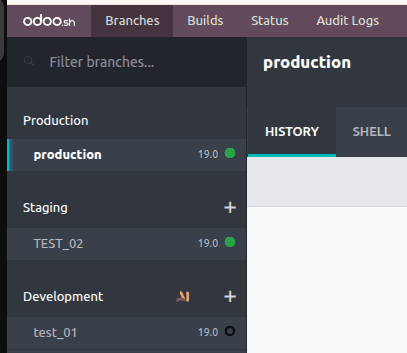
The branches section gives you a complete view of branches in your repository, and you can easily navigate and manage them.
Production Branch
- Your live production database is driven by the production branch, which is the main branch. In Odoo.sh, a project can have only one production branch at any point of time.
- When you push a new commit to this branch, Odoo.sh will automatically update the production server with the latest code and restart the services so the changes take effect.
- Odoo.sh takes automatic backups of the production database to protect your data. It takes seven daily, four weekly, and three monthly backups. Each backup contains the database dump, the filestore (attachments and other binary files), server logs, and user sessions. This simplifies restoring your environment if necessary.
Staging Branch
- A staging branch allows for the testing of new features and changes in an environment that is similar to production. Uses a sanitized copy of the production database to allow you to test updates without impacting your live data or adding test records to the production system.
- The production database is backed up automatically, but staging databases are not. But you can always restore a backup of the production database to a staging branch when you want to test changes or recover data that was accidentally removed from production. As needed, manual backups of staging databases can also be made.
The neutralization disables:
- Scheduled actions
- Outgoing emails
- IAP services
- Payment providers and shipping connectors
Development Branch
- The development branch helps you build and explore new features in a separate section. Pushing a commit to a development branch tells Odoo.sh to create a new database from nothing, load the demo data, and launch a new server with the updated code.
- Odoo.sh launches the unit tests for the module by default to check that no issues were created during the update. It helps you correct issues when you run into them during development.
- Like the staging environments, real emails are not sent in the development databases. Outgoing emails are caught in a mail catcher. Also, scheduled actions (cron jobs) are deactivated while the database is up.
- The development databases are not automatically backed up, and there is no support from Odoo.sh to create manual backups of them.
Merging branches
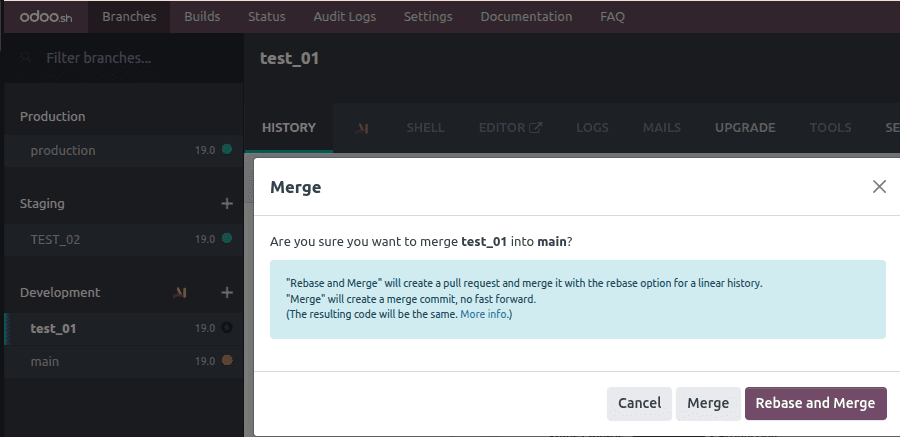
Branch merging is available in Odoo.sh via drag and drop.
Builds
In Odoo.sh, builds are designed as separate environments for specific project versions (revisions). Each build runs a separate Odoo server instance in a container with a dedicated test database for that project version.
Each build allows you to check service startup as well as the anticipated state of the database and the functionality of all newly implemented and/or modified features created in that revision prior to feature release. Serving this function allows problems to be caught and resolved early in the feature rollout process.
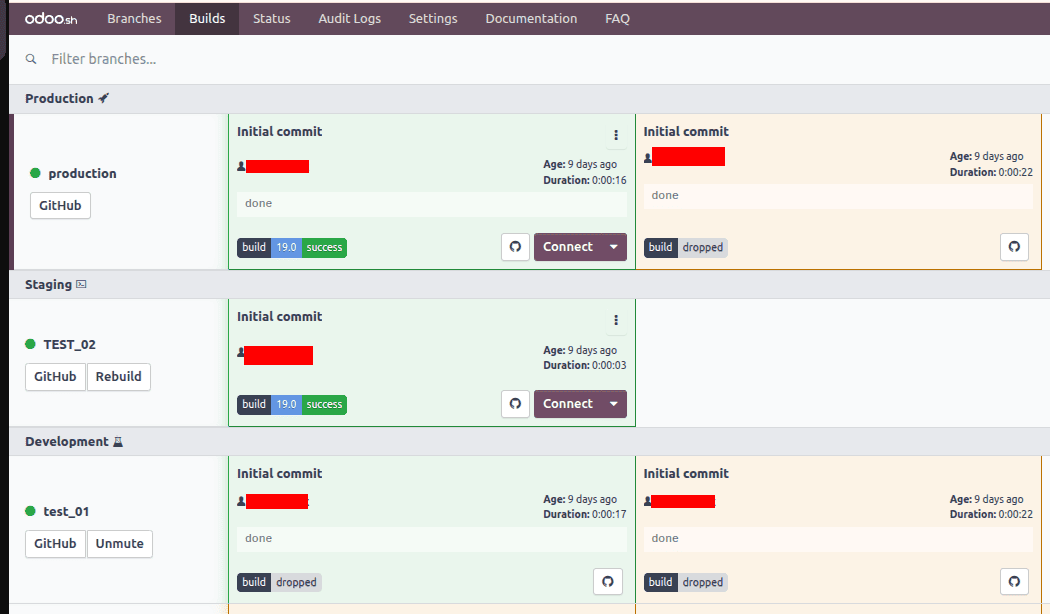
In the Builds view, you can see an overview of all the builds in your project. Each row is a branch. Each cell in that row is a build that was created for that branch.
As you push new commits to your Git repo, most builds will be created automatically. Other actions can trigger rebuilds, such as importing a database into Odoo.sh or asking to rebuild a branch manually.
Builds can have three possible statuses:
- A build is successful if it completes without any errors or warnings. Green means the build was successful.
- Warnings are okay, and you can call it almost successful if it does not have any errors. Successful builds are shown in yellow color.
- If errors occur during the build, then the build is considered failed. Builds that have failed are shown in red.
Odoo.sh is a full cloud development and hosting solution for Odoo. By providing seamless integration with Git, Odoo.sh allows for automated, reliable, and rapid development and deployment. Familiarity with the builds and statuses, along with an understanding of the Production, Staging, and Development branches, will allow developers to manipulate the code and implement deployments with confidence. Odoo.sh provides automated builds and environment isolation to ease the burdens of development and deployment, as well as integrated version control, to allow developers to be productive from the initial development phase all the way to the final phase of deployment.
To read more about Odoo SH: A Complete Guide to the Online Editor, refer to our blog Odoo SH: A Complete Guide to the Online Editor.