Choosing the right software backbone for the organization is one of the most important decision makers that a business organization can take. The software backbone determines how well the marketing activities attract customers, how smoothly the sales close deals, and how efficiently the backend supplies the product.
There are two common platforms that top the list for growing businesses in terms of the evaluation criteria - Odoo 20 and HubSpot.
Though both platforms have CRM and digital marketing functionalities, there is a fundamental difference in their architectural approach:
HubSpot is the best-of-breed customer platform. The key focus of the HubSpot platform is inbound marketing, lead nurturing, sales pipeline acceleration, and customer service.
Odoo 20 is an all-in-one business management ERP ecosystem. It integrates CRM, email marketing automation, accounting, inventory, manufacturing, procurement, point of sale, and human resources within the same database.
In this all-encompassing guide, we analyze Odoo 20 and HubSpot by comparing their marketing hub, CRM, website and landing pages, pricing models (real-world examples of 10-user TCO and 50-user TCO), ERP benefits, shortcomings, and Odoo 20 migration plan from HubSpot.
1. Understanding Odoo 20 and HubSpot
What is Odoo 20?
Odoo 20 is an open-core business application and ERP system with full integration. Odoo 20 is not about making businesses use different pieces of software for each individual department but about providing numerous applications on one database.
Important applications in Odoo 20 include:
- CRM & Sales: Lead enrichment, pipeline management, automatic quotations, e-signatures, and sales orders.
- Marketing Suite: Email Marketing, Visual Marketing Automation flows, Social Marketing, SMS Marketing, and WhatsApp.
- Content & Commerce: Visual drag-and-drop Website Builder, Landing Pages, eCommerce, Customer Portal, and Blogs.
- ERP Operations: Double-entry bookkeeping, Multi-warehousing, Barcode scanning, Purchasing, Manufacturing, Project Management, Timesheets, and Human Resources.
In Odoo 20, applications don’t sync; rather, they share data. The contact made from a landing page on a website is available in an instance to the salespeople in the CRM, the marketing team sending out email newsletters, the warehouse managers scheduling deliveries, and accountants creating invoices. Odoo 20 further integrates AI-based workflow automation, smart emails, and predictive lead scoring.
What is HubSpot?
Founded in 2006, HubSpot revolutionized the field of “inbound marketing” and became one of the most widely used customer management solutions on the planet. HubSpot has the following “hubs” in its architecture:
- Marketing Hub: lead generation forms, email marketing, behavioural automation, ads manager, social publishing, and campaign attribution.
- Sales Hub: deal pipeline, sales engagement sequences, meeting scheduling, quotes, and forecast.
- Service Hub: support tickets, knowledge base, feedback surveys, and omni-channel communication.
- Content Hub (previously called CMS Hub): website page creator, landing page generator, blog, and AI content assistant.
- Operations Hub: programmable data synchronization, data quality automation, and webhook triggers.
HubSpot is very good at UX design, polished marketing playbooks out-of-the-box, and sales enablement in particular. But HubSpot is not ERP software. HubSpot doesn’t provide any functionality for general accounting ledgers, bin-location inventory, bills of materials, or procurement in the supply chain. To manage backend processes, HubSpot requires integration with some external ERP or accounting software (QuickBooks, NetSuite, or Odoo).
2. Feature Comparison Matrix
| Feature / Domain | Odoo 20 | HubSpot (Customer Platform) |
| Primary Classification | All-in-One ERP & Business Suite | Dedicated CRM & Marketing/Sales Platform |
| CRM & Deal Pipelines | Included (Native) | Included (Sales Hub) |
| Email Marketing | Included (Native, Unlimited Contacts) | Included (Tiered by Marketing Contacts) |
| Marketing Automation | Included (Email, SMS, WhatsApp, Server Actions) | Included (Pro/Enterprise tiers; industry-leading branching) |
| Social Media Management | Included (LinkedIn, Facebook, Instagram, Twitter/X, YouTube) | Included (Marketing Hub Pro/Enterprise) |
| Website & Landing Pages | Included (Full visual builder + integrated eCommerce) | Included (Content Hub / Marketing Hub) |
| eCommerce & Customer Portal | Included (B2B/B2C, customer invoice/order portal) | Basic payments require external Shopify/WooCommerce for advanced retail |
| Core Accounting & Invoicing | Fully Native (GL, Bank Feeds, Tax reports, AP/AR) | Invoicing only; Requires external software (QuickBooks/Xero/NetSuite) |
| Inventory & Warehousing | Fully Native (Multi-warehouse, Lots/Serials, Routes) | None (Requires 3rd-party ERP integration) |
| Purchasing & Vendor Bills | Fully Native (RFQ, Purchase Orders, Vendor matching) | None (Requires 3rd-party ERP integration) |
| Manufacturing (MRP) | Fully Native (BOM, Work Centers, Routing, Maintenance) | None |
| Underlying Database | Single unified PostgreSQL database | Shared Customer Platform database across Hubs |
| Data & Hosting Freedom | SaaS (Odoo Online), PaaS (Odoo.sh), or Self-Hosted On-Premise | Strict Cloud SaaS Only (Proprietary) |
| Database Contact Limits | Unlimited contacts (No tier penalties) | Pay-per-contact pricing (strict contact tier limits) |
3. Marketing Capabilities: Odoo 20 vs HubSpot
3.1. Email Marketing
| ODOO 20 | HUBSPOT |
| Unlimited contact database | Pay-per-contact tiers |
| Native link to Sales & ERP | Advanced A/B testing |
| Custom SMTP / SES / Mailgun | Proprietary sending IPs |
| Drag-and-drop newsletter UI | World-class email analytics |
- Odoo 20 Email Marketing:
Makes it possible to create, organize, and send out mass emails directly via the ERP system. Any parameter in the business database can be used for segmentation (i.e., "Customers who bought Product X within the past six months without any open sales orders"). Integration with your own mail servers (Amazon SES, SendGrid, Mailgun, SMTP) means that you never pay extra money due to having more than 5,000 but less than 100,000 contacts.
- HubSpot Email Marketing:
An industry leader when it comes to email deliverability tools, drag-and-drop templates, smart rules for content showing depending on the customer’s life cycle stage, and intensive A/B testing of subjects and content. The drawback is that you have to tag your contacts as “Marketing Contacts” and thus face progressive pricing due to the number of contacts in your list.
If your marketing team is using intensive granular A/B testing, automatic optimization of send times, and behavioural heat maps, then choose HubSpot.
If you need to send out emails to big groups at affordable prices without contact penalties per month, then go with Odoo 20.
3.2. Marketing Automation and Omnichannel Journey
- Odoo 20 Marketing Automation:
Odoo 20 enables you to design automatic campaigns that occur in response to events in any module. If there is a certain trigger (for example, a lead gets a particular score, or an invoice goes unpaid after 7 days), then Odoo can do the following:
- Send automated SMS/WhatsApp messages.
- Create an internal task for the salesperson.
- Run server actions (for example, updating the credit limit, updating customer tags).
- HubSpot Marketing Automation:
The workflow engine of HubSpot (Professional/Enterprise version) is often called the gold standard in B2B marketing automation. It supports complicated branching logic, webhook triggers, lead rotation, internal Slack/Teams alerts, and even event tracking based on accurate page visits/video views on the website.
HubSpot is better suited for complicated B2B marketing automation workflows using the data from website tracking. Odoo 20 takes precedence over HubSpot, where the process goes beyond marketing automation—for example, automatic actions depending on warehouse delivery or accounting payment collections.
3.3. Social Media Management
- Social Marketing with Odoo:
Allowing marketing professionals to link their social media accounts (such as LinkedIn, Facebook, Instagram, Twitter/X, and YouTube), create a posting calendar, check click-through rates, and even live chat with page visitors.
- HubSpot Social:
As part of Marketing Hub Professional, HubSpot allows publishing on social networks using blog drafts, tracking brand mentions on social media platforms, and attributing clicks on social media to closed-won deals in CRM.
4. CRM: Lead Nurturing & Sales Pipeline Management
Both solutions provide Kanban sales pipelines, scheduling of activities, and deal-tracking features, but their coverage is drastically different when it comes to closing:
DEAL CLOSURE COMPARISON
| ODOO 20 | HUBSPOT |
| Deal Closed - Won | Deal Closed - Won |
| Generates Binding Sales Order | Generates Deal Record |
| Allocates Stock in Warehouse | Syncs to external ERP via API/Zap |
| Generates Invoices & Collects Cash | Manual/External Invoice in QB |
Odoo 20 CRM
Odoo CRM tracks the lifecycle of lead qualification through opportunity conversion:
- Predictive Lead Scoring: It applies machine learning parameters to assess lead scores based on their past conversion history.
- Generation of Quotation and Order: With one click, a lead becomes an opportunity that turns into a quotation considering all relevant pricing rules, volume discounts, and specific customer price lists.
- Operational Action: Once the quotation is digitally signed using Odoo Sign, a Sales Order is generated instantly, resulting in inventory reservations in the warehouse and invoicing in accounting.
HubSpot CRM
HubSpot CRM is known for its smooth and simple user interface:
- Sales Enablement: Includes call recordings, transcription, email opens monitoring, scheduling of meetings automatically, and deal stages customization.
- Playbooks & Sequences: Provides B2B SDRs (Sales Development Representatives) with the opportunity to conduct outreach sequences with pre-defined automation tasks.
- Integration Need: In case the deal status becomes "Closed-Won" in HubSpot, the process gets stuck there and cannot proceed further. To perform shipping or generate invoices, third-party integration (Syncari, Celigo, etc.) is required.
5. Website, Landing Pages, and eCommerce
- Odoo Website & eCommerce: Odoo comes with a complete open-source CMS and eCommerce system that works well together. With drag-and-drop elements, you build landing pages, a customer portal, job application forms, and an eCommerce store. Any form on the website ("Request a Quote," "Contact Us," "Download Whitepaper") posts data into the CRM database without webhooks or Zapier. Moreover, customers can enter the Customer Portal to check previous quotes, look at project timesheets, track shipping numbers, and pay their invoices.
- HubSpot Content Hub: HubSpot has one of the best marketer-oriented CMSs. The best SEO advice, drag-and-drop page builders, dynamic content staging, and personalized landing pages per specific lead groups are its key advantages. Nonetheless, despite being able to accept payments online, HubSpot was not designed for running a multi-thousand SKU eCommerce store that would be connected to the real-time warehouse.
- The Verdict: If the primary task for you is inbound content management and landing pages, HubSpot Content Hub is ideal for this. In case your website requires deeper integration with the real-time inventory, customer portal, B2B price lists, and manufacturing quotes, Odoo Website is better.
6. The Integrated ERP Benefit: "One Database" Importance
The single most important competitive advantage of Odoo 20 is its built-in ERP functionality.
In a fragmented software stack, for instance, "HubSpot + QuickBooks + ShipStation + Fishbowl", constant syncing is necessary through the API interfaces. API failures, rate limitations, duplicates, or schema drift are common occurrences.
The Odoo 20 Unified Lifecycle Walkthrough
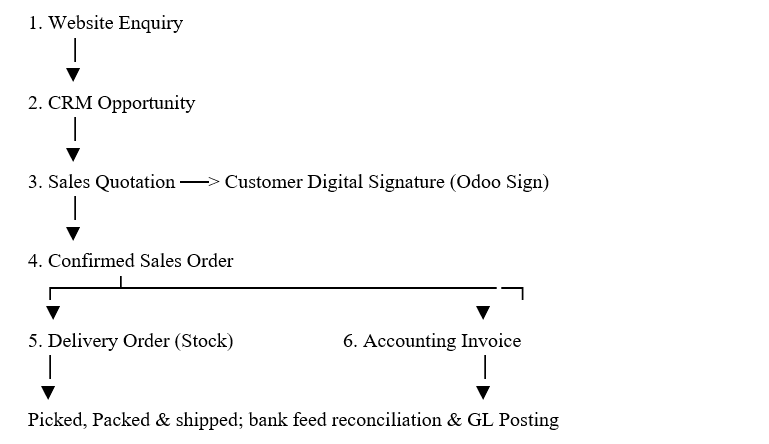
- Website Enquiry: The interested buyer fills out a form on the landing page of your website.
- CRM Opportunity: An opportunity gets created immediately, and the correct regional salesperson receives this lead automatically.
- Sales Quotation: The salesperson prepares a sales quotation using the real-time inventory data and sends it to the client via the secure portal link.
- Sales Order: The client approves digitally through Odoo Sign. The quotation gets converted into an official Sales Order.
- Inventory Delivery: The warehouse management system creates a delivery order automatically. It selects stock for delivery from the nearest bin locations and prints shipping labels.
- Accounting & Invoicing: The accounting system automatically creates an invoice for the customer based on delivery quantity. Payment is registered via Stripe or credit card. The General Ledger is updated in real time.
No webhooks, no middleware, no reconciling differences.
7. Pricing Comparison: Transparent Cost Analysis
The pricing of software could be misleading at times; despite the affordable initial prices, you may incur higher costs due to upgrades, contact limitations, and integration services.
Odoo 20 Pricing Strategy:
The Odoo pricing is a flat per-user pricing strategy which consists of access to all the applications as follows:
- One App Free ($0): No cost for an unlimited number of users if you use only one application (e.g., only Odoo CRM).
- Standard ($24.90 / user/month billed annually): All Odoo applications are covered, including those in Odoo Online (cloud SaaS).
- Custom ($37.40 – $49.00 / user/month billed annually): All applications covered, multiple company capabilities, external API connection, and Odoo Studio customization engine, hosted in Odoo Online, Odoo.sh cloud, and self-hosted On-Premise.
- Advantage: Contact tier pricing is zero; whether you have 2,000 or 2,000,000 contacts in your database, your Odoo license price will remain the same.
HubSpot Pricing Model
HubSpot’s pricing is based on Hubs, Seat Types, and Marketing Contacts:
- Starter Customer Platform: Starts at around 15-20/seat/month (fewer features, max 1,000 marketing contacts).
- Marketing Hub Professional: Starts at $890/month (includes 3 Core Seats & 2,000 marketing contacts). More Core Seats are charged at $50/seat/month. Extra marketing contacts are charged at 250/month per 5,000 contacts.
- Sales Hub Professional: Is priced separately at 90-100/seat/month for sales representatives with the need for pipeline and sequences.
- Onboarding Fee: HubSpot imposes a mandatory one-time onboarding fee of 3,000forMarketingHubProfessional(6,000 for Enterprise.
Scenario A: Total Cost for a 10-User Company
Assumptions: 10 internal users (3 marketing, 5 sales, 2 operations and management) with 15,000 customer contacts.
| Cost Component | Odoo 20 (Standard / Custom) | HubSpot (Pro Hybrid: Mktg Pro + Sales Pro) |
| Base Platform Fee | $0 | $890 / month (Marketing Hub Pro base) |
| User Licenses/Seats | Standard: 10 × $24.90 = $249/mo, Custom: 10 × $49.00 = $490/mo | 3 Mktg seats included, 5 Sales Hub Pro seats: 5 × $100 = $500/mo, 2 Core seats: 2 × $50 = $100/mo |
| Contact Tier Add-on (15,000 contacts) | $0 (Included) | 2,000 included; +13,000 contacts (~3 packs @ $225) = $675/mo |
| Accounting & Inventory Software | $0 (Fully Included) | External ERP needed (e.g., QuickBooks: ~$150/mo) |
| Mandatory Vendor Onboarding | $0 | $3,000 one-time fee |
| Estimated Monthly Subscription | $249 – $490 / month | $2,315 / month |
| First-Year Total Cost (Software + Onboarding) | $2,988 – $5,880 | $30,780 |
Cost Conclusion: A 10-user company would pay 5x to 10x more every year with HubSpot compared to Odoo due to the marketing contact tier costs, separate Sales Hub seats, and additional subscriptions for accounting from third parties.
Scenario B: Total Cost for a 50-User Company
Assumptions: 50 internal team members (8 marketing, 20 sales, 22 warehouse, procurement, accounting, and administrative) with 50,000 customer contacts.
| Cost Component | Odoo 20 (Custom Plan on Odoo.sh) | HubSpot (Customer Platform / Enterprise Hubs) |
| Platform/User Licenses | 50 users × $49.00 = $2,450 / month | Hubs + Seats + Core Platform seats: ~$5,500 – $7,500 / month |
| Contact Tier Fees (50,000 contacts) | $0 (Unlimited in Odoo) | 2,000 included; +48,000 contacts: ~$2,000 / month |
| ERP, Inventory & Accounting Licenses | $0 (Included for all 50 users) | External ERP Required (e.g., NetSuite: ~$3,000–$5,000/mo) |
| API Integration / Middleware (Celigo/Zapier) | $0 (Native) | ~$500 – $1,200 / month |
| Mandatory Vendor Onboarding | $0 | $6,000 – $9,000 one-time |
| Estimated Monthly Operating Cost | $2,450 – $3,000 / month | $11,000 – $15,700 / month |
| First-Year Total Cost | ~$35,000 – $42,000 | ~$138,000 – $197,000+ |
Cost Conclusion: With 50 users in the company, Odoo provides yearly savings of more than $100,000+ as well as removes the fragility of integrating HubSpot with the disconnected backend ERP system.Cost Conclusion: With 50 users in the company, Odoo provides yearly savings of more than $100,000+ as well as removes the fragility of integrating HubSpot with the disconnected backend ERP system.
8. The limitations of Odoo compared to HubSpot
Although Odoo has a massive cost and operational advantage, it is not without its trade-offs. Businesses must acknowledge that HubSpot is better than Odoo in the following ways:
- Marketing Analysis and Attribution: HubSpot has some of the best multi-touch revenue attribution analysis reports, including first-touch, last-touch, W-shaped, and linear attribution. Odoo offers conversion.
- Off-the-Charts Polish & Instant Usability: HubSpot boasts an almost zero learning curve feature. A Junior Marketing Coordinator can create a sophisticated workflow in a few hours after signing into their account. Odoo is a full enterprise platform; since modules integrate deeply with one another, the onboarding of users demands careful process engineering.
- Lead Journeys Optimization Features: HubSpot provides adaptive testing, send-time optimization powered by AI, and comprehensive personalization tokens from browser cookie data – capabilities that go beyond what Odoo’s standard marketing modules offer out-of-the-box.
- Third-Party MarTech Apps Marketplace: HubSpot's App Marketplace offers thousands of ready-made integrations with marketing tools such as G2, ZoomInfo, Chili Piper, and Drift. Odoo has a large app store (>40k community apps), but it is targeted at operational, localization, and utility modules instead of specialized MarTech products.
9. When to Select Which Platform?
Odoo 20 for:
- Full-fledged management of your business (CRM, Sales, Accounting, Inventory, Manufacturing, eCommerce, and HR) on one single platform.
- If you are fed up with spending thousands of dollars each time your marketing mailing list grows.
- If your sales team requires an instant view of the available stock, status of deliveries, and outstanding invoices from customers.
- If you seek data sovereignty and flexibility in hosting (either in your own private cloud or Odoo.sh).
- If you wish to avoid middleware connections like Zapier, Celigo, or custom REST API calls.
HubSpot for:
- Pure-play marketing & SaaS sales engagement for your organization.
- If your backend accounting and ERP system is mature (like SAP, NetSuite, or QuickBooks), then there is no need to change it.
- If your marketing department wants advanced features like A/B testing, multi-touch revenue attribution, Social listening, etc.
- You have a huge budget for marketing.
10. Detailed Migration Plan: Moving from HubSpot to Odoo
Migrating from HubSpot to Odoo 20 is more than exporting your data; it is consolidation of your customers.
MIGRATION TIMELINE AND MILESTONES
- Phase 1: Audit of Data & Custom Field Mapping
- Phase 2: Data Cleaning, De-duplication & Export
- Phase 3: Domain and Email Delivery Set-Up (SPF/DKIM/DMARC)
- Phase 4: Import Contacts, Companies and CRM Stages
- Phase 5: Rebuild Marketing Workflows and List Segmentation
- Phase 6: User Acceptance Testing (UAT) & Go Live
Step 1: Audit Data Structures & Custom Properties
- Examine all the custom properties that HubSpot has for Contacts, Companies, and Deals. In Odoo, decide if these properties correspond to built-in fields, need custom fields through Odoo Studio, or can be replaced with Odoo tags.
Step 2: Data Cleansing and Export
- Remove unengaged or bounced contacts from HubSpot prior to export to keep your sender score safe.
- Export Companies, Contacts, and Deals to CSV files. Remember to include the HubSpot Record ID in each export to ensure the relational nature is preserved while connecting contacts with their parent company.
Step 3: Email Deliverability Setup (Extremely Important)
- Set up email delivery before starting any campaigns from Odoo:
- Create an SPF record (v=spf1 include:... ~all).
- DKIM and DMARC for custom domain (2048-bit keys).
- This will make sure your marketing emails are delivered to the Inbox and not marked as spam.
Step 4: Relational Mapping of Data to Odoo
- Map the data in the following order:
- Users: Set up accounts in Odoo first for sales reps and marketing teams.
- Partners (Companies): Load business accounts (res.partner, is_company=true).
- Partners (Contacts): Load contacts and map to parent company id.
- CRM Opportunities: Load CRM opportunities (open/won) to crm.lead. They should be mapped to the salesperson, contact, and the respective pipeline stage.
Step 5: HubSpot Workflow Conversion to Odoo
- Check for workflows that are currently being used in HubSpot and re-create them in Odoo Marketing Automation:
- HubSpot static lists should be converted to Odoo mailing lists.
- Create an automated drip campaign; add conditions for time delay and activity.
Step 6: Training and System Go Live
- Train sales reps on the conversion of leads to quotes through the Odoo platform. Once UAT is approved, remove tracking scripts from HubSpot and replace them with Odoo website tracking or forms.
HubSpot is the epitome of premier, top-tier marketing and sales engagement software. If you work for venture-backed tech startups and the only software needed to be covered for inbound marketing at the top-of-the-funnel level, HubSpot is still a tough choice if your financial resources allow you to scale contact levels.
But if you operate small, medium-sized, and enterprise companies involved in manufacturing, stocking, selling, delivering, and invoicing of physical and/or digital goods, Odoo 20 is an unbeatable choice. Integrating CRM, email campaigns, and marketing automation with actual accounting, multi-warehouse inventory management, and sales orders in one unified database will help eliminate data silos, save up to 70% to 90% per year on software licenses, and build a sustainable foundation for growing your business.
To read more about Odoo 20 Community vs Enterprise: Features by Department, refer to our blog Odoo 20 Community vs Enterprise: Features by Department.