Until version 19.3, Odoo’s security was built on two separate layers. Access Control List (ir.model.access) controlled whether a user could create, read, write, or delete records in a model. Record rules (ir.rule) determined which specific records the user was allowed to see and modify. This approach seemed to work well but often seemed fragmented, and this required the developers to maintain two different types of security definitions.
This architecture has been completely redesigned with the release of Odoo 20. Record rules (ir.rule) have been removed, and a unified model of Access rights (ir.access) now handles both model and record-level permissions and filtering. In this article, we will explore these changes in Odoo 20 and why it matters.
No more ir.rule
In earlier versions, developers defined record rules using the ir.rule model. A record rule is defined as:
<record id="purchase_order_own_rule" model="ir.rule">
    <field name="name">Employee Own Requisitions</field>
    <field name="model_id" ref="model_purchase_order"/>
    <field name="domain_force">[('employee_id.user_id','=',user.id)]</field>
    <field name="groups" eval="[(4, ref('base.group_user'))]"/>
</record>
The ir.rule model is left out from Odoo 19.4 onwards. If we try to create a record in ir.rule, it will raise a KeyError; hence, developers commonly face this error when upgrading custom modules to Odoo 20.
What’s New with Model ir.access?
Odoo 20 replaces ir.model.access and ir.rule with a unified model ir.access, hence unifying the responsibilities of the previous versions into a single architecture.
You can navigate to the ir.access model through the user interface: General Settings > Technical > Security > Access Rights.
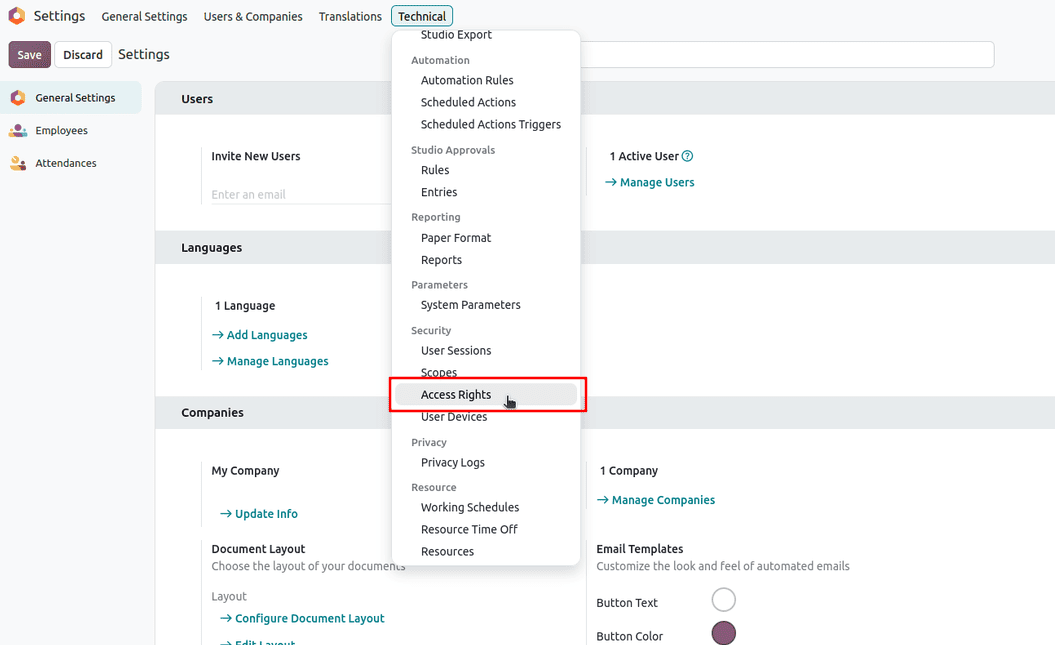
Different fields available in ir.access model are:
- name - describes an access rule.
- model_id - the model to which a rule is applied.
- group_id - the group that acquires the permission; becomes a restriction if left empty, i.e., the model becomes restricted to all users.
- operation - a selection field that defines the allowed actions.
- crud - all permissions (create, read, update/write, delete).
- cru - create, read, update
- crd - create, read, delete
- cud - create, update, delete
- rud - read, update, delete
- domain - applies a filter based on the defined domain for the user groups who have access to the model.
- active - archives and unarchives an ir.access model record.
- kind - a selection field with values. Permission and Restriction that determines the user access given to the model. An access right only works as permission if a user group is set for the record.
- is_standard - a boolean field that tells us if the access is defined by a module.
- note - a simple text field that lets users keep track of why the particular access right exists.
security/ir.access.csv
Previous versions of Odoo (19 and lower) had ir.access.model.csv under the security folder, which required csv columns.
id,name,model_id:id,group_id:id,perm_read,perm_write,perm_create,perm_unlink
access_id,access.name,model_name,group_name,1,1,1,1
The security folder had separate files - one for defining model access and the other for defining record rules.
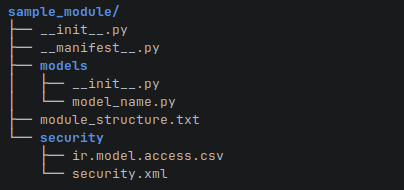
The module structure is now more unified.
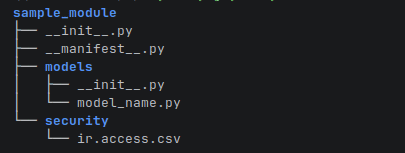
The new ir.access model has csv columns.
id,name,model_id,group_id/id,operation,domain
access_sale_order_request,sale_request_model_access,sale.order.request,base.group_user,crud,[('state','=','cancel')]
- id - unique id for the access right record.
- name - user-readable name for the record.
- model_id - technical name given to the model to which the access right is applicable.
- group_id - xml id of the group user to whom the access right is applicable.
- operation - specifies the permissible operations that the specified group users have on the records in the model. It is given as a combination of the letters ‘c’, ‘r’, 'u', and ‘d’, following the specified order as ‘crud’.
- domain - optionally specified to apply some filtering on the records that a user can see.
Permission and Restriction Logic
Access rights without a group apply global restrictions. With an assigned group, access rights are assigned to the associated group, constrained by the applied domains.
Permissions are granted for different groups where users can be combined. Consider a user that belongs to two groups:
- Library user: read access to books.
- Library staff: create and update access.
If a user possesses the group with read permission and update permission, the user will possess the permission to carry out both operations, with applied domain restrictions, if any. This is useful for organizations with layered roles, where an employee may belong to both a department-specific group and a general employee group.
Suppose a user with the librarian role has permission to read all books but is subject to the following restrictions:
- The librarian can access books that belong to their department.
- The librarian can only access the books marked as available for internal use.
The librarian must satisfy both restrictions to access records. If a record fails to follow any of the restrictions, it remains inaccessible to the librarian. This is inevitable because a permission from another group should not override a restriction.
In a case where no permission record exists, a user without any accessible permissions will not receive access simply because there are no existing restrictions. Suppose the library user group has no permission to create books. The user should not be able to carry out the create operation even if there is no visible restriction against it.
Odoo 20’s newer approach with unified model access rights and record rules depicts a vital shift in how developers organize and evaluate security. By combining model-level permissions and record-level restrictions, Odoo 20 provides a more centralized way to define who can perform an operation and which of the records may be affected by the operation.
To read more about How to Migrate ir.model.access.csv and Record Rules to ir.access.csv in Odoo 20, refer to our blog How to Migrate ir.model.access.csv and Record Rules to ir.access.csv in Odoo 20.