Access control is one of the most important security features in Odoo. This feature ensures that the user will have access only to the records related to their duties. While creating new modules or implementing business process workflows, the developer will face access issues that will prevent the user from performing required actions.
ACL debugging is an integral part of Odoo development. Understanding how ACL works and how you can debug access issues will save a lot of time on your project and also increase its security level.
In this article, we will speak about ACL debugging in Odoo from functional and technical viewpoints and analyze how access issues can be debugged.
ACLs in Odoo
Access Control List is the set of operations that a particular user can do to a particular model.
ACLs are normally configured using the ir.model.access.csv file. Users' abilities include the following:
- Read records
- Create records
- Modify records
- Delete records
A typical ACL entry contains:
- Model name
- User group
- Read access
- Write access
- Create access
- Delete access
E.g., the Sales User can be allowed to create and edit quotations, whereas the Sales Manager can be allowed more rights, like deleting sales orders.
Common Access Errors in Odoo
During development, you may encounter errors such as:
Access Error
You are not allowed to access 'Sale Order' records.
or
Sorry, you are not allowed to create this document.
These errors generally indicate one of the following:
- Missing ACL permissions
- Inappropriate user group assignments
- Strict record rules
- Model access limitations
- Multicompany security restrictions
Functional ACL Debugging Approach
It is necessary to check functional settings before going into code.
Verify User Groups
Navigate to:
Settings > Users & Companies > Users
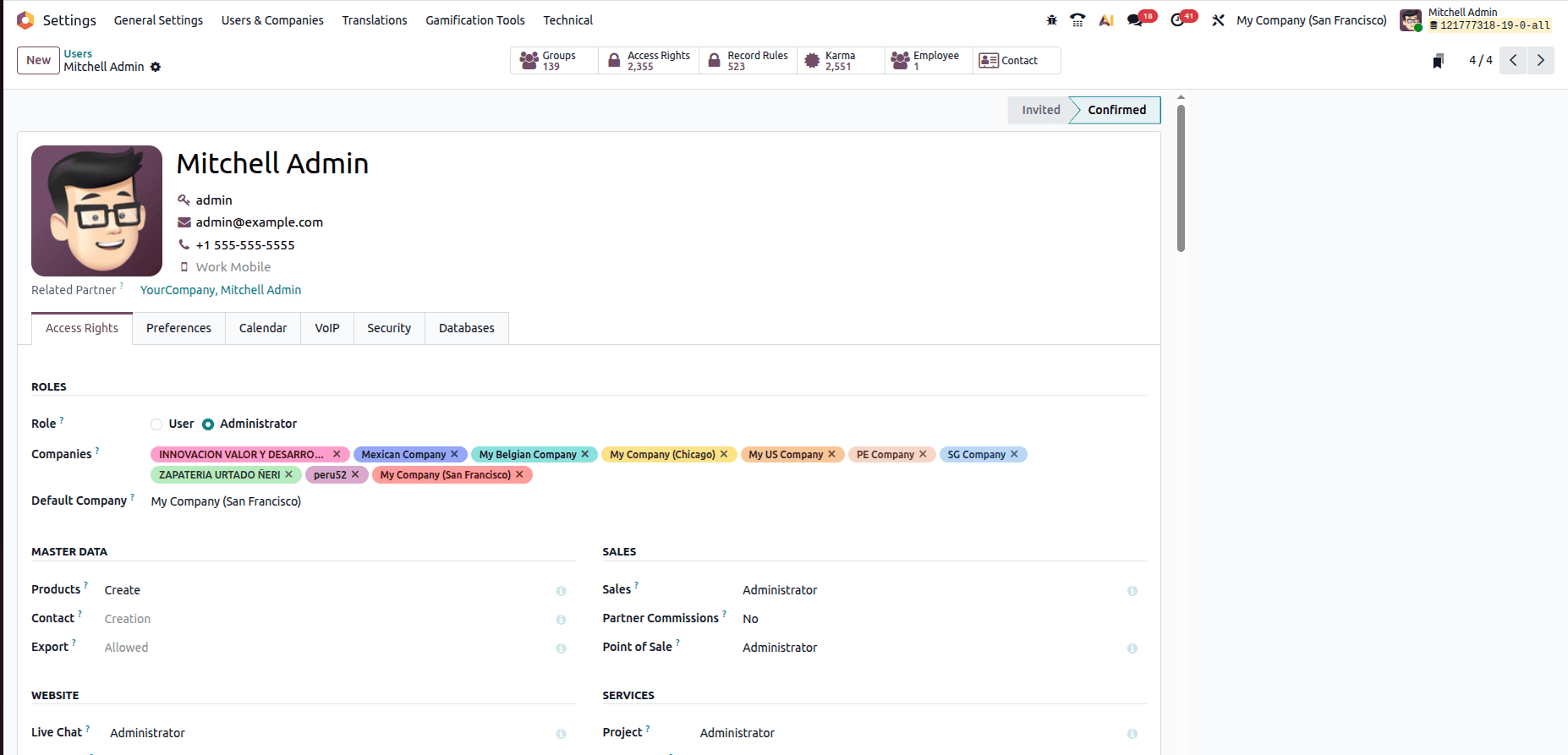
Make sure that the user is assigned to the proper security groups.
Often, an access problem appears only because the user is in the wrong group.
Review Security Settings
Inspect:
- User Roles
- Access Rights
- Record Rules
- Company Access
Sometimes, even though the access control list permissions have been configured properly, the record rules may deny access to certain records.
Test with Administrator Access
Test the process temporarily with admin access.
If the action works with the administrator’s account but not with another account, then the problem is more likely a security-related one than a business logic one.
Technical Approach to ACL Debugging
ACL Configuration Check
Inspect the following files related to the module:
security/ir.model.access.csv
Example:
id,name,model_id:id,group_id:id,perm_read,perm_write,perm_create,perm_unlink
access_custom_model_user,custom.model.user,model_custom_model,base.group_user,1,1,1,0
Verify:
- The model is referenced correctly
- The group is referenced correctly
- Permissions are configured appropriately
Enable Developer Mode
Developer Mode provides access to technical menus such as:
- Access Rights
- Record Rules
- Model Definitions
- User Groups
This makes it easier to inspect security configurations directly from the user interface.
Inspect Record Rules
Many ACL issues are actually caused by record rules.
Navigate to:
Settings > Technical > Security > Record Rules
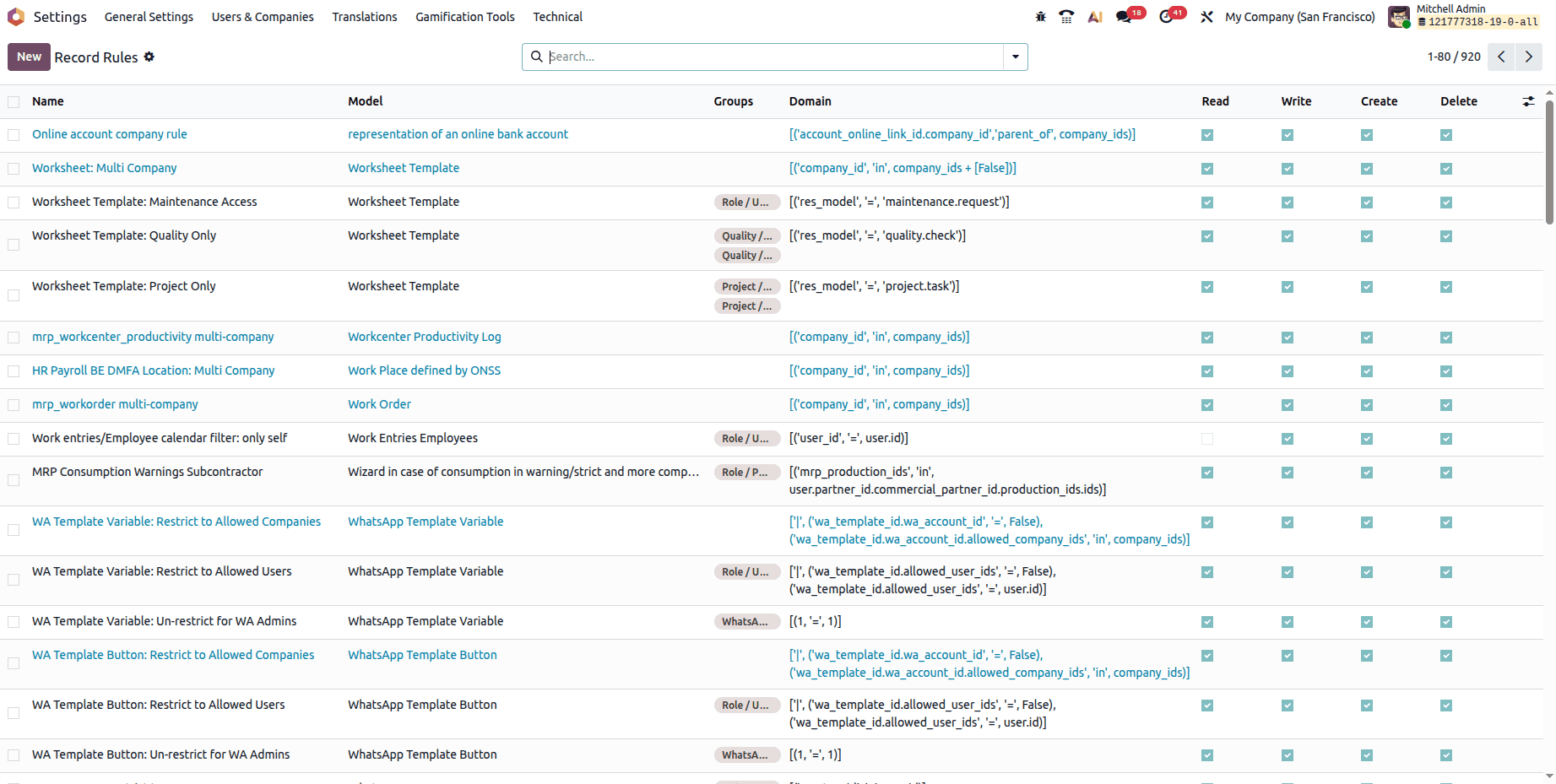
Example rule:
[('user_id', '=', user.id)]This rule restricts users to records assigned to them.
Even if ACL permissions allow reading records, this rule can prevent access to records owned by other users.
Check Related Models
Sometimes access errors originate from related models.
Example:
A user creates a custom ESG record but lacks access to:
- res.partner
- hr.employee
- account.move
The operation fails because Odoo validates permissions on all related models involved in the transaction.
Use Log Messages
Launch Odoo with logging:
./odoo-bin --log-level=debug
The logs often reveal:
- Model access rights missing
- Record rule evaluation errors
- Access restrictions information
This will help to pinpoint the problem.
ACL debugging is a vital task for Odoo developers and consultants. All problems related to access control usually arise due to lack of permissions, wrong user groups, or restricted record rules. Through a proper combination of functional testing and technical investigation, a developer is able to find the problem source and apply a solution.
Using a systematic way to debug Odoo ACL helps both decrease time needed to resolve the problem and ensure application security and maintainability.
To read more about Overview of Access Control Lists (ACLs) in Odoo 19, refer to our blog Overview of Access Control Lists (ACLs) in Odoo 19.