Drag-and-drop functionality is nowadays expected in most modern web applications. This includes such actions as moving a card in a kanban board, moving items in a list, or even creating a drag-and-drop sequencer. Users expect to grab and move elements around without refreshing the page or using a "move up/move down" button.
Drag and Drop functionality is already widely implemented in Odoo through internal UI views - Kanban view, handle-based reordering in the List view, as well as through the Studio feature. However, when creating a new Odoo module with a customized UI (OWL widget, dashboard, reporting tool, or any other UI page not provided out-of-the-box in Odoo views), it becomes necessary to implement such functionality independently. In this case, SortableJS – lightweight and standalone JavaScript library can come in handy.
In this blog, we'll walk through how to integrate SortableJS into an Odoo module and use it to implement drag-and-drop reordering in a custom OWL component.
What is SortableJS?
SortableJS is a library that allows you to create drag-and-drop sorting lists through JavaScript code. This library is framework-independent, requires no additional dependencies, works well with touch-enabled devices, and works great with animations. SortableJS would be an excellent choice to use with Odoo, as it does not have any clashes with the Odoo JS framework (OWL).
- Some of the factors driving developers to adopt SortableJS in Odoo customizations:
- No need for jQuery
- Built-in HTML5 drag and drop API, which is also supported on touch devices as a fallback
- A simple API providing animation, handle, group, and event features
- Integration with OWL lifecycle to restore the DOM order with Odoo data
Step 1: Add the SortableJS Library as an Asset
The first step is to bundle the SortableJS library into your module so it's available in the browser. You can download the library and add it to your module's static/lib folder, or reference it as a static asset.
your_module/
+-- static/
¦   +-- lib/
¦   ¦   +-- sortablejs/
¦   ¦       +-- Sortable.min.js
¦   +-- src/
¦       +-- js/
¦       ¦   +-- drag_drop_list.js
¦       +-- xml/
¦       ¦   +-- drag_drop_list.xml
¦       +-- scss/
¦           +-- drag_drop_list.scss
Register the library in your module's __manifest__.py under assets:
'assets': {
    'web.assets_backend': [
        'your_module/static/lib/sortablejs/Sortable.min.js',
        'your_module/static/src/scss/drag_drop_list.scss',
        'your_module/static/src/js/drag_drop_list.js',
        'your_module/static/src/xml/drag_drop_list.xml',
    ],
},
Make sure the library file is loaded before your component's JS file, since your component will depend on the global Sortable object it exposes.
Step 2: Build the OWL Component
Next, create an OWL component that will render the list and initialize SortableJS on its root element once it's mounted.
/** @odoo-module **/
import { Component, useRef, onMounted, onWillUnmount } from "@odoo/owl";
import { registry } from "@web/core/registry";
import { useService } from "@web/core/utils/hooks";
export class DragDropList extends Component {
    static template = "your_module.DragDropList";
    static props = { records: Array };
    setup() {
        this.orm = useService("orm");
        this.listRef = useRef("sortableList");
        this.sortableInstance = null;
        onMounted(() => this._initSortable());
        onWillUnmount(() => this._destroySortable());
    }
    _initSortable() {
        this.sortableInstance = Sortable.create(this.listRef.el, {
            animation: 150,
            handle: ".drag-handle",
            ghostClass: "o_dragdrop_ghost",
            onEnd: (evt) => this._onDragEnd(evt),
        });
    }
    _destroySortable() {
        if (this.sortableInstance) {
            this.sortableInstance.destroy();
            this.sortableInstance = null;
        }
    }
    async _onDragEnd(evt) {
        const { oldIndex, newIndex } = evt;
        if (oldIndex === newIndex) {
            return;
        }
        const records = [...this.props.records];
        const [moved] = records.splice(oldIndex, 1);
        records.splice(newIndex, 0, moved);
        // Persist the new sequence values back to the model
        const updates = records.map((rec, index) => ({
            id: rec.id,
            sequence: index + 1,
        }));
        await this.orm.call("your.model", "write_sequence_batch", [updates]);
    }
}
registry.category("actions").add("your_module.drag_drop_list", DragDropList);
A few things worth calling out here:
- The onMounted / onWillUnmount hooks are employed for initializing and disposing of the Sortable instance along with the component life cycle of OWL. Failure to dispose of the instance results in memory leaks and "ghost" listeners on the event if the component is re-rendered.
- handle: ".drag-handle" limits the dragging to a particular node within the row (e.g., a drag handle), instead of making the whole row draggable. It prevents unintentional dragging initiated by the click on the button or a text input within the row.
- The logic of actual re-ordering is implemented in onEnd callback. You get the old and new indices of the dragged item from SortableJS and calculate the sequence numbers based on these indices.
Step 3: The Template
<templates xml:space="preserve">
    <t t-name="your_module.DragDropList">
        <div class="o_dragdrop_container">
            <ul t-ref="sortableList" class="list-group">
                <t t-foreach="props.records" t-as="record" t-key="record.id">
                    <li class="list-group-item d-flex align-items-center" t-att-data-id="record.id">
                        <i class="fa fa-arrows drag-handle me-2"/>
                        <span t-esc="record.name"/>
                    </li>
                </t>
            </ul>
        </div>
    </t>
</templates>
Note the t-key="record.id" on the loop - this is essential. OWL uses the key to track which DOM node maps to which record across re-renders, and without a stable key, OWL may re-create elements in a way that fights with SortableJS's own DOM manipulation.
Step 4: Persisting the Order on the Backend
On the Python side, you need a method that accepts the new sequence mapping and writes it in a single transaction:
from odoo import models, fields, api

class YourModel(models.Model):
    _name = "your.model"
    _description = "Your Model"
    _order = "sequence, id"
    name = fields.Char(required=True)
    sequence = fields.Integer(default=10)
    @api.model
    def write_sequence_batch(self, updates):
        for update in updates:
            self.browse(update["id"]).write({"sequence": update["sequence"]})
        return True
When the list has many records, you could use sequence fields with gaps such as intervals of 10 rather than consecutive numbers, which follows the same principle as the one followed by Odoo's list view reordering process. In this way, it will be possible to add new records at any time.
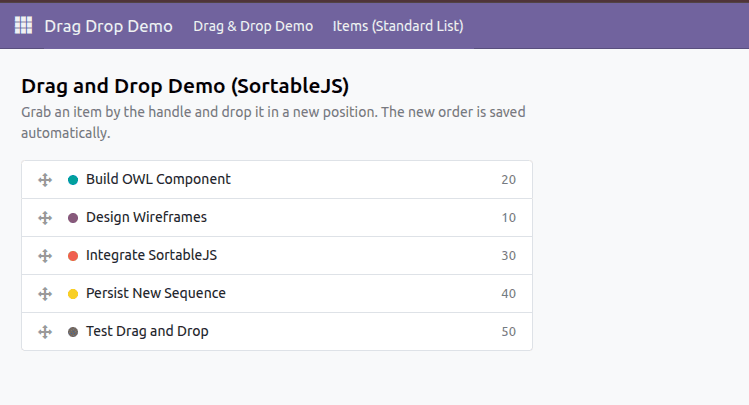
Example: Drag and Drop List
Common Pitfalls to Watch Out For
When you want drag-and-drop functionality in Odoo that is not handled by default by Odoo in its views, SortableJS offers an efficient solution. Through proper integration of SortableJS in the lifecycle of an OWL component by initializing and destroying it at the appropriate points, you have a nice drag-and-drop experience without needing to use any additional framework.
To read more about How to Implement Drag-and-Drop in OWL Components, refer to our blog How to Implement Drag-and-Drop in OWL Components.