Odoo supports third-party software to access its data from outside the system. Websites, mobile applications, accounting systems, and scripts can use this feature to place an order, synchronize customers, or generate reports. This was done using two APIs: XML-RPC and JSON-RPC.
Odoo 20 released a newer API known as External JSON-2, while the previous ones have been deprecated. The first part of the old API is no longer available in Odoo 20. In this blog post, we will find out how this affects your integration and what you should do to migrate each component to JSON-2.
Changes in Odoo 20
- The older APIs can be accessed using the endpoints /xmlrpc,/xmlrpc/2 and /jsonrpc. They both provide three similar services. The common service is used for login and version. The db service takes care of the databases. The object service provides read-write access to all models.
- Odoo 20 has deprecated the db service. Common and object services remain functional but are set for removal in Odoo 22. Thus, it is better to start the migration earlier, since all integrations that are using the old API will need to be changed one day.
- One thing that is not affected by this change is the controllers that you write inside your own modules with @route(type='jsonrpc') (called type='json' until Odoo 18).
The Deprecation Warning in the Log
When the old endpoints are called by the clients, Odoo writes a warning in the log. Each call to /xmlrpc, /xmlrpc/2, and /jsonrpc writes this warning in the log.
WARNING odoo.addons.rpc.controllers.xmlrpc: The /xmlrpc, /xmlrpc/2 and /jsonrpc endpoints are deprecated in Odoo 19 and scheduled for removal in Odoo 22. Please report the problem to the client making the request.
This call will continue to work, so nothing is broken when it pops up. The warning is a reminder that the client needs to update the endpoints.
The message does not say which client made the call. To find it, look at the Odoo log and at the access log of your web server. The old paths show up in both:
grep -i "deprecated in Odoo" /var/log/odoo/odoo.log
grep -E "/xmlrpc|/jsonrpc" /var/log/nginx/access.log
These warnings need to be identified and fixed. Every customer you identify will be an integration that needs to be migrated, and once the message stops showing up for a particular customer, then that is done.
Common Service
The common service has three functions:
- version()
- authenticate(db, login, password, user_agent_env)
- login(db, login, password)
version
The clients made use of this method to find out what version of Odoo was being addressed. In Odoo 20, the same information can be gathered through the /web/version path. It is an ordinary GET request and does not require any authentication:
GET /web/version HTTP/1.1
HTTP/1.1 200 OK
Content-Type: application/json
{"version_info": [20, 0, 0, "final", 0, ""], "version": "20.0"}
login and authenticate
The two functions verified the username and the password and generated the user ID. With each subsequent call to the object service, the client would have to provide the ID and the password.
The working of JSON-2 is quite easy. It doesn’t require the user id and password at all. Instead, the API key is provided to the server, and the server identifies the user through that key. Therefore, there is no need for login at all.
To create an API key:
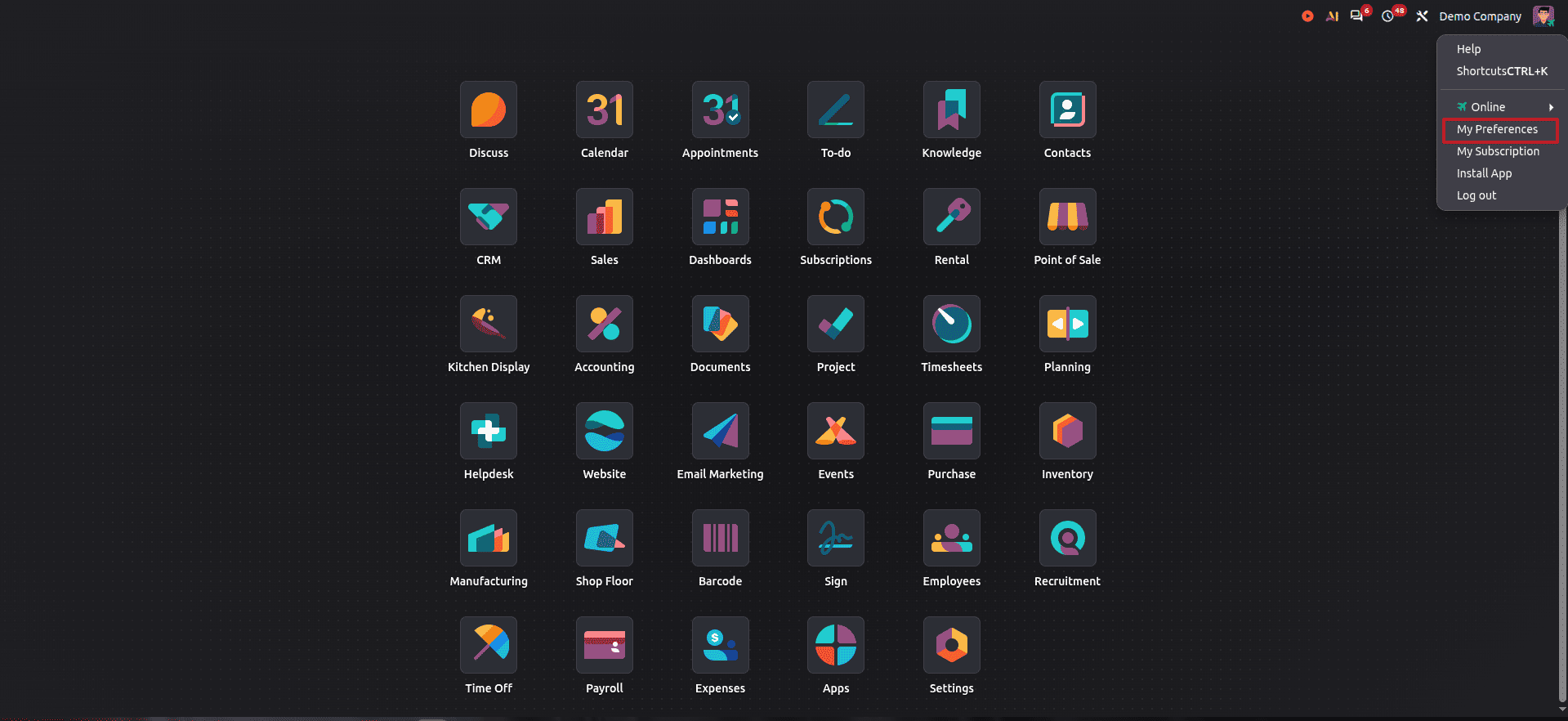
- Click Avatar on the top right and open Preferences
- Open the Security tab under Preferences and click New API Key
- Enter a description and choose a duration
- Standard users can choose 1 Day or 1 Month
- System administrators can select 1 Day, 1 Month, 1 Year, or Never
- Generate and copy the key; Odoo only shows it once
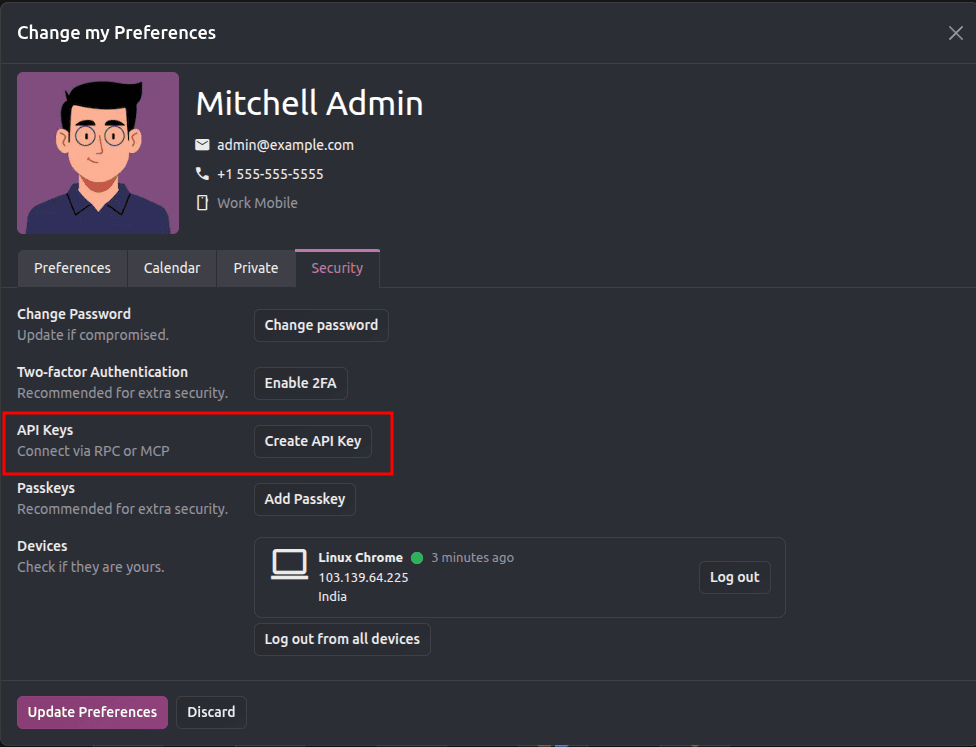
The description will help you to know the purpose of the key. The duration refers to the validity period of the key.
When the integrations are ongoing, avoid using your personal account for integrations. You need to create a bot user instead of yourself and provide access to the integration only. This way, even if the key gets leaked somewhere, the damage will be limited. Leaving the password empty prevents anyone from logging in via the web login interface. The bot authenticates exclusively via the API key. Each integration should have its own key.
Database Service
The DB service had 13 methods, like create, clone, drop, backup, and restore a database. Odoo 20 no longer supports the DB service, but the majority of those actions can now be done via the /web/database controllers. It is the very same controller used for the database manager at /web/database/manager; hence, it works over regular HTTP requests. Since they require a master password, you need to check out the Database Manager Security section of the Odoo documentation before applying them.
The following controller uses a POST request with the content-type application/x-www-form-urlencoded.
- /web/database/create takes master_pwd, name, login, password, demo, lang, and phone.
- /web/database/duplicate takes master_pwd, name, new_name, and neutralize_database. The default is false for neutralize_database.
- /web/database/drop takes master_pwd and name.
- /web/database/backup takes master_pwd, name, and backup_format. The default is zip for backup_format, and the backup will be in the response.
- /web/database/change_password takes master_pwd and master_pwd_new.
The restore function requires a file, so it uses multipart/form-data. /web/database/restore requires master_pwd, name, copy and neutralize along with the file in backup_file.
The listing function differs from the others. /web/database/list uses the content type application/json-rpc. You need to send an empty JSON object, and the listing will be received in the result field of the answer.
There are three remaining functions. Instead of server_version, you can use /web/version, which we have discussed above. The list_lang and list_countries functions are available via JSON-2 for res.lang and res.country models respectively. There is no API for the migrate_databases function yet.
Object service
The object service is the one most integrations depend on. It has two functions:
- execute(db, uid, passwd, model, method, *args)
- execute_kw(db, uid, passwd, model, method, args, kw={})
Both calls are stateless, which means that all information is contained in the database, user ID, password, model, and method. After that, execute takes the parameters of the method as additional positional parameters. execute_kw takes the list of positional parameters and a dictionary of keyword parameters. Odoo will take the IDs of the records from the first positional parameter if the method is not a method decorated with the @api.model decorator. Context can be passed only via execute_kw as a keyword parameter named context.
Mapping execute_kw to a JSON-2 Body
JSON-2 separates the same information that execute_kw uses into three components: URL, headers, and body. In the case of the request, the HTTP Method used is POST, and the URL has the format of /json/2/<model>/<method>. The body contains only one JSON object and includes all arguments of the method, IDs, and context as separate fields. All arguments have names.
| Old Call | JSON-2 |
| db | X-Odoo-Database header. Only needed when several databases share the same domain. |
| uid and pwd | Authorization header: bearer <API key> |
| Model and method | In the URL: /json/2/<model>/<method> |
| First positional list of record IDs | ids key in the body. Leave it empty for an @api.model method |
| Context keyword | Context key in body |
| Other args and keywords | Named keys in body |
Below you can see the same read call in both XML-RPC and JSON-2:
XML-RPC:
object.execute_kw("odoo20_db", 2, "admin", "res.partner", "read",
                  [[1, 2, 3], ["name"]],
                  {"context": {"lang": "en_US"}, "load": None})
JSON-2:
import requests
API_KEY = "your_api_key_here"
requests.post(
    "http://localhost:8069/json/2/res.partner/read",
    headers={
        "Authorization": f"bearer {API_KEY}",
        "X-Odoo-Database": "odoo20_db",
    },
    json={
        "ids": [1, 2, 3],
        "fields": ["name"],
        "context": {"lang": "en_US"},
        "load": None,
    },
).json()
In the old call, the array needed to be read using positions. So [1, 2, 3] were the IDs and ["name"] was the field due to their order. However, in JSON-2, every value has its own name. This makes calls easy to understand and error-free.
The names are the parameter names of the method. These are the ones you will use most:
- search and search_count use domain
- search_read uses domain, fields, offset, limit, and order
- read uses ids and fields
- create uses vals_list
- write uses ids and vals
- unlink uses ids
Updating Third-Party Connectors:
All calls are not made by code you wrote. Some automated processes, some platform integrations, and some libraries still use those old endpoints and will only change if you update them. This is what is shown by the warning in the log.
Connectors should be updated one by one. Generate an API key for each connector. Preferably set up a bot user for the connector. Replace the password with the new API key. Start the connector. Check the log for any error messages. Once the log shows no issues, remove the old password.
- Identify them. From the deprecation warning logged, you will see the connectors that still use the deprecated endpoints.
- Verify if JSON-2 is supported for the connector. You can find more information about this in the documentation provided by the connector. The type of connection that requires an API key usually supports JSON-2. If the type of connection needs only a username and password, it most likely uses the old API.
- Switch to the use of an API key. Generate a new API key for the connector; create a separate bot user for this purpose. Replace the password with this API key.
- Check the logs. If the warning is not showing up for the connector anymore, then the switch worked properly.
- Remove the old password.
Muting the warning
During the migration process, the warning message may flood the log, thus hiding other messages. You can lower the level of the specified logger to display only error messages. Use this setting when you launch Odoo for a short time and remove it after migration is done:
./odoo-bin -c odoo.conf --log-handler odoo.addons.rpc.controllers:ERROR
You can also set it up in the configuration file using:
log_handler = odoo.addons.rpc.controllers:ERROR
Testing Both Endpoints During Transition
In Odoo 20, both the old and new endpoints run on the server. This means you can migrate your clients one by one. There is no need to worry about risking the migration. The XML-RPC client supports API keys instead of passwords. This makes things safer and easier to manage.
Save the following script to a file named test_transition.py. This script will send the read operation through both endpoints and then compare the results.
import xmlrpc.client
import requests
URL = 'http://localhost:8069'
DB = 'odoo20_db'
LOGIN = 'admin'
API_KEY = 'your_api_key_here'
common = xmlrpc.client.ServerProxy(f'{URL}/xmlrpc/2/common')
uid = common.authenticate(DB, LOGIN, API_KEY, {})
models = xmlrpc.client.ServerProxy(f'{URL}/xmlrpc/2/object')
domain = [['is_company', '=', True]]
fields = ['name', 'email']
xmlrpc_result = models.execute_kw(
    DB, uid, API_KEY, 'res.partner', 'search_read',
    [domain], {'fields': fields, 'order': 'id', 'limit': 20})
response = requests.post(
    f'{URL}/json/2/res.partner/search_read',
    headers={
        'Authorization': f'bearer {API_KEY}',
        'X-Odoo-Database': DB,
    },
    json={'domain': domain, 'fields': fields, 'order': 'id', 'limit': 20},
    timeout=30,
)
assert response.status_code == 200, response.text
assert xmlrpc_result == response.json()
print('Both endpoints returned the same records')
Run it using
python3 test_transition.py
Now, check the Odoo logs. The deprecation warning is logged when using the XML-RPC call but not when using the JSON-2 call. After the real client is moved, the warning no longer appears for that particular client. This indicates that the migration process is complete.
Odoo 20 would be an excellent time to review all integrations talking to your database. The db service has been deprecated, while the two remaining services have a deadline for Odoo 22. The migration will not be difficult since there is a specific place for each component of the old call in JSON-2. A user will become an API key; the model and method will go to the URL; and every argument will have its name.
Make the changes step by step. Let your logs reveal clients using the old endpoint, migrate them one after another, and review every migrated integration before moving on to the next one. By the time Odoo 22 is reached, there will be nothing left to make a rush about.
To read more about How to Use the Odoo 20 External API with JSON-2, XML-RPC Deprecation, and API Keys, refer to our blog How to Use the Odoo 20 External API with JSON-2, XML-RPC Deprecation, and API Keys.