In Odoo 19, building responsive and user-friendly business applications continues to be a key focus. One of the most powerful tools developers use to enhance form interactions is the onchange method. Onchange methods allow fields to react instantly when a user modifies a value, updating other fields in real time without requiring the record to be saved.
These methods play a crucial role in improving data accuracy and user experience by enforcing business logic directly at the form level. Whether it’s auto-filling related fields, recalculating amounts, or applying conditional rules, onchange methods help reduce manual effort and prevent common data entry errors.
Onchange methods are special functions in Odoo's ORM (Object-Relational Mapping) that are automatically triggered when a user modifies a specific field within a form view. Their primary purpose is to dynamically update other fields or provide immediate feedback to the user based on the changes made, all without requiring the record to be saved to the database. This mechanism significantly enhances data entry efficiency and helps maintain data consistency by pre-filling related information or adjusting values on the fly.
This blog explores how onchange methods work in Odoo 19, what’s new or improved, and how developers can use them effectively to create dynamic and efficient forms while maintaining clean and maintainable code.
When the value of a field is changed in the user interface, most commonly in a form view, an onchange method is automatically triggered. This allows Odoo to react immediately to the user’s input and update other related fields on the screen, without saving the fieldsrecord to the database.
Let us understand this behavior with a simple example. In the following workflow, a user enters the marks obtained by a student and defines a pass mark for the exam. Based on these values, the system automatically determines whether the student has passed or failed. As soon as the marks or pass mark is modified, the status field is updated instantly using an onchange method.
# -*- coding: utf-8 -*-
from odoo import api, fields, models
class StudentPerformance(models.Model):
   _name = 'student.performance'
   _description = 'Student Performance'

   _inherit = ['mail.thread', 'mail.activity.mixin']
   _rec_name = 'student_id'
   student_id = fields.Many2one('student', string='Student')
   subject = fields.Selection([
       ('math', 'Mathematics'),
       ('sci', 'Science'),
       ('eng', 'English'),
       ('hist', 'History'),
       ('geo', 'Geography'),
   ], string='Subject')
   date = fields.Date(string='Exam Date', required=True)
   status = fields.Selection([
       ('pass', 'Pass'),
       ('fail', 'Fail')
   ], string='Status', readonly=True)
   pass_mark = fields.Float(string='Pass Mark', default=40.0)
   marks = fields.Float(string='Marks', required=True)
   @api.onchange('marks', 'pass_mark')
   def _onchange_marks_pass_mark(self):
       if self.marks and self.pass_mark:
           self.status = 'pass' if self.marks >= self.pass_mark else 'fail'
       else:
           self.status = False
The @api.onchange('marks', 'pass_mark') decorator is used in Odoo to define a method that reacts immediately when specific field values are modified in the user interface. In this case, the method is linked to two fields: Marks and Pass Mark. Whenever a user changes either of these fields in a form view, Odoo automatically triggers the associated onchange method. This mechanism allows developers to implement real-time behavior directly on the form. Instead of waiting for the record to be saved, Odoo evaluates the logic as soon as the user updates a value. This makes forms more interactive and helps users see the impact of their inputs instantly, improving usability and reducing mistakes.
Inside the _onchange_marks_pass_mark function, the business logic compares the student’s marks with the defined pass mark. If the obtained marks are greater than or equal to the pass mark, the system automatically sets the Status field to Pass. If the marks are below the pass mark, the status is set to Fail. The user does not need to select the status manually, as it is derived automatically from the entered values.
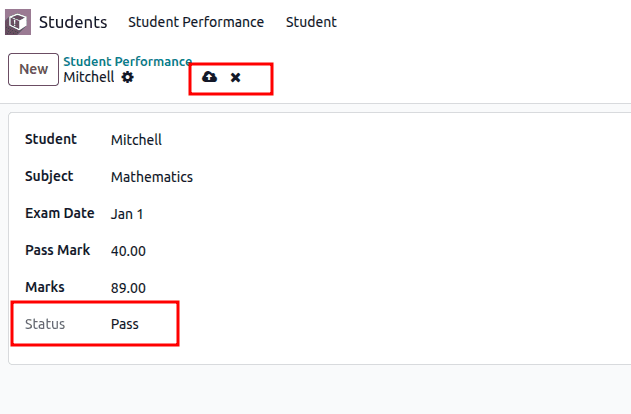
This screenshot shows a form view from Odoo’s Student Performance module. It displays the exam details for a student named Mitchell. Key information such as the subject (Mathematics), exam date, pass mark (40.00), and marks obtained (89.00) are filled in. The Status field at the bottom automatically shows "Pass," indicating that Mitchell has passed the exam because the marks entered are higher than the pass mark. This automatic update happens in real-time thanks to the onchange method in the backend, which evaluates the marks against the pass mark and sets the status accordingly without needing to save the record first.
It is important to understand that onchange methods operate only at the user interface level. They do not permanently store values in the database unless the user explicitly saves the record. For this reason, onchange methods are best suited for form-level automation, field suggestions, and UI validations rather than critical backend rules.
Using onchange methods in Odoo allows forms to become much more interactive and user-friendly by instantly responding to user input. This dynamic behavior ensures that important fields, like the status in the student performance example, are automatically updated based on relevant data such as marks and pass marks. By handling these calculations and validations in real time, onchange methods help reduce errors and save time, making the data entry process smoother and more efficient. When implemented thoughtfully, they enhance both accuracy and usability, contributing to a better overall experience for users working within Odoo.
To read more about How to Create() orm method in Odoo 19, refer to our blog An How to Create() orm method in Odoo 19.