While SQL constraints provide fast, database-level validation, many business rules require more sophisticated logic than SQL can express. Python constraints in Odoo 19 fill this gap, enabling you to implement complex validations that involve calculations, related records, business logic, and dynamic conditions that would be impossible or impractical to enforce at the database level.
What Are Python Constraints?
Python constraints are validation methods decorated with @api.constrains that execute whenever specified fields are created or modified. Unlike SQL constraints that operate at the database layer, Python constraints run within Odoo's application layer, giving you access to the full power of Python, the ORM, and all model methods.
When a constraint condition is violated, these methods raise a ValidationError exception, preventing the save operation and displaying a user-friendly error message. This approach allows you to implement business rules that consider multiple records, perform calculations, access related data, and apply conditional logic that adapts to your specific requirements.
Syntax and Structure
Python constraints follow a consistent pattern using the @api.constrains decorator:
# -*- coding: utf-8 -*-
from odoo import api, fields, models, _
from odoo.exceptions import ValidationError
class YourModel(models.Model):
    _name = 'your.model'

    field_name = fields.Char(string='Field')
    @api.constrains('field_name')
    def _check_field_name(self):
        for record in self:
            if not self._validate_condition(record):
                raise ValidationError(_('Your error message here'))
Let's break down each component:
- @api.constrains decorator: Specifies which fields trigger the validation when modified
- Method name: By convention, starts with _check_ followed by a descriptive name
- Loop through records: Always iterate through self as the method may receive multiple records
- ValidationError: The exception raised when validation fails
- Underscore function _(): Enables translation of error messages
Common Use Cases
Date and Time Validations
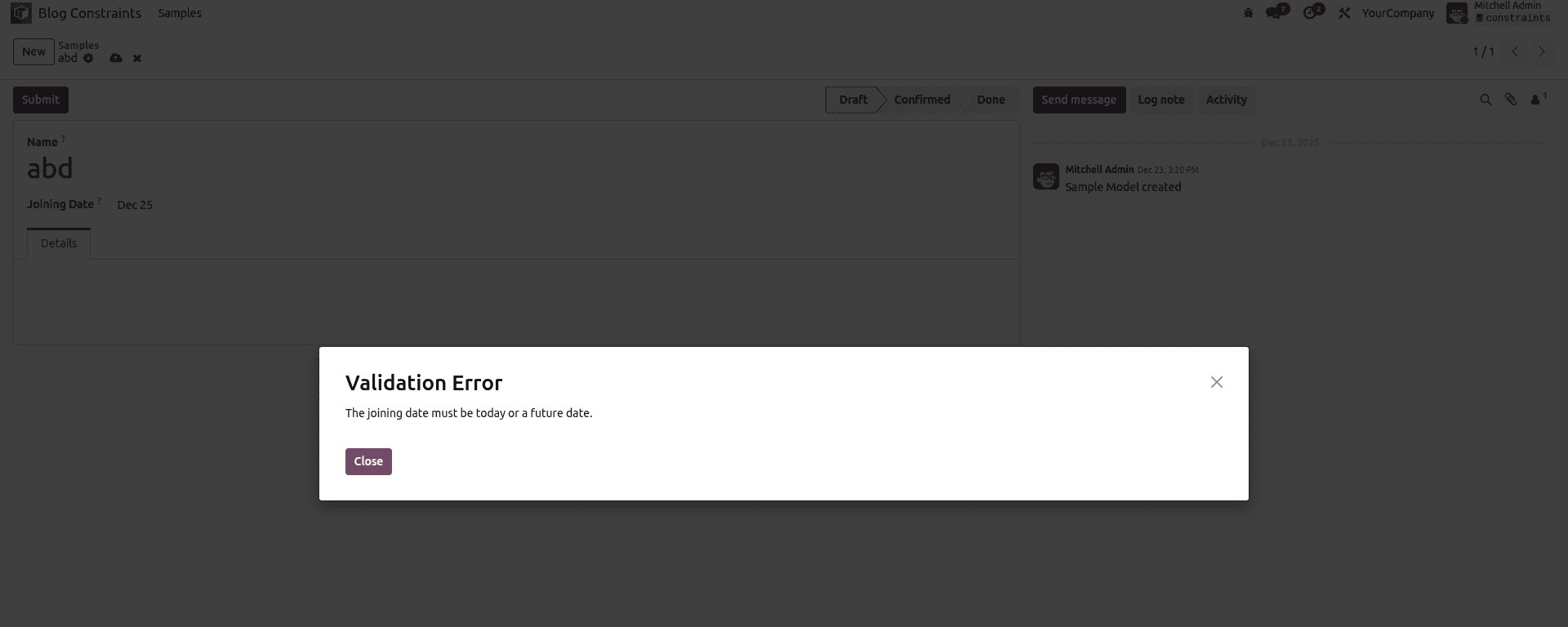
One of the most practical uses of Python constraints is validating date relationships. Unlike SQL constraints that struggle with date comparisons, Python makes this straightforward:
class ClassTeacher(models.Model):
    _name = 'class.teacher'
    _description = 'Class Teacher'

    joining_date = fields.Date(string='Joining Date')
    @api.constrains('joining_date')
    def _check_joining_date(self):
        for rec in self:
            if rec.joining_date and rec.joining_date < fields.Date.today():
                raise ValidationError( _("The joining date must be today or a future date.") )
This constraint ensures teachers can only be registered with joining dates that haven't already passed, preventing administrative errors.
Age and Numerical Range Validation
Python constraints excel at validating numerical fields with complex conditions:
class Student(models.Model):
    _name = 'school.student'
    age = fields.Integer(string='Age')
    grade = fields.Selection([ ('elementary', 'Elementary'), ('middle', 'Middle           School'), ('high', 'High School') ])
    @api.constrains('age', 'grade')
    def _check_age_grade_compatibility(self):
        for student in self:
            if student.age and student.grade:
                if student.grade == 'elementary' and student.age > 11:
                    raise ValidationError( _('Elementary students must be 11 years old or younger.') )
                elif student.grade == 'middle' and not (12 <= student.age <= 14):
                    raise ValidationError( _('Middle school students must be between 12 and 14 years old.') )
                elif student.grade == 'high' and student.age < 15:
                    raise ValidationError( _('High school students must be at least 15 years old.') )
Email and Format Validation
Python's string manipulation capabilities make format validation simple and powerful:
import re
class Contact(models.Model):
    _name = 'res.partner'
    _inherit = 'res.partner'

    email = fields.Char(string='Email')
    phone = fields.Char(string='Phone')

    @api.constrains('email')
    def _check_email_format(self):
        email_pattern = r'^[a-zA-Z0-9._%+-]+@[a-zA-Z0-9.-]+\.[a-zA-Z]{2,}$'
        for partner in self:
            if partner.email and not re.match(email_pattern, partner.email):
                raise ValidationError(
                    _('Please enter a valid email address.')
                )

    @api.constrains('phone')
    def _check_phone_format(self):
        for partner in self:
            if partner.phone:
                digits_only = re.sub(r'\D', '', partner.phone)
                if len(digits_only) < 10:
                    raise ValidationError(
                        _('Phone number must contain at least 10 digits.')
                    )
Experience and Qualification Validation
Business logic often requires validating relationships between multiple fields:
class ClassTeacher(models.Model):
    _name = 'class.teacher'

    qualification = fields.Selection([
        ('bachelor', "Bachelor's Degree"),
        ('master', "Master's Degree"),
        ('phd', 'PhD')
    ])
    experience = fields.Float(string='Experience (Years)')
    subject = fields.Selection([
        ('math', 'Mathematics'),
        ('science', 'Science'),
        ('english', 'English')
    ])

    @api.constrains('experience', 'qualification', 'subject')
    def _check_teaching_requirements(self):
        for teacher in self:
            if teacher.experience < 0:
                raise ValidationError(
                    _('Experience cannot be negative.')
                )

            if teacher.subject == 'math' and teacher.experience < 2:
                raise ValidationError(
                    _('Mathematics teachers must have at least 2 years of experience.')
                )

            if teacher.qualification == 'phd' and teacher.experience < 5:
                raise ValidationError(
                    _('Teachers with PhD must have at least 5 years of teaching experience.')
                )
Important Limitations and Considerations
Direct Fields Only
The @api.constrains decorator only monitors direct fields of the model. It does not trigger for related or computed fields:
# This WILL work - monitoring direct field
@api.constrains('partner_id')
def _check_partner(self):
    pass
# This WON'T work - related fields are ignored
@api.constrains('partner_id.phone')
def _check_partner_phone(self):
    pass
If you need to validate related fields, monitor the direct foreign key field and access the related data within your constraint method.
Performance Considerations
Python constraints execute for every create and write operation on monitored fields. For optimal performance:
- Only include necessary fields in the decorator
- Avoid complex database queries within constraints
- Consider caching frequently accessed data
- Use efficient algorithms for validation logic
Multiple Field Dependencies
When your validation logic depends on multiple fields, list them all in the decorator:
@api.constrains('start_date', 'end_date', 'state')
    def _check_date_range(self):
        # Triggers when any of these three fields change
        pass
Best Practices
Use Descriptive Method Names: Name your constraint methods clearly, starting with _check_ followed by what you're validating.
Always Loop Through Records: Even if you expect a single record, always iterate through self for consistency and batch operation support.
Provide Clear Error Messages: Write error messages that explain what's wrong and guide users toward fixing the issue.
Use Translation Function: Wrap error messages in _() to enable multi-language support.
Handle None Values: Always check if fields contain values before performing operations to avoid errors.
Keep Constraints Focused: Each constraint method should validate one logical rule or closely related set of rules.
Test Thoroughly: Test your constraints with valid data, invalid data, edge cases, and NULL values.
Consider Performance: Avoid expensive operations like complex searches or external API calls within constraints.
When to Use Python Constraints
Python constraints are ideal for:
- Date comparisons and calculations
- Complex business logic involving multiple fields
- Validating data from related records
- Format checking (emails, phone numbers, codes)
- State-dependent validations
- Calculations that determine validity
- Rules that require Python's flexibility
Use SQL constraints for simple, fast rules like uniqueness and basic value checks. Use Python constraints for everything else that requires logic, calculations, or ORM access.
Conclusion
Python constraints are a powerful tool in Odoo development, enabling you to implement sophisticated validation logic that goes far beyond what database constraints can achieve. By leveraging Python's full capabilities alongside Odoo's ORM, you can enforce complex business rules that ensure data integrity while providing clear, helpful feedback to users. When combined with SQL constraints for simpler validations, Python constraints form a comprehensive validation strategy that keeps your Odoo application robust, reliable, and aligned with your business requirements.
To read more about How to Configure Python & SQL Constraints in Odoo 18, refer to our blog How to Configure Python & SQL Constraints in Odoo 18.