While working with business apps in Odoo, it is essential to ensure data integrity. Using SQL constraints in your Odoo business apps is an effective and efficient way to implement business logic for your data, ensuring data accuracy and consistency.
What Are SQL Constraints?
SQL constraints are database-level checks that validate data before entering or being persisted to a database. Unlike application-level validations, SQL constraints are database-level checks at the PostgreSQL level and are therefore extremely fast and accurate. SQL constraints are indeed the first line of defense against corrupted data and prevent all attempts at recording data that violate those constraints.
Where, in Odoo version 19, SQL constraints are declared through models.Constraint, and if a constraint is violated, the database will not carry out the process and will return an error message because it prevents tainted data from getting inside your database.
Syntax and Structure
The basic syntax for defining an SQL constraint in Odoo 19 is as follows:
_constraint_name = models.Constraint(sql_definition, error_message)
Let's break down each component:
Constraint Name: A unique identifier preceded by underscore (for example, _unique_email). Constraint Name will aid you in identifying the constraint that caused problems while displaying errors and during bug fixing.
SQL Definition: Actual SQL rule as a string. Typically "UNIQUE(field_name)" for uniqueness constraints or "CHECK(condition)" for value constraints.
Error Message: A user-friendly message to describe what has happened when the constraint has not been met. This message will appear in Odoo, enabling users to clarify any issues with input.
Common Use Cases
Ensuring Unique Values
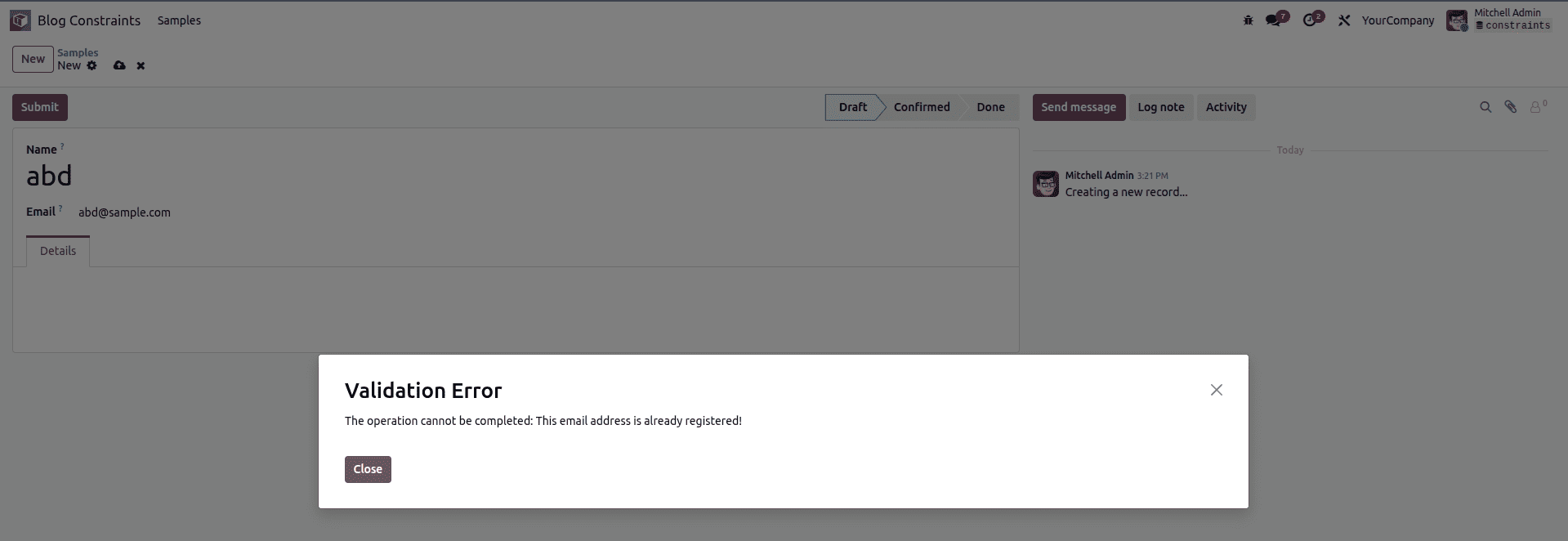
One of the most common uses of SQL constraints is uniqueness checking. Take an example of a teachers' management system where teachers are required to have unique email addresses.
class ClassTeacher(models.Model):
    _name = 'class.teacher'
    _description = 'Class Teacher'

    email = fields.Char(string='Email')

    _unique_email = models.Constraint(
        'UNIQUE(email)',
        'This email address is already registered!'
    )
However, applying this constraint on the database ensures that the database does not allow any repeated email entries. In fact, when an individual tries registering a teacher using an existing email, the person receives an error message instantly.
Validating Positive Values
SQL constraints are great for validating numeric fields for basic conditions. It can check, for instance, for the condition that age must always be a positive numeric value:
_positive_age = models.Constraint(
    'CHECK(age > 0)',
    'Age must be a positive number.'
)
'CHECK constraint': Validates that only values greater than zero can be present in the age field.
It prevents values such as zero and even negative numbers from being inserted into the age field, since age can never be zero or negative.
Composite Uniqueness
Occasionally, uniqueness needs to be achieved over more than one field. For example, at an enrollment system in a course offering environment, it should be ensured that the same student is not enrolled in the same course twice:
class CourseEnrollment(models.Model):
    _name = 'course.enrollment'

    student_id = fields.Many2one('res.partner', string='Student')
    course_id = fields.Many2one('course.course', string='Course')

    _unique_enrollment = models.Constraint(
        'UNIQUE(student_id, course_id)',
        'This student is already enrolled in this course!'
    )
Advantages of SQL Constraints
Performance: SQL constraints run on a database level. Therefore, they are much faster compared to an application level. The database engine can handle such tasks effectively.
Reliability: The mentioned limitations are also applicable for the cases when changes are made in the data directly accessed through the database, through other tools, or through API communication, which doesn’t use the ORM system of Odoo.
Simplicity: For simple validation rules, SQL constraints involve little code or complexity.
Immediate Feedback: The system offers immediate feedback to users, who in turn receive error messages instantly in case they violate any constraints.
When to Use SQL Constraints
SQL Constraints: SQL constraints can be most effectively utilized in scenarios that involve simple and straightforward conditions, which can also be stated using SQL. They can be applied most effectively for:
- Uniqueness requirements (single or composite fields)
- Basic value range checks (positive numbers, non-null values)
- Simple relational integrity rules
- Rules that must be enforced regardless of how data enters the system
For more complex validation tasks, such as business logic or calculations over multiple records, and cases in which the flexibility offered by the Python language is required, the Python constraints (using the @api.constrains decorator) would be more suited.
Best Practices
Be Specific with Error Messages: Write clear, actionable error messages that tell users exactly what's wrong and how to fix it.
Use Descriptive Names: Label your constraints thoughtfully to describe what they are used for, so that it is readable.
Keep It Simple: SQL constraints should manage simple rules. This advice tells us not to encode complex business rules in SQL database implementation.
Test Thoroughly: Make sure that the constraints are working as expected by testing valid as well as invalid data points.
Conclusion
SQL constraints are a basic tool in Odoo development that allow you to validate data quickly and reliably at the database level. By never letting bad data into your application in the first place, they are even helping to provide you with a quite stable application by means of a complete data validation system by combining Python constraints for complex validations as well.
To read more about How to Configure Python & SQL Constraints in Odoo 18, refer to our blog How to Configure Python & SQL Constraints in Odoo 18.