File uploads are a crucial part of modern web applications, and Odoo 19 provides a powerful and elegant Upload Service to handle this functionality. Whether you're building custom modules, creating client actions, or enhancing existing features, understanding the Upload Service will help you implement robust file upload capabilities with progress tracking, error handling, and a seamless user experience.
In this guide, we'll explore how to leverage the Upload Service in Odoo 19 with a complete, production-ready example that demonstrates all its features.
What is the Upload Service?
The Upload Service in Odoo 19 is a core service that manages file uploads with built-in features including:
- Progress tracking with visual toast notifications
- Sequential uploads optimized for bandwidth efficiency
- Automatic file size validation
- Error handling with user-friendly notifications
- WebP format conversion for image compatibility
- URL-based uploads for remote resources
Complete Client Action Example
Here's a comprehensive client action that demonstrates all Upload Service features in a single component:
Owl Component
/** @odoo-module **/
import { Component, useState, useRef } from "@odoo/owl";
import { registry } from "@web/core/registry";
import { useService } from "@web/core/utils/hooks";
class ComprehensiveUploadAction extends Component {
    static template = "my_module.ComprehensiveUploadAction";
    setup() {
        // Services
        this.upload = useService("upload");
        this.notification = useService("notification");
        this.orm = useService("orm");

        // Refs for file inputs
        this.fileInputRef = useRef("fileInput");
        this.imageInputRef = useRef("imageInput");

        // Component state
        this.state = useState({
            // Upload tabs
            activeTab: "files", // 'files', 'images', 'url', 'dragdrop'

            // Uploaded items
            documents: [],
            images: [],

            // Drag and drop
            isDragging: false,

            // URL upload
            urlInput: "",
            urlUploading: false,

            // Loading states
            loading: false,

            // Stats
            totalUploads: 0,
            successfulUploads: 0,
            failedUploads: 0,
        });
        // Load existing attachments
        this.loadAttachments();
    }
    // ========================================
    // 1. BASIC FILE UPLOAD
    // ========================================

    async onFileInputChange(ev) {
        const files = ev.target.files;
        if (files.length === 0) return;
        await this.uploadFiles(files, {
            isImage: false,
            targetList: "documents",
        });

        // Reset input
        ev.target.value = "";
    }
    // ========================================
    // 2. IMAGE-ONLY UPLOAD
    // ========================================

    async onImageInputChange(ev) {
        const files = ev.target.files;
        if (files.length === 0) return;
        // Filter only image files
        const imageFiles = Array.from(files).filter(file =>
            file.type.startsWith('image/')
        );
        if (imageFiles.length === 0) {
            this.notification.add(
                "Please select valid image files (jpg, png, gif, webp, etc.)",
                { type: "warning" }
            );
            ev.target.value = "";
            return;
        }
        if (imageFiles.length < files.length) {
            this.notification.add(
                `${files.length - imageFiles.length} non-image file(s) were skipped`,
                { type: "info" }
            );
        }
        await this.uploadFiles(imageFiles, {
            isImage: true,
            targetList: "images",
        });

        // Reset input
        ev.target.value = "";
    }
    // ========================================
    // 3. DRAG AND DROP UPLOAD
    // ========================================

    onDragOver(ev) {
        ev.preventDefault();
        ev.stopPropagation();
        this.state.isDragging = true;
    }
    onDragLeave(ev) {
        ev.preventDefault();
        ev.stopPropagation();
        this.state.isDragging = false;
    }
    async onDrop(ev) {
        ev.preventDefault();
        ev.stopPropagation();
        this.state.isDragging = false;
        const files = ev.dataTransfer.files;
        if (files.length === 0) return;
        // Separate images from other files
        const imageFiles = [];
        const documentFiles = [];
        Array.from(files).forEach(file => {
            if (file.type.startsWith('image/')) {
                imageFiles.push(file);
            } else {
                documentFiles.push(file);
            }
        });
        // Upload images
        if (imageFiles.length > 0) {
            await this.uploadFiles(imageFiles, {
                isImage: true,
                targetList: "images",
            });
        }
        // Upload documents
        if (documentFiles.length > 0) {
            await this.uploadFiles(documentFiles, {
                isImage: false,
                targetList: "documents",
            });
        }
    }
    // ========================================
    // 4. URL UPLOAD
    // ========================================

    onUrlInputChange(ev) {
        this.state.urlInput = ev.target.value;
    }
    async uploadFromUrl() {
        const url = this.state.urlInput.trim();

        if (!url) {
            this.notification.add(
                "Please enter a valid URL",
                { type: "warning" }
            );
            return;
        }
        // Basic URL validation
        try {
            new URL(url);
        } catch (error) {
            this.notification.add(
                "Please enter a valid URL (e.g., https://example.com/file.pdf)",
                { type: "warning" }
            );
            return;
        }
        this.state.urlUploading = true;
        this.state.totalUploads++;
        try {
            const resId = this.getResId();

            await this.upload.uploadUrl(
                url,
                {
                    resModel: "res.partner",
                    resId: resId,
                },
                (attachment) => {
                    if (attachment.error) {
                        this.state.failedUploads++;
                        this.notification.add(
                            `Error uploading from URL: ${attachment.error}`,
                            { type: "danger" }
                        );
                    } else {
                        this.state.successfulUploads++;
                        this.notification.add(
                            `Successfully uploaded: ${attachment.name}`,
                            { type: "success" }
                        );

                        // Add to appropriate list
                        const targetList = attachment.mimetype?.startsWith('image/')
                            ? "images"
                            : "documents";

                        this.state[targetList].push({
                            id: attachment.id,
                            name: attachment.name,
                            mimetype: attachment.mimetype,
                            url: `/web/content/${attachment.id}?download=true`,
                            imageUrl: attachment.mimetype?.startsWith('image/')
                                ? `/web/image/${attachment.id}`
                                : null,
                        });
                    }
                }
            );
            // Clear input on success
            this.state.urlInput = "";

        } catch (error) {
            this.state.failedUploads++;
            this.notification.add(
                "Failed to upload from URL. Please check the URL and try again.",
                { type: "danger" }
            );
            console.error("URL upload error:", error);
        } finally {
            this.state.urlUploading = false;
        }
    }
    // ========================================
    // CORE UPLOAD LOGIC
    // ========================================

    async uploadFiles(files, { isImage, targetList }) {
        const resId = this.getResId();

        this.state.totalUploads += files.length;
        try {
            await this.upload.uploadFiles(
                files,
                {
                    resModel: "res.partner",
                    resId: resId,
                    isImage: isImage,
                },
                (attachment) => {
                    if (attachment.error) {
                        // Handle upload error
                        this.state.failedUploads++;
                        this.notification.add(
                            `Error uploading ${attachment.name}: ${attachment.error}`,
                            { type: "danger" }
                        );
                    } else {
                        // Handle successful upload
                        this.state.successfulUploads++;

                        const uploadedItem = {
                            id: attachment.id,
                            name: attachment.name,
                            mimetype: attachment.mimetype,
                            url: `/web/content/${attachment.id}?download=true`,
                            imageUrl: isImage ? `/web/image/${attachment.id}` : null,
                        };
                        this.state[targetList].push(uploadedItem);
                    }
                }
            );
        } catch (error) {
            this.notification.add(
                "Upload failed. Please try again.",
                { type: "danger" }
            );
            console.error("Upload error:", error);
        }
    }
    // ========================================
    // UTILITY METHODS
    // ========================================

    getResId() {
        // Get from context or use 0 for new records
        return this.props.action?.context?.active_id || 0;
    }
    async loadAttachments() {
        this.state.loading = true;
        try {
            const resId = this.getResId();

            if (!resId) {
                this.state.loading = false;
                return;
            }
            const attachments = await this.orm.searchRead(
                "ir.attachment",
                [
                    ["res_id", "=", resId],
                    ["res_model", "=", "res.partner"]
                ],
                ["name", "mimetype", "file_size", "create_date"]
            );
            // Separate images from documents
            attachments.forEach(att => {
                const item = {
                    id: att.id,
                    name: att.name,
                    mimetype: att.mimetype,
                    url: `/web/content/${att.id}?download=true`,
                    imageUrl: att.mimetype?.startsWith('image/')
                        ? `/web/image/${att.id}`
                        : null,
                };
                if (att.mimetype?.startsWith('image/')) {
                    this.state.images.push(item);
                } else {
                    this.state.documents.push(item);
                }
            });
        } catch (error) {
            console.error("Error loading attachments:", error);
        } finally {
            this.state.loading = false;
        }
    }
    async deleteAttachment(attachmentId, listName) {
        try {
            await this.orm.unlink("ir.attachment", [attachmentId]);

            // Remove from state
            const index = this.state[listName].findIndex(item => item.id === attachmentId);
            if (index !== -1) {
                this.state[listName].splice(index, 1);
            }

            this.notification.add(
                "Attachment deleted successfully",
                { type: "info" }
            );
        } catch (error) {
            this.notification.add(
                "Failed to delete attachment",
                { type: "danger" }
            );
            console.error("Delete error:", error);
        }
    }
    downloadAttachment(url, filename) {
        const link = document.createElement('a');
        link.href = url;
        link.download = filename;
        link.click();
    }
    switchTab(tab) {
        this.state.activeTab = tab;
    }
    triggerFileInput() {
        this.fileInputRef.el?.click();
    }
    triggerImageInput() {
        this.imageInputRef.el?.click();
    }
    get uploadStats() {
        return {
            total: this.state.totalUploads,
            successful: this.state.successfulUploads,
            failed: this.state.failedUploads,
            successRate: this.state.totalUploads > 0
                ? Math.round((this.state.successfulUploads / this.state.totalUploads) * 100)
                : 0
        };
    }
}
registry.category("actions").add("comprehensive_upload_action", ComprehensiveUploadAction);
XML Template
<?xml version="1.0" encoding="UTF-8"?>
<templates xml:space="preserve">
<t t-name="my_module.ComprehensiveUploadAction">
<div class="o_comprehensive_upload_action h-100">
<!-- Header with Stats -->
<div class="bg-light border-bottom p-3">
<div class="container-fluid">
<div class="row align-items-center">
<div class="col-md-6">
<h3 class="mb-0">
<i class="fa fa-cloud-upload me-2"/>
Upload Manager
</h3>
</div>
<div class="col-md-6">
<div class="d-flex justify-content-end gap-3">
<div class="text-center">
<div class="fw-bold text-primary fs-4">
<t t-esc="uploadStats.total"/>
</div>
<small class="text-muted">Total</small>
</div>
<div class="text-center">
<div class="fw-bold text-success fs-4">
<t t-esc="uploadStats.successful"/>
</div>
<small class="text-muted">Success</small>
</div>
<div class="text-center">
<div class="fw-bold text-danger fs-4">
<t t-esc="uploadStats.failed"/>
</div>
<small class="text-muted">Failed</small>
</div>
</div>
</div>
</div>
</div>
</div>
<!-- Navigation Tabs -->
<ul class="nav nav-tabs px-3 pt-3">
<li class="nav-item">
<a class="nav-link"
t-att-class="state.activeTab === 'files' ? 'active' : ''"
t-on-click="() => this.switchTab('files')"
href="#">
<i class="fa fa-file me-1"/>
File Upload
</a>
</li>
<li class="nav-item">
<a class="nav-link"
t-att-class="state.activeTab === 'images' ? 'active' : ''"
t-on-click="() => this.switchTab('images')"
href="#">
<i class="fa fa-image me-1"/>
Image Upload
</a>
</li>
<li class="nav-item">
<a class="nav-link"
t-att-class="state.activeTab === 'url' ? 'active' : ''"
t-on-click="() => this.switchTab('url')"
href="#">
<i class="fa fa-link me-1"/>
Upload from URL
</a>
</li>
<li class="nav-item">
<a class="nav-link"
t-att-class="state.activeTab === 'dragdrop' ? 'active' : ''"
t-on-click="() => this.switchTab('dragdrop')"
href="#">
<i class="fa fa-hand-pointer-o me-1"/>
Drag & Drop
</a>
</li>
</ul>
<!-- Tab Content -->
<div class="p-3" style="height: calc(100% - 150px); overflow-y: auto;">
<!-- TAB 1: Basic File Upload -->
<div t-if="state.activeTab === 'files'" class="tab-pane-content">
<div class="card">
<div class="card-body">
<h5 class="card-title">Upload Files</h5>
<p class="text-muted">
Select one or multiple files to upload. The upload service will
process them sequentially, starting with the smallest files.
</p>
<input
type="file"
multiple="true"
t-ref="fileInput"
t-on-change="onFileInputChange"
class="d-none"
/>
<button class="btn btn-primary" t-on-click="triggerFileInput">
<i class="fa fa-upload me-2"/>
Choose Files
</button>
</div>
</div>
<!-- Uploaded Documents List -->
<div class="mt-4" t-if="state.documents.length">
<h5>Documents (<t t-esc="state.documents.length"/>)</h5>
<div class="list-group">
<div t-foreach="state.documents" t-as="doc" t-key="doc.id"
class="list-group-item d-flex justify-content-between align-items-center">
<div>
<i class="fa fa-file-o me-2"/>
<strong t-esc="doc.name"/>
<span class="badge bg-secondary ms-2" t-esc="doc.mimetype"/>
</div>
<div>
<button class="btn btn-sm btn-outline-primary me-2"
t-on-click="() => this.downloadAttachment(doc.url, doc.name)">
<i class="fa fa-download"/>
</button>
<button class="btn btn-sm btn-outline-danger"
t-on-click="() => this.deleteAttachment(doc.id, 'documents')">
<i class="fa fa-trash"/>
</button>
</div>
</div>
</div>
</div>
</div>
<!-- TAB 2: Image Upload -->
<div t-if="state.activeTab === 'images'" class="tab-pane-content">
<div class="card">
<div class="card-body">
<h5 class="card-title">Upload Images</h5>
<p class="text-muted">
Upload images (JPG, PNG, GIF, WebP). The service automatically
creates JPEG alternatives for WebP images for better compatibility.
</p>
<input
type="file"
multiple="true"
accept="image/*"
t-ref="imageInput"
t-on-change="onImageInputChange"
class="d-none"
/>
<button class="btn btn-primary" t-on-click="triggerImageInput">
<i class="fa fa-image me-2"/>
Choose Images
</button>
</div>
</div>
<!-- Uploaded Images Gallery -->
<div class="mt-4" t-if="state.images.length">
<h5>Images (<t t-esc="state.images.length"/>)</h5>
<div class="row g-3">
<div t-foreach="state.images" t-as="img" t-key="img.id"
class="col-md-3">
<div class="card">
<img t-att-src="img.imageUrl"
class="card-img-top"
style="height: 200px; object-fit: cover;"
t-att-alt="img.name"/>
<div class="card-body p-2">
<p class="card-text small mb-2"
style="white-space: nowrap; overflow: hidden; text-overflow: ellipsis;"
t-esc="img.name"/>
<div class="d-flex gap-1">
<button class="btn btn-sm btn-outline-primary flex-fill"
t-on-click="() => this.downloadAttachment(img.url, img.name)">
<i class="fa fa-download"/>
</button>
<button class="btn btn-sm btn-outline-danger flex-fill"
t-on-click="() => this.deleteAttachment(img.id, 'images')">
<i class="fa fa-trash"/>
</button>
</div>
</div>
</div>
</div>
</div>
</div>
</div>
<!-- TAB 3: URL Upload -->
<div t-if="state.activeTab === 'url'" class="tab-pane-content">
<div class="card">
<div class="card-body">
<h5 class="card-title">Upload from URL</h5>
<p class="text-muted">
Enter a URL to download and upload a file directly from the internet.
</p>
<div class="input-group mb-3">
<input
type="url"
class="form-control"
placeholder="https://example.com/file.pdf"
t-att-value="state.urlInput"
t-on-input="onUrlInputChange"
t-att-disabled="state.urlUploading"
/>
<button
class="btn btn-primary"
t-on-click="uploadFromUrl"
t-att-disabled="state.urlUploading or !state.urlInput">
<i t-att-class="state.urlUploading ? 'fa fa-spinner fa-spin' : 'fa fa-upload'"/>
<span class="ms-2">
<t t-if="state.urlUploading">Uploading...</t>
<t t-else="">Upload</t>
</span>
</button>
</div>
<div class="alert alert-info" role="alert">
<i class="fa fa-info-circle me-2"/>
<strong>Tip:</strong> Paste any public file URL to upload it to your account.
</div>
</div>
</div>
</div>
<!-- TAB 4: Drag and Drop -->
<div t-if="state.activeTab === 'dragdrop'" class="tab-pane-content">
<div
class="dropzone border border-3 rounded p-5 text-center"
t-att-class="state.isDragging ? 'border-primary bg-light' : 'border-dashed'"
t-on-dragover="onDragOver"
t-on-dragleave="onDragLeave"
t-on-drop="onDrop"
style="min-height: 300px; display: flex; align-items: center; justify-content: center;">
<div>
<i class="fa fa-cloud-upload fa-5x text-muted mb-3"
t-att-class="state.isDragging ? 'text-primary' : 'text-muted'"/>
<h4 t-if="state.isDragging" class="text-primary">Drop files here!</h4>
<h4 t-else="">Drag and Drop Files Here</h4>
<p class="text-muted mt-3">
or click below to browse
</p>
<button class="btn btn-outline-primary mt-2" t-on-click="triggerFileInput">
<i class="fa fa-folder-open me-2"/>
Browse Files
</button>
<input
type="file"
multiple="true"
t-ref="fileInput"
t-on-change="onFileInputChange"
class="d-none"
/>
</div>
</div>
<div class="alert alert-info mt-4" role="alert">
<i class="fa fa-lightbulb-o me-2"/>
<strong>Smart Upload:</strong> The drag and drop area automatically
separates images from documents and uploads them to the appropriate category.
</div>
</div>
</div>
</div>
</t>
</templates>
Python: Client Action Registration
# -*- coding: utf-8 -*-
from odoo import models
class ResPartner(models.Model):
    _inherit = 'res.partner'
    def action_open_upload_manager(self):
        return {
            'type': 'ir.actions.client',
            'tag': 'comprehensive_upload_action',
            'name': 'Upload Manager',
            'context': {'active_id': self.id},
        }
Manifest File
# __manifest__.py
{
    'name': 'Upload Service Demo',
    'version': '19.0.1.0.0',
    'category': 'Tools',
    'summary': 'Comprehensive Upload Service demonstration',
    'depends': ['web', 'base'],
    'assets': {
        'web.assets_backend': [
            'my_module/static/src/components/**/*.js',
            'my_module/static/src/components/**/*.xml',
        ],
    },
    'installable': True,
    'application': False,
}
Key Features Demonstrated
1. Sequential Upload Strategy
Files are uploaded one at a time, starting with the smallest, to optimize bandwidth and provide quick feedback to users.
2. Automatic WebP Conversion
When uploading WebP images, the service automatically creates a JPEG alternative at 75% quality for better compatibility with reports.
3. Progress Tracking
The built-in UploadProgressToast component automatically displays upload progress for all files.
4. Comprehensive Error Handling
Both frontend and backend errors are caught and displayed to users with appropriate notifications.
5. Smart File Categorization
The component automatically separates images from documents based on MIME type.
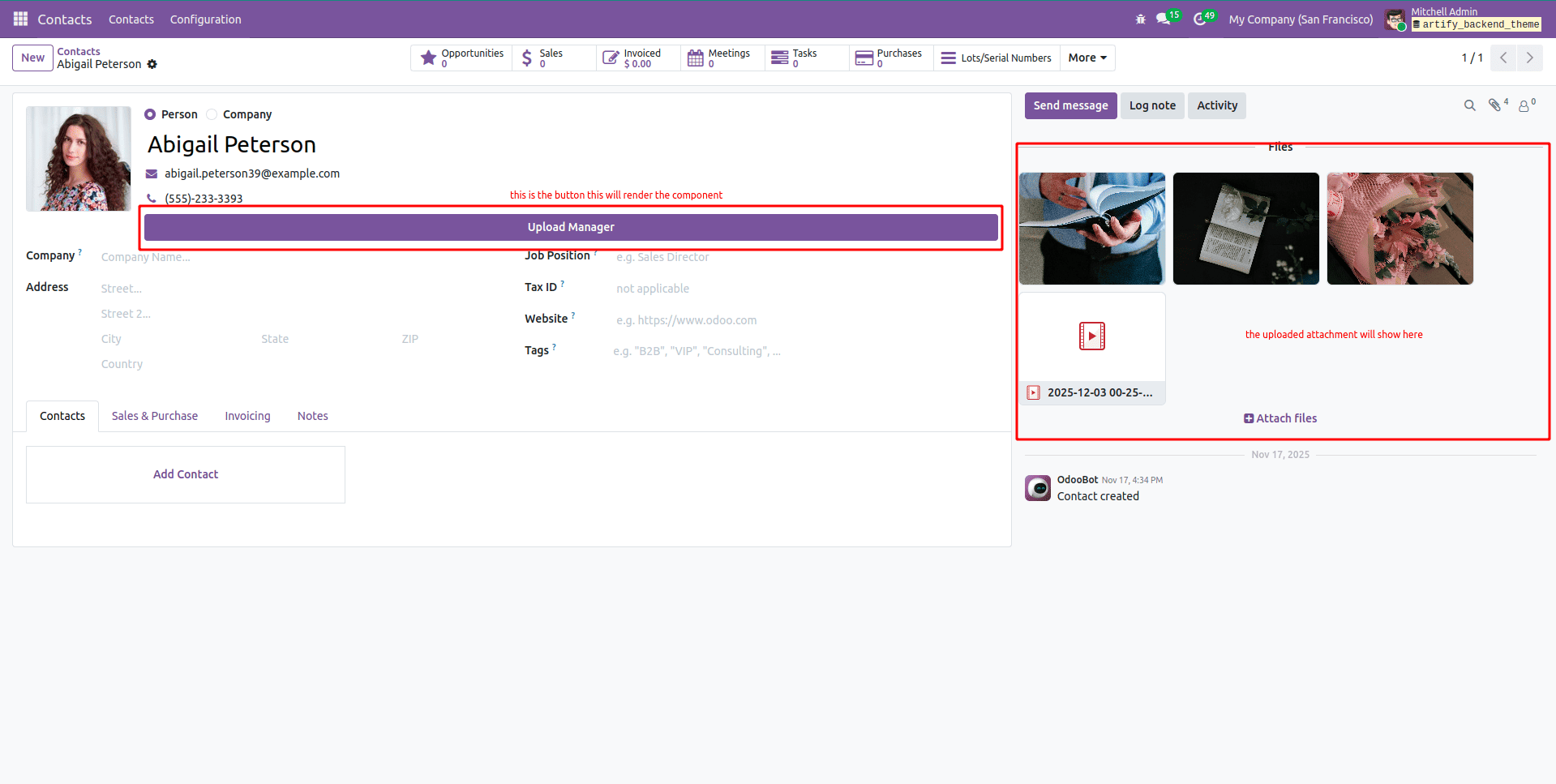
How to Use
- Install the module in your Odoo instance
- Open a partner form and add a button to trigger the action:
<button name="action_open_upload_manager"
        string="Upload Manager"
        type="object"
        class="btn-primary"/>
Test all upload methods: file input, image upload, URL upload, and drag-and-drop
Best Practices
- Always validate file types before upload for better UX
- Use the isImage flag appropriately for image uploads
- Handle errors gracefully with user-friendly messages
- Reset file inputs after upload to allow re-uploading the same file
- Provide visual feedback during uploads
- Set proper resModel and resId for correct attachment linking
Conclusion
This comprehensive example demonstrates all the capabilities of Odoo 19's Upload Service in a single, production-ready component. You can use this as a starting point for your own upload implementations or extract specific features as needed.
The Upload Service handles the complex parts of file uploading progress tracking, error handling, and optimization, allowing you to focus on building great user experiences.
To read more about How to Configure Client Action in Odoo 18, refer to our blog How to Configure Client Action in Odoo 18.