The Odoo versions from 16 are based on the same technology stack as the OWL (Odoo Web Library) framework; therefore, modern Odoo applications use OWL to create fast, reactive UI parts. However, while OWL allows you to create advanced user interfaces, many developers find it hard to debug without good debugging tools, and knowing what debugging tools are available will greatly improve your ability to develop and create a quality codebase with a quicker turnaround time.
What is OWL?
OWL (Odoo Web Library) is Odoo’s modern JavaScript Framework for creating reactive UI components. OWL uses concepts that are found in other modern UI frameworks, such as React, Vue, etc. OWL uses components, reactive data, lifecycle hooks, and service injection. Therefore, because of the way OWL was developed using a modern architecture, the traditional approaches of debugging may not be as sufficient.
Why OWL Debugging Tools Are Important
OWL Debugging tools are essential for developers who experience challenges when utilizing OWL, including:
- Non-rendering components
- Unupdating state
- Improperly injected services
- A failed patch
- Rerenders that occur unexpectedly
OWLs must have a debugging tool specifically made to help developers diagnose and troubleshoot efficiently.
Main OWL Debugging Tools
Here are the most useful tools for debugging OWL in Odoo:
- Debug assets mode
- OWL DevTools
- Browser developer console
Let’s explore each of them.
Debug Assets Mode
To enable debug assets mode, add the following parameter:
?debug=assets
In this mode you will have access to:
- Unminified JavaScript files
- Readable OWL templates
- Easier debugging of breakpoints
Debug assets mode is strongly recommended for development.
OWL DevTools (Primary Tool)
A browser extension is OWL DevTools that lets developers check OWL (Odoo Web Library) components from within the browser. Like React DevTools, OWL DevTools has been created specifically to work with Odoo.
To enable OWL DevTools.
- Install the OWL DevTools from the browser extension store (Chrome Web Store or Add-ons for Firefox).
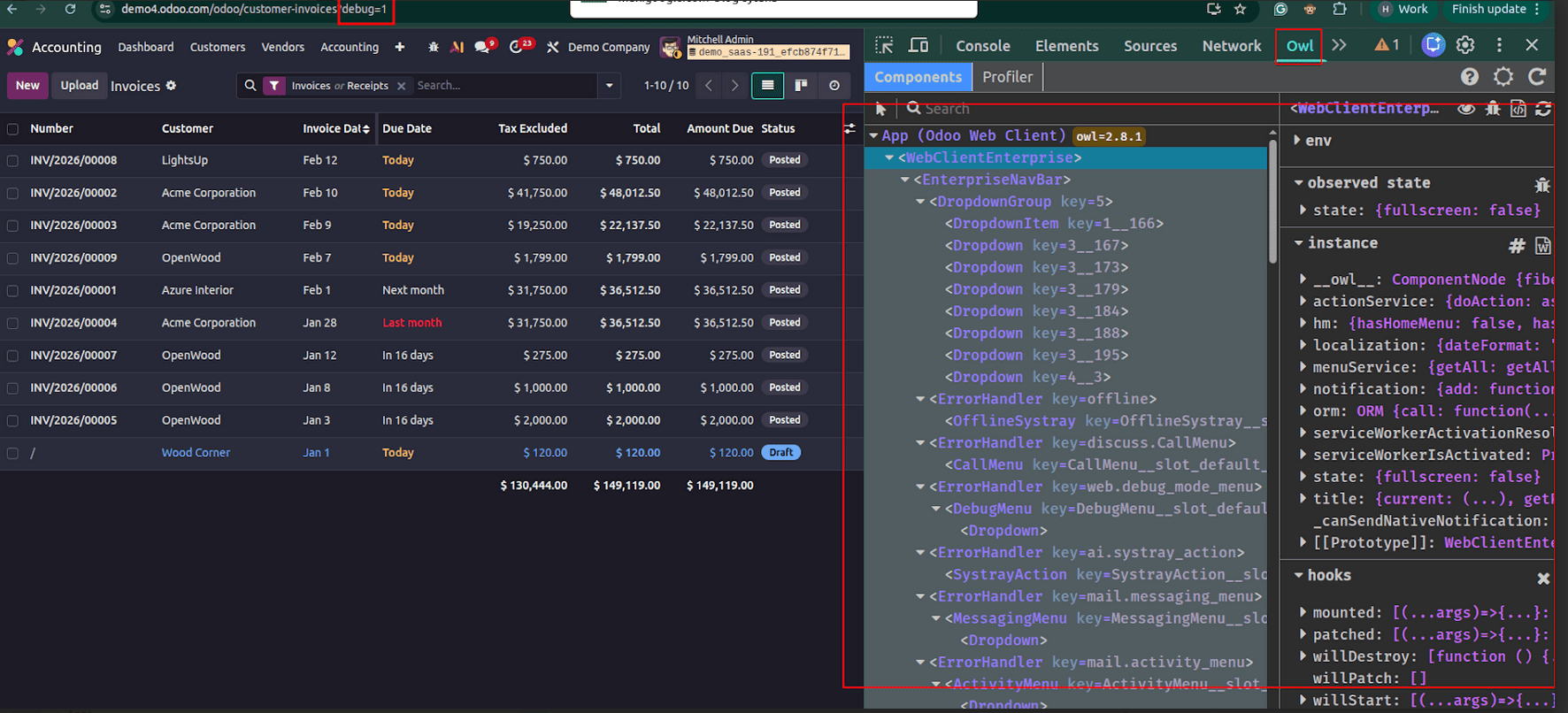
- Make sure your Odoo instance is running in debug mode by adding ?debug=1 to the end of the URL.
- To do advanced level debug checking, use ?debug=assets.
- Now you can open the Owl tab from Developer tools (F12) in your browser.
Browser Console Debugging
The browser console remains an essential debugging tool even when using OWL DevTools.
Developers can log runtime values such as:
console.log(this.env);
console.log(this.state);
This helps inspect event flows, API responses, and runtime errors.
There's no doubt that OWL debugging can look very complicated, however OWL DevTools is the most powerful of all available tools and provides great assistance by offering:
- Component Hierarchy Visualization
- Reactive State Inspection
- Lifecycle Tracking
- Service Visibility
- By learning how to use these tools effectively, you'll be much more efficient in developing new Odoo frontend features with OWL debugging instances.
If you're developing customizations to Odoo using OWL, then you'll greatly benefit from spending time mastering these tools to enhance your debugging process and also improve your development process overall.
To read more about Overview of Debugging in Odoo 19, refer to our blog Overview of Debugging in Odoo 19.