The aged receivable report is crucial in all ERP systems for monitoring overdue customers and the duration it takes for them to settle payments on the list of dues. Aged receivables display all unpaid invoices for customers and categorize these invoices into different timeframes. In the standard Odoo version, the aged receivables are organized into aging bucket intervals: At the Date, 0-30, 31-60, 61-90, 91-120, and Older. Utilizing the default Odoo aging buckets allows us to identify the aging of outstanding items for up to 120 days. Data beyond 120 days cannot be pinpointed; instead, such data is categorized under the 'Older' Bucket in the current Odoo report.
Certain companies need to retrieve outstanding records that are older than 120 days. In this article, we will explore how to incorporate new aging bucket intervals, such as 121–150 days, 151–180 days, and 181–360 days, into the current aged receivable report in Odoo.
For this, firstly, we need to add a data file that defines the aging intervals in a custom module. So, add a data file, extend the existing Aged Receivable report, and add new aging bucket columns in the same file. Here we are trying to add 121-150 days, 151-180 days, and 181-360 days aging intervals along with the existing aging intervals.
<data>
   <record id="account_reports.aged_receivable_report" model="account.report">
       <field name="column_ids">
           <record id="aged_receivable_report_period6" model="account.report.column">
               <field name="name">121-150</field>
               <field name="expression_label">period6</field>
               <field name="sortable" eval="True"/>
           </record>
           <record id="aged_receivable_report_period7" model="account.report.column">
               <field name="name">151-180</field>
               <field name="expression_label">period7</field>
               <field name="sortable" eval="True"/>
           </record>
           <record id="aged_receivable_report_period8" model="account.report.column">
               <field name="name">181-360</field>
               <field name="expression_label">period8</field>
               <field name="sortable" eval="True"/>
           </record>
       </field>
   </record>
</data>
This data file creates new columns in the existing aged receivable report.
- name: Defines the column label displayed in the report (for example, 121–150).
- expression_label: Links the column to a report expression with the same identifier (period6, period7, or period8).
- sortable: Enables sorting for the newly introduced column in the report interface.
For computing the data for the additional column that was added using the data file, we need to add the following to the same file.
<record id="account_reports.aged_receivable_line" model="account.report.line">
   <field name="expression_ids">
       <record id="aged_receivable_line_period6" model="account.report.expression">
           <field name="label">period6</field>
           <field name="engine">custom</field>
           <field name="formula">_report_custom_engine_aged_receivable</field>
           <field name="subformula">period6</field>
           <field name="auditable" eval="True"/>
       </record>
       <record id="aged_receivable_line_period7" model="account.report.expression">
           <field name="label">period7</field>
           <field name="engine">custom</field>
           <field name="formula">_report_custom_engine_aged_receivable</field>
           <field name="subformula">period7</field>
           <field name="auditable" eval="True"/>
       </record>
       <record id="aged_receivable_line_period8" model="account.report.expression">
           <field name="label">period8</field>
           <field name="engine">custom</field>
           <field name="formula">_report_custom_engine_aged_receivable</field>
           <field name="subformula">period8</field>
           <field name="auditable" eval="True"/>
       </record>
   </field>
</record>
Here, we have added the expression for computing the data into the corresponding aging column.
Each report expression is configured to use the custom computation engine, which invokes the `_report_custom_engine_aged_receivable` method to retrieve the required values. The `subformula` parameter identifies the specific aging interval (such as `period6`, `period7`, or `period8`) that should be calculated by the Python method. Likewise, the `label` value corresponds to the `expression_label` defined for the report column, allowing Odoo to map the calculated result to the appropriate column in the report. By enabling the `auditable` option, users can drill down from the report and view the accounting entries that make up each aging bucket.
After this, we need to update the _aged_partner_report_custom_engine_common() method in the ‘account.aged.receivable.report.handler’ model. In Odoo 17, this method is overridden using a monkey patch to extend the standard report functionality without modifying the core source code.
The period lists define the aging bucket intervals used by the report engine. By default, Odoo includes a limited number of predefined periods. In this customization, we extend the list by adding three new aging buckets: 121–150 days, 151–180 days, and 181–360 days, while moving invoices older than 360 days into a separate 360+ bucket.
class AgedReceivableCustomHandlerExtend(models.AbstractModel):
    _inherit = 'account.aged.receivable.report.handler'
    _description = 'Aged Receivable Custom Handler Extend'

    def _aged_partner_report_custom_engine_common(self, options, internal_type, current_groupby, next_groupby, offset=0, limit=None):
        report = self.env['account.report'].browse(options['report_id'])
        report._check_groupby_fields((next_groupby.split(',') if next_groupby else []) + ([current_groupby] if current_groupby else []))
        def minus_days(date_obj, days):
            return fields.Date.to_string(date_obj - relativedelta(days=days))
        date_to = fields.Date.from_string(options['date']['date_to'])
        periods = [
            (False, fields.Date.to_string(date_to)),
            (minus_days(date_to, 1), minus_days(date_to, 30)),
            (minus_days(date_to, 31), minus_days(date_to, 60)),
            (minus_days(date_to, 61), minus_days(date_to, 90)),
            (minus_days(date_to, 91), minus_days(date_to, 120)),
            (minus_days(date_to, 121), minus_days(date_to, 150)),
            (minus_days(date_to, 151), minus_days(date_to, 180)),
            (minus_days(date_to, 181), minus_days(date_to, 360)),
            (minus_days(date_to, 361), False),
        ]
        def build_result_dict(report, query_res_lines):
            rslt = {f'period{i}': 0 for i in range(len(periods))}
            for query_res in query_res_lines:
                for i in range(len(periods)):
                    period_key = f'period{i}'
                    rslt[period_key] += query_res[period_key]
            if current_groupby == 'id':
                query_res = query_res_lines[0] # We're grouping by id, so there is only 1 element in query_res_lines anyway
                currency = self.env['res.currency'].browse(query_res['currency_id'][0]) if len(query_res['currency_id']) == 1 else None
                expected_date = len(query_res['expected_date']) == 1 and query_res['expected_date'][0] or len(query_res['due_date']) == 1 and query_res['due_date'][0]
                rslt.update({
                    'invoice_date': query_res['invoice_date'][0] if len(query_res['invoice_date']) == 1 else None,
                    'due_date': query_res['due_date'][0] if len(query_res['due_date']) == 1 else None,
                    'amount_currency': query_res['amount_currency'],
                    'currency_id': query_res['currency_id'][0] if len(query_res['currency_id']) == 1 else None,
                    'currency': currency.display_name if currency else None,
                    'account_name': query_res['account_name'][0] if len(query_res['account_name']) == 1 else None,
                    'expected_date': expected_date or None,
                    'total': None,
                    'has_sublines': query_res['aml_count'] > 0,
                    # Needed by the custom_unfold_all_batch_data_generator, to speed-up unfold_all
                    'partner_id': query_res['partner_id'][0] if query_res['partner_id'] else None,
                })
            else:
                rslt.update({
                    'invoice_date': None,
                    'due_date': None,
                    'amount_currency': None,
                    'currency_id': None,
                    'currency': None,
                    'account_name': None,
                    'expected_date': None,
                    'total': sum(rslt[f'period{i}'] for i in range(len(periods))),
                    'has_sublines': False,
                })
            return rslt
        # Build period table
        period_table_format = ('(VALUES %s)' % ','.join("(%s, %s, %s)" for period in periods))
        params = list(chain.from_iterable(
            (period[0] or None, period[1] or None, i)
            for i, period in enumerate(periods)
        ))
        period_table = self.env.cr.mogrify(period_table_format, params).decode(self.env.cr.connection.encoding)
        # Build query
        tables, where_clause, where_params = report._query_get(options, 'strict_range', domain=[('account_id.account_type', '=', internal_type)])
        currency_table = report._get_query_currency_table(options)
        always_present_groupby = "period_table.period_index, currency_table.rate, currency_table.precision"
        if current_groupby:
            select_from_groupby = f"account_move_line.{current_groupby} AS grouping_key,"
            groupby_clause = f"account_move_line.{current_groupby}, {always_present_groupby}"
        else:
            select_from_groupby = ''
            groupby_clause = always_present_groupby
        select_period_query = ','.join(
            f"""
                CASE WHEN period_table.period_index = {i}
                THEN %s * (
                    SUM(ROUND(account_move_line.balance * currency_table.rate, currency_table.precision))
                    - COALESCE(SUM(ROUND(part_debit.amount * currency_table.rate, currency_table.precision)), 0)
                    + COALESCE(SUM(ROUND(part_credit.amount * currency_table.rate, currency_table.precision)), 0)
                )
                ELSE 0 END AS period{i}
            """
            for i in range(len(periods))
        )
        tail_query, tail_params = report._get_engine_query_tail(offset, limit)
        query = f"""
            WITH period_table(date_start, date_stop, period_index) AS ({period_table})
            SELECT
                {select_from_groupby}
                %s * (
                    SUM(account_move_line.amount_currency)
                    - COALESCE(SUM(part_debit.debit_amount_currency), 0)
                    + COALESCE(SUM(part_credit.credit_amount_currency), 0)
                ) AS amount_currency,
                ARRAY_AGG(DISTINCT account_move_line.partner_id) AS partner_id,
                ARRAY_AGG(account_move_line.payment_id) AS payment_id,
                ARRAY_AGG(DISTINCT move.invoice_date) AS invoice_date,
                ARRAY_AGG(DISTINCT COALESCE(account_move_line.date_maturity, account_move_line.date)) AS report_date,
                ARRAY_AGG(DISTINCT account_move_line.expected_pay_date) AS expected_date,
                ARRAY_AGG(DISTINCT account.code) AS account_name,
                ARRAY_AGG(DISTINCT COALESCE(account_move_line.date_maturity, account_move_line.date)) AS due_date,
                ARRAY_AGG(DISTINCT account_move_line.currency_id) AS currency_id,
                COUNT(account_move_line.id) AS aml_count,
                ARRAY_AGG(account.code) AS account_code,
                {select_period_query}
            FROM {tables}
            JOIN account_journal journal ON journal.id = account_move_line.journal_id
            JOIN account_account account ON account.id = account_move_line.account_id
            JOIN account_move move ON move.id = account_move_line.move_id
            JOIN {currency_table} ON currency_table.company_id = account_move_line.company_id
            LEFT JOIN LATERAL (
                SELECT
                    SUM(part.amount) AS amount,
                    SUM(part.debit_amount_currency) AS debit_amount_currency,
                    part.debit_move_id
                FROM account_partial_reconcile part
                WHERE part.max_date <= %s AND part.debit_move_id = account_move_line.id
                GROUP BY part.debit_move_id
            ) part_debit ON TRUE
            LEFT JOIN LATERAL (
                SELECT
                    SUM(part.amount) AS amount,
                    SUM(part.credit_amount_currency) AS credit_amount_currency,
                    part.credit_move_id
                FROM account_partial_reconcile part
                WHERE part.max_date <= %s AND part.credit_move_id = account_move_line.id
                GROUP BY part.credit_move_id
            ) part_credit ON TRUE
            JOIN period_table ON
                (
                    period_table.date_start IS NULL
                    OR COALESCE(account_move_line.date_maturity, account_move_line.date) <= DATE(period_table.date_start)
                )
                AND
                (
                    period_table.date_stop IS NULL
                    OR COALESCE(account_move_line.date_maturity, account_move_line.date) >= DATE(period_table.date_stop)
                )
            WHERE {where_clause}
            GROUP BY {groupby_clause}
            HAVING
                (
                    SUM(ROUND(CASE WHEN account_move_line.balance > 0  THEN account_move_line.balance else 0 END * currency_table.rate, currency_table.precision))
                    - COALESCE(SUM(ROUND(part_debit.amount * currency_table.rate, currency_table.precision)), 0)
                ) != 0
                OR
                (
                    SUM(ROUND(CASE WHEN account_move_line.balance < 0  THEN -account_move_line.balance else 0 END * currency_table.rate, currency_table.precision))
                    - COALESCE(SUM(ROUND(part_credit.amount * currency_table.rate, currency_table.precision)), 0)
                ) != 0
            ORDER BY {groupby_clause}
            {tail_query}
        """
        multiplicator = -1 if internal_type == 'liability_payable' else 1
        params = [
            multiplicator,
            *([multiplicator] * len(periods)),
            date_to,
            date_to,
            *where_params,
            *tail_params,
        ]
        self._cr.execute(query, params)
        query_res_lines = self._cr.dictfetchall()
        if not current_groupby:
            return build_result_dict(report, query_res_lines)
        else:
            rslt = []
            all_res_per_grouping_key = {}
            for query_res in query_res_lines:
                grouping_key = query_res['grouping_key']
                all_res_per_grouping_key.setdefault(grouping_key, []).append(query_res)
            for grouping_key, query_res_lines in all_res_per_grouping_key.items():
                rslt.append((grouping_key, build_result_dict(report, query_res_lines)))
            return rslt
    AgedPartnerBalanceCustomHandler._aged_partner_report_custom_engine_common = _aged_partner_report_custom_engine_common
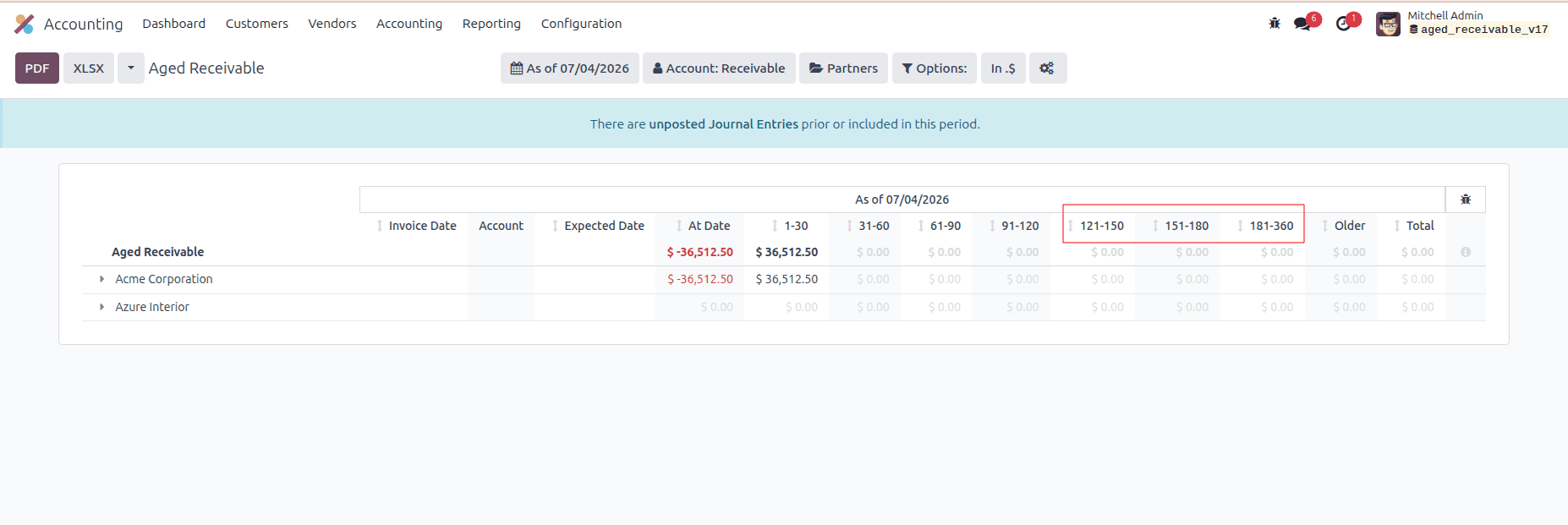
After upgrading the custom module, navigate to Accounting > Reporting > Aged Receivables. You can see the additional aging interval in the existing aged receivable report. The report organizes outstanding receivables into the newly configured aging intervals, making it easier to analyze overdue amounts based on the customized period ranges.
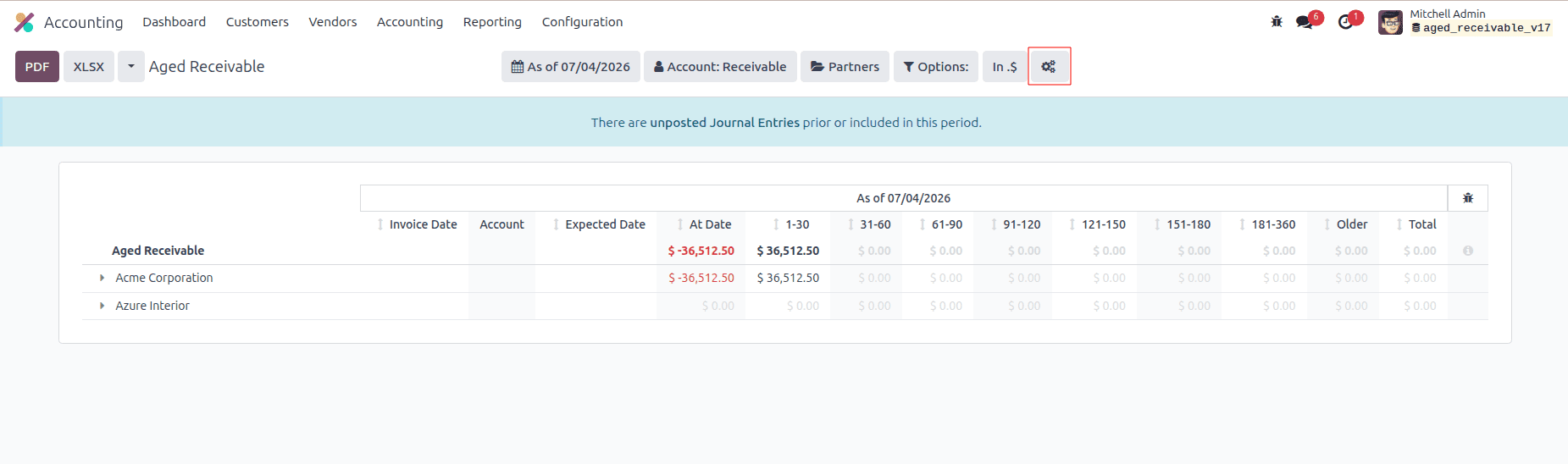
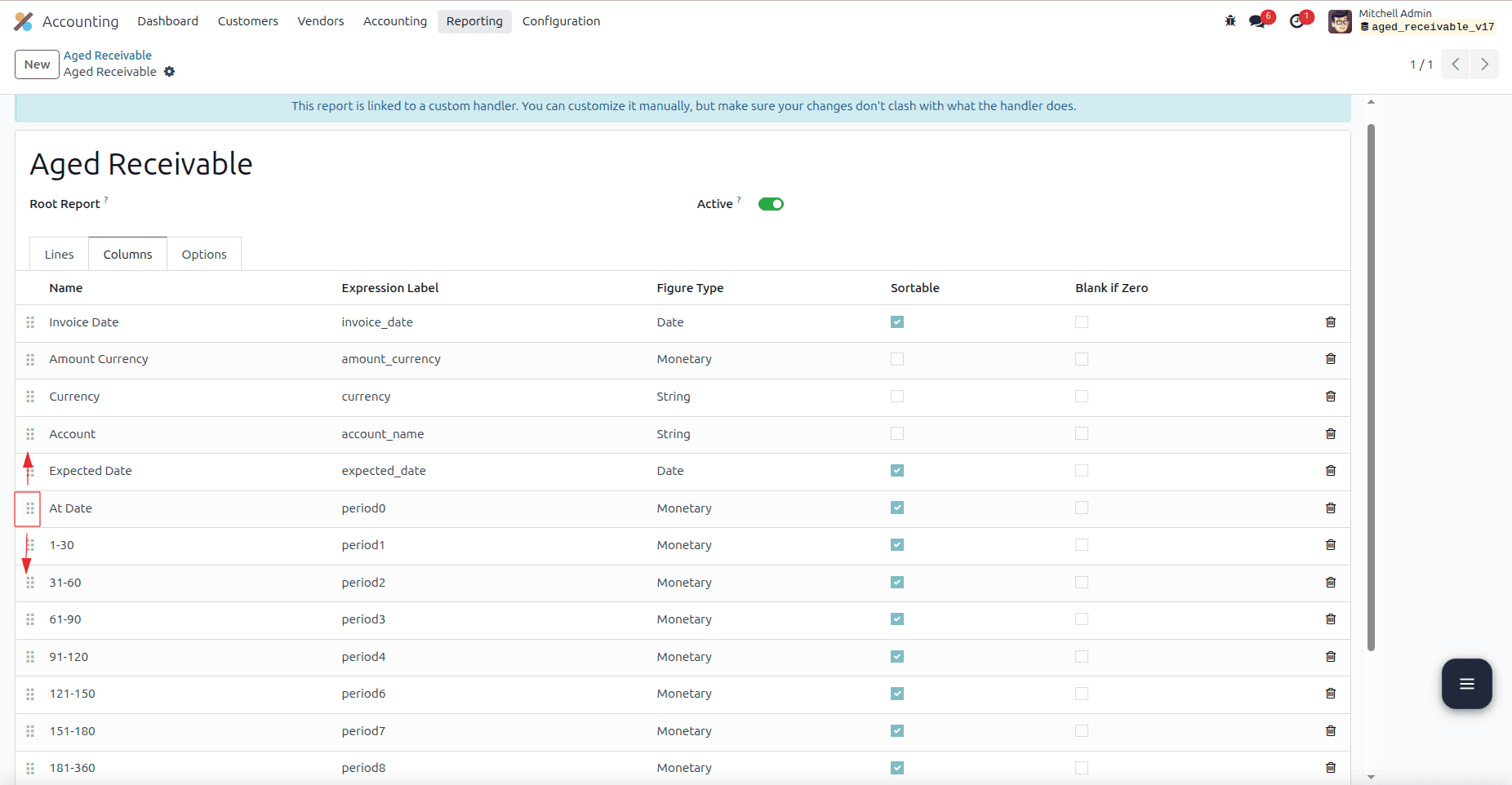
The order of the aging bucket columns can be customized to match your reporting requirements. Enable Developer Mode, then go to Accounting > Configuration > Accounting Reports and open the Aged Receivable report. Navigate to the Columns section, where you can rearrange, add, or customize the report columns as required.
Open the Aged Receivable report and go to the Columns section. You can rearrange the aging bucket columns by modifying their sequence. After saving the changes, the report will display the columns in the newly defined order.
Adding custom aging bucket intervals allows you to tailor the Aged Receivable report to your organization's reporting needs. By extending the standard report through model inheritance, you can present a more detailed view of outstanding receivables while preserving Odoo's core functionality, making the customization simple to maintain and enhance in the future.
To read more about How to Add a Custom Aging Bucket Interval to the Aged Receivable Report in Odoo 19, refer to our blog How to Add a Custom Aging Bucket Interval to the Aged Receivable Report in Odoo 19.