Odoo provides a powerful and flexible email templating system that allows you to automate communication across different modules. In many cases, the default templates provided by Odoo are sufficient, but you may want to customize them to match your branding, add additional fields, or modify the message content.
Before we look at how to customize them, it’s important to understand how mail templates are structured in Odoo 19. Each email template is defined in XML and includes several key components that control what the email will contain. These components specify details such as the subject line, the message body, who the email should be sent to, and any files that need to be attached. Fortunately, Odoo allows you to easily customize any existing email template to match your specific business requirements. Let’s now explore how to do this in detail.
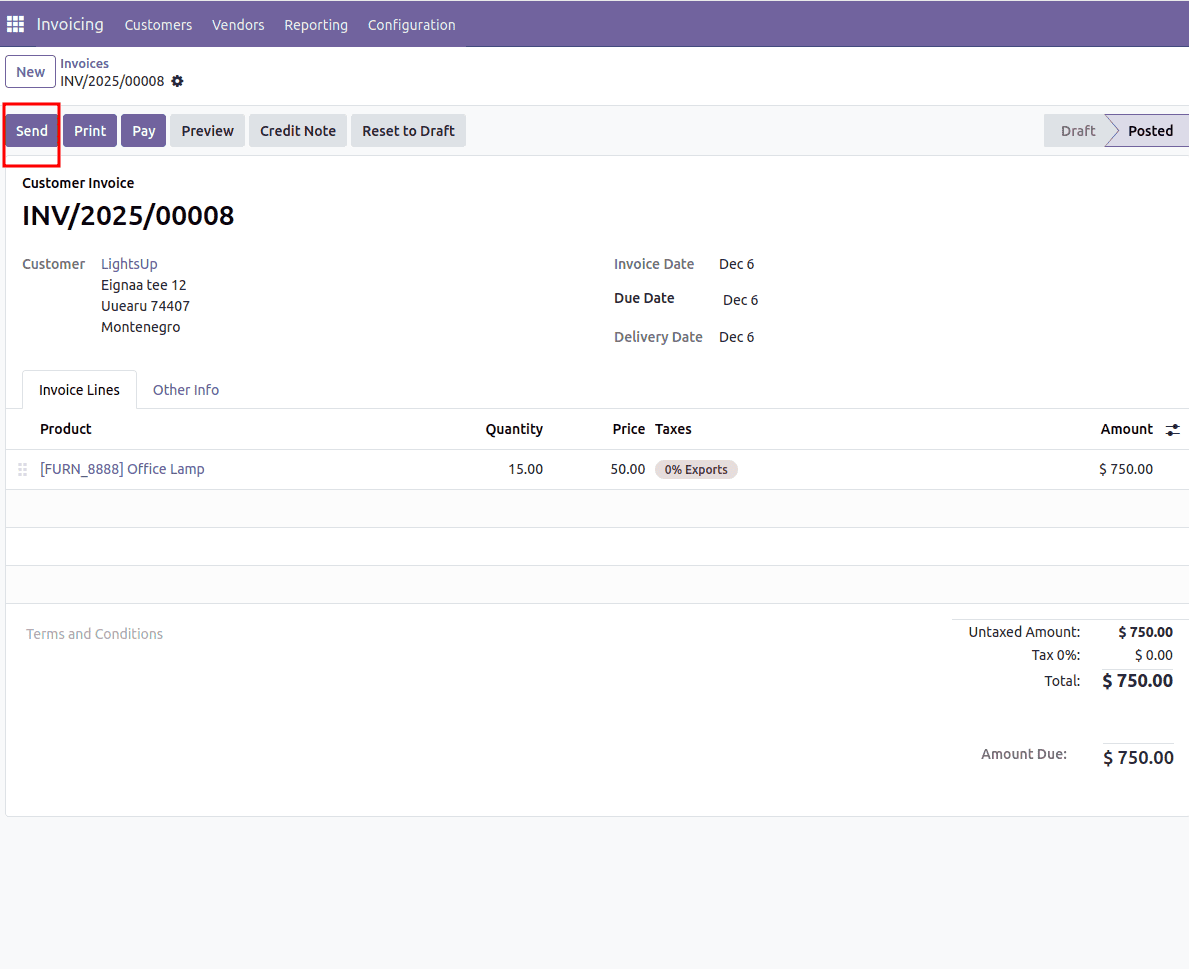
For instance, assume that we need to customize the email template used in the Accounting module. When the user clicks the “Send” button on an account to move a record, Odoo opens a wizard that prepares the email. Our objective is to customize the mail template that this wizard uses.
This is the template that Odoo uses when sending invoices.
<?xml version="1.0" ?>
<odoo>
<!-- Mail template are declared in a NOUPDATE block
so users can freely customize/delete them -->
<data noupdate="1">
<record id="email_template_edi_invoice" model="mail.template">
<field name="name">Invoice: Sending</field>
<field name="model_id" ref="account.model_account_move"/>
<field name="email_from">{{ (object.invoice_user_id.email_formatted or object.company_id.email_formatted or user.email_formatted) }}</field>
<field name="partner_to" eval="False"/>
<field name="use_default_to" eval="True"/>
<field name="subject">{{ object.company_id.name }} Invoice (Ref {{ object.name or 'n/a' }})</field>
<field name="description">Sent to customers with their invoices in attachment</field>
<field name="body_html" type="html">
<div style="margin: 0px; padding: 0px;">
<p style="margin: 0px; padding: 0px; font-size: 13px;">
Dear
<t t-if="object.partner_id.parent_id">
<t t-if="object.partner_id.name">
<t t-out="object.partner_id.name">Brandon Freeman</t> (<t t-out="object.partner_id.parent_id.name or ''">Azure Interior</t>),
</t>
<t t-else="">
<t t-out="object.partner_id.parent_id.name or ''">Azure Interior</t>,
</t>
</t>
<t t-else="">
<t t-out="object.partner_id.name or ''">Brandon Freeman</t>,
</t>
<br /><br />
Here is your
<t t-if="object.name">
invoice <span style="font-weight:bold;" t-out="object.name or ''">INV/2021/05/0005</span>
</t>
<t t-else="">
invoice
</t>
<t t-if="object.invoice_origin">
(with reference: <t t-out="object.invoice_origin or ''">SUB003</t>)
</t>
amounting in <span style="font-weight:bold;" t-out="format_amount(object.amount_total, object.currency_id) or ''">$ 143,750.00</span>
from <t t-out="object.company_id.name or ''">YourCompany</t>.
<t t-if="object.payment_state in ('paid', 'in_payment')">
This invoice is already paid.
</t>
<t t-else="">
Please remit payment at your earliest convenience.
<t t-if="object.payment_reference">
<br /><br />
Please use the following communication for your payment: <strong t-out="object.payment_reference or ''">INV/2021/05/0005</strong>
<t t-if="object.partner_bank_id">
on the account <strong t-out="object.partner_bank_id.acc_number"/>
</t>
.
</t>
</t>
<t t-if="hasattr(object, 'timesheet_count') and object.timesheet_count">
<br /><br />
PS: you can review your timesheets <a t-att-href="'/my/timesheets?search_in=invoice&search=%s' % object.name">from the portal.</a>
</t>
<br /><br />
Do not hesitate to contact us if you have any questions.
<t t-if="not is_html_empty(object.invoice_user_id.signature)">
<br /><br />
<div>--<br/><t t-out="object.invoice_user_id.signature or ''">Mitchell Admin</t></div>
</t>
</p>
</div>
</field>
<field name="report_template_ids" eval="[]"/>
<field name="auto_delete" eval="True"/>
</record>
</data>
</odoo>
In the template, the email template name, sender address, subject, and model ID are specified.
Now, let us examine the process of modifying this email template.
First, we need to change noupdate="1" to noupdate="0", because this attribute prevents us from modifying the template.
<function name="write" model="ir.model.data">
  <function name="search" model="ir.model.data">
    <value eval="[('name', '=', 'email_template_edi_invoice'), ('module', '=', 'account')]" />
  </function>
  <value eval="{'noupdate': False}" />
</function>
In this code, we locate the email template with the ID email_template_edi_invoice in the account module and then set the noupdate attribute to False.
<record id="account.email_template_edi_invoice" model="mail.template">
            <field name="subject">{{ object.company_id.name }} Invoice (Ref {{ object.name or 'n/a' }}) {{
                object.invoice_date }}
            </field>
 </record>
In this code, we locate the email template with the ID email_template_edi_invoice in the account module and then set the noupdate attribute to False.
<record id="account.email_template_edi_invoice" model="mail.template">
            <field name="subject">{{ object.company_id.name }} Invoice (Ref {{ object.name or 'n/a' }}) {{
                object.invoice_date }}
            </field>
 </record>
In this code, we modify the subject field to incorporate the invoice date by adding object.invoice_date to the code.
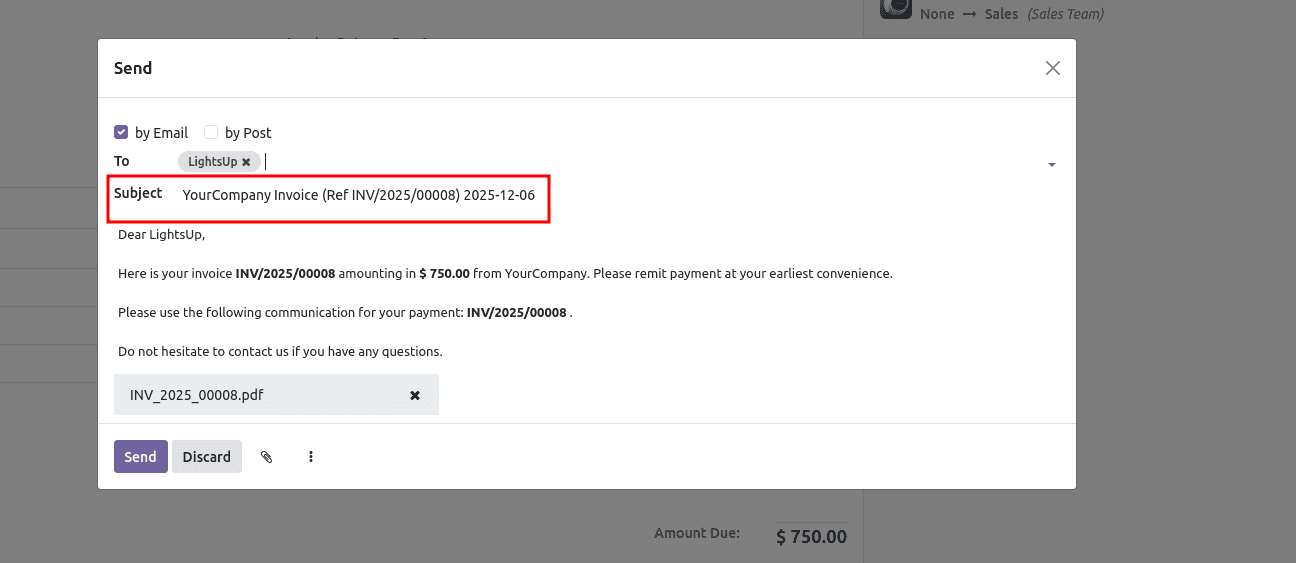
Here, we can see that the date is displayed in the subject.
After completing the modifications, we need to prevent further updates to the template by setting the noupdate attribute back to True. This ensures that the template remains unchanged during future module updates or installations.
<function name="write" model="ir.model.data">
  <function name="search" model="ir.model.data">
    <value eval="[('name', '=', 'email_template_edi_invoice'), ('module', '=', 'account')]" />
  </function>
  <value eval="{'noupdate': True}" />
</function>
Customizing existing mail templates in Odoo 19 allows businesses to tailor automated communications to their specific requirements while maintaining consistency with their branding and workflows. By temporarily setting the noupdate flag to False, inheriting and modifying the desired template, and then restoring the flag to True. Developers can safely update standard Odoo email templates without directly altering core files. This approach ensures that customizations remain maintainable and upgrade-friendly. Whether you need to modify the subject line, enhance the email content, add dynamic fields, or personalize customer communications, understanding how to inherit and update mail templates provides the flexibility needed to create a more effective and professional communication experience in Odoo.
To read more about How to Inherit & Update an Existing Mail Template in Odoo 18, refer to our blog How to Inherit & Update an Existing Mail Template in Odoo 18.