In Odoo's Web client, it's assumed that the Internet is available at all times. The lack of connection results in an error message and an empty view. It might be hard to build an offline-first PWA; however, there are two small features in the browser that will cover all common cases. The localStorage survives page reload and works in all other tabs, making it an ideal choice for cached records and changes, while the sessionStorage exists only within one tab, which makes it a perfect choice for per-tab data. Let's take the Gantt view as an example and use them to show the last valid state instead of an error and save changes to use later.
However, using only localStorage and sessionStorage isn't enough to make Gantt an offline-first PWA; however, it definitely helps to solve the issue of saving the latest view state to avoid a blank view or the loading spinner in case of internet connection loss. In this blog post, we will hack the Gantt view model and its renderer to:
- The successfully loaded dataset is to be stored in localStorage by namespace of each view, user, and company.
- Fall back to the cache in case of a failed fetch or in case of an offline browser.
- SessionStorage will be used for short-term storage of UI status (scroll, zoom).
- A banner will be displayed saying "showing cached data from…"
Step 1: Understand What You're Caching
Before we even get into coding, split the tasks - you cannot simply replace them:
| Feature |
localStorage |
sessionStorage |
| Lifetime |
Survives closing the browser |
Cleared when the tab closes |
| Scope |
Shared across tabs for the same origin |
Isolated per tab |
| Use it for |
The last successfully fetched Gantt records, so there's something to show offline |
The current scale (day/week/month), scroll position, or open/collapsed groups for this session |
Trying to cache everything in the same bucket will result in serving someone else’s user data when the localStorage keys aren’t namespaced correctly - always namespace your keys.
Step 2: Set Up the Module and Assets
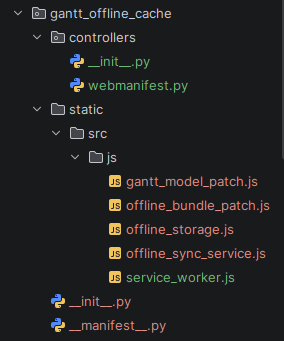
# __manifest__.py
{
   "name": "Gantt Offline Cache",
   "version": "20.0.1.0.0",
   "category": "Productivity",
   "summary": "Keep the Gantt view usable through network drops using "
              "localStorage and sessionStorage",
   "description": """
Gantt Offline Cache
===================
* Caches the last successful Gantt payload per query (domain, groupby,
 date range, scale) in localStorage, namespaced by database, user
 and company.
* Serves that cache when the server is unreachable.
* Queues record writes made while offline (for example date changes from
 drag and drop) and replays them when the browser is back online.
* Uses sessionStorage for a per-tab id so only one tab replays the queue.
Requires the Enterprise ``web_gantt`` module.
   """,
   "depends": ["web_gantt"],
   "assets": {
       "web.assets_backend": [
           "gantt_offline_cache/static/src/js/offline_storage.js",
           "gantt_offline_cache/static/src/js/offline_bundle_patch.js",
           "gantt_offline_cache/static/src/js/offline_sync_service.js",
       ],
       "web.assets_backend_lazy": [
           "gantt_offline_cache/static/src/js/gantt_model_patch.js",
       ],
   },
   "installable": True,
   "application": False,
   "license": "LGPL-3",
}
No Python is necessary for this module at all, as it is pure frontend work; therefore, the entire module contains only one small JavaScript hack inside the backend assets bundle.
Step 3: Improve Odoo's Service Worker
The service worker of Odoo is precompiled on the server side in the WebManifest._get_service_worker_content() method. The controller is subclassed, and your own code is added to it, used internally by users:
// controllers/webmanifest.py
from odoo.http import request
from odoo.tools import file_open
from odoo.addons.web.controllers import webmanifest

class WebManifest(webmanifest.WebManifest):
   def _get_service_worker_content(self):
       content = super()._get_service_worker_content()
       if request.env.user._is_internal():
           with file_open("gantt_offline_cache/static/src/js/service_worker.js") as worker:
               content += worker.read()
       return content
And then the worker code itself. Odoo's listener works on the page navigation events only, so there is no conflict when adding another fetch listener for subresources:
// static/src/js/service_worker.js
const ganttOfflineAssetCache = "gantt-offline-assets-v1";
const cacheableDestinations = new Set(["script", "style", "font", "image"]);
self.addEventListener("fetch", (event) => {
   const request = event.request;
   if (request.method !== "GET") {
       return;
   }
   const url = new URL(request.url);
   if (url.origin !== self.location.origin) {
       return;
   }
   const isOdooBundle = url.pathname.startsWith("/web/bundle/");
   if (!isOdooBundle && !cacheableDestinations.has(request.destination)) {
       return;
   }
   event.respondWith(
       (async () => {
           const cache = await caches.open(ganttOfflineAssetCache);
           try {
               const response = await fetch(request);
               if (response.ok) {
                   await cache.put(request, response.clone());
               }
               return response;
           } catch (error) {
               const cached = await cache.match(request);
               if (cached) {
                   return cached;
               }
               throw error;
           }
       })()
   );
});
Next comes the worker code itself. In Odoo's case, the worker listens to navigation events only, thus avoiding the conflict when adding another fetch listener for subresources:
It is a network-first approach. The stage of network requests has all the fetch requests successful and cached. Once an offline event occurs, then the same fetch request will be satisfied using the copy from the cache. While the worker has control over the requests only to /odoo, the fetch handler in that page will receive all the same-origin requests on those pages, including the requests to /web/bundle/.
Step 4: Fallback routine for bundle descriptors
The getBundle function in the lazy loader will request/web/bundle/<name> and return a list of URLs of scripts and styles. If not successful, Odoo will throw an error. This step includes wrapping the call and caching the last successfully fetched descriptor in localStorage:
// static/src/js/offline_bundle_patch.js
/** @odoo-module **/
import { assets } from "@web/core/assets";
import { browser } from "@web/core/browser/browser";
import { session } from "@web/session";
import { user } from "@web/core/user";
const CACHE_MAX_AGE_MS = 24 * 60 * 60 * 1000;
const CACHE_PREFIX = "gantt_offline:bundle:";
const originalGetBundle = assets.getBundle.bind(assets);
function cacheKey(bundleName) {
   return `${CACHE_PREFIX}${session.db}:${user.userId}:${bundleName}:${JSON.stringify(
       session.bundle_params || {}
   )}`;
}
assets.getBundle = async function (bundleName) {
   const key = cacheKey(bundleName);
   try {
       const descriptor = await originalGetBundle(bundleName);
       try {
           browser.localStorage.setItem(key, JSON.stringify({ ts: Date.now(), descriptor }));
       } catch {
           // Storage quota or privacy settings can disable this optional cache.
       }
       return descriptor;
   } catch (error) {
       try {
           const cached = JSON.parse(browser.localStorage.getItem(key));
           if (cached?.descriptor && Date.now() - cached.ts <= CACHE_MAX_AGE_MS) {
               return cached.descriptor;
           }
       } catch {
           // Missing, expired, or malformed entry: keep Odoo's original error.
       }
       throw error;
   }
};
This is because the key comprises the bundle parameters provided by Odoo within the request; thus, the descriptor related to one set of parameters will never apply to another set.
Both layers overlap each other. If the worker has cached /web/bundle/... then the request will be successful, and the fallback process will not kick off. This is important just in case the worker does not have access yet, such as when setting up your website for the very first time. The scripts pointed out by the descriptor will be fetched from the worker’s cache in Step 3.
Step 5: Storage layer
All other steps depend on this file. This will define the keys, will process the storage errors, will describe the network errors, and will give you the data cache, write queue, and tab.
// static/src/js/offline_storage.js
/** @odoo-module **/
import { browser } from "@web/core/browser/browser";
import { ConnectionLostError } from "@web/core/network/rpc";
import { session } from "@web/session";
import { user } from "@web/core/user";
const PREFIX = "gantt_offline";
const CACHE_MAX_AGE_MS = 24 * 60 * 60 * 1000; // 24h
const LOCK_TTL_MS = 15 * 1000;
const TAB_ID_KEY = `${PREFIX}:tab_id`;
/**
* Every key is namespaced by database and user, because localStorage is
* shared by everyone using this browser on this origin.
*/
const scope = () => `${PREFIX}:${session.db}:${user.userId}`;
function hash(str) {
   let h = 5381;
   for (let i = 0; i < str.length; i++) {
       h = ((h << 5) + h) ^ str.charCodeAt(i);
   }
   return (h >>> 0).toString(36);
}
function readJSON(storage, key) {
   try {
       const raw = storage.getItem(key);
       return raw ? JSON.parse(raw) : null;
   } catch {
       return null;
   }
}
function writeJSON(storage, key, value) {
   try {
       storage.setItem(key, JSON.stringify(value));
       return true;
   } catch {
       // Quota exceeded or storage blocked. Caching is optional.
       return false;
   }
}
function localKeys(prefix) {
   const ls = browser.localStorage;
   const keys = [];
   for (let i = 0; i < ls.length; i++) {
       const key = ls.key(i);
       if (key && key.startsWith(prefix)) {
           keys.push(key);
       }
   }
   return keys;
}
export function isNetworkError(error) {
   return (
       error instanceof ConnectionLostError ||
       (error instanceof TypeError &&
           [
               "Failed to fetch", // Chromium
               "Load failed", // WebKit
               "NetworkError when attempting to fetch resource.", // Firefox
           ].includes(error.message)) ||
       !browser.navigator.onLine
   );
}
/** Cache of get_gantt_data payloads, one entry per distinct query. */
export const ganttCache = {
   key(resModel, args, kwargs, companyId) {
       const query = hash(JSON.stringify([args, kwargs]));
       return `${scope()}:cache:${companyId}:${resModel}:${query}`;
   },
   save(key, data) {
       const entry = { ts: Date.now(), data };
       if (!writeJSON(browser.localStorage, key, entry)) {
           this.pruneOldest();
           writeJSON(browser.localStorage, key, entry);
       }
   },
   load(key) {
       const entry = readJSON(browser.localStorage, key);
       if (!entry || Date.now() - entry.ts > CACHE_MAX_AGE_MS) {
           return null;
       }
       return entry;
   },
   /** Quota hit: drop the oldest half of this user's cache entries. */
   pruneOldest() {
       const entries = localKeys(`${scope()}:cache:`).map((key) => ({
           key,
           ts: readJSON(browser.localStorage, key)?.ts || 0,
       }));
       entries.sort((a, b) => a.ts - b.ts);
       entries
           .slice(0, Math.ceil(entries.length / 2))
           .forEach((e) => browser.localStorage.removeItem(e.key));
   },
   /** Housekeeping at startup: remove expired entries. */
   purgeExpired() {
       for (const key of localKeys(`${scope()}:cache:`)) {
           const entry = readJSON(browser.localStorage, key);
           if (!entry || Date.now() - entry.ts > CACHE_MAX_AGE_MS) {
               browser.localStorage.removeItem(key);
           }
       }
   },
};
/** Writes made while offline, replayed in order when back online. */
export const writeQueue = {
   _key: () => `${scope()}:queue`,
   all() {
       return readJSON(browser.localStorage, this._key()) || [];
   },
   push(op) {
       writeJSON(browser.localStorage, this._key(), [...this.all(), op]);
   },
   replace(ops) {
       if (ops.length) {
           writeJSON(browser.localStorage, this._key(), ops);
       } else {
           browser.localStorage.removeItem(this._key());
       }
   },
};
/**
* Tab identity lives in sessionStorage: it is private to the tab and
* is discarded when the tab closes, which is exactly what we want.
*/
export function getTabId() {
   let id = browser.sessionStorage.getItem(TAB_ID_KEY);
   if (!id) {
       id = Math.random().toString(36).slice(2);
       try {
           browser.sessionStorage.setItem(TAB_ID_KEY, id);
       } catch {
           // Non-fatal: the id just won't survive a reload of this tab.
       }
   }
   return id;
}
/**
* Coarse cross-tab lock so only one tab replays the queue.
* Not atomic. For a strict guarantee use navigator.locks (Web Locks API).
*/
export function acquireLock(tabId) {
   const key = `${scope()}:lock`;
   const lock = readJSON(browser.localStorage, key);
   if (lock && lock.tab !== tabId && Date.now() - lock.ts < LOCK_TTL_MS) {
       return false;
   }
   writeJSON(browser.localStorage, key, { tab: tabId, ts: Date.now() });
   return true;
}
isNetworkError now captures the real TypeError which is raised when the fetch() call fails in all three major engines: Chromium, WebKit and Firefox. While Odoo's RPC layer wraps any connection error into ConnectionLostError, the fetch() calls made from other places, like the bundle loader, will throw the plain TypeError.
Step 6: Patch the Gantt model
The orm of the model we use gets patched in order to cache any successful fetch of the data and to return that data from cache in case of a network error and to defer any write operations.
// static/src/js/gantt_model_patch.js
/** @odoo-module **/
import { patch } from "@web/core/utils/patch";
import { _t } from "@web/core/l10n/translation";
import { GanttModel } from "@web_gantt/gantt_model";
import { ganttCache, writeQueue, isNetworkError } from "./offline_storage";
const FETCH_METHOD = "get_gantt_data";
patch(GanttModel.prototype, {
   async load() {
       this._wrapOrmForOffline();
       return super.load(...arguments);
   },
   _wrapOrmForOffline() {
       if (this._offlineWrapped || !this.orm) {
           return;
       }
       this._offlineWrapped = true;
       const baseOrm = this.orm;
       const model = this;
       const orm = Object.create(baseOrm);
       orm.call = async (resModel, method, args = [], kwargs = {}) => {
           if (method !== FETCH_METHOD) {
               return baseOrm.call(resModel, method, args, kwargs);
           }
           const companyId = model.env.services.company?.currentCompany?.id;
           const key = ganttCache.key(resModel, args, kwargs, companyId);
           try {
               const result = await baseOrm.call(resModel, method, args, kwargs);
               ganttCache.save(key, result);
               model._offlineNotified = false;
               return result;
           } catch (error) {
               if (!isNetworkError(error)) {
                   throw error; // validation/access errors must not be masked
               }
               const entry = ganttCache.load(key);
               if (!entry) {
                   throw error;
               }
               if (!model._offlineNotified) {
                   model._offlineNotified = true;
                   model.env.services.notification.add(
                       _t(
                           "You're offline. Showing the schedule saved at %s.",
                           new Date(entry.ts).toLocaleString()
                       ),
                       { type: "warning" }
                   );
               }
               return entry.data;
           }
       };
       orm.webSearchRead = async (...args) => {
           try {
               return await baseOrm.webSearchRead(...args);
           } catch (error) {
               if (!isNetworkError(error)) {
                   throw error;
               }
               return { records: [], length: 0 };
           }
       };
       orm.write = async (resModel, ids, data, kwargs = {}) => {
           try {
               return await baseOrm.write(resModel, ids, data, kwargs);
           } catch (error) {
               if (!isNetworkError(error)) {
                   throw error;
               }
               writeQueue.push({
                   resModel,
                   ids,
                   data,
                   context: kwargs.context || {},
                   queuedAt: Date.now(),
               });
               model.env.services.notification.add(
                   _t("Change saved on this device. It will sync when you're back online."),
                   { type: "info" }
               );
               return true;
           }
       };
       this.orm = orm;
   },
});
The newly created wrapper function webSearchRead will return an empty array while using it while offline. The same thing happens in the case of Gantt, which reads data along with making a data call, and due to no wrapper, the error propagates, causing a render failure. In such cases, it becomes impossible to distinguish between an empty array and nothingness, and the chart elements based on the data call would be blank while offline.
Double-check the names of the functions used in your code against the source ones: get_gantt_data, webSearchRead, and what ORM function gets invoked by drag (Network tab).
Step 7: Replay the Queue
It is the service that retrieves the offline event from the browser and proceeds to replay all the write requests in order, using the tab ID from sessionStorage and a brief lock for it to make sure that just one tab performs this operation at a time.
// static/src/js/offline_sync_service.js
/** @odoo-module **/
import { registry } from "@web/core/registry";
import { browser } from "@web/core/browser/browser";
import { _t } from "@web/core/l10n/translation";
import { RPCError } from "@web/core/network/rpc";
import { ganttCache, writeQueue, getTabId, acquireLock } from "./offline_storage";
export const ganttOfflineSyncService = {
   dependencies: ["orm", "notification"],
   start(env, { orm, notification }) {
       const tabId = getTabId();
       let running = false;
       ganttCache.purgeExpired();
       async function flush() {
           if (running || !browser.navigator.onLine || !acquireLock(tabId)) {
               return;
           }
           const queue = writeQueue.all();
           if (!queue.length) {
               return;
           }
           running = true;
           const remaining = [];
           let synced = 0;
           try {
               for (const [index, op] of queue.entries()) {
                   try {
                       await orm.write(op.resModel, op.ids, op.data, {
                           context: op.context,
                       });
                       synced++;
                   } catch (error) {
                       if (error instanceof RPCError) {
                           // Server rejected it (access rule, validation).
                           // Drop it so it can't block the rest of the queue.
                           notification.add(
                               _t("A change made offline was rejected: %s", error.data?.message || ""),
                               { type: "danger" }
                           );
                       } else {
                           // Still no network: keep this op and everything after it.
                           remaining.push(...queue.slice(index));
                           break;
                       }
                   }
               }
           } finally {
               writeQueue.replace(remaining);
               running = false;
           }
           if (synced) {
               notification.add(_t("%s offline change(s) synced.", synced), {
                   type: "success",
               });
               env.bus.trigger("GANTT_OFFLINE_SYNCED");
           }
       }
       browser.addEventListener("online", flush);
       flush(); // pick up anything left over from a previous session
   },
};
registry.category("services").add("gantt_offline_sync", ganttOfflineSyncService);
The very first invocation of the flush() function processes those changes that were accumulated during the previous session of this tab that has already been closed. In case of an update that cannot be accepted by the server, it will be simply dropped along with the corresponding error message.
Features that work offline in Odoo 20 are working pretty well with the common views. However, in the case of Enterprise views that employ a lazy-loading mechanism, such as the Gantt view, it does not have an additional bundle with all the resources that cannot be downloaded offline using just a page refresh. The service worker is somewhat extended; localStorage contains the data cache and updates queue, while sessionStorage contains the replay list.
To read more about How to use Local Storage and Session Storage for Offline Functionalities in Odoo 19, refer to our blog How to use Local Storage and Session Storage for Offline Functionalities in Odoo 19.