In web development, localStorage and sessionStorage are two important browser storage mechanisms used to store data on the client side (the user’s system). These storage options help improve performance, reduce unnecessary server requests, and enable offline functionality.
Local Storage
Local storage helps store data permanently in the browser. The stored data remains available even after:
- Page refresh
- Browser close
- System restart
Because of this, localStorage is commonly used to store:
- User preferences (e.g., Dark Mode)
- Offline form data
- Cached records
Eg:
If a user selects Dark Mode in Odoo and it is saved in localStorage, the UI will remain in Dark Mode even the next day after reopening the browser.
Session Storage
Session storage stores data only for the current browser tab session. Once the tab is closed, the data is automatically deleted. It is mainly used for:
- Multi-step forms
- Temporary workflow data
- Page navigation states
Why Local Storage & Session Storage Are Important
These storage mechanisms are important because they help to:
- Save records when the internet is slow or disconnected
- Prevent data loss
- Make screens load faster
- Store temporary UI-related data
Working with Local Storage
1. Store data in local storage
To store data locally, we use a function called setItem('key', 'value'). It has two parameters: the left is the key, and the right is the value. We use a key to access a value.
Eg:
localStorage.setItem("theme_mode", "dark");2. Get Data from Local Storage
To get data from local storage, we can use - getItem(‘key’) - it has one {key} parameter.
Eg:
const mode = localStorage.getItem("theme_mode");3. Remove Data
To remove data from local storage, we have a function call - removeItem("key") -it has one {key} parameter.
Eg:
localStorage.removeItem("theme_mode");4. Clear All Data
We also have a function to clear local storage - clear() - it has no parameter.
Eg:
localStorage.clear();
Working With Session Storage
1. Save Data
To save data in a session, we have a function call - setItem("key", "value") - It has two parameters: the left is the key, and the right is the value. We use a key to access a value.
Eg:
sessionStorage.setItem("current_step", "step_2");2. Get Data
To get data from session, we can use - getItem(‘key’) - it has one {key} parameter.
Eg:
const step = sessionStorage.getItem("current_step");3. Remove Data
To remove data from a session, we have a function call - removeItem("key") -it has one {key} parameter.
Eg:
sessionStorage.removeItem("current_step");4. Clear Session Storage
We also have a function to clear the session - clear() - it has no parameter.
Eg:
sessionStorage.clear();
I am giving a small example below of how we use it.
if (!navigator.onLine) {
    console.log("Internet is disconnected");
const formData = {
    name: "Test Customer",
    mobile: "9876543210"
};
localStorage.setItem("offline_partner_data", JSON.stringify(formData));

}
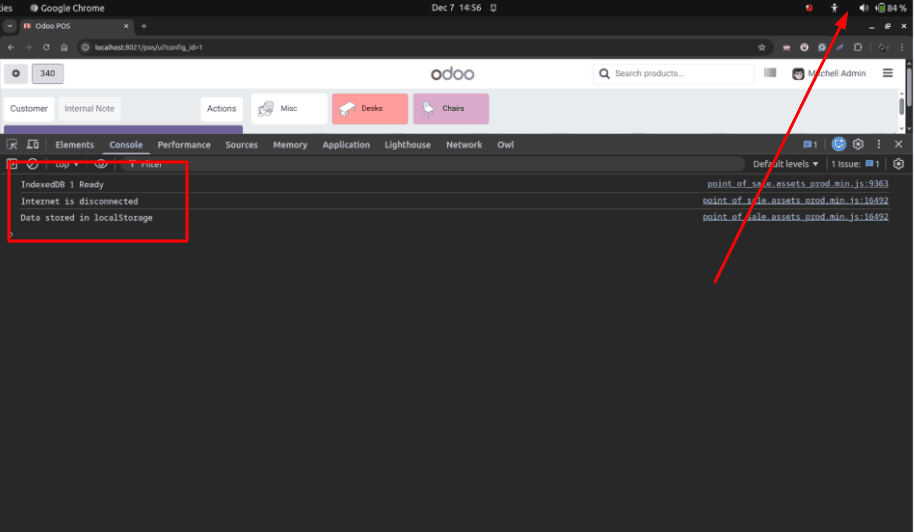
First, we are storing a small amount of data when there is no internet connection.
 window.addEventListener("online", () => {
         const data =         localStorage.getItem("offline_partner_data");

if (data) {
        const record = JSON.parse(data);
        console.log("Internet is back ");
        console.log("Offline data found:", record);
        // Optional: remove after logging
        localStorage.removeItem("offline_partner_data");
    } else {
        console.log("No offline data found to sync.");
    }
});
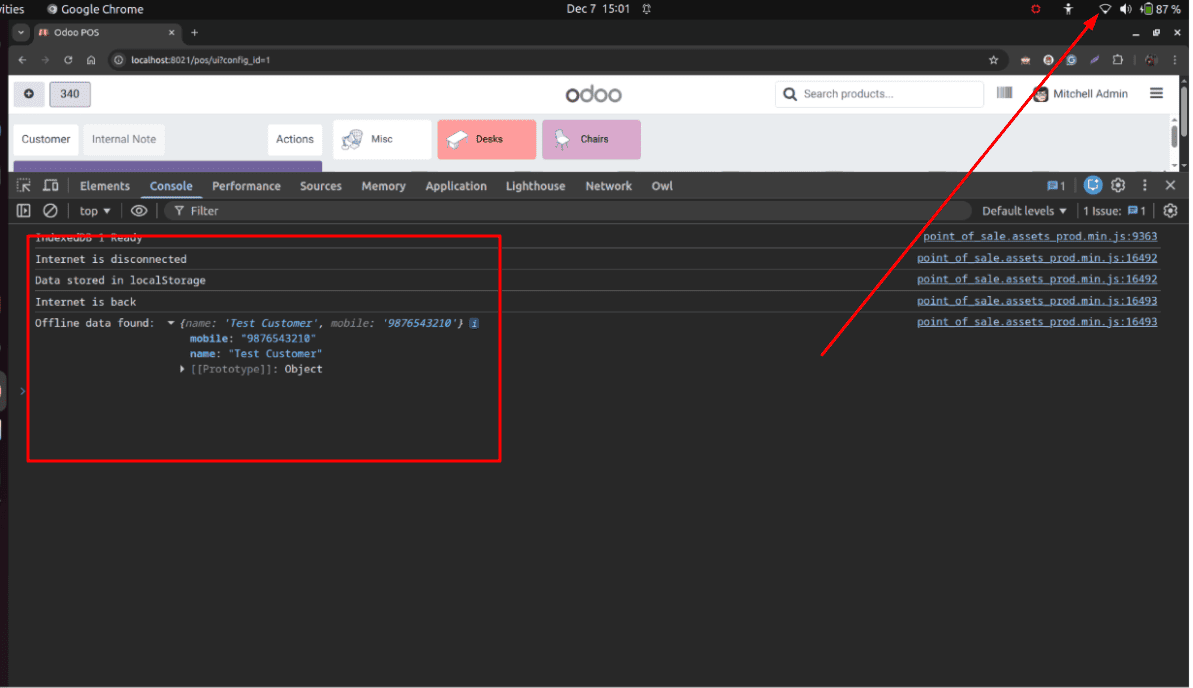
Then we are returning local storage data when the internet comes back.
Output screenshots:
1) No Internet connection
2) Internet Connection Restored
By using both browser storage and network status detection together, Odoo 19 applications can continue working even when the internet connection is unstable. This method helps avoid data loss, minimizes unnecessary server requests, and improves the overall user experience. It is especially useful for mobile users, POS systems, and field-based operations where internet connectivity is not always reliable. With proper implementation, browser storage makes Odoo faster, more stable, and more practical for real-time business usage.
To read more about How to Use Local Storage & Session Storage for Offline Functionality, refer to our blog How to Use Local Storage & Session Storage for Offline Functionality.