This is a common problem with custom Odoo apps because when a user is looking at the same record on their computer and their phone, and they change something on their phone, the laptop application that is open to that record has no idea until it is refreshed manually.
In this blog post, we will build a simplified version of this system using a ticket with a status field that remains synced in real time across all sessions viewing the record, and something that most tutorials out there do not do, and that is handling the case where the bus transport fails, which it will.
This pattern consists of two parts:
Server-side: Post a message to the channel on write for record.
Client side: Any open connection subscribes to the channel and acts on receiving a message.
This works if the WebSocket/long-polling worker is indeed running, and it works for a proper production setup with the - workers configuration, but many local development environments (either a regular odoo-bin without any worker flags or a Docker image with a default command not setting up any workers) never create that channel in the first place. The write operation succeeds, so the value will show up just fine after a manual refresh, but nothing gets pushed, as there is no active connection for the push to go over.
It is a very common pitfall, and debugging this externally would look exactly like "sync is not working." That is why the module does not rely solely on the bus; instead, it uses the bus as the primary and fastest mechanism, but it also provides a lightweight polling alternative to ensure the feature works in an environment with missing bus transport.
Module Structure
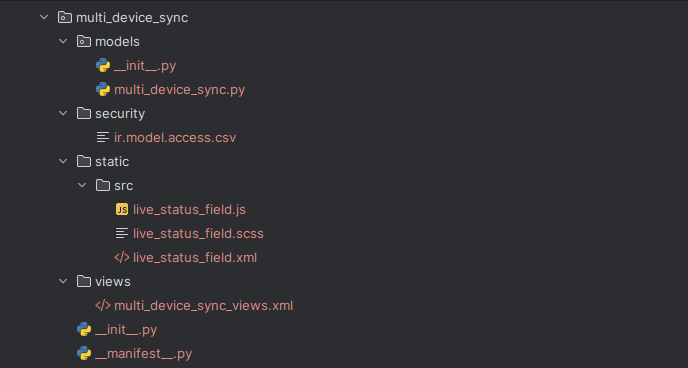
Module Manifest
{
   'name': 'Multi-Device Session Sync Demo'
   'version': '19.0.1.0.0'
   'category': 'Tools',
   'summary': 'Live-updates a record across every open session/device viewing it, using bus.bus',
   'description': """
       Demonstrates cross-device / cross-session real-time sync:""",
   'depends': ['base', 'web', 'bus'],
   'assets': {
       'web.assets_backend': [
           'multi_device_sync/static/src/live_status_field.js',
           'multi_device_sync/static/src/live_status_field.xml',
           'multi_device_sync/static/src/live_status_field.scss',
       ],
   },
   'data': [
       'security/ir.model.access.csv',
       'views/multi_device_sync_views.xml',
   ],
   'installable': True,
   'application': False,
   'license': 'LGPL-3',
}
Server Side: Broadcasting on Write
from odoo import models, fields

class MultiDeviceSync(models.Model):
   _name = 'multi.device.sync'
   _description = 'Multi-Device Sync Demo Ticket'
   name = fields.Char(string='Title', required=True)
   status = fields.Selection([
       ('open', 'Open'),
       ('in_progress', 'In Progress'),
       ('done', 'Done'),
   ], string='Status', default='open')
   def write(self, vals):
       result = super().write(vals)
       if 'status' in vals:
         for record in self:
           channel = f'multi_device_sync_ticket_{record.id}'
               self.env['bus.bus']._sendone(
                   channel,
                   'ticket_status_changed',
                   {
                       'id': record.id,
                       'status': record.status,
                       'write_uid': self.env.uid,
                   },
               )
       return result
Two points of interest:
- Because \'status\' in vals will broadcast only if the value of the specific field we are interested in changes, other writes will not swamp our sessions.
- The channel scope is by record ID, not by model, and in fact, a particular session needs to know only what it has opened.
Client Side: Bus as Primary, Polling as Fallback (live_status_field.js)
/** @odoo-module **/
import { registry } from "@web/core/registry";
import { standardFieldProps } from "@web/views/fields/standard_field_props";
import { Component, useState, onWillStart, onWillUnmount, onMounted } from "@odoo/owl";
import { useService, useBus } from "@web/core/utils/hooks";
const STATUS_LABELS = {
   open: "Open",
   in_progress: "In Progress",
   done: "Done",
};
export class LiveStatusField extends Component {
   static template = "multi_device_sync.LiveStatusField";
   static props = { ...standardFieldProps };
   static supportedTypes = ["selection"];
   setup() {
       this.busService = useService("bus_service");
       this.notification = useService("notification");
       this.orm = useService("orm");
       this.state = useState({
           justSyncedRemotely: false,
       });
       this._pollInterval = null;
       onWillStart(() => {
           const channel = `multi_device_sync_ticket_${this.props.record.resId}`;
           this.channel = channel;
           this.busService.addChannel(channel);
       });
       useBus(this.busService, "notification", (ev) => {
           const notifications = Array.isArray(ev.detail) ? ev.detail : [ev.detail];
           for (const message of notifications) {
               if (
                   message.type === "ticket_status_changed" &&
                   message.payload.id === this.props.record.resId
               ) {
                   this._applyRemoteUpdate(message.payload);
               }
           }
       });
       onMounted(() => {
           this._pollInterval = setInterval(() => this._pollStatus(), 5000);
       });
       onWillUnmount(() => {
           this.busService.deleteChannel(this.channel);
           if (this._pollInterval) {
               clearInterval(this._pollInterval);
               this._pollInterval = null;
           }
       });
   }
   get value() {
       return this.props.record.data[this.props.name];
   }
   get statusLabel() {
       return STATUS_LABELS[this.value] || this.value;
   }
   async _pollStatus() {
       try {
           const result = await this.orm.read(
               this.props.record.resModel,
               [this.props.record.resId],
               [this.props.name]
           );
           if (result && result.length > 0) {
               const serverStatus = result[0][this.props.name];
               if (serverStatus !== this.value) {
                   await this._applyRemoteUpdate({
                       id: this.props.record.resId,
                       status: serverStatus,
                   });
               }
           }
       } catch (_e) {
                  }
   }
   async _applyRemoteUpdate(payload) {
       if (payload.status === this.value) {
           return;
       }
       this.state.justSyncedRemotely = true;
       await this.props.record.load();
       this.notification.add(
           `Status updated to "${STATUS_LABELS[payload.status] || payload.status}" on another session`,
           { type: "info" }
       );
       setTimeout(() => {
           this.state.justSyncedRemotely = false;
       }, 2000);
   }
   async onStatusChange(ev) {
       await this.props.record.update({ [this.props.name]: ev.target.value });
       await this.props.record.save();
          }
}
registry.category("fields").add("live_status", {
   component: LiveStatusField,
   displayName: "Live-Synced Status",
   supportedTypes: ["selection"],
});
Explain the design choices that are important to the reader:
- Two separate strategies target the same handler: A bus listener and a fallback polling approach will result in execution of the _applyRemoteUpdate() method; only the one that catches the update will win, and the other will not find anything new at all (payload.status === this.value shortcut). Therefore, there will be no conflicts between the two approaches, and no coordination of them is required, and they are simply redundant.
- Fallback poll is not based on timestamp but on the comparison of the local cached value: pollStatus() does an orm.read() for a single field only, and goes to _applyRemoteUpdate() only if the server value of this field is really different from the rendered one. This is how the fallback mechanism stays lightweight: just a field reading every 5 seconds, but no record reloading.
- Array.isArray(ev.detail)? ev.detail: [ev.detail] This is a safety measure for the structure of the bus payload and the fact that the structure of Odoo minor versions might vary based on version numbers; thus, normalization of ev.detail prevents the widget from silently crashing due to version differences.
- Both the cleanups are essential in onWillUnmount: Unsubscribing from the bus channel unregisters the push subscription, and clearing the interval cancels the polling; otherwise, you would have a memory leak with the subscription in the first case and a setInterval loop querying the ORM for a record that no longer exists because the user moved on in the second case.
- The 5-second interval for the polling is a compromise that was deliberately made: It is fast enough to provide the illusion of live updates to the status field, but it is slow enough that it does not incur significantly higher costs than the bus subscription; it should be smaller for fields where the staleness is important.
The live_status_field.xml template
<?xml version="1.0" encoding="UTF-8" ?>
<templates xml:space="preserve">
   <t t-name="multi_device_sync.LiveStatusField">
       <div class="o_live_status" t-att-class="state.justSyncedRemotely ? 'o_live_status_flash' : ''">
           <select class="form-select form-select-sm"
                   t-att-value="value"
                   t-on-change="onStatusChange"
                   style="width: auto; display: inline-block;">
               <option value="open" t-att-selected="value === 'open'">Open</option>
               <option value="in_progress" t-att-selected="value === 'in_progress'">In Progress</option>
               <option value="done" t-att-selected="value === 'done'">Done</option>
           </select>
           <i t-if="state.justSyncedRemotely"
              class="fa fa-refresh o_live_status_icon" title="Updated on another session"/>
       </div>
   </t>
</templates>
The module live_status_field.scss style
.o_live_status {
   display: inline-flex;
   align-items: center;
   gap: 6px;
   padding: 3px 6px;
   border-radius: 4px;
   transition: background-color 0.3s ease;
   &.o_live_status_flash {
       background-color: rgba(255, 193, 7, 0.25);
   }
   .o_live_status_icon {
       color: #f5a623;
       font-size: 0.9rem;
   }
}
Create the view of the module
<?xml version="1.0" encoding="UTF-8" ?>
<odoo>
   <record id="view_multi_device_sync_ticket_form" model="ir.ui.view">
       <field name="name">multi.device.sync.form</field>
       <field name="model">multi.device.sync</field>
       <field name="arch" type="xml">
           <form>
               <sheet>
                   <group>
                       <field name="name"/>
                       <field name="status" widget="live_status"/>
                   </group>
                   <div class="alert alert-info mt-3">
                       Open this same record in a second browser tab
                       (or a second device logged into the same
                       database) and change the status here. The
                       other tab updates within a second or two,
                       with no manual refresh, and shows a brief
                       highlight plus a notification.
                   </div>
               </sheet>
           </form>
       </field>
   </record>
   <record id="view_multi_device_sync_ticket_list" model="ir.ui.view">
       <field name="name">multi.device.sync.list</field>
       <field name="model">multi.device.sync</field>
       <field name="arch" type="xml">
           <list>
               <field name="name"/>
               <field name="status"/>
           </list>
       </field>
   </record>
   <record id="action_multi_device_sync_ticket" model="ir.actions.act_window">
       <field name="name">Multi-Device Sync Demo</field>
       <field name="res_model">multi.device.sync</field>
       <field name="view_mode">list,form</field>
   </record>
   <menuitem id="menu_multi_device_sync_ticket_root" name="Multi-Device Sync Demo"
             action="action_multi_device_sync_ticket" sequence="100"/>
</odoo>
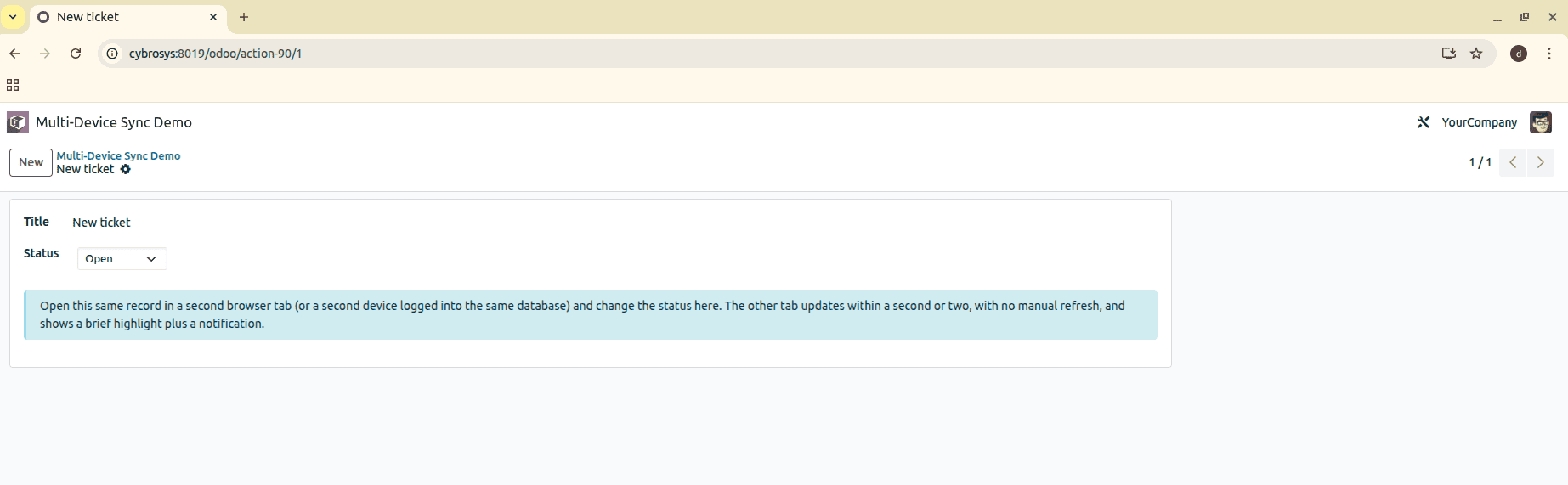
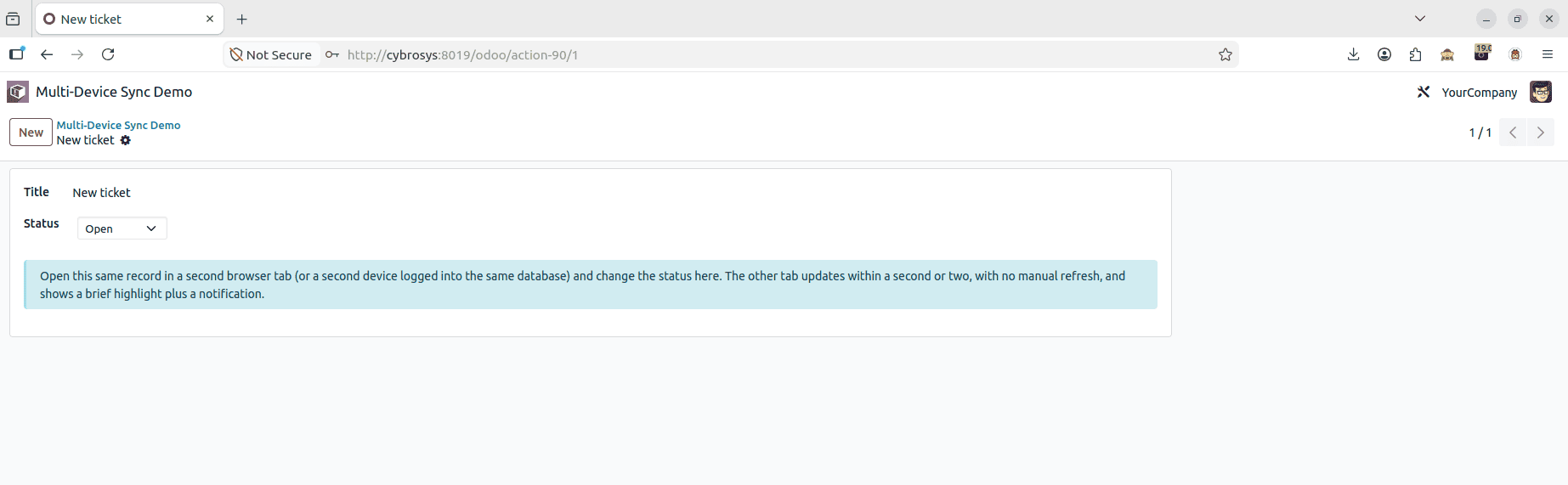
Install the module and open Multi-Device Sync Demo. In one of your browsers, create the ticket and set its status (in this example, you would set the Status to Open for the ticket titled New ticket, using the information box to launch the same record in another browser/device).
That second window, which was launched this time through Firefox instead of Chrome, points to the same record, with the same Title and the same Status field, which is still Open at this point.
The live outcome is proven, as recorded here: Chrome (left) has the status of In Progress, and Firefox (right), an entirely separate session from step 2, picked it up automatically, with the Status field showing In Progress and a message banner at the top indicating Status updated to In Progress in another session. No manual refresh was performed on the Firefox side, which is precisely what the live_status widget was designed to do.
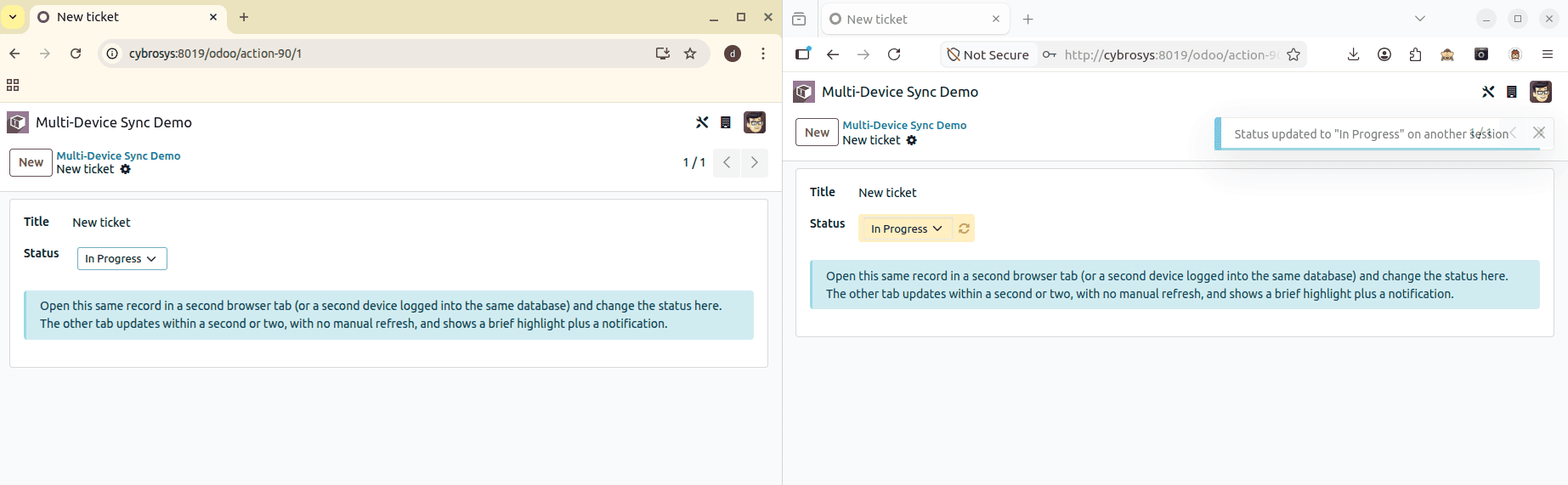
After reversing the test, now marked the status as Done in Firefox. Chrome automatically updated the status and also showed the status updated notification.
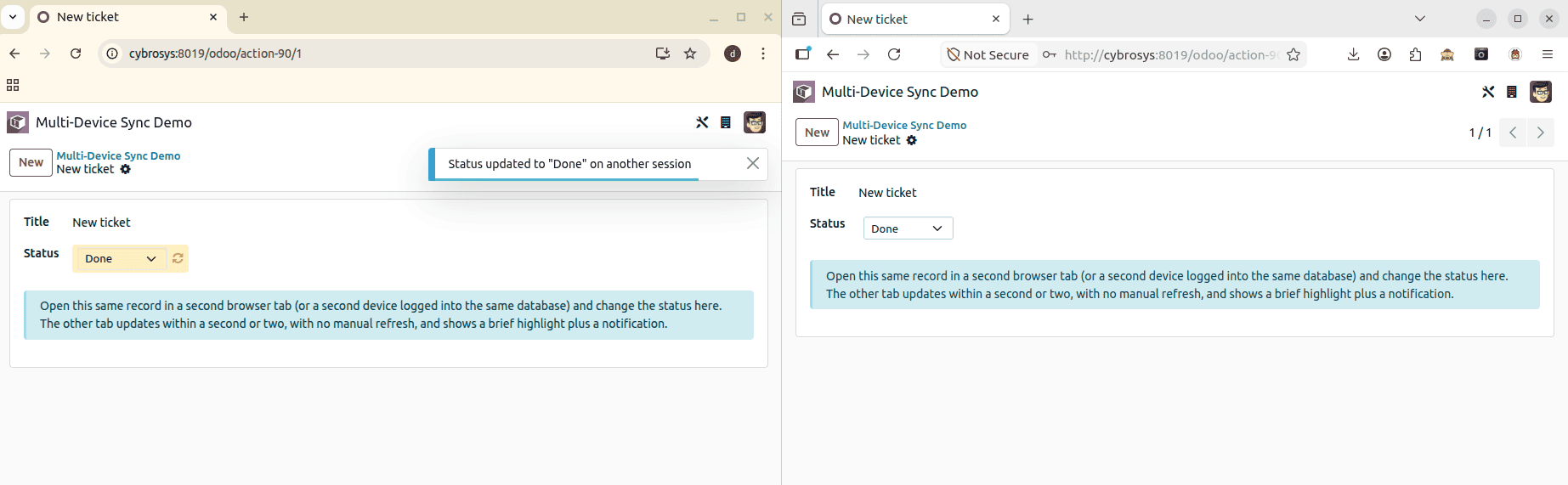
No single part can maintain consistency between two open tabs, but a combination of a channel at the server end and a listener at the client side can, and bus.bus and bus_service do just that. This is just one example of that, but the pattern of broadcast on write, subscription per record, and falling back to polling when the push does not go through is applicable to any UI element that must remain consistent across multiple devices, rather than simply showing the status at the time of the last load.
To read more about How to Use the Session Storage in Odoo 19, refer to our blog How to Use the Session Storage in Odoo 19.