Inheritance is a key mechanism in modular development that enables
customization and extension of existing components without altering
the original source code. It allows developers to build on top of
standard functionality, whether in models, views, or other elements,
ensuring clean, maintainable, and upgrade-safe customizations.
There are mainly two types of inheritance used in Odoo:
- Model Inheritance (including Classical, Prototype, and
Delegation)
- View Inheritance
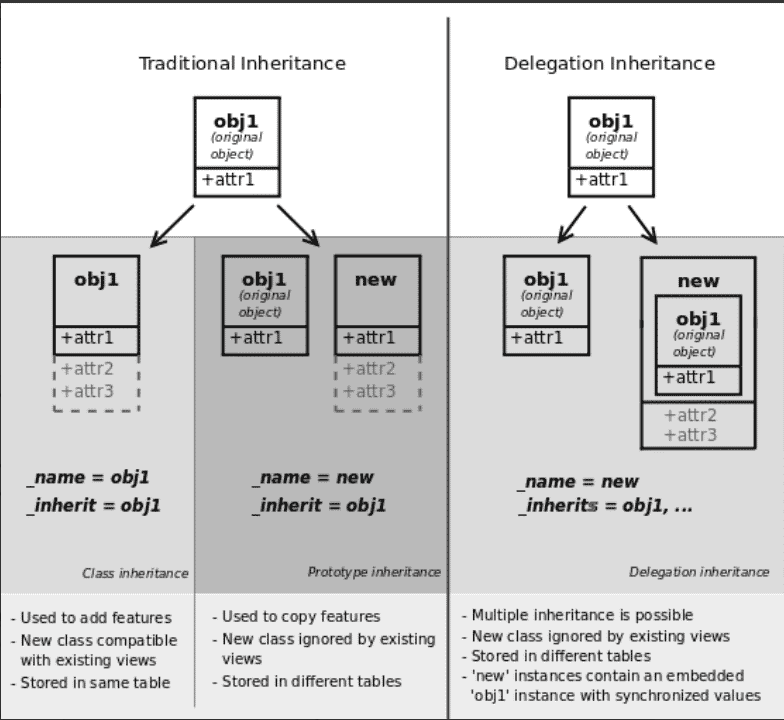
Classical Inheritance
Classical inheritance is used to create a new model that inherits all
fields and behavior from a base model, while also allowing
additional fields or method overrides.
from odoo import models, fields

class ParentModel(models.Model):
    _name = 'parent.model'

    name = fields.Char(string="Name")


class ChildModel(models.Model):
    _name = 'child.model'
    _inherit = 'parent.model'

    date = fields.Date(string="Date")
- ChildModel now includes both the name and date fields.
- You can override or extend existing methods from the parent
model.
- This creates a new database table for child.model.
Prototype Inheritance
Prototype inheritance is a technique that allows developers to
enhance an existing model by adding new fields or methods to
it—without creating a new model or database table. This approach
essentially reuses and extends an existing model’s structure, a
process commonly referred to as prototyping.
In this type of inheritance, only the _inherit attribute is required.
By omitting the _name attribute, you directly modify the original
model. The system treats the extended version as the most recent
definition of the model, incorporating both its original and new
features.
from odoo import models, fields

# Parent Model
class ParentModel(models.Model):
    _name = 'parent.model'

    name = fields.Char(string="Name")


# Prototype Inheritance - Modifying the Parent Model
class InheritParentModel(models.Model):
    _inherit = 'parent.model'

    date = fields.Date(string="Date")
- The ParentModel defines the base structure with
a name field.
- The InheritParentModel adds a new field date to
the existing parent.model.
- Since no
_name is defined in the second class, it
doesn’t create a new model or table.
- The parent.model now includes both name and date fields, as if
they were part of the same original definition.
- You can also override or extend methods using this approach.
Delegation Inheritance
Delegation inheritance allows you to reuse the fields and behavior of
an existing model without subclassing. It creates a one-to-one
relation via _inherits.
from odoo import models, fields

# Parent Model
class ProductTemplate(models.Model):
    _name = "product.template"

    name = fields.Char(string="Name")


# Child Model with delegation inheritance
class ProductProduct(models.Model):
    _name = "product.product"
    _inherits = {'product.template': 'product_tmpl_id'}

    product_tmpl_id = fields.Many2one(
        'product.template',
        string='Product Template',
        required=True,
        ondelete="cascade",
        auto_join=True,
        index=True
    )
- The product.product model delegates access to
all fields from product.template via
product_tmpl_id.
- Used when two models are tightly related but still separate.
- Affects the behavior and schema differently from
_inherit.
View Inheritance
View inheritance is used to extend, modify, or reorganize existing
views like forms, kanban, tree, etc. It relies on the inherit_id
field in XML and uses XPath expressions.
    product.view.form.inherit.custom.module
    product.template
- inherit_id links this view to the original one.
- XPath selects elements in the base view using
expr, then you can insert or modify elements:
- position="before": insert before the node.
- position="after": insert after the node.
- position="inside": insert as a child.
- position="replace": replace the node.