Scaffolding in Odoo refers to the process of generating the basic
structure of a new module. This automated approach significantly
reduces development time by creating all the essential files and
directories required for a module. Typically, each module resides as
a subdirectory within the designated addons path.
To create a new module, begin by choosing a directory under your
custom add-ons folder — for example, /opt/odoo/custom-addons. Next,
open a terminal and navigate to the location of odoo-bin. From
there, you can run the scaffolding command to generate the module
structure.
To create a sample module structure, use the scaffold command. The
command is as follows.
./odoo-bin scaffold module_name folder_name
module_name: The module's name.
folder_name: The name of the directory within which
you want to create the module.
In Odoo, a module is typically a directory located within an addons
directory. The addons path defines where Odoo looks for these
modules. To get started, create a new module inside a custom
directory like /opt/odoo/custom-addons
To scaffold the module structure, open a terminal and navigate to the
directory where odoo-bin is located. Then run the following command
to generate the basic structure of your new module automatically:
./odoo-bin scaffold new_module custom_addons
By running the above command, a new module with some directories is
created.
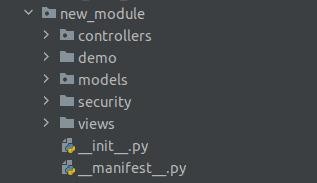
Module expanded view
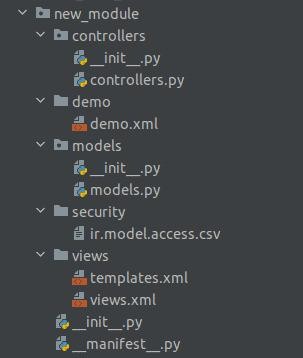
Each module requires two Python files: '__init__.py' and
'__manifest__.py'.
As illustrated in the previous image, each directory within the
module is automatically generated. You can then customize the
contents of these directories as needed to suit your module’s
functionality.
1. Models: The Python files contained within the
module.
2. Views: XML files used in the display of records.
3. Data: Consists of demo data required by the
module. It includes XML that creates and updates databases.
4. Security: Made up of access rights configuration
files.
5. __init__.py: Imports all of the module's Python
files.
6. Controllers: Used when we need to render data to
the website.