Users may occasionally need the ability to configure specific
settings. With Odoo's growing flexibility, it's now easier to
customize configurations. In this section, we'll explore how to add
a custom setting to a custom module.
Imagine a model that manages a comprehensive student record database.
Some organizations might require an email notification each time a
new student is added, while others may not need this feature. To
accommodate this variation, we'll create a configurable setting that
allows users to enable or disable the notification feature. We'll
implement this by creating a model for student records and a module
named education_organization.
Student Model
from odoo import fields, models

class Student(models.Model):
    _name = "student.student"
    _description = "Student"

    name = fields.Char(string="Name", required=True)
    phone = fields.Char(string="Phone Number")
    email = fields.Char(string="Email", required=True)
The student model contains only the most essential fields. To
incorporate a custom settings option, we need to inherit the
res.config.settings model.
Custom Settings Model
class ResConfigSettings(models.TransientModel):
    # mail send configurator
    _inherit = 'res.config.settings'

    send_mail = fields.Boolean(
        string="Notify Student",
        default=True,
        help='Check to Send a mail to Student on "creating a Student"'
    )
Action Record
Create a new menu item labeled Settings under the Configuration menu,
and define the corresponding action for it.
<record id="res_config_settings_menu_action" model="ir.actions.act_window">
   <field name="name">Settings</field>
   <field name="type">ir.actions.act_window</field>
   <field name="res_model">res.config.settings</field>
   <field name="view_mode">form</field>
   <field name="target">inline</field>
   <field name="context">{'module': 'education_organisation'}</field>
</record>
While creating the action record, it's important to consider the
context. You must pass {'module': 'education_organization'} in the
action's context to ensure the settings are correctly associated
with your module.
Form View for Custom Settings
<record id="res_config_settings_view_form" model="ir.ui.view">
    <field name="name">res.config.settings.view.form.inherit.organisation</field>
    <field name="model">res.config.settings</field>
    <field name="priority" eval="45"/>
    <field name="inherit_id" ref="base.res_config_settings_view_form"/>
    <field name="arch" type="xml">
        <xpath expr="//form" position="inside">
            <div class="app_settings_block" data-string="Education Organisation"
                string="Education Organisation" data-key="education_organisation">
               <h2>Education Organisation</h2>
               <div class="row mt16 o_settings_container">
                   <div class="col-xs-12 col-md-6 o_setting_box">
                       <div class="o_setting_left_pane">
                           <field name="send_mail"/>
                       </div>
                       <div class="o_setting_right_pane">
                           <label for="send_mail"/>
                            <div class="text-muted">
                               Check to Send a mail to Student on creating
                               a Student
                            </div>
                        </div>
                    </div>
                </div>
            </div>
        </xpath>
    </field>
</record>
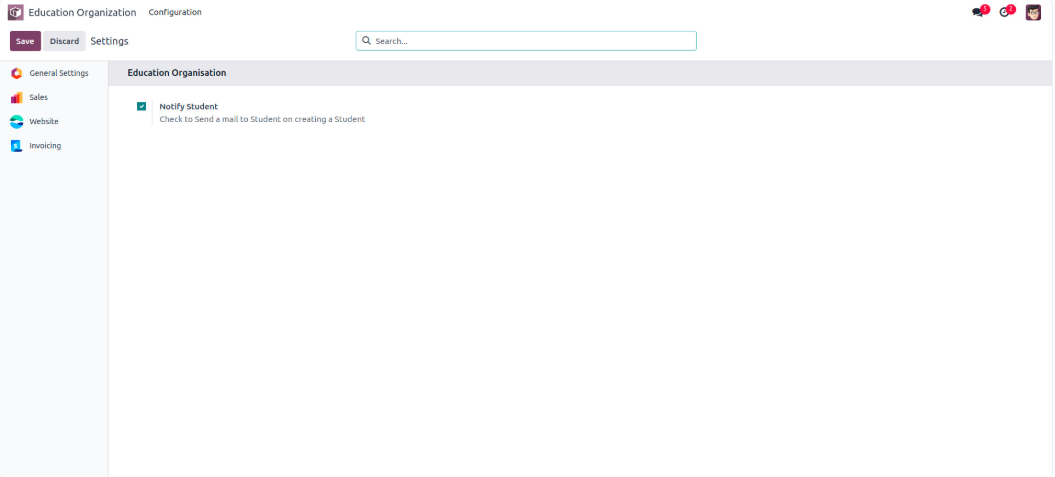
Custom setting looks like:
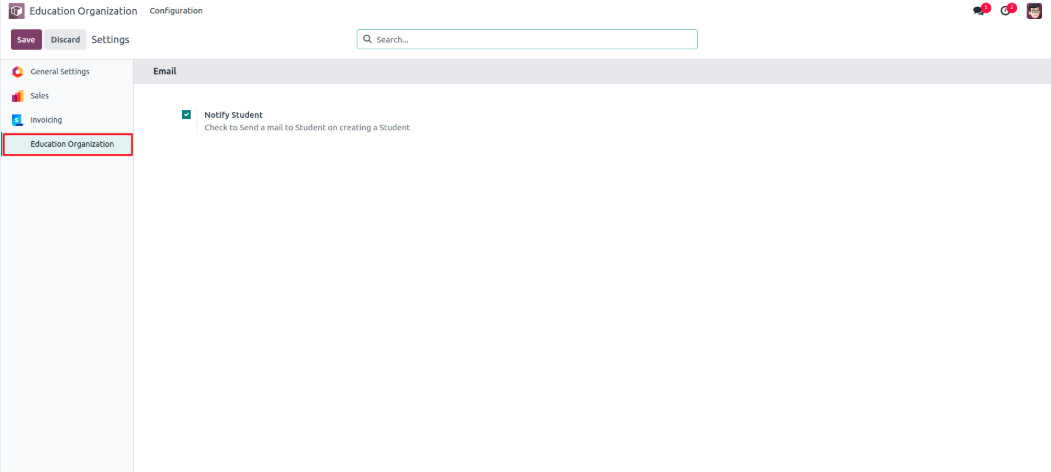
We can also add the custom settings to appear under the module's web
icon using the app tag in the view.
<record id="res_config_settings_view_form" model="ir.ui.view">
    <field name="name">res.config.settings.view.form.inherit.organisation</field>
    <field name="model">res.config.settings</field>
    <field name="priority" eval="45"/>
    <field name="inherit_id" ref="base.res_config_settings_view_form"/>
    <field name="arch" type="xml">
        <xpath expr="//form" position="inside">
            <app data-string="Education Organization"
                id="EducationOrganization" string="Education Organization"
                name="visa_application">
                <block title="Email" id="education_org">
                       <div class="row mt16 o_settings_container">
                           <div class="col-xs-12 col-md-6 o_setting_box">
                               <div class="o_setting_left_pane">
                                   <field name="send_mail"/>
                               </div>
                               <div class="o_setting_right_pane">
                                   <label for="send_mail"/>
                                   <div class="text-muted">
                                       Check to Send a mail to Student on
                                       creating a Student
                                   </div>
                               </div>
                           </div>
                       </div>
                </block>
            </app>
        </xpath>
    </field>
</record>
Remember that the res.config.settings model is a transient model,
meaning its data is not stored permanently in the database.
Therefore, we need to define additional functions to save and
retrieve the data for the view.