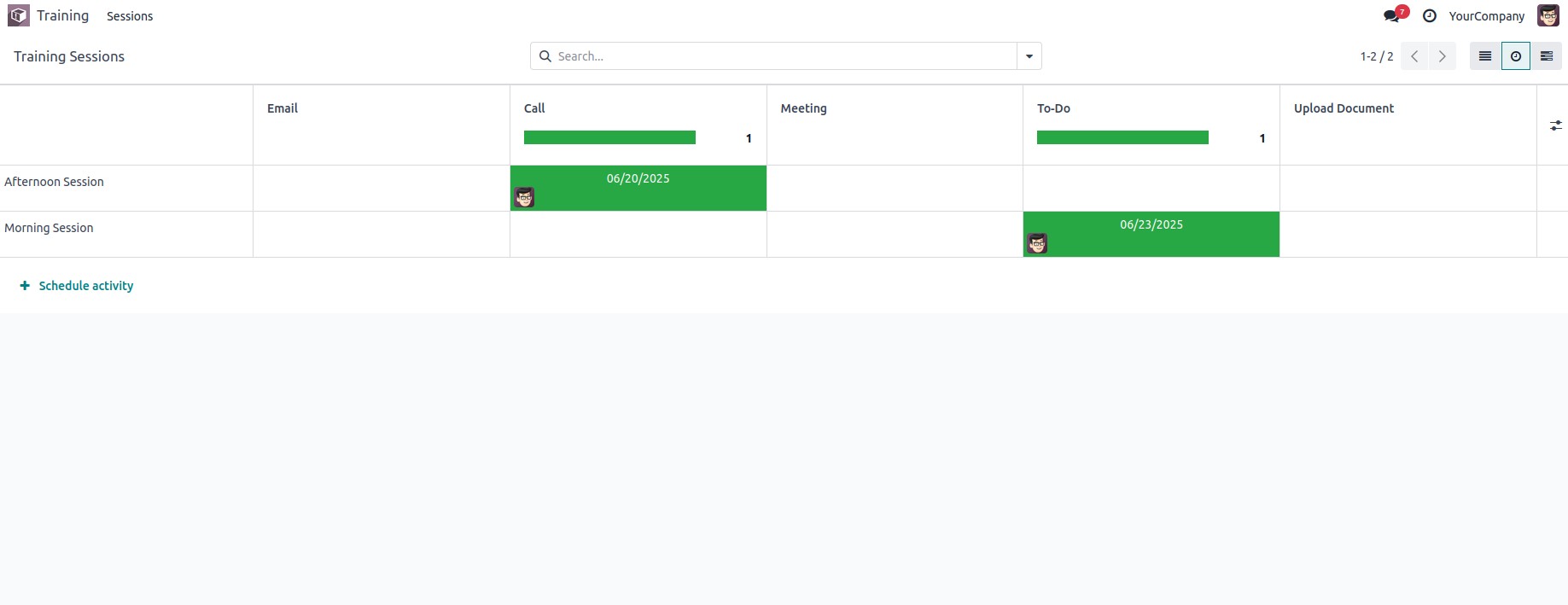
The activity view in Odoo is a valuable feature that helps users
manage business operations effectively. It displays information
related to scheduled activities for specific records, making it
easier for users to track and follow up on tasks.
To enable this feature, you first need to add 'mail' to the depends
list in your module’s manifest file.
Next, inherit the mail.thread and mail.activity.mixin models in your
custom model to activate activity tracking.
Here’s an example model:
Let’s look at an example:
                       from odoo import models, fields

class TrainingSession(models.Model):
    _name = "training.session"
    _inherit = ['mail.thread', 'mail.activity.mixin']
    _rec_name = 'title'

    title = fields.Char(string="Session Title", required=True, tracking=True)
    trainer_id = fields.Many2one('res.partner', string="Trainer", help="Trainer in charge")
    participant_ids = fields.Many2many('res.partner', string="Participants")
    date_start = fields.Datetime(string="Start Date", default=lambda self: fields.Datetime.now())
    date_end = fields.Datetime(string="End Date")
    location = fields.Char(string="Location")
After creating the model, we can proceed to add the menu and define
the corresponding action for it.
<record id="action_training_session" model="ir.actions.act_window">
    <field name="name">Training Sessions</field>
    <field name="type">ir.actions.act_window</field>
    <field name="res_model">training.session</field>
    <field name="view_mode">tree,form,activity,gantt</field>
    <field name="help" type="html">
        <p class="o_view_nocontent_smiling_face">
            Schedule a new training session!
        </p>
    </field>
</record>
<menuitem id="menu_training_root"
          name="Training"
          sequence="10"/>

<menuitem id="menu_training_session"
          name="Sessions"
          parent="menu_training_root"
          action="action_training_session"
          sequence="20"/>
Now, we can configure the model to include a Gantt view.
<record id="view_training_session_activity" model="ir.ui.view">
    <field name="name">training.session.activity</field>
    <field name="model">training.session</field>
    <field name="arch" type="xml">
        <activity string="Training Activities">
            <templates>
                <div t-name="activity-box">
                    <div>
                        <field name="title"/>
                        <field name="trainer_id"/>
                        <field name="date_start"/>
                        <field name="location"/>
                    </div>
                </div>
            </templates>
        </activity>
    </field>
</record>
The view looks like: