Search Engine Optimization (SEO) refers to the practice of enhancing
your website’s structure and content to improve its visibility and
ranking in search engines like Google. Strong SEO is essential for
driving more visitors to your company’s website.
Odoo 18 provides built-in tools to help you manage SEO effectively
through its Website module. These tools are accessible via the
settings menu and are integrated into various website templates. For
example, product pages in an online store are often generated using
a shared template with unique product data — each of these pages may
require individual SEO configurations to perform well in search
results.
To further enhance your SEO setup, Odoo allows you to connect with
Google Analytics and Google Search Console through the SEO tab. Once
configured, you can access the SEO optimization features from the
Site > Optimize SEO menu. This opens a dialog box where you can
adjust SEO metadata for specific pages, as illustrated in the
example screen.
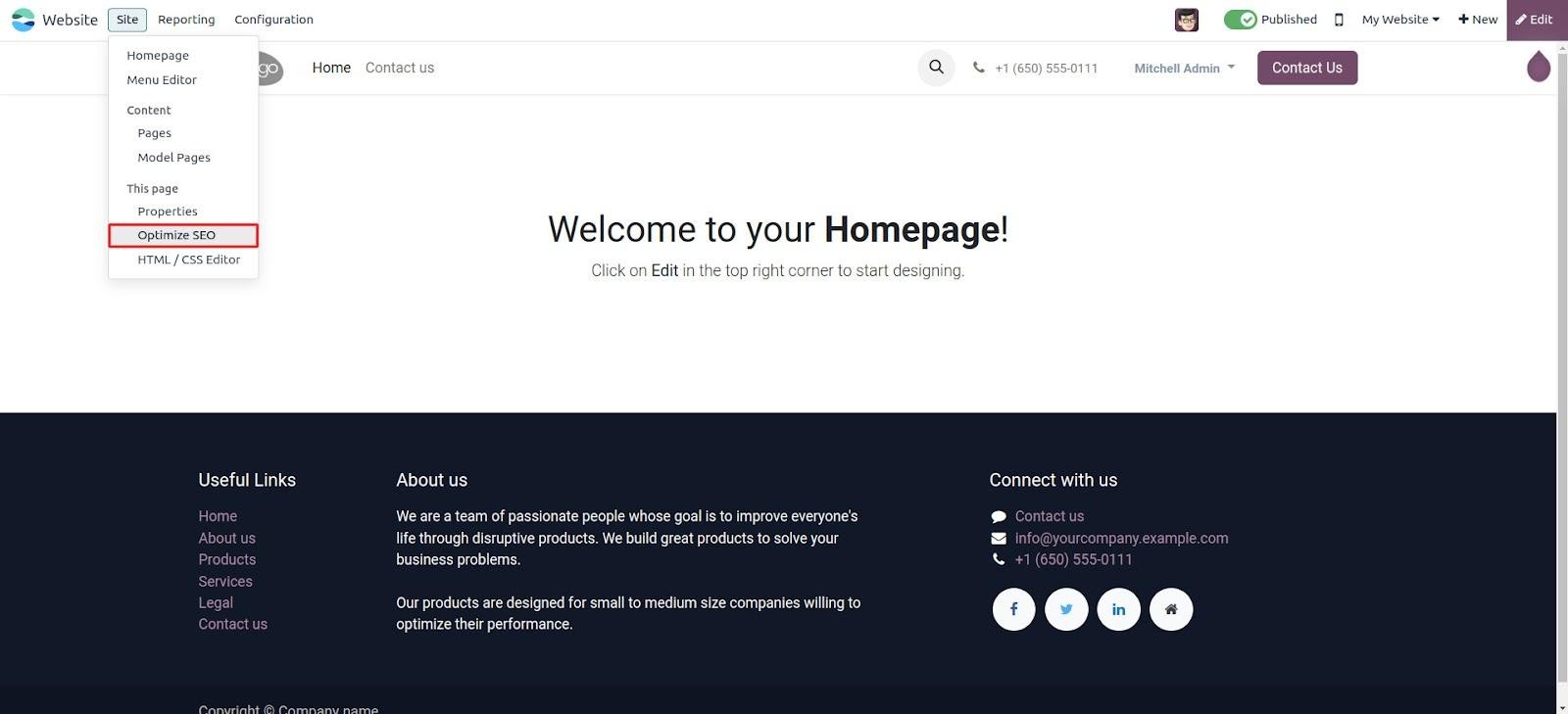
To begin optimizing your content, click on the Optimize SEO option.
Here, you can enter the page title and meta description, which are
used by search engines to better understand and rank your page.
Next, add relevant keywords — these are search terms you want to
associate with your website. You also have the option to upload an
image that will appear when your page is shared on social media
platforms.
If you want to enable SEO features for each individual record of a
custom model, you need to inherit the website.seo.metadata mixin in
your model definition. This will automatically add SEO-related
fields and functionality, allowing you to manage SEO settings for
each record independently. These enhancements ensure your content is
optimized both for search engines and social sharing.
                         class YourModule(models.Model):
    _name = your.model
    _inherit = ['website.seo.metadata']

    name = fields.Char(string="Name", required=True)
    date = fields.Date(string="Date")
The fields and methods provided by the website.seo.metadata mixin can
be found in the website.py file located at /addons/website/models/.
This mixin is responsible for handling all SEO-related functionality
in Odoo.
In the template website.layout, SEO metadata is dynamically loaded
using the main_object variable. When rendering a page, if you pass a
specific record through main_object, the layout uses that record’s
SEO details—such as title, description, and keywords.
However, if no main_object is passed from the controller, the system
defaults to using the template’s recordset. As a result, the same
SEO metadata may appear across multiple records or pages. To ensure
each record has unique SEO data, it’s important to explicitly pass
the correct object via main_object in your controller.
    http.route('/url/', type='http', auth="user", website=True)
def your_demo_function(self, record):
    return request.render(
        your_model.your_template, {
            record: record,
            'main_object': record
        })
Odoo allows you to define custom meta tags specifically for Twitter
Cards and Open Graph (used by platforms like Facebook) to enhance
social media sharing. Once you've integrated the
website.seo.metadata mixin into your model, you can extend the
functionality by overriding the _default_website_meta() method.
By customizing this method, you can inject additional meta tags
tailored to your needs—such as unique titles, images, or
descriptions for better visibility and presentation when your
content is shared on social platforms.
        def _default_website_meta(self):
    res = super(YourModel, self)._default_website_meta()
    res['default_opengraph']['og:image'] = self.env['website'].image_url(self, 'image')
    res['default_twitter']['twitter:image'] = self.env['website'].image_url(self, 'image')
    return res
Once a record's URL is shared on social media platforms, the
designated cover image will appear in the preview. To enable this,
ensure the module is updated and the SEO settings are configured to
reference the correct record pages.
Using the "Optimize SEO" feature, you can customize SEO details for
each individual record. This allows you to define separate
metadata—such as titles, descriptions, keywords, and images—ensuring
better visibility and tailored presentation for every record across
search engines and social platforms.
Visitor Information
Website visitor data refers to the details collected about
individuals who browse the site. This information is stored on the
backend of the website.
To access this data in Odoo 18, go to Website → Visitors.
A kanban view will be presented, showcasing each visitor along with
key information such as their name, current status, number of
visits, and whether they are active or inactive, among other
insights.
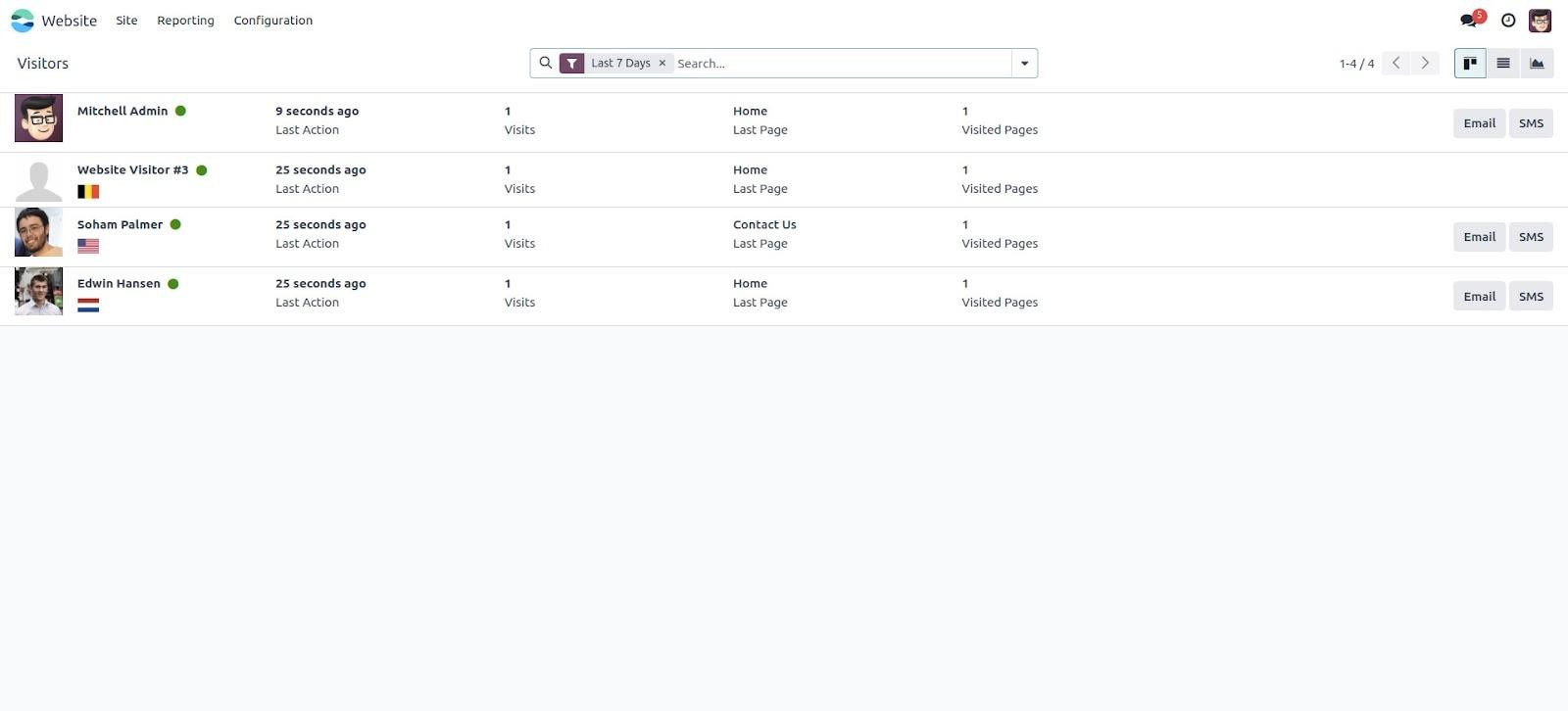
Based on your requirements, you can switch between List view and
Graph view using the toggle icons at the top-right corner of the
interface. Odoo’s filter and group by functionalities allow you to
efficiently organize and analyze website visitor data.
If a visitor’s contact details are available in your database, you
can conveniently reach out to them via email or SMS directly from
the system.
To access more detailed information, simply click on a visitor record
to open it.
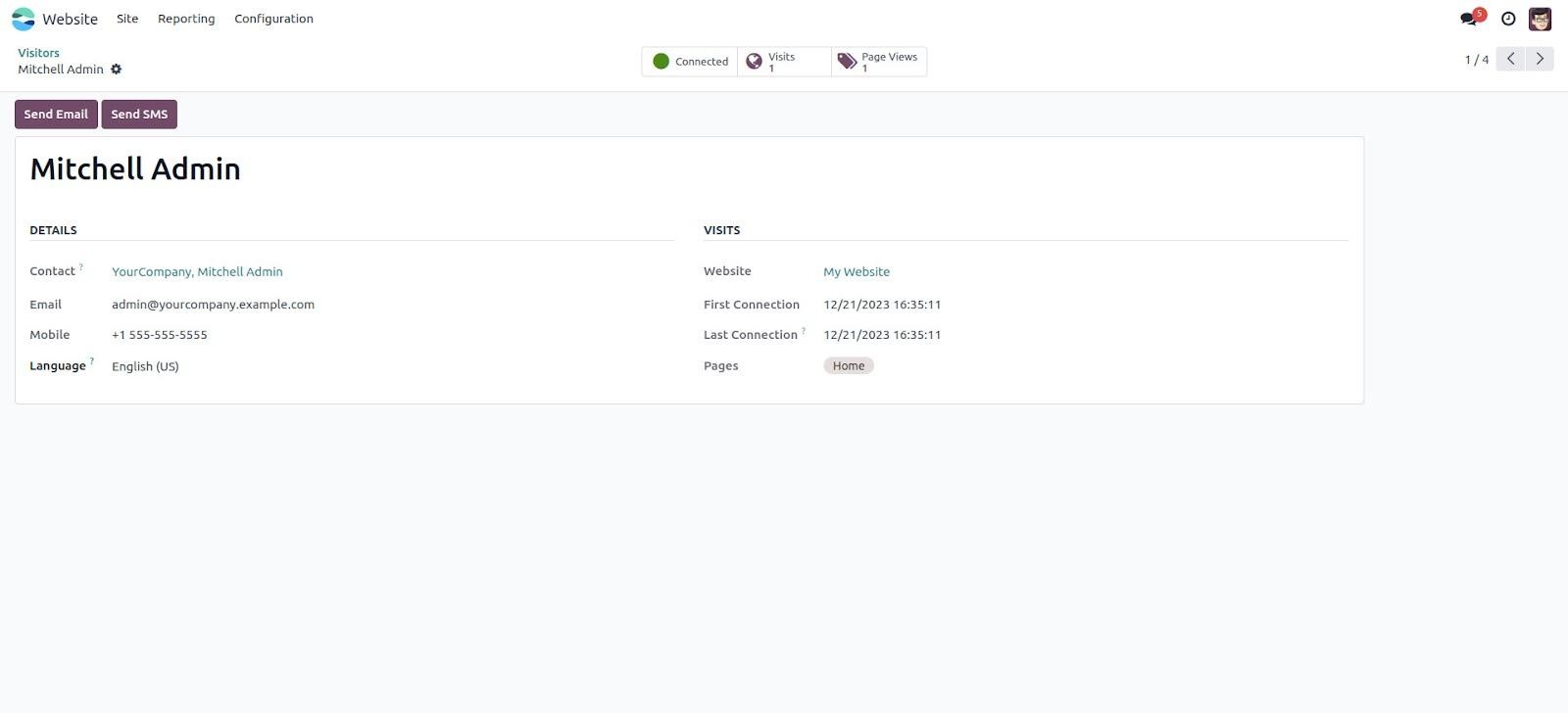
Within the visitor details, you can view both the visitor’s personal
information and their website activity. The visitor form provides
essential details such as the linked partner, email address,
preferred language, phone number, and more.
Under the Visits tab, you can track various aspects of their
interaction with the website, including the first and last
connection dates, pages visited, and products viewed.
Furthermore, the system also provides insights such as the number of
visits per page, product view counts, and whether the visitor is
currently online.