In Odoo 19, the Chatter feature continues to be a powerful tool for collaboration and record management. With Chatter, users can log internal notes, communicate with team members or customers, share documents, and monitor record changes in real-time. This makes workflows more transparent and boosts productivity across teams.
By default, Chatter is usually displayed in the form view of a model, and its position is controlled by the position attribute—allowing it to appear either at the bottom or on the right side of the view.
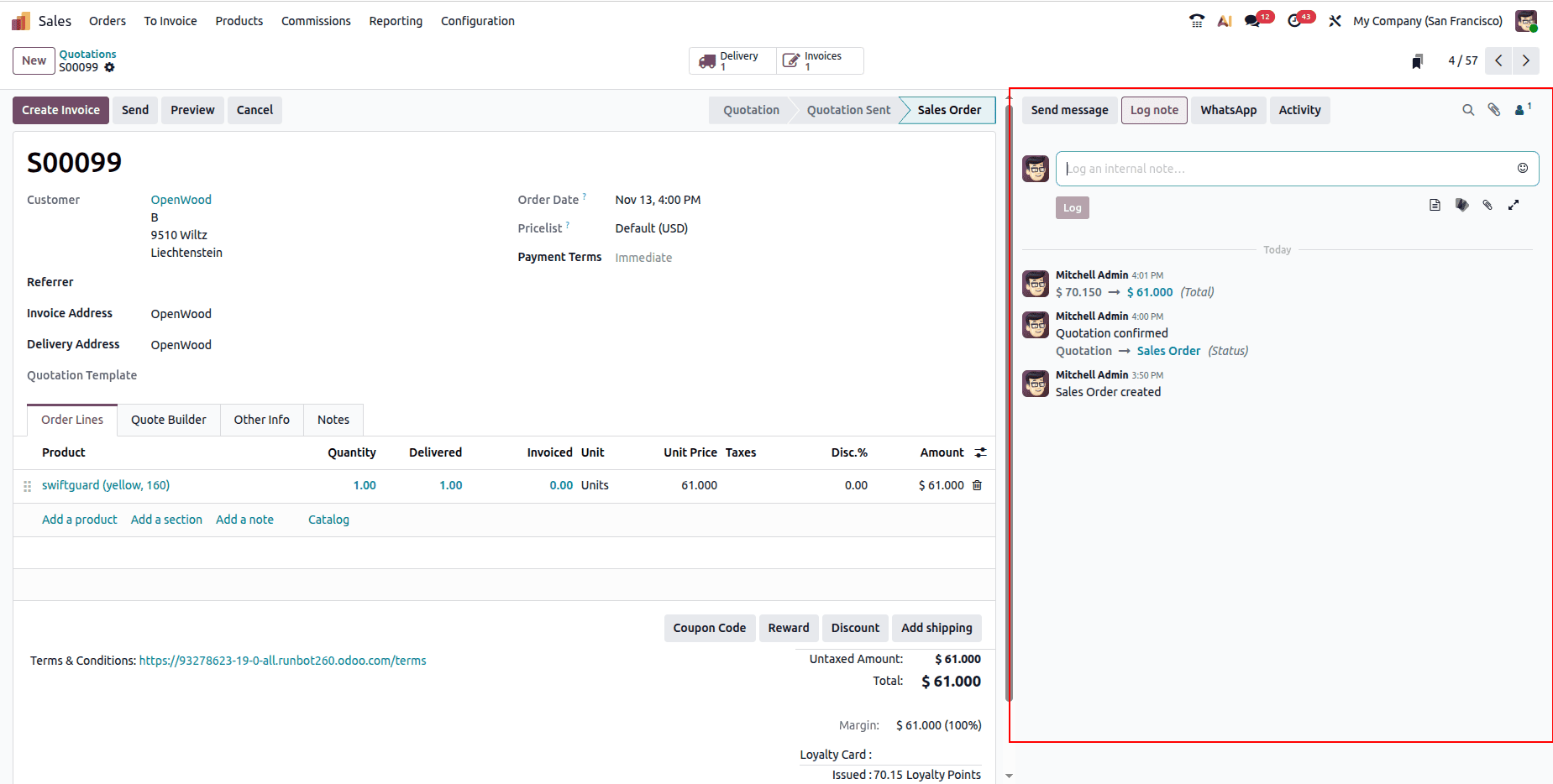
In this blog, we’ll explore how to integrate Chatter into a custom model in Odoo 19 and how to enable tracking of changes and scheduling of activities through Chatter.
Step 1: Update the Model
To enable Chatter, the first requirement is to inherit the mail.thread model. This ensures that our custom model can store messages, notes, and tracked field changes. Additionally, if we want to schedule activities (like calls, follow-ups, or reminders), we also inherit mail.activity.mixin.
Here’s an example of a custom model with Chatter integration:
# -*- coding: utf-8 -*-
from odoo import api, fields, models
class EmployeeLevel(models.Model):
   _name = "employee.level"
   _description = "Employee Level"
   _order = "salary desc"
   _rec_name = "level"
   _inherit = ['mail.thread', 'mail.activity.mixin']
   level = fields.Char(string="Level", tracking=True)
   salary = fields.Monetary(string="Salary", tracking=True)
   currency_id = fields.Many2one(
       "res.currency",
       string="Currency",
       required=True,
       default=lambda self: self.env.user.currency_id
   )
   date = fields.Date(
       string="Date",
       default=fields.Date.today,
       help="Date of record creation"
   )
   team_head_id = fields.Many2one(
       'res.users',
       string='Team Leader',
       tracking=True,
       help="Head of the team"
   )
Note: Don’t forget to add "mail" in the depends list of your module’s __manifest__.py.
Step 2: Modify the Form View
After enabling the Chatter backend, the next step is to add it to the XML form view using the <chatter/> tag.
Here’s how a form view looks after adding Chatter:
<?xml version="1.0" encoding="utf-8"?>
<odoo>
  <record id="employee_level_view_form" model="ir.ui.view">
      <field name="name">employee.level.view.form</field>
      <field name="model">employee.level</field>
      <field name="arch" type="xml">
          <form>
              <sheet>
                  <group>
                      <group>
                          <field name="level"/>
                          <field name="salary"/>
                      </group>
                      <group>
                          <field name="date"/>
                          <field name="team_head_id"/>
                      </group>
                  </group>
              </sheet>
              <chatter/>
          </form>
      </field>
  </record>
</odoo>
When you upgrade the module, the Chatter panel will appear in your form view.
Step 3: Track Changes
One of Chatter’s most useful features is field tracking. When fields are updated, the changes are automatically logged in the Chatter panel. This ensures that every action is visible to the team.
For example:
team_head_id = fields.Many2one(
   'res.users',
   string='Team Leader',
   tracking=True,
   help="Head of the team"
)
Now, whenever the Team Leader changes, Chatter will log the update automatically.
Step 4: Manage Activities
By inheriting mail.activity.mixin, your model will include an Activities button within Chatter. This allows users to:
- Schedule follow-up calls or meetings
- Set reminders and deadlines
- Mark activities as completed
- Reassign tasks to other users
This feature keeps communication structured and ensures no task is overlooked.
Benefits of Adding Chatter in Odoo 19
- Improved Collaboration: Team members and managers can discuss records directly within the form view.
- Full History Tracking: Every update, comment, and activity is stored for better traceability.
- Centralized Communication: Attachments, notes, and messages remain linked to the relevant record.
- Increased Productivity: Activities and notifications help teams stay on top of deadlines.
Conclusion
Adding Chatter to form views in Odoo 19 is simple yet highly effective for improving collaboration and record traceability. With a few model and XML updates, you can enable seamless communication, track changes, and schedule activities, all directly within your business workflows.
Just like in earlier versions, Chatter remains one of the most practical features of Odoo, making it easier for teams to stay connected and aligned.
To read more about How to Add Chatter to Form View in Odoo 18, refer to our blog How to Add Chatter to Form View in Odoo 18.