As a business grows, the amount of data it creates also increases. Customer details, leads, products, and partner records are entered regularly—often by different people and through different channels. Because of this, mistakes are bound to happen. Over time, businesses may face duplicate records, inconsistent formats, or outdated information. What may seem like a small issue in the beginning can slowly affect daily operations and lead to poor decision-making.
The Data Cleaning module in Odoo 18 is designed to solve these problems. This helps in making your database correct, relevant, and well-organized without any dependence on a manual procedure, wasting many hours on this process.
What Is the Data Cleaning Module?
Odoo 18 Enterprise includes the Data Cleaning module, which helps businesses find, review, and manage duplicate or outdated records across the system. It works with key data such as CRM leads, contacts, customers, vendors, and products, ensuring that information remains reliable and consistent.
Instead of making automatic changes, the module highlights possible issues and allows users to decide what action to take. This ensures better accuracy while keeping full control over every update.
Key Features of the Data Cleaning Module
Duplicate Detection
Odoo 18 identifies possible duplicate records using flexible matching rules. Records can be compared using email addresses, phone numbers, or similar names. Matching levels can be adjusted based on business needs, helping maintain the right balance between accuracy and coverage.
Smart Merge Suggestions
When duplicates are found, Odoo suggests smart merge options. Records are shown side by side so users can easily compare them and choose which values to keep—without losing related documents or past activity.
Field Cleaning Rules
The module also helps standardize data. It can fix capitalization, remove extra spaces, format phone numbers correctly, and maintain consistency across records.
Scheduled Cleaning
To keep data clean over time, cleaning rules can be scheduled. Odoo 18 allows businesses to run checks automatically at regular intervals, reducing the need for repeated manual work.
Custom Cleaning Logic
Businesses with specific needs can create custom rules to match their data structure or industry standards, making the module flexible and suitable for complex requirements.
Why Clean Data Matters
Clean and accurate data benefits the entire organization:
- Sales Efficiency: Sales teams work with one clear customer record, avoiding duplicate leads and missed follow-ups.
- Marketing Accuracy: Campaigns reach the correct audience with valid contact details, improving engagement.
- Operational Reliability: Reports and KPIs reflect true business performance without errors caused by duplicate data.
- Improved Productivity: Employees spend less time fixing data and more time on important tasks.
How the Data Cleaning Process Works in Odoo 18
In Odoo 18, data cleaning follows a clear, rule-based process using the Recycle Records feature. After installing the module, users can access the Recycle Records dashboard, which shows all processed records in one place. Filters and search options help users review data easily.
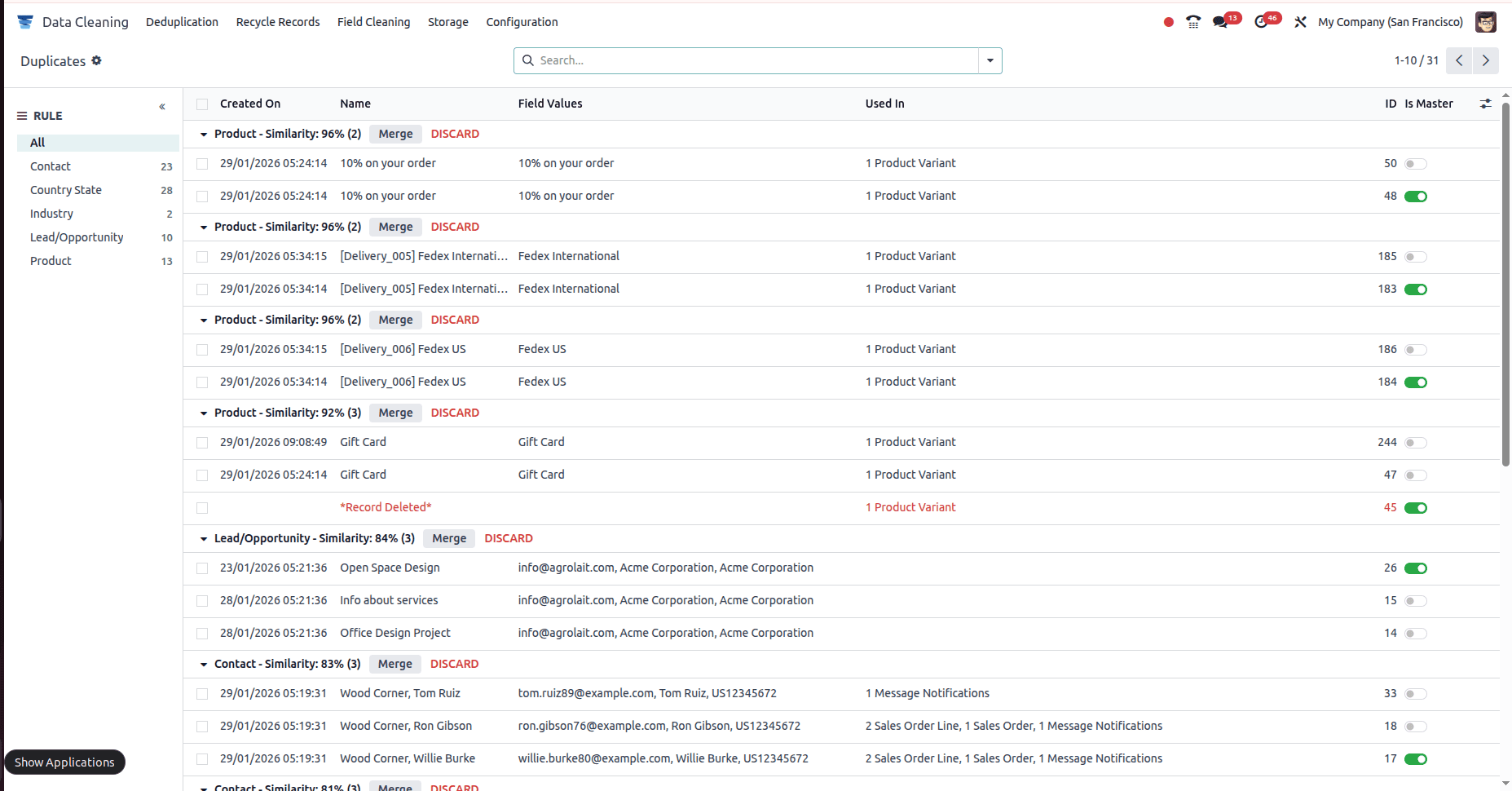
Cleaning rules are created in the Configuration section. These rules define which application and model to target and set conditions for recycling records. Users can apply simple filters or advanced logic for better accuracy.
Odoo 18 supports both manual and automatic recycling. Manual mode lets users review and apply actions when needed, while automatic rules run continuously and act when conditions are met. Records can be archived for future reference or deleted permanently, depending on the rule.
All actions are logged for transparency. Users can review results, undo actions if needed, and access archived records for audits or recovery. Notifications can also be enabled to keep teams informed.
This process ensures data remains clean while avoiding accidental data loss.
The Data Cleaning module in Odoo 18 is more than just a maintenance tool. It improves productivity, ensures reliable data, and supports better decision-making. With smart detection, flexible rules, and safe automation, businesses can focus less on fixing data issues and more on growth.
To read more about How to Handle Duplicate Data with Odoo 18’s Data Cleaning Module, refer to our blog How to Handle Duplicate Data with Odoo 18’s Data Cleaning Module.