Across industries such as retail, manufacturing, logistics, and services, organizations are increasingly adopting digital signature solutions to simplify document approvals and enhance customer interactions. Electronic signatures have become a critical component of modern business operations, enabling companies to sign sales orders, customer onboarding documents, vendor contracts, rental agreements, and delivery confirmations without relying on physical paperwork. By eliminating manual documentation, businesses can significantly reduce processing time, minimize errors, and improve overall operational efficiency.
Digital signature platforms also support mobility and flexibility, allowing stakeholders to sign documents from any location using desktops, tablets, or mobile devices. This anytime-anywhere accessibility accelerates decision-making and enables faster transaction closures, which is especially valuable for businesses operating with remote teams or global customers. In addition to efficiency, digital signatures improve traceability and compliance by creating a secure, auditable record of approvals. As companies continue to shift toward paperless workflows, integrating digital signatures into core business systems is no longer optional, it is essential for staying competitive.
Odoo 19 builds on this digital transformation by offering a seamless and fully integrated digital signature feature within its Sales and Inventory modules. This integration allows businesses to manage approvals, confirmations, and validations directly within their operational workflows, without the need for third-party tools. In sales processes, digital signatures help validate quotations and sales orders online, while in inventory operations, they play a crucial role in confirming product deliveries. Together, these capabilities ensure smoother transactions, improved accountability, and enhanced customer trust.
Within the Sales module of Odoo 19, digital signatures are primarily used to confirm quotations and sales orders. When a quotation is sent to a customer, the recipient can review the document online and sign it electronically to indicate acceptance of the terms, pricing, and conditions. This electronic confirmation acts as a formal approval, enabling the sales team to proceed immediately with delivery, invoicing, or further fulfillment steps. The use of online signatures significantly reduces delays caused by manual approvals, email follow-ups, or physical document exchanges, helping businesses close deals faster and improve conversion rates.
Beyond sales approvals, digital signatures are particularly valuable for businesses that serve remote or international customers. By allowing customers to sign documents online, companies can maintain a clear and legally traceable approval process regardless of geographic location. This not only improves the customer experience but also lowers operational costs by reducing paperwork and administrative overhead. Odoo 19 ensures that all signed documents are securely stored within the system, providing an auditable trail that supports compliance and dispute resolution when needed.
The Inventory module in Odoo 19 also benefits significantly from digital signature integration, especially during the delivery confirmation process. Delivery order signatures serve as proof that goods have been successfully handed over to the customer, making them an essential part of logistics and supply chain operations. To activate this functionality, users must first enable the signature feature in the Inventory settings. This can be done by navigating to Inventory > Configuration > Settings and locating the Shipping section.
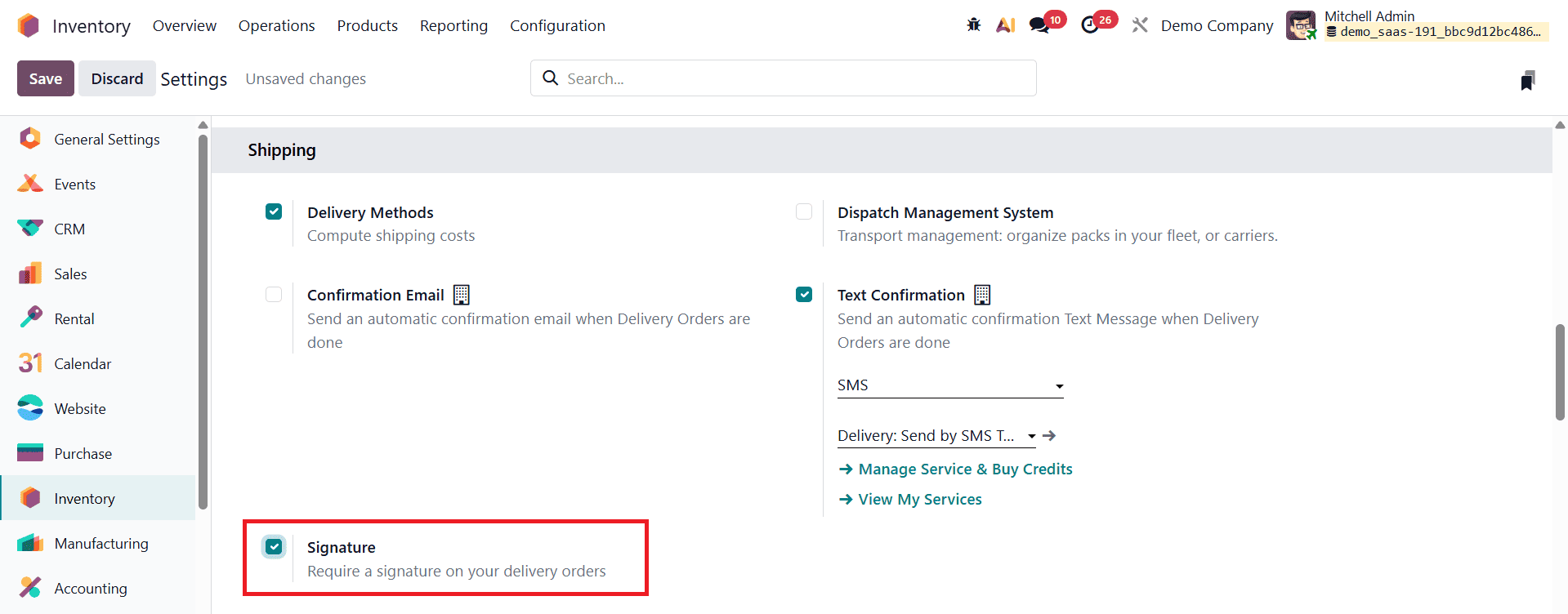
Here, enabling the Signature option activates signature collection for delivery orders across the system.
Once the signature feature is enabled, businesses can begin collecting customer signatures during delivery operations.
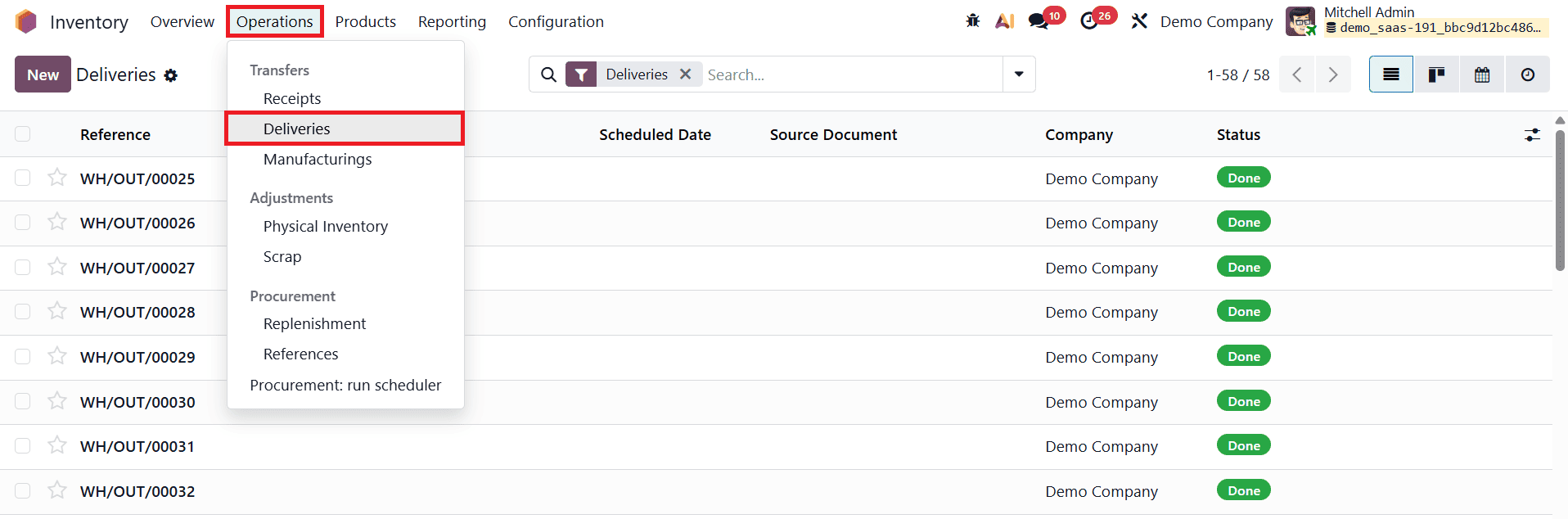
To use this feature in practice, navigate to Inventory > Operations > Delivery Orders and click New to create a delivery order. In the delivery form, users must enter the required information, including the customer or delivery address and the products being delivered. Products can be added under the Operations tab, where quantities and other relevant details are specified. This setup ensures that the delivery order accurately reflects the goods being shipped to the customer.
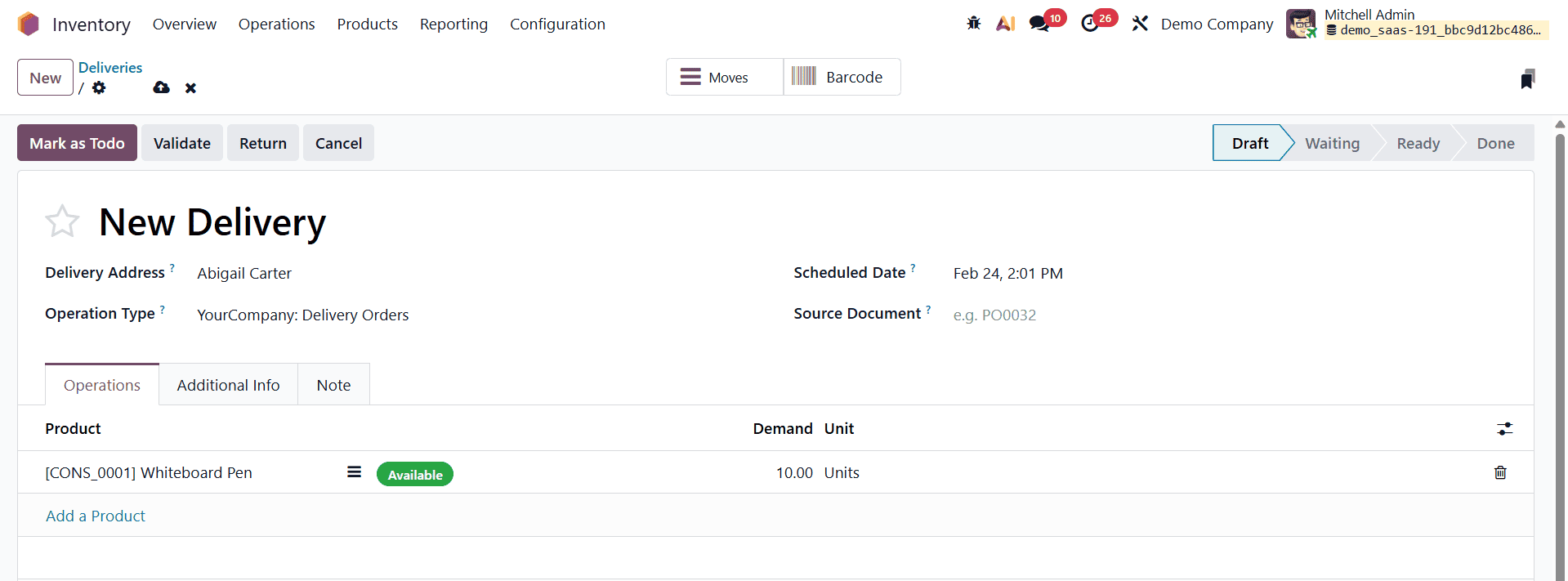
After saving the delivery order and confirming it, additional workflow action buttons become available, including Mark as To Do, Validate, and Sign. These options guide users through the delivery process step by step. When the delivery is ready to be completed, clicking the Validate button confirms the stock movement.
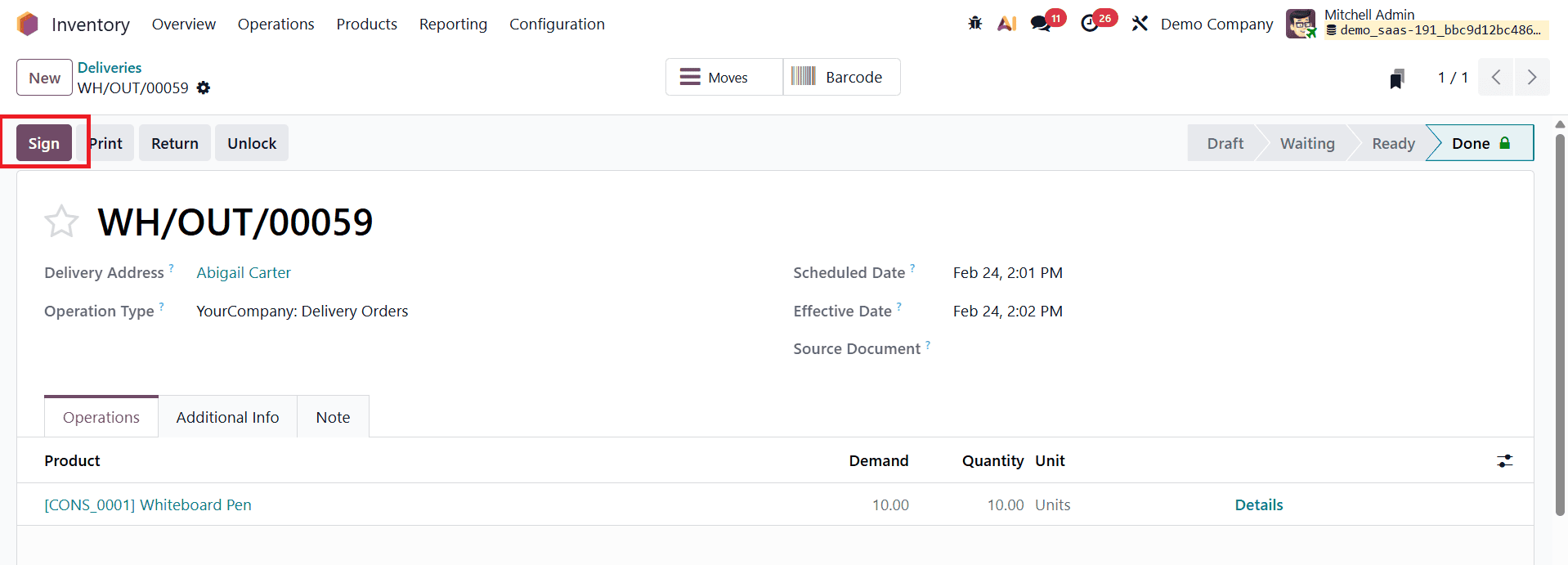
At this stage, the Sign button becomes active, allowing the user to collect the customer’s signature as proof of delivery. This seamless integration ensures that delivery confirmation is handled within the same workflow as inventory management.
Upon clicking the Sign button, Odoo 19 opens a signature pop-up window that provides multiple options for capturing the customer’s signature. These options include Draw, Auto, and Load, each designed to accommodate different delivery scenarios and customer preferences.
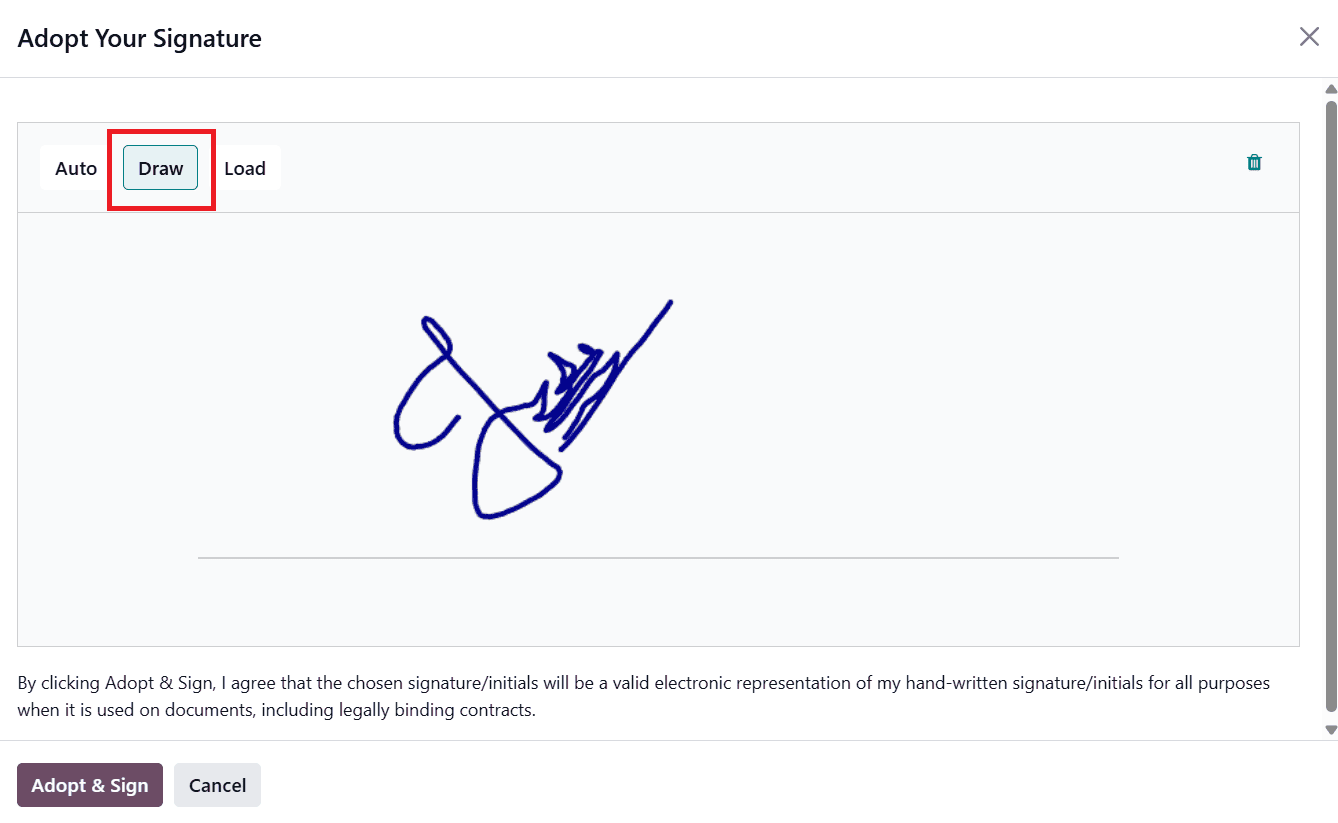
The Draw option allows the customer to manually sign the document using a mouse, stylus, or touchscreen. This method closely resembles a traditional handwritten signature and is ideal when the customer is physically present at the time of delivery.
The Auto signature option automatically generates a digital signature based on the customer’s name entered in the delivery order.
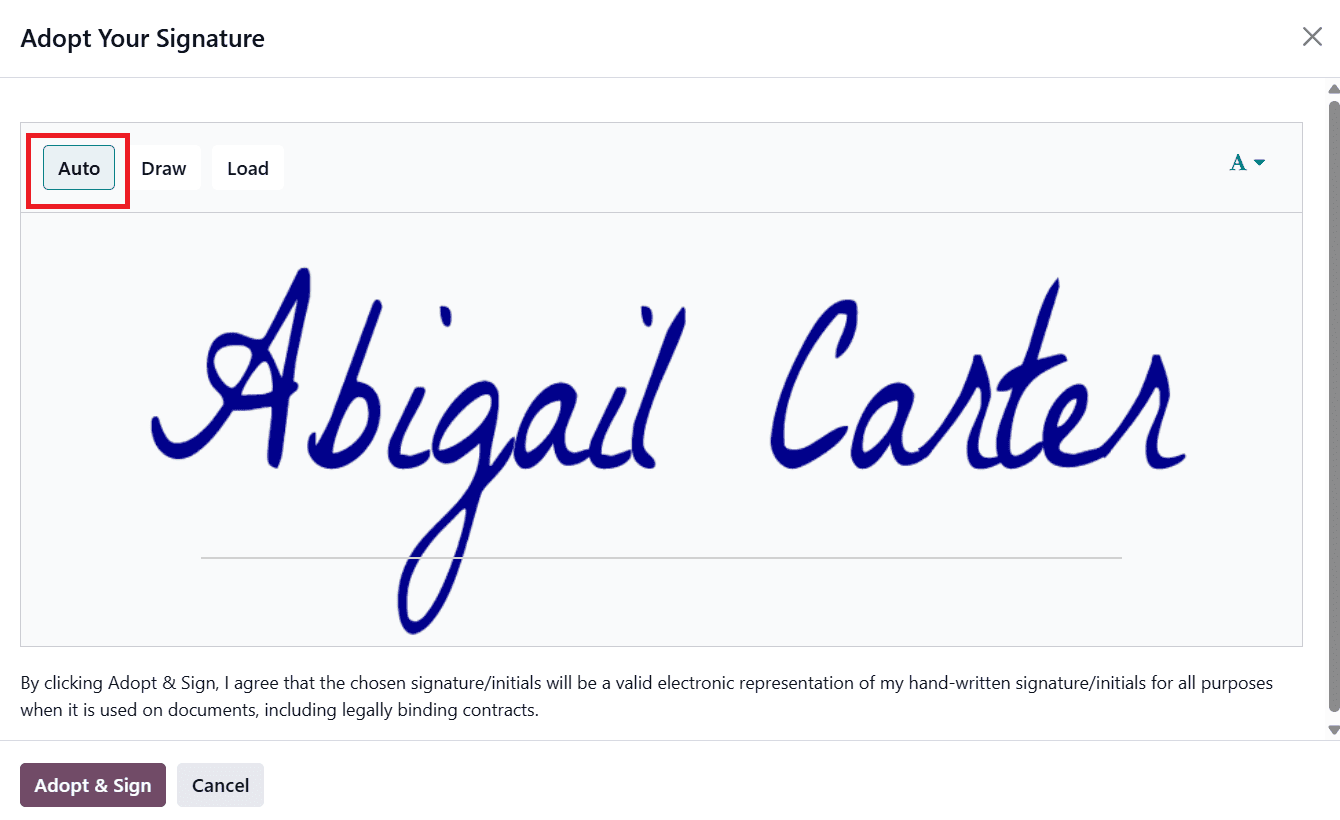
This option is particularly useful when a handwritten signature is not feasible, such as during contactless deliveries or remote confirmations. It offers a clean, professional appearance and allows deliveries to be completed quickly without compromising documentation. Meanwhile, the Load option enables users to upload a pre-existing signature file from their device, such as a scanned image or a saved digital signature.
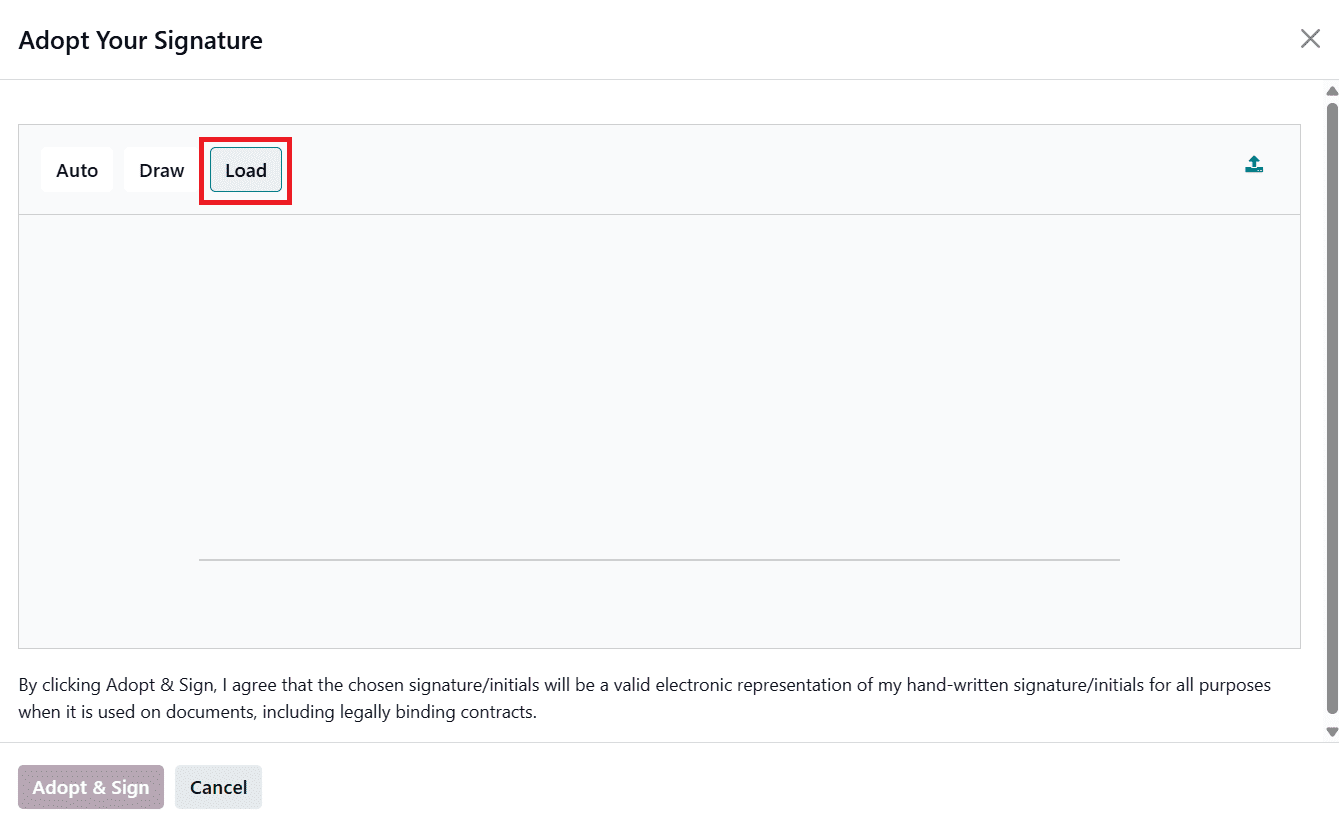
This method is especially convenient for repeat customers who prefer using a consistent, pre-approved signature across multiple transactions.
After the signature is captured using any of these methods, it can be adopted and saved directly into the delivery record. Once saved, the signature becomes a permanent part of the delivery documentation, completing the verification process. Odoo 19 also allows users to generate and print delivery-related documents after the signature has been collected.
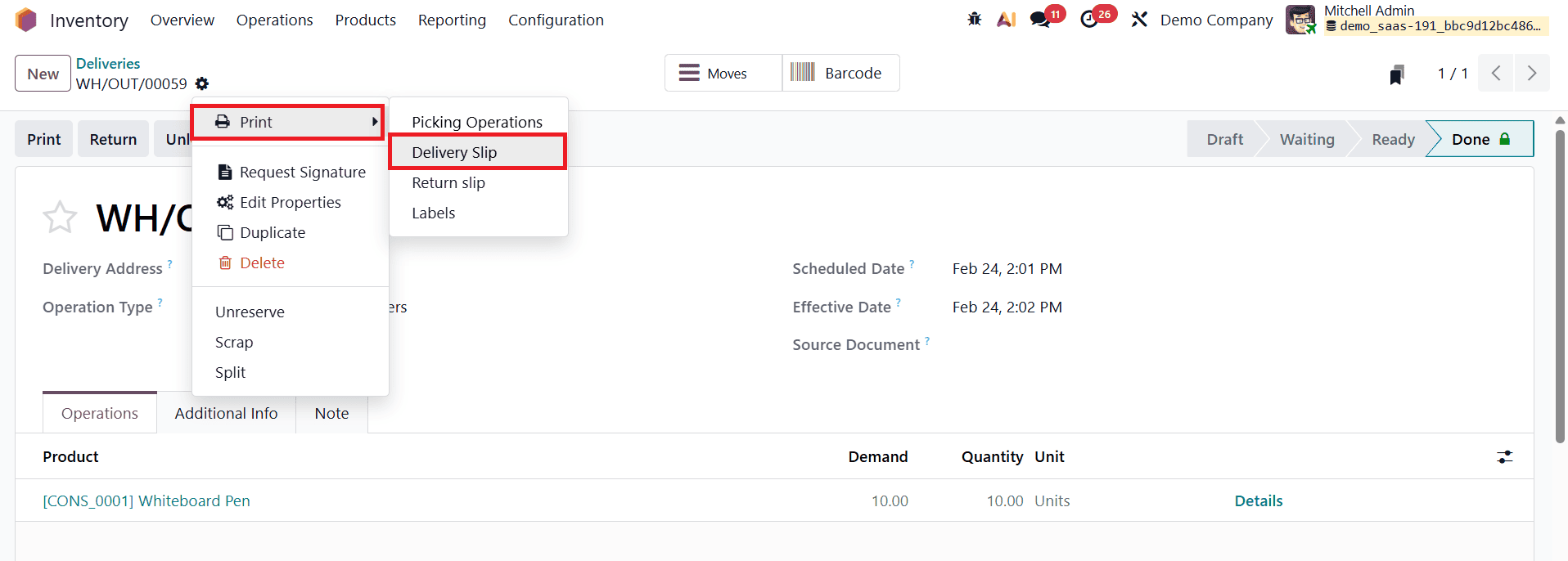
From the Action menu within the delivery order, users can select options such as Print > Delivery Slip to generate a PDF version of the delivery slip. This document includes all delivery details along with the customer’s embedded signature, providing a professional and verifiable record of the transaction.
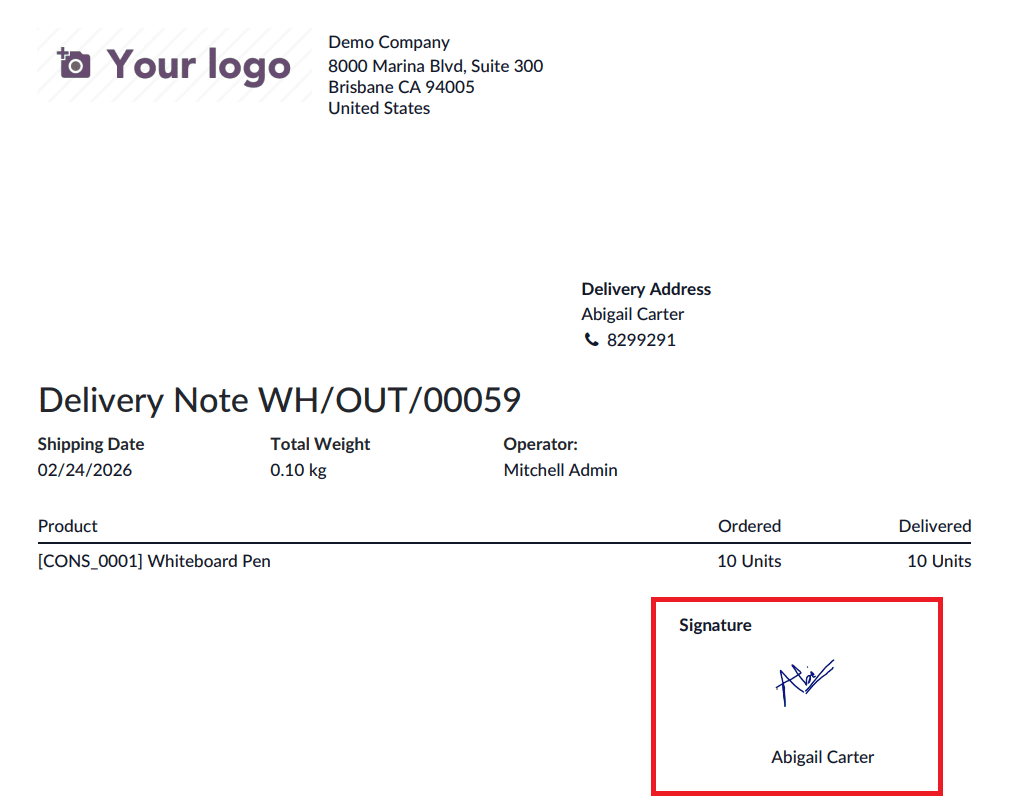
The signed delivery slip can be stored internally for audit purposes or shared with the customer as confirmation of receipt.
To request a signature for delivery orders in Odoo 19, the process is designed to be both intuitive and tightly integrated with existing business workflows. With the relevant record, such as a delivery order, sales order, or any related document, open on the screen, users can initiate the signature request by clicking the Actions icon located in the upper-left corner of the form view.
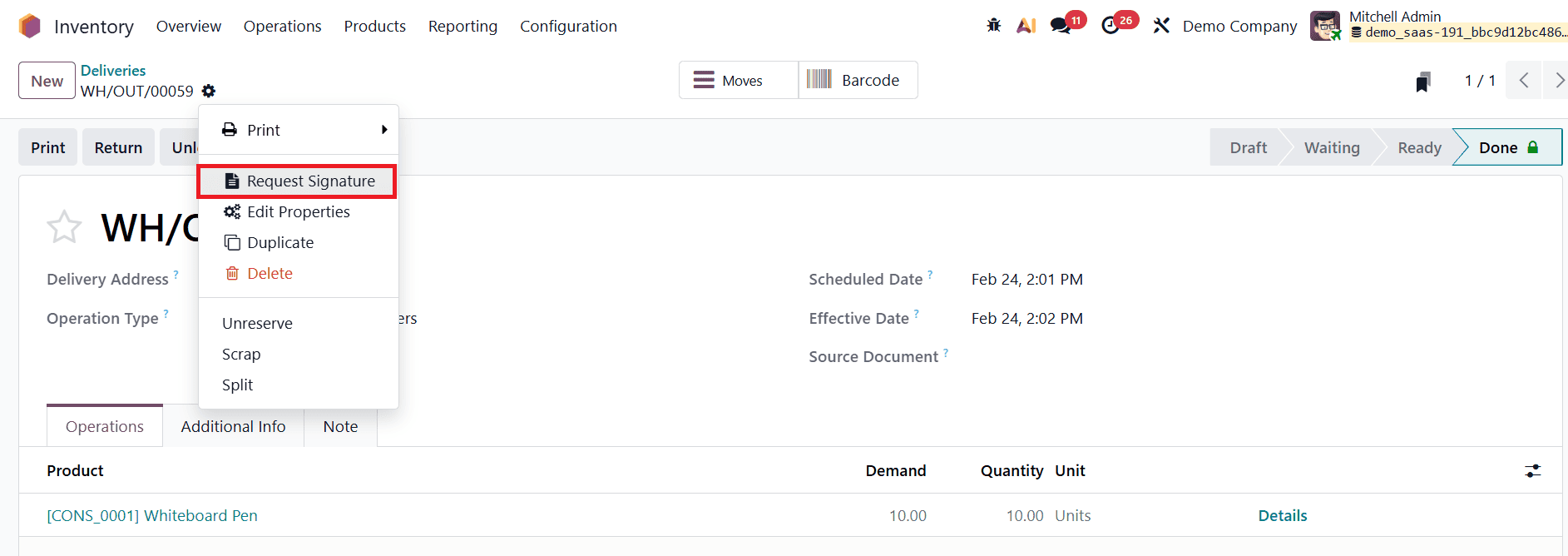
From the available options, selecting Request Signature opens a new interface where the signature workflow is configured and managed, eliminating the need to switch between modules or external tools.
In the New Signature Request window, users can upload the document or set of documents that require signatures by clicking Upload PDF.

After selecting the appropriate PDF file(s) from their device and clicking Open, the document is loaded into Odoo’s signature editor. At this stage, the document can be prepared for signing by placing the required fields, such as signature boxes, initials, dates, or text inputs, directly onto the document. Odoo 19 also allows users to add multiple signers and additional documents if the process involves more than one participant or requires multiple approvals, making it suitable for both simple and complex signing workflows.
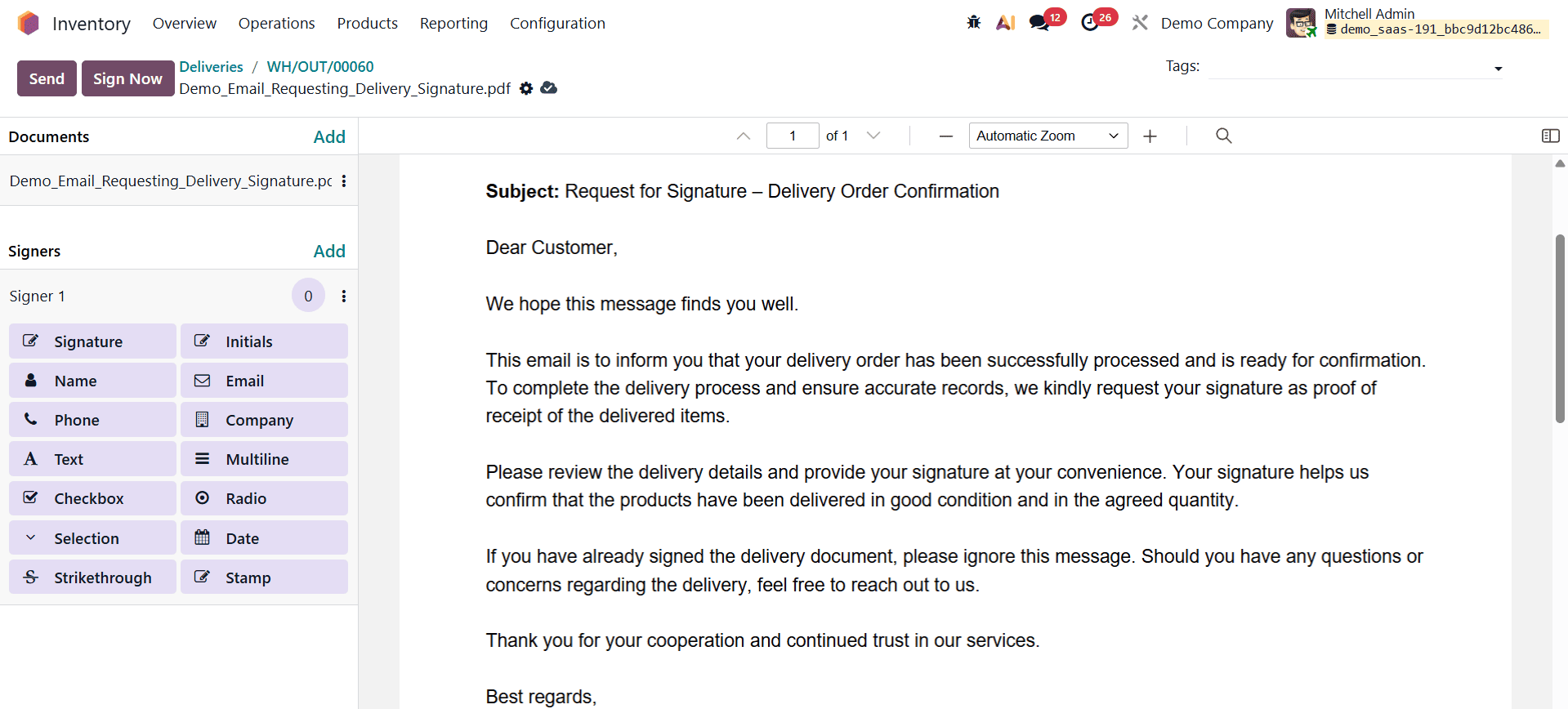
Once the document setup is complete, users can proceed by clicking Send, which opens the remaining fields of the New Signature Request window. Here, essential details such as signer roles, signing order (if applicable), and communication settings can be finalized. When a signature request is initiated from an Odoo record, the system automatically adds the related customer or relevant contact as a signer, reducing manual effort and minimizing the risk of errors. This automation ensures that the request is directly linked to the appropriate business partner and record context.
Depending on the user’s role in the signing process, Odoo 19 offers flexible next steps. If the user initiating the request is also one of the signers and is ready to complete the process immediately, they can click Sign Now to open the document and provide their signature without delay. Alternatively, if the user is not a signer or if a signing order has been defined that requires other participants to sign first, clicking Send dispatches the signature request to the designated signers, who can then review and sign the document in sequence.
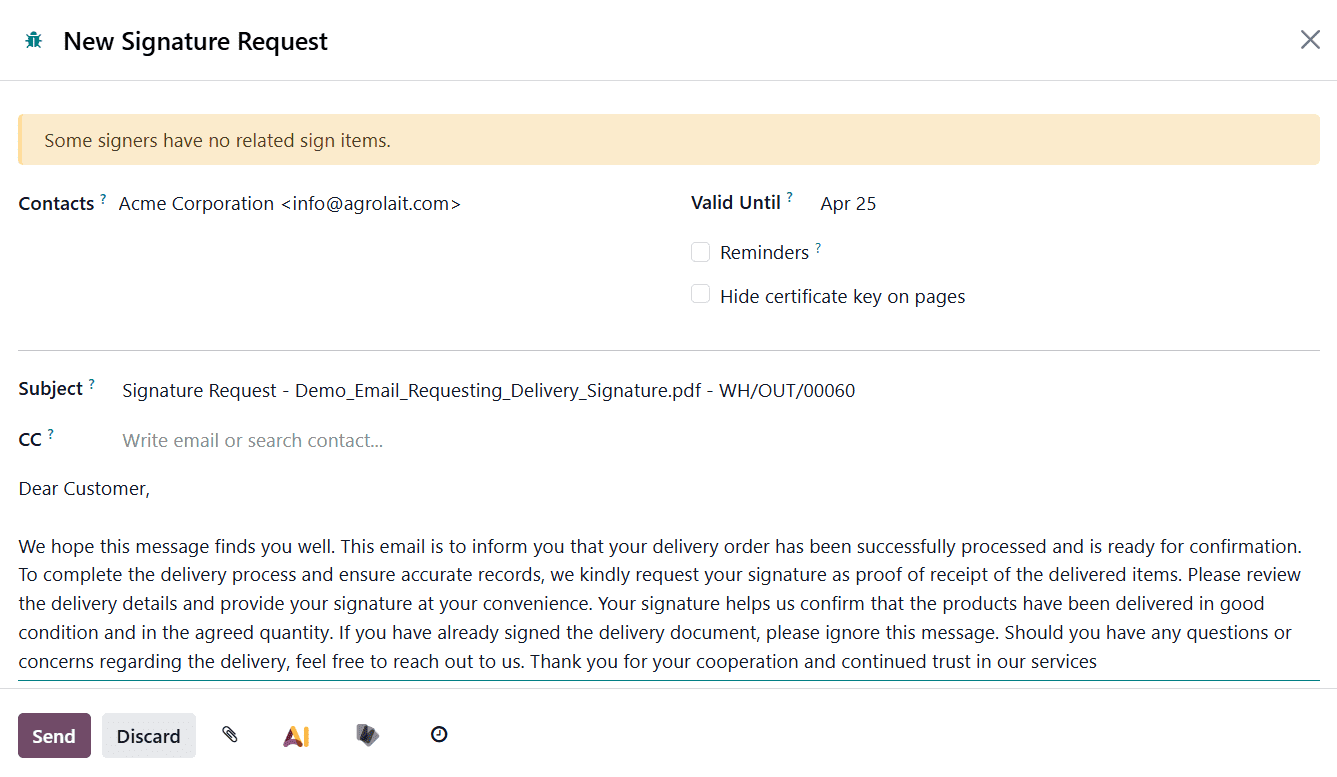
After all required parties have completed their signatures, Odoo 19 automatically finalizes the process by attaching the fully signed document and the certificate of completion to the record’s chatter.
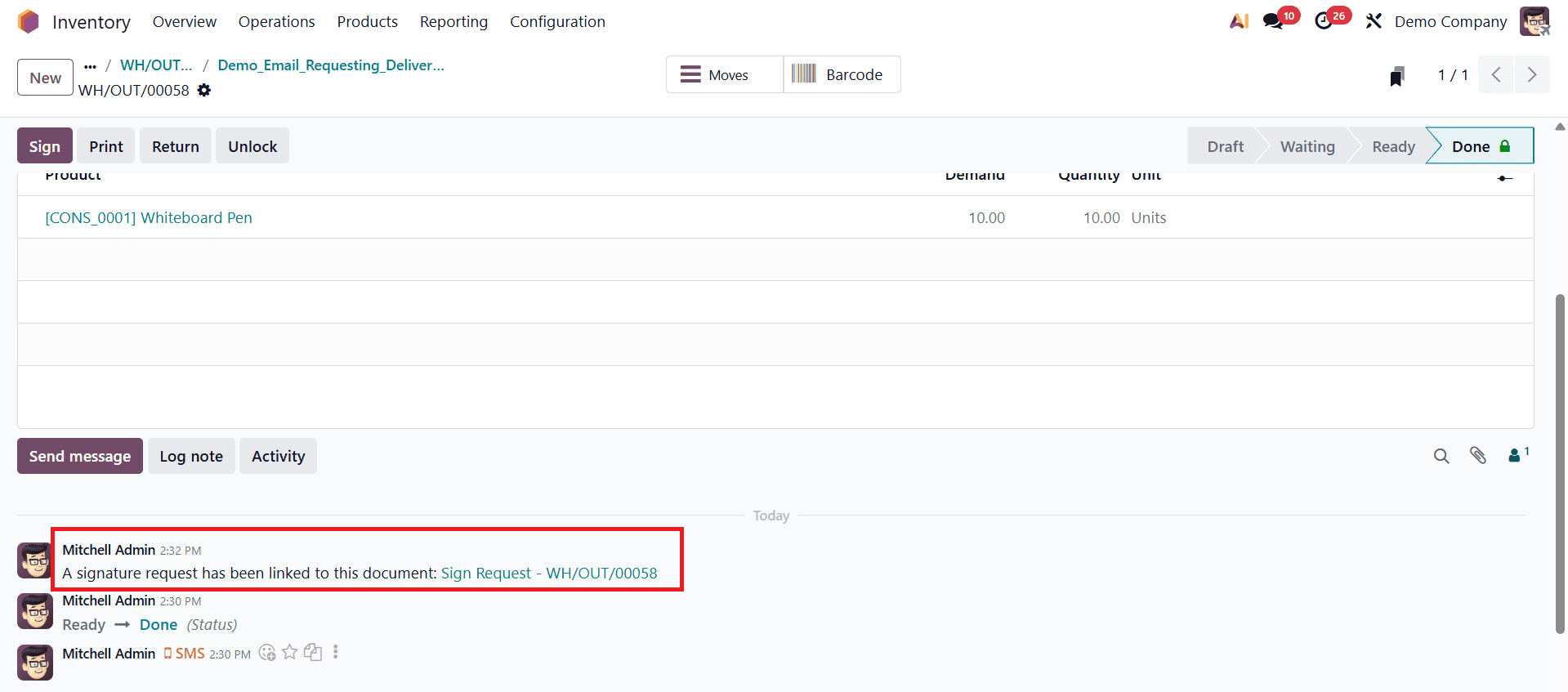
This ensures that all signed files are securely stored alongside the related record, providing a clear audit trail and easy access for future reference.
By integrating digital signatures directly into inventory and sales workflows, Odoo 19 significantly enhances the professionalism and reliability of order handling processes. Delivery order signatures improve accountability by ensuring that every delivery is verified and documented. They also strengthen customer trust, as customers receive clear proof of transactions and confirmations. For businesses, this reduces disputes, improves operational control, and supports compliance with internal and external regulations.
The digital signature functionality in Odoo 19 plays a vital role in modernizing business operations. From validating sales quotations to confirming delivery orders, electronic signatures streamline workflows, reduce manual effort, and enhance customer satisfaction. By embedding these capabilities directly into the Sales and Inventory modules, Odoo 19 empowers businesses to manage end-to-end transactions in a secure, efficient, and user-friendly manner. For organizations seeking to embrace paperless operations and improve delivery verification, enabling and using delivery order signatures in Odoo 19 is a practical and impactful step forward.
To read more about How to Simplify Delivery Order Signatures in Odoo 18, refer to our blog How to Simplify Delivery Order Signatures in Odoo 18.