As databases get larger, inefficient usage of ORMs leads to slower response times, slows down batch jobs, and makes regular tasks like processing sales orders, updating stock, and managing employee attendance less efficient.
One of the main sources of inefficiency is performing database actions in a loop from within the Python code when a similar task could be done through a single database operation.
Suppose you need to fetch about 500 employees and calculate their attendance counts for the previous month. An inefficient approach will perform a query to find each of those employees. A more optimal approach will be to fetch all the needed records in batches and apply grouped queries on these records.
_read_group() method for efficient aggregation
The primary rule of optimization when using ORM methods is to reduce unnecessary database queries.
Consider a custom HR module where you are required to retrieve the count of attendance records for each employee. Given below is a code snippet that initially fetches all the employees in the database and then retrieves the count of attendance records for each employee by calling search_count() with the id as the filtering criterion.
employees = self.env['hr.employee'].search([])
for employee in employees:
    attendance_count = self.env['hr.attendance'].search_count([
        ('employee_id', '=', employee.id),
    ])
For a company database with 500 employee records stored, this approach will perform about 501 ORM-level database queries – one query to fetch the employees and 500 queries to count the attendance records for each employee. When it is uncertain of the number of SQL queries involved, and that number is too large, the search_count() method calls will still be unnecessary. The method will cost the performance of the operation when the number of employees is too large. Thus, it will be more efficient to get the count of all the relevant employees with a single grouped query.
employees = self.env['hr.employee'].search([])
attendance_data = self.env['hr.attendance']._read_group(
    domain=[('employee_id', 'in', employees.ids)],
    groupby=['employee_id'],
    aggregates=['__count'],
)
attendance_counts = {
    employee.id: count
    for employee, count in attendance_data
}
OUTPUT:
ATTENDANCE {1: 2, 3: 10, 7: 1, 15: 2, 18: 1}
- The group query will filter out any employee without attendance records.
- The optimized code moves the counting functionality from Python code into the database.
- The databases are optimized for performing filtering, grouping, and aggregation tasks. Moreover, using databases for doing so saves the overhead of communication between Python and PostgreSQL.
Best practice: Always examine whether the code under a loop that calls search(), search_count(), or a similar ORM method should be performed for the entire collection.
Not all the loops need optimization. Python’s looping logic creates too much unnecessary database access when the appropriate ORM method is not being called in each iteration.
_read_group() is an ORM method that does grouping and aggregation in the database by itself. This is especially handy when you want to calculate statistics on your data records, such as count, sum, average, etc. Rather than fetching records and calculating statistics on them in Python, you can allow PostgreSQL to do the aggregation and return the statistics.
The method has the syntax:
_read_group(domain, groupby, aggregates)
The parameters are:
- domain – determines the records to be included in the aggregation
- groupby – determines the field by which the aggregates are to be grouped
- aggregates – determines the aggregate functions to be computed
The method returns a list of tuples containing the group values and their respective aggregate calculations. The function is different from the old-style, presentation-focused grouping API methods in that it is meant for backend ORM operations.
Following are some scenarios where the _read_group() method can be used:
- Count related records of multiple employees or customers
- Determine the total sales by a salesperson or a sales team
- Inventory quantities by the product or warehouse location
- Determine the number of tasks assigned to each employee
- Create dashboard statistics without retrieving every underlying record
Retrieve records efficiently with search_fetch()
The search_fetch() method combines the methods search() and fetch().
search() – fetches the records or recordset in a model conforming to the specified domain.
fetch() - retrieves only the selected field values from the required recordset.
Consider: we need to view the name, department, and email address of every active employee in our database.
Code can be written as:
employees = self.env['hr.employee'].search([
    ('active', '=', True),
])
employees.fetch([
    'name',
    'department_id',
    'work_email',
])
The same operation can be written in a single line using search_fetch().
employees = self.env['hr.employee'].search_fetch(
    domain=[
        ('active', '=', True),
    ],
    field_names=[
        'name',
        'department_id',
        'work_email',
    ],
)
When you already have a recordset and are required to retrieve only certain field values, the fetch() method can be directly used on the recordset, as it is wasteful to use the search_fetch() method on an already existing recordset.
The search_fetch() method can be used when a user is required to access a known set of fields of a recordset. This method explicitly loads fields without relying on other patterns or logic. The search_fetch() method can manage a large number of records that may be involved in scheduled actions. It is also used to fetch records to export data and to generate reports on a predictable set of fields.
Batch create
Consider an external biometric device integrated with Odoo that imports about 1,000 transactions into the Odoo database. Here, the initial approach would be to run a loop over the records to be created as the model data and call the create() method for each imported record. This triggers repeated ORM calls in the database, hence affecting field computation performance.
Attendance = self.env['hr.attendance']
for transaction in transactions:
    Attendance.create({
        'employee_id': transaction['employee_id'],
        'check_in': transaction['check_in'],
    })
The above approach is inefficient, as we can see the create() method is called separately in every iteration.
In such cases, batch creation facilitates optimal performance. The batch creation approach initially prepares a list of dictionaries and then creates the records in a single operation.
Attendance = self.env['hr.attendance'].
Attendance = self.env['hr.attendance']
vals_list = []
for transaction in transactions:
    vals_list.append({
        'employee_id': transaction['employee_id'],
        'check_in': transaction['check_in'],
    })
records = Attendance.create(vals_list)
A recordset of newly created attendance records is returned.
Batch creation reduces the ORM overhead and facilitates optimal and efficient operations such as field computations.
Understanding @api.model_create_multi
A user can implement additional logic into custom-created models by overriding the create() method. Consider a custom attendance transaction model, which needs to assign a transaction source identifier during the record creation. In such a case, it is recommended to use the decorator @api.model_create_multi with batch creation.
from odoo import api, fields, models
class AttendanceTransaction(models.Model):
    _name = 'attendance.transaction'
    _description = 'Attendance Transaction'
    name = fields.Char(required=True)
    employee_id = fields.Many2one(
        'hr.employee',
        required=True,
    )
    check_in = fields.Datetime(required=True)
    source = fields.Char()
    @api.model_create_multi
    def create(self, vals_list):
        for vals in vals_list:
            if not vals.get('source'):
                vals['source'] = 'manual'
        return super().create(vals_list)
The decorator lets the method accept a single dictionary or a list of dictionaries while also establishing an appropriate batch-oriented method for overrides.
As mentioned before, when the model is required to create multiple records as a result of external integrations, the create() method is called at every iteration within the imported records, which hinders the performance of Odoo when the size of the rendered data is too large. If the imported amount is up to 1,000, then the create() method is called that many times.
for vals in vals_list:
    model.create(vals)
With batch creation, the entire record list is received in a single call.
model.create(vals_list)
Best practices for batch creation
1. Prepare the field values before calling create
The data that needs to be written into the odoo model as new records can be kept as a list of dictionaries.4
vals_list = [
    {
        'name': 'Transaction A',
        'employee_id': employee_a.id,
    },
    {
        'name': 'Transaction B',
        'employee_id': employee_b.id,
    },
]
records = self.env['attendance.transaction'].create(
    vals_list
)
2. Prevent unnecessary searches inside loops
Fetch and map the employee ID before calling the create() method for each transaction to avoid having to run a search() to find the employee for each iteration.
3. Preserve validation and business logic
ORM logic shouldn’t be overridden simply to improve performance, as the ORM standard creation can handle model behaviours that straightforward SQL may not reproduce automatically.
4. Check for redundant data
Appropriate database constraints need to be used to manage duplication of data, as batch creation doesn’t automatically prevent duplicate imports.
When to use Domains and when to use filtered()?
Domain can be used along with the search method() to express the filtering criteria when fetching records from the database. Whereas, filtered() is used to match records from an existing recordset.
Suppose you need to retrieve all the confirmed sales orders.
orders = self.env['sale.order'].search([
    ('state', 'in', ['sale', 'done']),
])
The filtering condition, or the domain is applied to the database and returns all the matching data in a recordset.
If the same records need to be retrieved with filtered(),
orders = self.env['sale.order'].search([])
confirmed_orders = orders.filtered(
    lambda order: order.state in ['sale', 'done']
)
First, we have to fetch all the records into a recordset and call the filtered() method on this recordset. Domain-based data fetching is more efficient if there is no pre-fetched recordset and the records are to be retrieved directly from the database.
filtered() is useful when there already exists a recordset in memory, where the required fields may already be fetched. This method uses Python logic to filter the required records from an existing record set, without needing to perform another database search. The filtered() method allows preserving the context of the original recordset.
Consider the following example:
employees = self.env['hr.employee'].search_fetch(
    domain=[('active', '=', True)],
    field_names=['name', 'department_id'],
)
it_employees = employees.filtered(
    lambda employee: employee.department_id.name == 'IT'
)
This may be reasonable only if the employee record set is needed for some other operations. But if the objective is to just retrieve the employees from the IT department, then a simple domain shall suffice to fetch the necessary record set.
it_employees = self.env['hr.employee'].search([
    ('active', '=', True),
    ('department_id.name', '=', 'IT'),
])
There exists a method filtered_domain() in Odoo that lets you filter an existing recordset using a domain.
employees = self.env['hr.employee'].search([])
active_employees = employees.filtered_domain([
    ('active', '=', True),
])
filtered_domain() uses domain conditions on an existing recordset, whereas filtered() uses a Python function or field path to find the matching records.
Understand browse() and prefetching
Understanding how the record sets work is vital to writing efficient code in Odoo. The browse() method creates a recordset with record IDs, such that it facilitates the prefetching of fields from a recordset across a large set of data when they are required to be accessed.
Odoo enables the prefetching of fields in the most optimal approach by calling the browse() method.
employees = self.env['hr.employee'].browse(
    [3, 7, 12]
)
for employee in employees:
    print(employee.name)
Consider the example of an organization with about 1,000 employee records. If we are required to access two fields from the records individually, say, name and email, without prefetching, it may lead to a large number of database queries. Prefetching allows Odoo to retrieve field values from a recordset by reducing the need to repeatedly access the database.
How to use fetch() with recordsets?
The fetch() method is utilized to explicitly prepare the field values; these field values are known to be used in your code.
employees = self.env['hr.employee'].browse(
    employee_ids
)
employees.fetch([
    'name',
    'work_email',
    'department_id',
])
for employee in employees:
    print(
        employee.name,
        employee.work_email,
        employee.department_id.name,
    )
Do note that…
- browse() and search() serve different purposes. browse() returns a recordset matching the specified IDs and may not establish that a record with the specified ID exists. The search() method returns a recordset, which may include all the records in that model unless some filtering condition or domain is specified.
- Calling the browse() method for a deleted/removed id may cause an error.
- Prefetching can help to reduce unnecessary access to databases, but it doesn’t promise an instance where it does. Prefetching may reduce unnecessary database queries, but it doesn’t really eliminate all the database access.
- It is always recommended to fetch recordsets with the field values that the developer might actually need for the operation since fetching recordsets with all of their fields may cause a wastage of memory and database resources.
Measuring Performance with Odoo Profiling
Profiling lets developers/users analyse and measure the performance of a program in order to identify which parts of the program code take the most time, memory, and resources during the execution. This helps the developers infer the efficiency of their custom modules when it comes to interacting with the database and execution of business logic.
Suppose you are developing a custom module that generates an attendance report for employees, and generating the report takes 15 seconds. This could lead to an assumption that the report may contain too much data, when in fact, the actual issue could be:
- Execution of too many SQL queries.
- Redundant ORM searches inside Python loops.
- Computed fields are being inefficient.
- Fetching records from the database unnecessarily.
- Database query execution is slow.
Profiling Metrics
- Execution time
- SQL query count
- SQL execution time
- Memory usage
- Function calls
Odoo provides a built-in profiler that helps developers analyse the performance of applications, which includes the following collectors:
- SQL Collector - records of SQL queries and their execution details, which is useful for identifying excessive database querying.
- Periodic Collector - identifies the execution time of applications by sampling the execution at regular intervals.
- Qweb Collector - analyse the execution of Qweb templates.
How to enable the profiler through the UI?
- Activate developer mode in Odoo by typing in debug=1 into the URL or from the general settings.
- Open the developer tools menu.
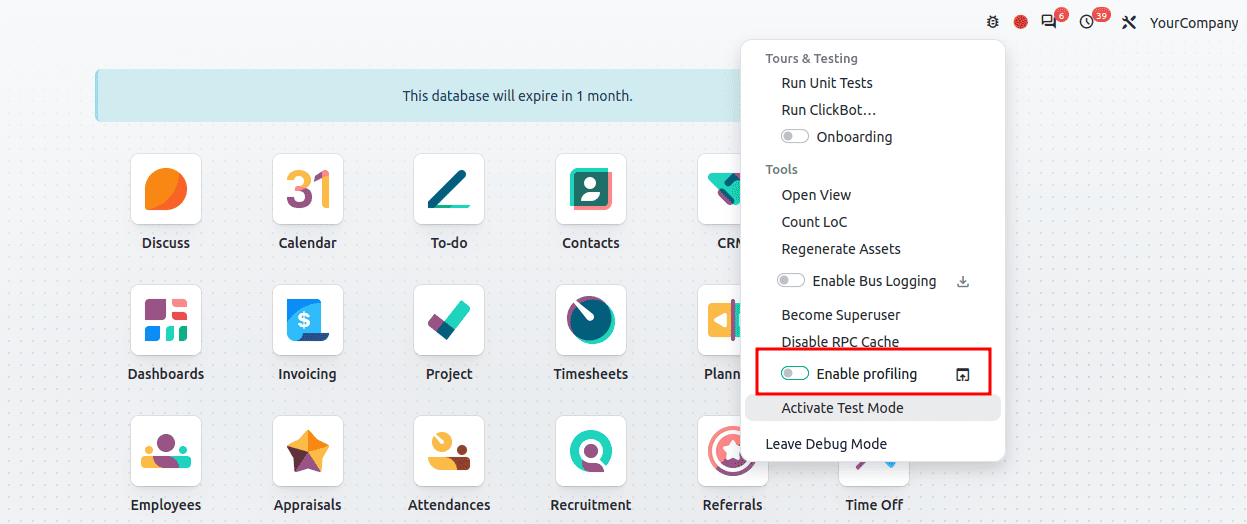
- Enable profiling and activate profiling for your session.
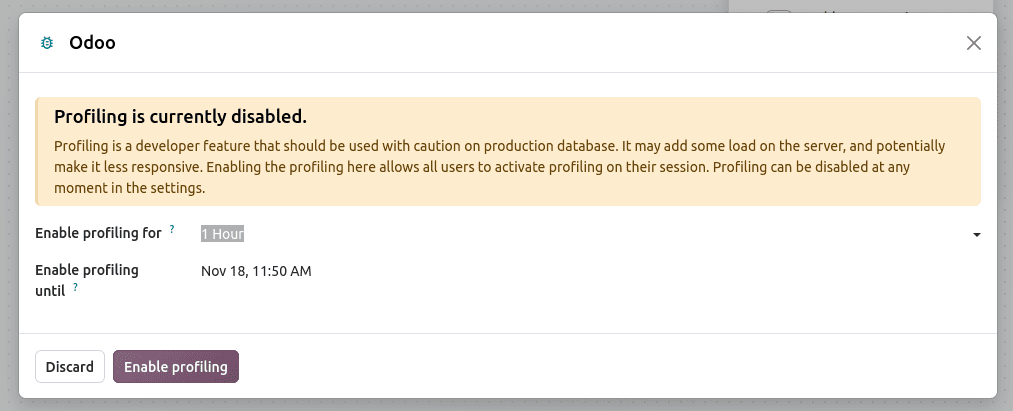
- Perform the operation that needs to be analyzed.
- Inspect the profiling records in ir.profile and the SQL queries.
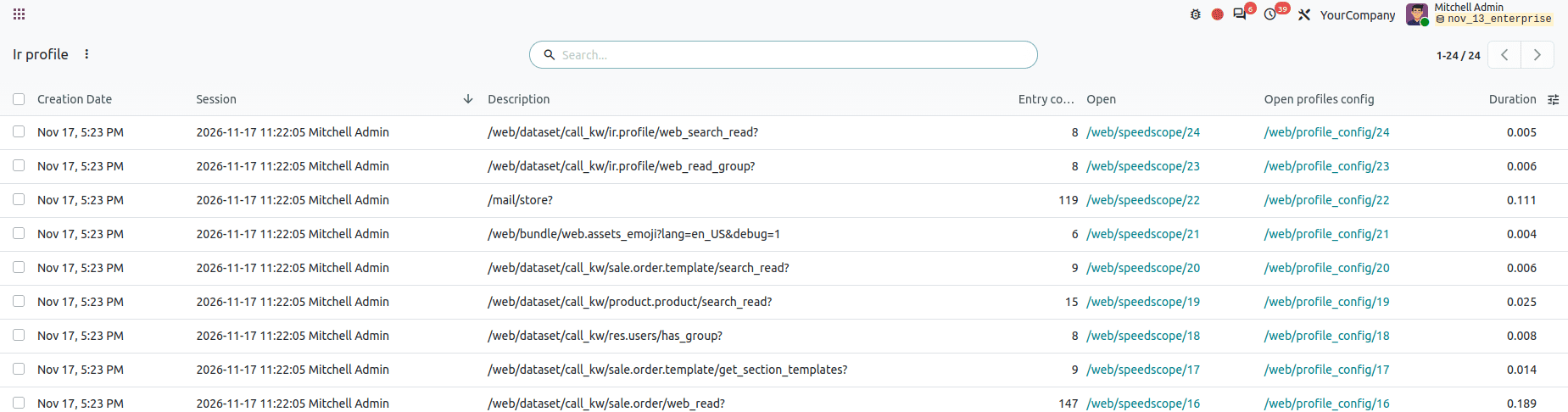
Hence, profiling can be used by developers to investigate and identify slow-running operations and find opportunities for optimizations.
Writing optimized modules in Odoo requires an understanding of how the ORM interacts with PostgreSQL and how the recordset, caching, aggregation, and batch operations work together.
The most important practices include:
- Use _read_group() when you need grouped record counts and other aggregate results.
- Use search_fetch() when you need to fetch specific fields of the required records.
- Use fetch() when you already have a recordset but only need specific fields for each record.
- Use @api.model_create_multi and create(vals_list) to support batch-wise creation of records.
- Use domains to filter records when fetching data from the database.
- Use browse() with collections of IDs for prefetching of recordset.
- Use Odoo profiler to identify and measure application performance to optimize the same.
Consistent utilization of these techniques could let the developers build custom modules that can handle larger datasets efficiently, and make it easier to maintain and implement even when the business requirements seem to grow.
To read more about How to Improve Data Model Performance for Large Datasets in Odoo 19, refer to our blog, How to Improve Data Model Performance for Large Datasets in Odoo 19.