Nowadays, AI is being integrated into almost every area of technology, such as coding, mobile phones, image and video editing, content creation, and many other applications. Odoo has also introduced AI capabilities in Odoo 19 to make business operations easier and more efficient.
Odoo 19 includes AI Agents, which work as intelligent assistants. They can understand natural-language instructions from users and interact with Odoo's data and available tools to retrieve information or perform supported actions.
Traditionally, users have to follow a step-by-step process to operate Odoo. They need to navigate through different menus, open the required application, find the record, and then perform the action.
With AI Agents, users can communicate with Odoo using natural language instead of manually following all these steps.
For example, instead of navigating through different menus to find customer quotations, a user can simply ask:
"Show me all the quotations created for ABC Company this month."
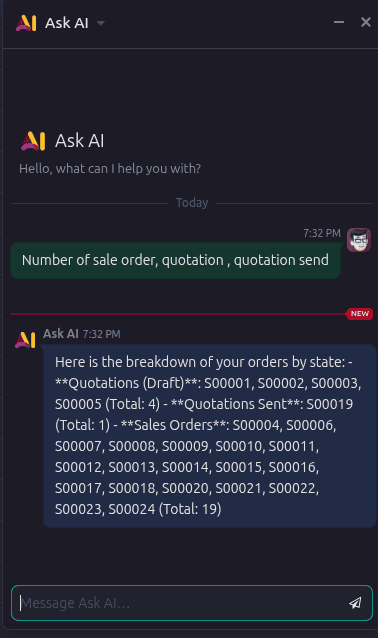
By understanding the request, the AI Agent can identify and use the right Odoo tools to fetch the required information.
AI Agent vs Odoo Chatbot
An AI Agent is different from a traditional Odoo chatbot.
A chatbot generally works based on predefined conversations, questions, and responses. It follows a predefined flow or script to communicate with the user.
An AI Agent is more flexible. It uses natural-language understanding to identify what the user wants and can use configured Odoo tools to retrieve information or perform supported actions.
In simple terms:
- Odoo Chatbot: Predefined conversation > User selects/asks > Predefined response or flow
- Odoo AI Agent: Natural-language request > AI understands the intent > Uses available Odoo tools > Retrieves information or performs an action
Therefore, AI Agents can reduce the need for users to remember the complete Odoo menu structure and the steps required to perform different operations.
The main goal is to make Odoo more intelligent, natural, and user-friendly, allowing users to interact with the ERP system in a way that is closer to normal human conversation.
AI Agents can help the support team by answering customer questions, providing guidance, and collecting the required information. Once properly configured, an AI Agent can handle many common support requests and queries automatically.
This reduces the workload of the support team and allows employees to focus on more complex or critical issues that require human attention.
For example, an AI Agent can:
- Ensure all required details are collected before creating the ticket.
- Help identify and categorize customer issues.
- Provide relevant information from the Odoo database.
- Escalate complex issues to a human support employee when required.
So, instead of the support team manually handling every basic query, the AI Agent can take care of routine requests and improve the overall efficiency of the support process.
Let’s take a detailed look at how to configure an AI Agent.
AI Fields
Another important feature is AI Fields. By using a proper and well-defined prompt, we can easily generate consistent text and values automatically in the fields. This helps minimize manual data entry, saves valuable time, and reduces repetitive tasks.
With AI Fields, users can automate common data-entry tasks and maintain consistency across records, which ultimately helps reduce workload and improve overall productivity.
Nowadays, most people rely on AI for writing content, composing emails, and improving their messages. With Odoo’s AI features, we can perform these tasks directly within Odoo itself, without having to switch between different tabs or applications.
This makes the workflow faster and more convenient, allowing users to generate, edit, and improve content directly from Odoo, which helps save time and increase productivity.
AI Features Across Odoo
AI can bring significant improvements across various Odoo modules, including Accounting, Sales, Purchase, Inventory, Website, Helpdesk, Documents, Server Actions, and more.
AI in Inventory
In the Inventory module, AI can help users:
- Identify the nearest warehouse based on the customer's location.
- Find products using natural-language queries, without manually applying multiple filters.
- Assist with scrap management by analyzing inventory data and identifying products that may need to be scrapped.
- Support rework processes by identifying products that require rework and suggesting the appropriate actions.
- Analyze inventory data to provide recommendations and insights for better stock management.
AI in Sales and Purchase
AI can also automate and improve several Sales and Purchase processes:
- Automatically update target margins and product costs based on business requirements and current data.
- Give the details of the most suitable vendor by analyzing price, product quality, previous quality-check results, and vendor performance.
- Provide warnings and recommendations when a selected vendor or product does not meet required quality standards.
- Monitor BOM requirements and suggest the most suitable vendors for purchasing required components.
- Analyze purchasing history to support better vendor selection and purchasing decisions.
AI in Helpdesk
AI can make Helpdesk operations faster and more efficient by:
- Automatically classifying and routing support tickets to the appropriate team or agent.
- Analyzing ticket descriptions and extracting important task details, priorities, and required actions.
- Suggesting responses based on previous tickets and available knowledge.
- Identifying recurring issues and providing recommendations for resolution.
- Prioritizing tickets based on urgency, customer impact, and historical data.
AI for Server Actions
AI can assist administrators and technical users with Server Actions by:
- Reviewing server action code and identifying potential issues.
- Explaining existing server actions in simple language.
- Suggesting improvements or optimized logic.
- Helping generate server-action logic based on business requirements.
- Detecting potential errors before actions are executed.
AI for Revenue and Budget Analysis
AI can transform financial reporting from simple data presentation into intelligent business analysis.
It can:
- Analyze revenue reports and identify important trends and patterns.
- Compare actual revenue against targets and previous periods.
- Identify products, customers, or sales channels contributing most to revenue.
- Analyze budgets and actual spending to identify significant variances.
- Highlight areas where expenses are exceeding the planned budget.
- Provide recommendations and insights to help management make data-driven financial decisions.
AI in Documents
AI can significantly improve the Documents module by reducing manual document-processing work:
- Automatically classify and sort documents.
- Automatically identify the appropriate document type and folder.
- Search documents using natural-language queries.
- Summarize lengthy documents and highlight important information.
- Extract key fields and use them to support automated Odoo workflows.
Overall Impact
By integrating AI across Odoo modules, Odoo can move beyond simply storing and displaying data. AI can understand information, identify patterns, make recommendations, automate repetitive tasks, and support users in making better business decisions.
AI + Odoo = Faster Operations + Less Manual Work + Better Decisions + Intelligent Automation.
To read more about How to Create an Odoo AI Chatbot with n8n in Simple Steps, refer to our blog How to Create an Odoo AI Chatbot with n8n in Simple Steps.