In modern Odoo development, flexibility is just as important as structure. While traditional relational fields like Many2one work perfectly when relationships are fixed, real-world business logic often demands something more dynamic. This is where Reference and Many2oneReference fields come into play.
These fields allow developers to build smart, adaptable relationships between models without being limited to a single predefined target, whether you're designing configurable workflows, generic linking mechanisms, or dynamic business rules, understanding how Reference and Many2oneReference fields work is essential for building scalable and future-proof Odoo applications.
Defining a Reference Field in Odoo 19
Below is a basic example of a Reference field definition:
class PersonalDetails(models.Model):
   _name = 'personal.details'
   _description = 'Personal Details'
   reference = fields.Reference(
       selection=[
           ('res.partner', 'Partner'),
           ('sale.order', 'Sales Order'),
           ('purchase.order', 'Purchase Order'),
       ],
       string="Related Document"
   )
How It Works
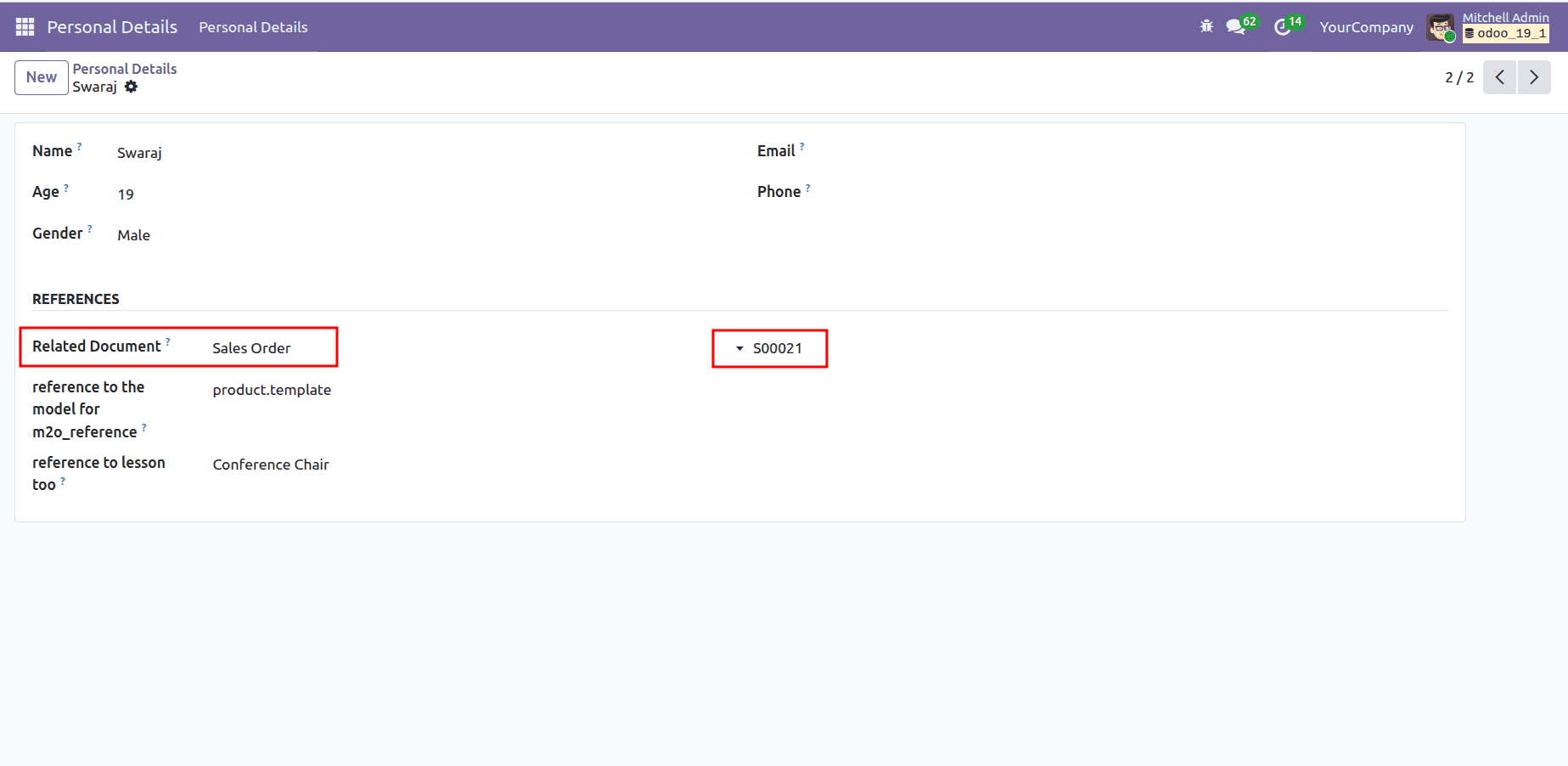
- The dropdown shows Partner, Sales Order, and Purchase Order
- Once selected, the user can choose a record from the selected model
- The value is stored as <model_name>,<record_id>
Example stored value:
sale.order,24
Understanding selection in Reference Fields
The selection attribute defines the list of models that the Reference field can point to.
selection = [
    ('res.partner', 'Partner'),
    ('sale.order', 'Sales Order'),
]
Each tuple consists of:
- The technical model name
- The human-readable label
This mechanism ensures flexibility while still maintaining control over which models can be referenced.
Using selection_add with Reference Fields
Because Reference fields inherit from Selection fields, they support selection_add.
This allows other modules to extend the available models without overriding the field.
reference = fields.Reference(selection_add=[
   ('account.move', 'Invoice')
])
This is especially useful in modular Odoo development, where different modules may want to extend the same reference field safely.
The image below shows how it will be reflected in the form view
Key Characteristics of Reference Fields
- Can reference multiple models
- Inherits behavior from Selection fields
- Supports modular extension using selection_add
- Stores values as model_name,record_id
- Does not enforce database-level foreign keys
- Slightly slower than Many2one for large datasets
When to Use Reference Fields
Reference fields are ideal when:
- A record can relate to multiple possible models
- You are building generic relationships
- You need flexibility rather than strict relational enforcement
Common use cases include:
- Activity logs
- Audit trails
- Communication history
- Generic document linking
Many2one Reference Field in Odoo 19
The Many2oneReference field in Odoo 19 is a powerful and flexible relational field designed to handle dynamic relationships where the target model is not fixed at design time.
Unlike a standard Many2one field which always points to a single predefined model a Many2oneReference field determines which model to reference at runtime, based on the value of another field.
What is a Many2oneReference Field?
A Many2oneReference is a pseudo-relational field that behaves like a Many2one field but does not enforce a database-level foreign key.
Instead of directly linking to a model, it relies on:
- A Char field that stores the model name
- A Many2oneReference field that stores the record ID of that model
This design allows the record to dynamically link to different models, depending on the value stored in the model field.
This tells us three important things:
- The field stores an integer ID
- There is no database-level foreign key
- The actual model is resolved dynamically using another field
Core Concept: Model Field + Reference Field
A Many2oneReference always works together with a Char field that stores the model name.
Example Definition
m2o_reference_model = fields.Char(
   string='Reference Model',
   help="Technical name of the model to be used for the Many2one reference."
)
m2o_reference_id = fields.Many2oneReference(
   string='Related Record',
   model_field='m2o_reference_model',
   help="Select a record from the chosen reference model."
)
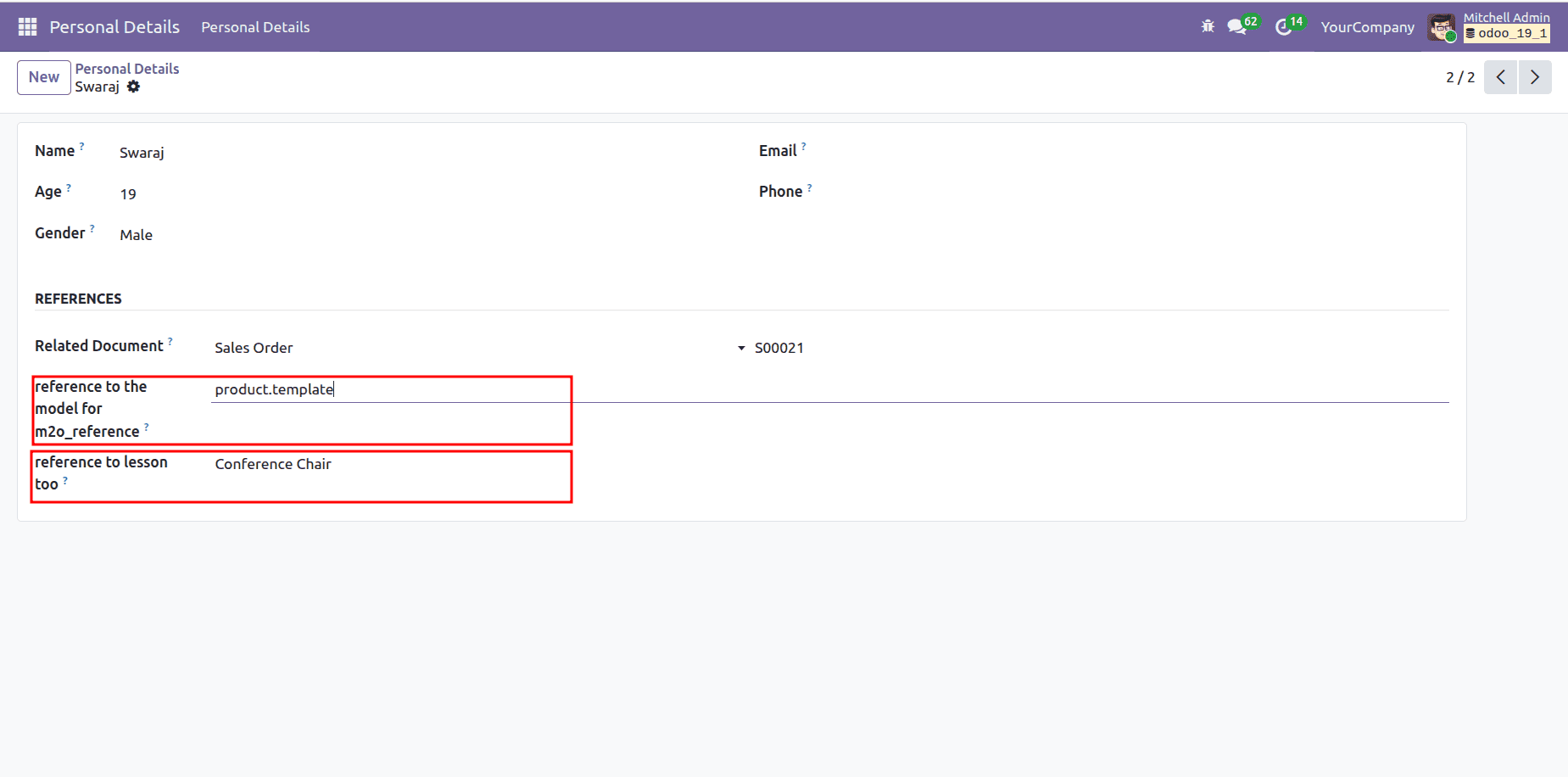
The image below shows how it will be reflected in the form view
How This Works
- m2o_reference_model
- Stores the technical model name (e.g., sale.order, purchase.order)
- Acts as a controller for the reference field
- m2o_reference_id
- Stores the ID of the selected record
- Dynamically adapts based on the model defined in m2o_reference_model
How It Works in the User Interface
The user enters or selects a model name in the Reference Model field
Example:
The Related Record field automatically adapts and allows selection of:
- Sale Orders if sale.order is entered
- Purchase Orders if purchase.order is entered
- Any other valid model name
This makes the field fully dynamic, allowing one record to link to different types of business documents.
Why Use Many2oneReference?
Advantages
- Extremely flexible relationship handling
- Ideal for dynamic or configurable workflows
- No need to define multiple Many2one fields
- Clean and extensible architecture
Considerations
- No database-level foreign key enforcement
- Model name must be valid and correctly typed
- Requires careful UI validation for user input
When to Use Many2oneReference
Use Many2oneReference when:
- The target model is not known in advance
- The model is selected dynamically by the user
- You want to build generic configuration systems
- You need a more controlled alternative to Reference fields
Common use cases:
- Workflow engines
- Approval systems
- Generic document linking
- Configurable automation rules
Create a file named personal_details.py inside the models directory and add the following code:
# -*- coding: utf-8 -*-
from odoo import fields, models

class PersonalDetails(models.Model):
   _name = 'personal.details'
   _description = 'Personal Details'
   reference = fields.Reference(
       selection=[
           ('res.partner', 'Partner'),
           ('sale.order', 'Sales Order'),
           ('purchase.order', 'Purchase Order'),
       ],
       string="Related Document",
       help="Select a related document such as a Partner, Sales Order, or Purchase Order."
   )
   name = fields.Char(
       string='Name',
       required=True,
       help="Enter the full name of the person."
   )
   age = fields.Integer(
       string='Age',
       help="Enter the age of the person."
   )
   gender = fields.Selection(
       [
           ('male', 'Male'),
           ('female', 'Female'),
           ('other', 'Other')
       ],
       string='Gender',
       help="Select the gender of the person."
   )
   email = fields.Char(
       string='Email',
       help="Enter the email address of the person."
   )
   phone = fields.Char(
       string='Phone',
       help="Enter the contact phone number."
   )
   document_reference = fields.Reference(
       selection=[
           ('res.partner', 'Partner'),
           ('sale.order', 'Sale'),
           ('res.users', 'User'),
           ('product.product', 'Product')
       ],
       string='Document Reference',
       help="Link this record to another document such as a Partner, User, Sale, or Product."
   )
   m2o_reference_model = fields.Char(
       string='Reference Model',
       help="Technical name of the model to be used for the Many2one reference."
   )
   m2o_reference_id = fields.Many2oneReference(
       string='Related Record',
       model_field='m2o_reference_model',
       help="Select a record from the chosen reference model."
   )
In the views directory, create a new file named personal_details_views.xml and paste the code below.
<?xml version="1.0" encoding="utf-8"?>
<odoo>
   <data>
       <!-- list View -->
       <record id="view_personal_details_list" model="ir.ui.view">
           <field name="name">personal.details.list</field>
           <field name="model">personal.details</field>
           <field name="arch" type="xml">
               <list string="Personal Details">
                   <field name="name"/>
                   <field name="age"/>
                   <field name="gender"/>
                   <field name="email"/>
                   <field name="phone"/>
               </list>
           </field>
       </record>
       <!-- Form View -->
       <record id="view_personal_details_form" model="ir.ui.view">
           <field name="name">personal.details.form</field>
           <field name="model">personal.details</field>
           <field name="arch" type="xml">
               <form string="Personal Details">
                   <sheet>
                       <group>
                           <group>
                               <field name="name"/>
                               <field name="age"/>
                               <field name="gender"/>
                           </group>
                           <group>
                               <field name="email"/>
                               <field name="phone"/>
                           </group>
                       </group>
                       <group string="References">
                          <field name="reference"/>
                          <field name="m2o_reference_model"/>
                          <field name="m2o_reference_id"/>
                       </group>
                   </sheet>
               </form>
           </field>
       </record>
       <!-- Action -->
       <record id="action_personal_details" model="ir.actions.act_window">
           <field name="name">Personal Details</field>
           <field name="res_model">personal.details</field>
           <field name="view_mode">list,form</field>
           <field name="help" type="html">
               <p class="o_view_nocontent_smiling_face">
                   Create a new personal detail record.
               </p>
           </field>
       </record>
       <!-- Menu Item -->
       <menuitem id="menu_personal_details_root"
                 name="Personal Details"
                 sequence="10"/>
       <menuitem id="menu_personal_details"
                 name="Personal Details"
                 parent="menu_personal_details_root"
                 action="action_personal_details"
                 sequence="10"/>
   </data>
</odoo>
Both Reference and Many2oneReference fields play a crucial role in building flexible and scalable Odoo applications. While they differ in how they store and resolve relationships, their shared purpose is to overcome the limitations of fixed relational models and support dynamic business logic.
By using these fields appropriately, developers can design systems that adapt to evolving requirements, reduce unnecessary model dependencies, and support complex workflows with ease. When applied thoughtfully, Reference and Many2oneReference fields become powerful tools for creating modular, maintainable, and highly extensible Odoo solutions.
To read more about A Complete Overview of Fields in Odoo 19, refer to our blog A Complete Overview of Fields in Odoo 19.