A crucial financial document that displays a company's financial situation at a specific point in time is called the balance sheet. The balance sheet gives a clear picture of the company's assets, liabilities, and general financial situation on a given date, whereas the profit and loss statement tracks corporate success over time.. This report is the primary document used by investors, tax authorities, and creditors to assess a company's long-term solvency and net worth.
In Odoo 19, the Balance Sheet is a dynamic, real-time tool. Because Odoo uses a double-entry bookkeeping system, every transaction across your Sales, Purchase, and Inventory modules flows directly into this report, allowing you to monitor your financial health without waiting for month-end manual entries.
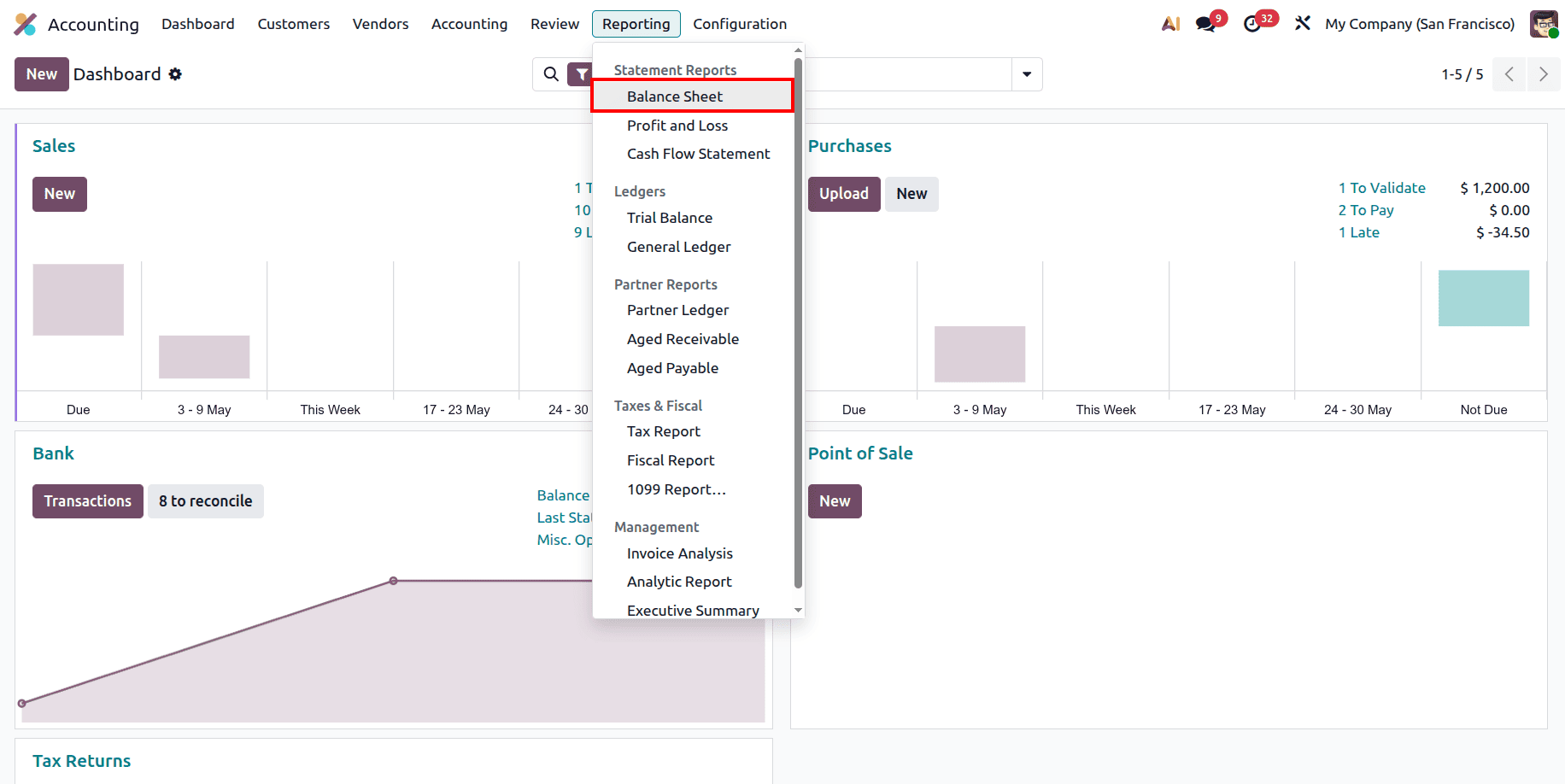
To obtain the balance sheet report, navigate to the accounting module and locate it in the ‘Balance Sheet’ section from the Statement Reports area under the Reporting menu, as shown in the screenshot below.
The Fundamental Accounting Equation
Every Balance Sheet is built on the core equation: Assets = Liabilities + Equity. This mathematical certainty means that everything a company owns (Assets) was purchased either by borrowing money (Liabilities) or by using the owner's own funds and accumulated profits (Equity).
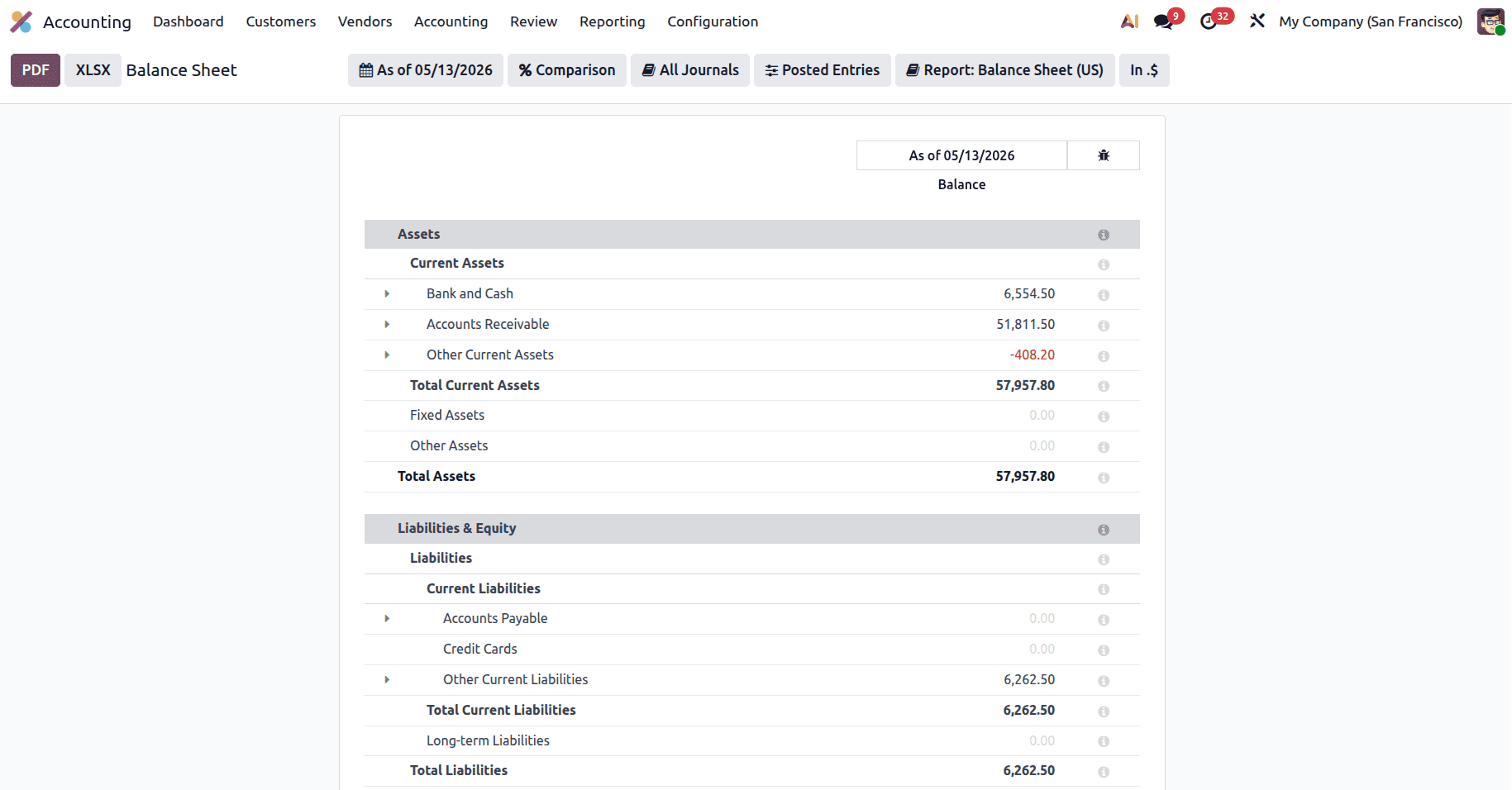
In Odoo, the report is structured to ensure these two sides always balance. If you ever notice a discrepancy, it is usually due to unposted entries or misconfigured accounts in the Chart of Accounts. Comprehending this balance sheet is the first step towards professional financial literacy.
In general accounting, Odoo organizes your financial data into three distinct areas, which are then divided into sub-sections to help you track specific types of value and debt.
1. Assets (What You Own)
This section lists everything of value currently held by your business. Odoo organizes assets based on liquidity, or how quickly they can be converted into cash.
- Current Assets: Current assets are short-term resources expected to be used or converted into cash within a year, such as cash, inventory, and receivables. This includes Bank and Cash balances, which are your most liquid assets, and Accounts Receivable, which represents money your customers owe you for goods or services already delivered. These assets help businesses manage daily operations and maintain healthy cash flow.
- Fixed Assets: These are long-term physical or intangible investments not intended for immediate sale. Common examples include machinery, company vehicles, property, or office equipment.
- Other Assets: This often includes prepayments (like insurance paid in advance) or security deposits that don't fit into the standard categories.
2. Liabilities (What You Owe(Debts))
Your business's financial commitments to third parties are represented by its liabilities. These are grouped according to due dates, just like assets.
- Current Liabilities: Debts that have a one-year maturity date. In Odoo, this primarily tracks Accounts Payable (money you owe to vendors) and Credit Card balances.
- Other Current Liabilities: This sub-section typically includes tax payables (such as VAT, GST, or TDS), accrued expenses, or short-term business loans.
- Long-term Liabilities: These are debts and financial obligations that are due beyond the current 12-month cycle, such as long-term bank mortgages or equipment leases.
3. Equity (The Net Worth)
Equity represents the "book value" of the company. Equity represents the net worth of a business and reflects the amount remaining for the owners after all assets are liquidated and all liabilities are fully paid off.
- Unallocated Earnings: This includes Current Year Unallocated Earnings, which is the profit or loss generated in the current fiscal year. Odoo calculates this automatically based on your Profit and Loss data.
- Retained Earnings: This tracks the cumulative profits from Previous Years that have been kept in the company to reinvest in growth rather than being paid out as dividends to shareholders.
Detailed Analysis of Odoo 19 Filters
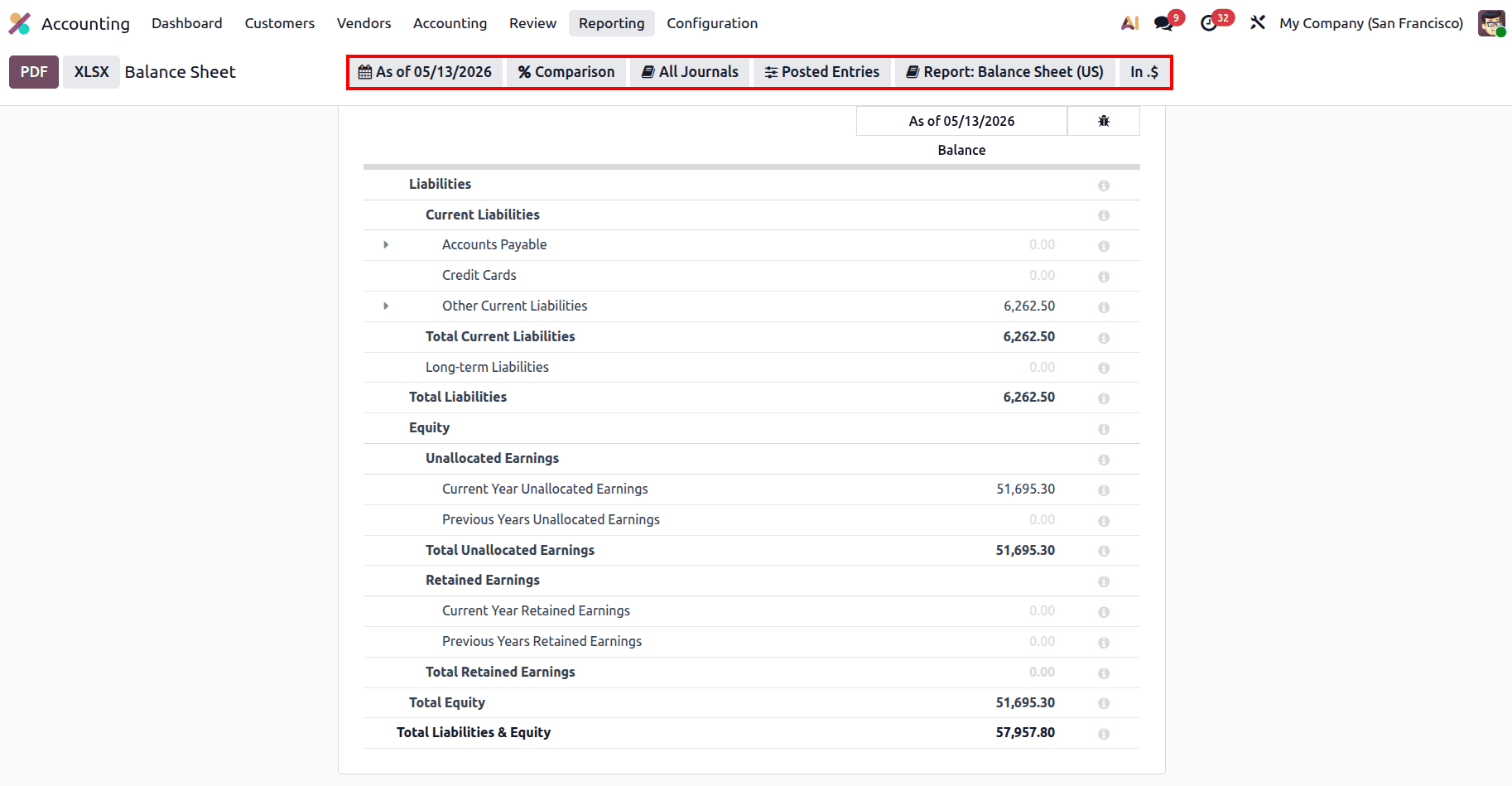
The power of Odoo 19 lies in its interactive filters. These tools allow you to transform a standard report into a deep-dive analytical tool.
- As of Date (Snapshot Control): This filter defines the exact moment for your financial snapshot. Selecting Today provides a live view of your ledger. The End of Month, End of Quarter, or End of Year options are essential for standard period-close reporting. You can also use the Specific Date option to reconstruct the Balance Sheet as it appeared on a past date.
- Comparison (Growth Tracking): This menu allows you to compare your current position against historical data. By selecting Previous Period or Same Period Last Year, you can identify trends. For instance, you can see if your cash reserves have increased or if your debt levels have risen compared to the previous fiscal year.
- All Journals (Source Isolation): By default, the report aggregates data from all accounting journals. However, you can use this filter to isolate specific journals. This is particularly useful if you want to see the balance of only your "Bank" or "Cash" journals without the influence of miscellaneous adjustments.
- Posted vs. Draft Entries (Data Integrity): This menu provides critical control over your data visibility. Selecting Draft Entries creates a "pro-forma" view, showing you how the Balance Sheet will look once all currently draft invoices and bills are validated. It also includes the Unfold All option to expand all hierarchies and Hide lines at 0 to remove accounts with no balance.
- Currency Scaling (Numerical Display): For businesses with high transaction volumes, the currency scaling filter (In .$) is essential. You can view raw data, round to the nearest dollar (In $), or scale by thousands (In K$) and millions (In M$). This makes the report much easier for executives and stakeholders to read.
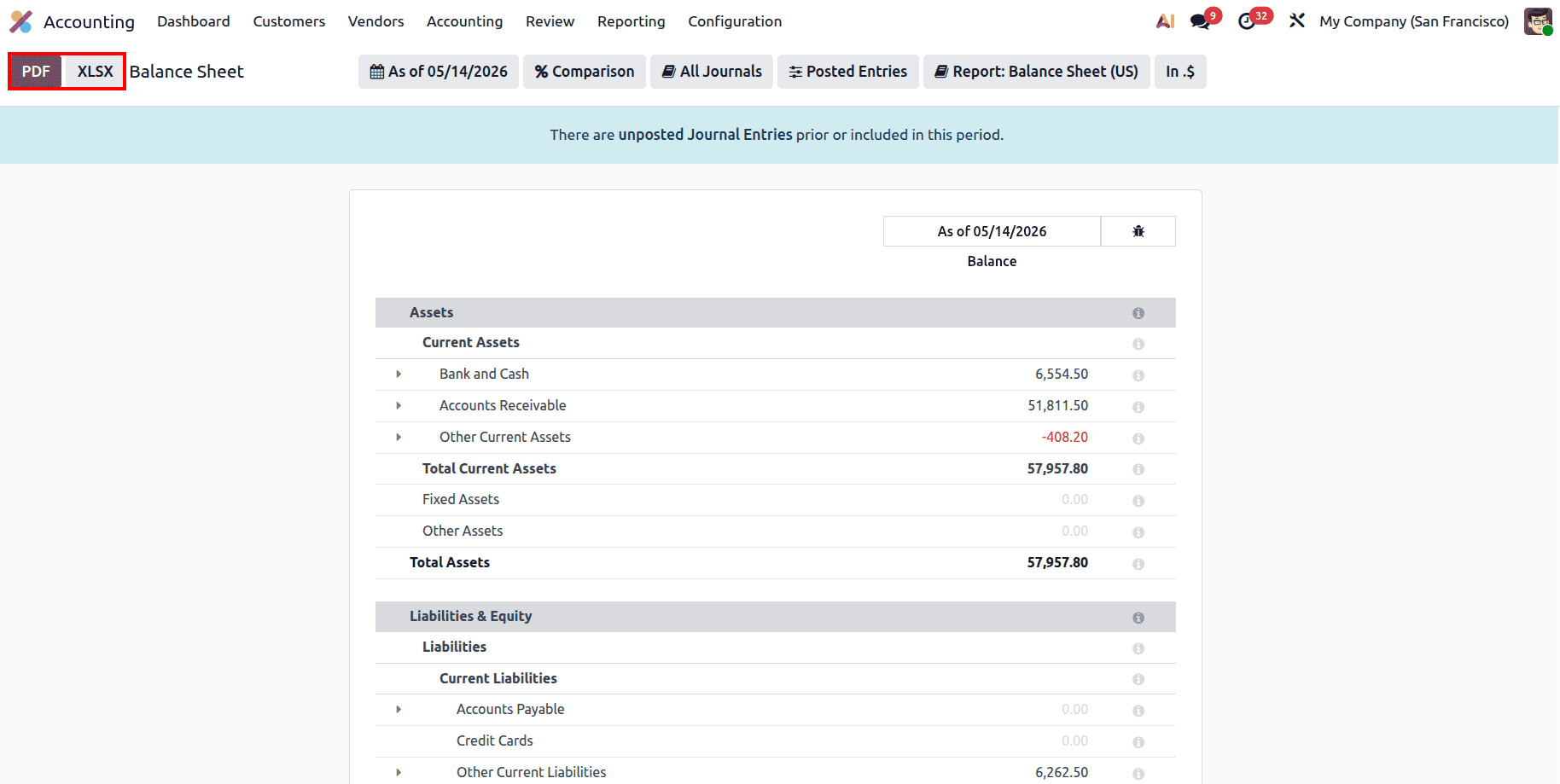
To ensure your Balance Sheet is a reliable decision-making tool, you must pay attention to the unposted Journal Entries banner at the top of the report. This warning indicates that there are transactions, potentially large payments or new bills, that haven't been finalized. Decisions made using a Balance Sheet with unposted entries are based on incomplete data and can lead to serious cash flow errors. Finally, the report can also be printed and exported in both XLSX and PDF formats as per your requirements.
In conclusion, the Odoo 19 Balance Sheet is the ultimate record of your business's financial health. By mastering the use of Comparison filters to track year-over-year growth and Currency Scaling for executive reviews, you can move from simple record-keeping to strategic financial management. Regularly reconciling your Assets and Liabilities ensures that your Equity reflects the true value of the business you have built.
To read more about A Complete Guide to Balance Sheet in Odoo 19 Accounting Reports, refer to our blog A Complete Guide to Balance Sheet in Odoo 19 Accounting Reports.